1. Introduction
This manual provides instructions for the Re-Flix Superior Light Universal Remote Control, Model 747516. This remote is specifically pre-programmed for use with HUAYU RM-L859 televisions, offering a direct replacement or secondary control solution without requiring complex setup procedures. It is designed for ease of use and reliable operation.
2. Safety Information
- Do not expose the remote control to direct sunlight, heat sources, or extreme temperatures.
- Avoid dropping the remote control or subjecting it to strong impacts.
- Do not mix old and new batteries, or different types of batteries.
- Remove batteries if the remote control will not be used for an extended period to prevent leakage.
- Dispose of used batteries according to local regulations.
3. Package Contents
- 1 x Re-Flix Superior Light Universal Remote Control (Model 747516)
- Note: Batteries (2 x AAA) are not included.
4. Setup
4.1 Battery Installation
To install the batteries, follow these steps:
- Locate the battery compartment cover on the back of the remote control.
- Slide the cover downwards or press the latch and lift to open the compartment.
- Insert two (2) AAA batteries, ensuring the positive (+) and negative (-) terminals match the markings inside the compartment.
- Replace the battery compartment cover by sliding it back into place until it clicks securely.

Image 1: Back view of the remote control showing the battery compartment.
4.2 Initial Use
The Re-Flix Superior Light remote control is pre-programmed for HUAYU RM-L859 televisions. No additional setup or code searching is required. Once batteries are installed, the remote is ready for immediate use with your compatible TV.
5. Operating Instructions
Point the remote control directly at your television's infrared receiver. Ensure there are no obstructions between the remote and the TV.
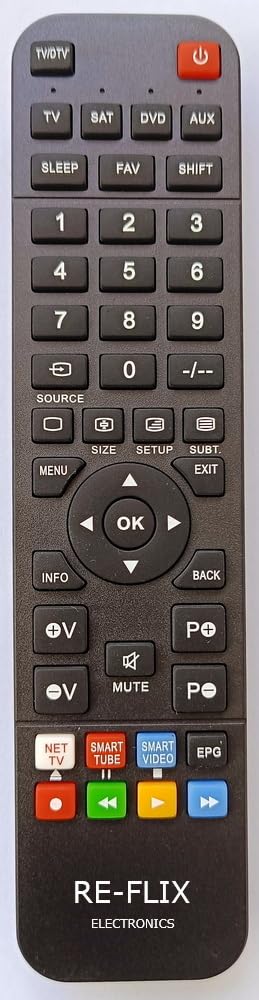
Image 2: Front view of the remote control, illustrating button layout.
5.1 Basic Functions
- POWER: Turns the TV on or off.
- VOL +/-: Increases or decreases the volume.
- CH +/-: Changes the TV channel up or down.
- MUTE: Mutes or unmutes the TV sound.
- INPUT/SOURCE: Cycles through available input sources (HDMI, AV, etc.).
- Other buttons: Use as labeled for specific TV functions (e.g., number keys for direct channel input, menu navigation).
This remote also features 4-in-1 universal capabilities, allowing it to control up to four different devices (TV, SAT, AUX, DVD). For programming instructions for devices other than the pre-programmed HUAYU RM-L859 TV, please refer to the general universal remote programming guide provided by Re-Flix, if available, or consult the device's original manual for IR codes.
6. Maintenance
- Clean the remote control with a soft, dry cloth. Do not use liquid cleaners or abrasive materials.
- If the remote control's performance degrades, replace the batteries with fresh AAA batteries.
- Store the remote in a cool, dry place when not in use for extended periods.
7. Troubleshooting
- Remote not responding:
- Check if the batteries are inserted correctly with the correct polarity.
- Replace old batteries with new AAA batteries.
- Ensure there is a clear line of sight between the remote control and the TV's infrared sensor.
- Make sure the remote is pointed directly at the TV.
- Specific buttons not working:
- This remote is pre-programmed for HUAYU RM-L859 TVs. Some advanced functions or buttons specific to other TV models may not be supported.
- Clean the remote control, especially around the unresponsive buttons, to remove any debris.
8. Specifications
| Brand | Re-Flix |
| Model Number | 747516 |
| Compatibility | HUAYU RM-L859 TV (Pre-programmed) |
| Connectivity Technology | Infrared (IR) |
| Battery Type | 2 x AAA (not included) |
| Special Feature | Universal (4-in-1 capability) |
| Color | Black |
9. Warranty and Support
For warranty information or technical support, please refer to the documentation provided at the time of purchase or contact your retailer. Keep your proof of purchase for any warranty claims.


