
KiiBoom Phantom 81 V3
KiiBoom Phantom 81 V3 Pink Mechanical Gaming Keyboard User Manual
Model: Phantom 81 V3
Introduction
Welcome to the KiiBoom Phantom 81 V3 Pink Mechanical Gaming Keyboard user manual. This guide provides detailed instructions for setting up, operating, maintaining, and troubleshooting your new keyboard. The Phantom 81 V3 is a 75% transparent mechanical keyboard featuring a gasket mount design, hot-swappable switches, RGB backlighting, and triple-mode connectivity for versatile use across various operating systems.
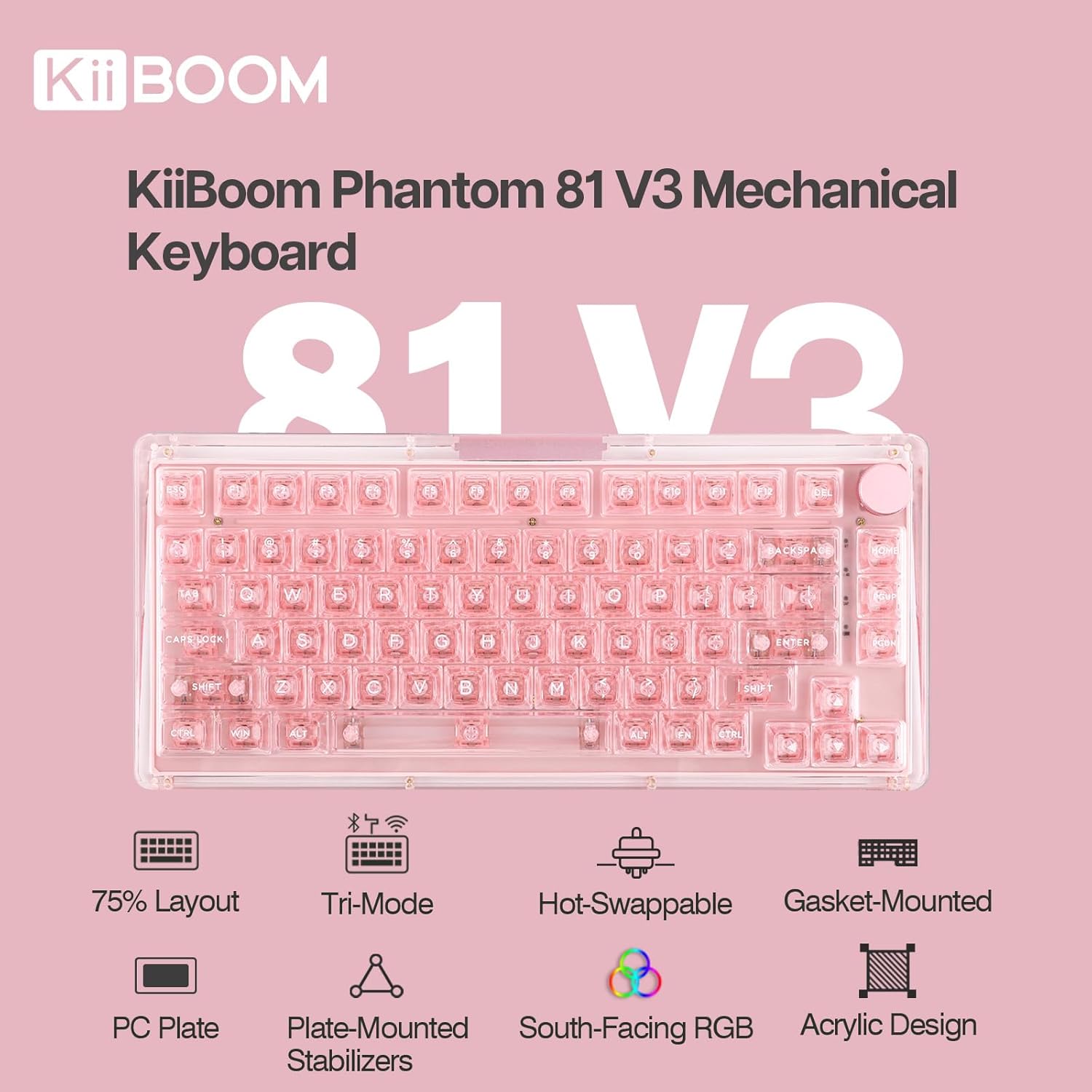
Image: KiiBoom Phantom 81 V3 Pink Mechanical Gaming Keyboard highlighting its 75% layout, tri-mode connectivity, hot-swappable switches, gasket-mounted design, PC plate, plate-mounted stabilizers, south-facing RGB, and acrylic design.
Product Features
- Futuristic Design and Build: Features a crystal-clear acrylic frame with a gasket mount and PC mounting plate for durability and aesthetic appeal. South-facing LEDs enhance lighting.
- Full-key Hot-Swappable PCB: Allows for seamless customization of switches, ensuring a robust and reliable typing experience. Upgraded plate-mounted stabilizers provide consistent key presses.
- South-facing LEDs & Compatibility: Equipped with south-facing LEDs for refined lighting with reduced glare. Customizable LED settings for color and brightness. Fully compatible with Mac and Windows operating systems.
- Triple Modes Connectivity: Offers versatile connectivity via Type-C Wired, Bluetooth 5.0, and 2.4GHz modes. The V3 version includes an 8000mAh battery for extended use.
- Enhanced Gasket Mount and PC Plate: The PC (Polycarbonate) Plate works with the Gasket Mount system to provide a pleasant typing sound and a slightly flexible, cushioned feel.
Setup
Unboxing and Initial Inspection
Carefully remove all components from the packaging. Verify that all items listed in the 'What's in the Box' section are present and undamaged. The package includes a USB Cable and a Keycap Puller.
Video: An unboxing demonstration of the KiiBOOM Phantom 81 V3 Transparent Keyboard, showing the contents of the package and initial setup steps.
Connecting the Keyboard
The Phantom 81 V3 supports three connectivity modes: Type-C Wired, Bluetooth 5.0, and 2.4GHz wireless. The mode switch is located on the back of the keyboard.

Image: The back of the KiiBoom Phantom 81 V3 keyboard, illustrating the Type-C port, Win/Mac switch, and tri-mode connectivity switch (BT/USB/2.4G).
- Wired Mode: Connect the provided USB Type-C cable to the keyboard and your computer. Ensure the mode switch is set to 'USB'.
- 2.4GHz Wireless Mode: Plug the 2.4GHz USB receiver into your computer. Set the mode switch on the keyboard to '2.4G'. The keyboard should automatically connect.
- Bluetooth Mode: Set the mode switch on the keyboard to 'BT'. On your device (computer, tablet, smartphone), search for Bluetooth devices and select 'KiiBoom Phantom 81'. Follow any on-screen pairing instructions.
Initial Charging
Before first use, it is recommended to fully charge the keyboard using the provided USB Type-C cable. The keyboard features an 8000mAh battery (V3 version).
Operating Instructions
Basic Keyboard Functions
The KiiBoom Phantom 81 V3 is a 75% layout keyboard with 82 keys and a multi-functional knob. It supports N-Key Rollover (NKRO), allowing all keys to register simultaneously for fast and accurate typing.

Image: Diagram showing the dimensions and 75% ANSI layout of the KiiBoom Phantom 81 V3 keyboard, including the 82 keys and 1 knob.
Switching Operating Systems (Win/Mac)
Use the dedicated switch on the back of the keyboard to toggle between Windows and Mac compatibility modes. This ensures proper key mapping for your chosen operating system.
Multi-functional Knob
The knob typically controls volume by default. Its functions can be customized using the software.
Connectivity Modes
The Phantom 81 V3 offers seamless switching between three connection types:
- Type-C Wired (FN + 5): For a stable, low-latency connection. Ideal for gaming or when charging.
- 2.4GHz Wireless (FN + 4): Provides a reliable wireless connection with minimal latency, suitable for gaming.
- Bluetooth 5.0 (FN + 1/2/3): Connect up to three Bluetooth devices and switch between them easily.

Image: A visual representation of the three connectivity modes (BT Mode, 2.4G Mode, Wired Mode) and their corresponding function key combinations, along with compatible devices like PC, Laptop, Tablet, Switch, XBOX, and PlayStation.
RGB Lighting Control
The keyboard features 16.8 million RGB backlights with south-facing LEDs for vibrant and customizable illumination. Use the following key combinations to control the lighting effects:
- FN + V: Toggle Backlight Effects
- FN + J: Toggle Backlight Colors
- FN + P: Toggle Bottom Light Mode
- FN + B: Toggle Bottom Light Colors

Image: A visual guide to controlling the 16.8M RGB backlights on the KiiBoom Phantom 81 V3 using FN key combinations.
Video: A demonstration of the KiiBOOM Phantom 81 V3 keyboard showcasing its various RGB backlight effects.
Hot-Swappable Switches
The Phantom 81 V3 features a hot-swappable PCB, allowing you to easily change mechanical switches without soldering. It is compatible with both 3-pin and 5-pin mechanical switches.

Image: Detailed view of the hot-swappable PCB, illustrating compatibility with 3-pin/5-pin switch sockets and south-facing LEDs.
The keyboard comes with KiiBoom Pink Rose Switches, which are linear 5-pin mechanical switches with a total travel of 3.80 ±0.2 mm, pre-travel of 1.6 ±0.4 mm, actuation force of 38 ±15 gf, and bottom force of 42 ±15 gf. The stem material is PC.
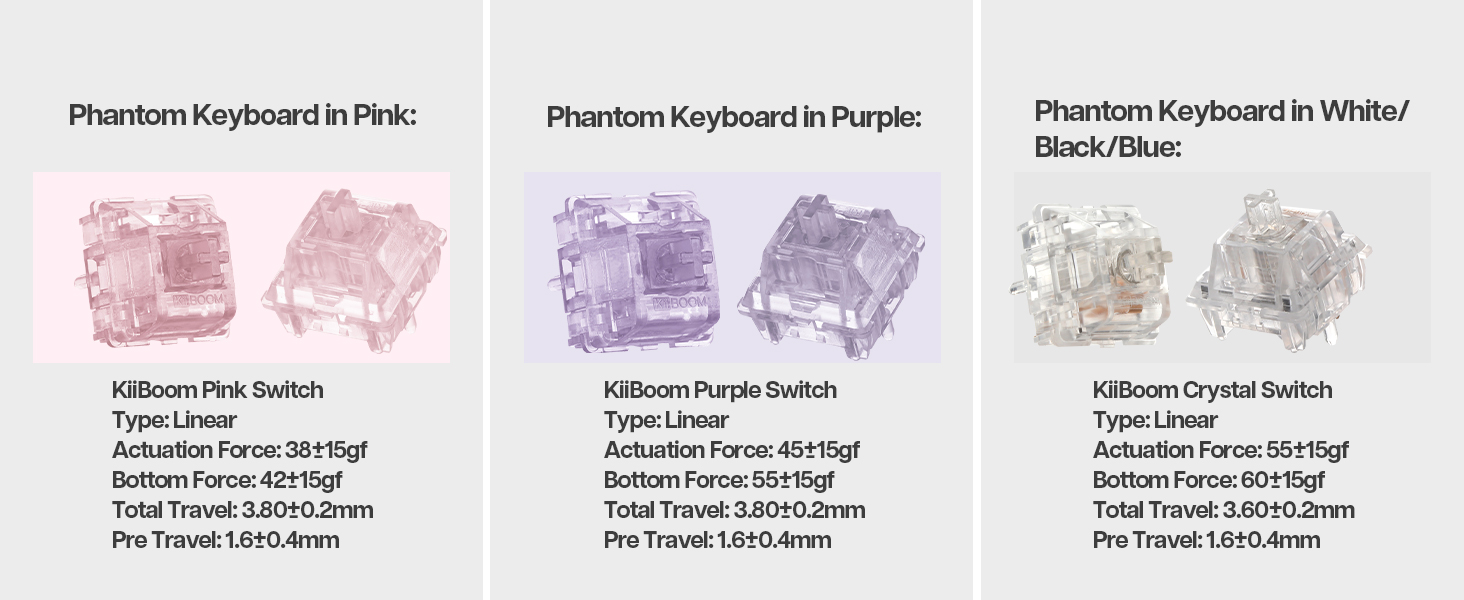
Image: Specifications for KiiBoom Pink, Purple, and Crystal switches, detailing their type, actuation force, bottom force, total travel, and pre-travel.
Video: A demonstration of KiiBOOM Jello Switches being used in the Phantom 81 V3 Keyboard, highlighting their sound and feel.
Battery Information
The Phantom 81 V3 is equipped with an 8000mAh rechargeable battery, providing long-lasting wireless usage. To check the current battery power, press FN + Backspace. The keyboard's RGB lighting will indicate the battery level.

Image: A visual guide on how to check the battery level of the KiiBoom Phantom 81 V3 using FN+Backspace, with indicators for 30%, 40%, 60%, and 100% charge.
Software Programmable
Customize your keyboard experience with the dedicated software. This allows you to:
- Remap keys to your preference.
- Adjust and create custom light effects.
- Program macros for complex commands.
- Share your custom settings with others.

Image: Screenshots of the KiiBoom software interface, demonstrating options for key remapping, light effects, macros, and sharing settings.
Maintenance
Cleaning the Keyboard
To clean your KiiBoom Phantom 81 V3, use a soft, lint-free cloth. For deeper cleaning, you can remove the keycaps using the provided keycap puller. Gently wipe the keycaps and the keyboard base. Avoid using harsh chemicals or abrasive materials.
Switch and Keycap Replacement
Thanks to the hot-swappable design, switches can be replaced easily. Use the provided switch puller to carefully remove switches. When inserting new switches, ensure the pins are aligned correctly to avoid bending them. Keycaps can be removed and replaced using the keycap puller.
Troubleshooting
- Keyboard not responding: Ensure the keyboard is charged and properly connected (wired, 2.4GHz receiver, or Bluetooth paired). Check the mode switch (USB/2.4G/BT) and the Win/Mac switch.
- Keys not registering: If individual keys are not working, try removing and re-inserting the switch for that key. Ensure the switch pins are straight and fully seated.
- RGB lighting issues: Check the lighting control key combinations (FN + V/J/P/B). Ensure the keyboard is not in a low-power state.
- Bluetooth connectivity problems: Try unpairing and re-pairing the keyboard with your device. Ensure no other devices are interfering with the Bluetooth signal.
- Software not detecting keyboard: Ensure the keyboard is connected via wired mode when attempting to use the customization software.
Specifications
| Feature | Detail |
|---|---|
| Brand | KiiBoom |
| Model | Phantom 81 V3 |
| Connectivity Technology | 2.4Ghz Wireless, Bluetooth 5.0, USB-C Wired |
| Number of Keys | 82 |
| Keyboard Layout | 75% (ANSI) |
| Switch Type | Linear (KiiBoom Pink Rose Switches) |
| Hot-Swappable | Yes (3-pin/5-pin compatible) |
| Backlighting | RGB (South-facing LEDs) |
| Battery Capacity | 8000mAh (V3 version) |
| Compatible Devices | Gaming Console, Laptop, PC, Smartphone, Tablet |
| Operating System Compatibility | Windows, macOS, Android |
| Material | Acrylic, Polycarbonate |
| Weight | Approx. 1.45kg |
| Included Accessories | USB Cable, Keycap Puller |
Warranty
The KiiBoom Phantom 81 V3 Mechanical Gaming Keyboard comes with a 1 YEAR WARRANTY from the date of purchase. Please retain your proof of purchase for warranty claims. The warranty covers manufacturing defects and malfunctions under normal use. It does not cover damage caused by misuse, accidents, unauthorized modifications, or normal wear and tear.
Support
For further assistance, technical support, or warranty inquiries, please visit the official KiiBoom website or contact their customer service. Refer to the product packaging or the KiiBoom website for the most up-to-date contact information.
Related documentsPhantom 81 V3


Ask a question about this manual
Ask about setup, troubleshooting, compatibility, parts, safety, or missing instructions. Manuals+ will review the question and use this page’s manual context to help answer it.