
1. Introduction
The DANOPLUS 6-in-1 Wireless Water Quality Tester is a versatile and essential tool for monitoring water parameters in pools, spas, and hydroponic systems. This device provides comprehensive analysis of pH, EC, ORP, Chlorine, Salinity, and Temperature, ensuring optimal water conditions. With seamless Bluetooth connectivity, real-time data monitoring and analysis are conveniently accessible via a dedicated mobile application.

Figure 1: The 6-in-1 Floating Monitor and its measured parameters.
2. What's in the Box
Upon opening your DANOPLUS 6-in-1 Wireless Water Quality Tester package, you should find the following items:
- 1 × 6-in-1 Floating Monitor
- 5 × Buffer Powder packets (for calibration)
- 1 × User Manual

Figure 2: All components included in the product package.
3. Setup
3.1 Initial Setup
Before first use, ensure the device has batteries installed. After replacing the battery, please close the battery cover tightly to avoid water ingress into the device. This is crucial for maintaining the device's waterproof integrity.
3.2 App Installation and Bluetooth Connection
To utilize the full features of your water quality tester, download the "YINMIK" app from your device's app store (compatible with iOS and Android). Ensure location services are enabled on your mobile device for proper Bluetooth functionality.
- Download the "YINMIK" app from your app store.
- Turn on the meter by pressing the "On/Off" button.
- Enable Bluetooth on your mobile phone.
- Enable location services on your mobile phone. This is required for the Bluetooth connection to function properly.
- Open the "YINMIK" app. The device should automatically connect. The device name "BLE-YC01" will appear in the app if pairing is successful.

Figure 3: Step-by-step guide for connecting the device via Bluetooth on Android and iOS.
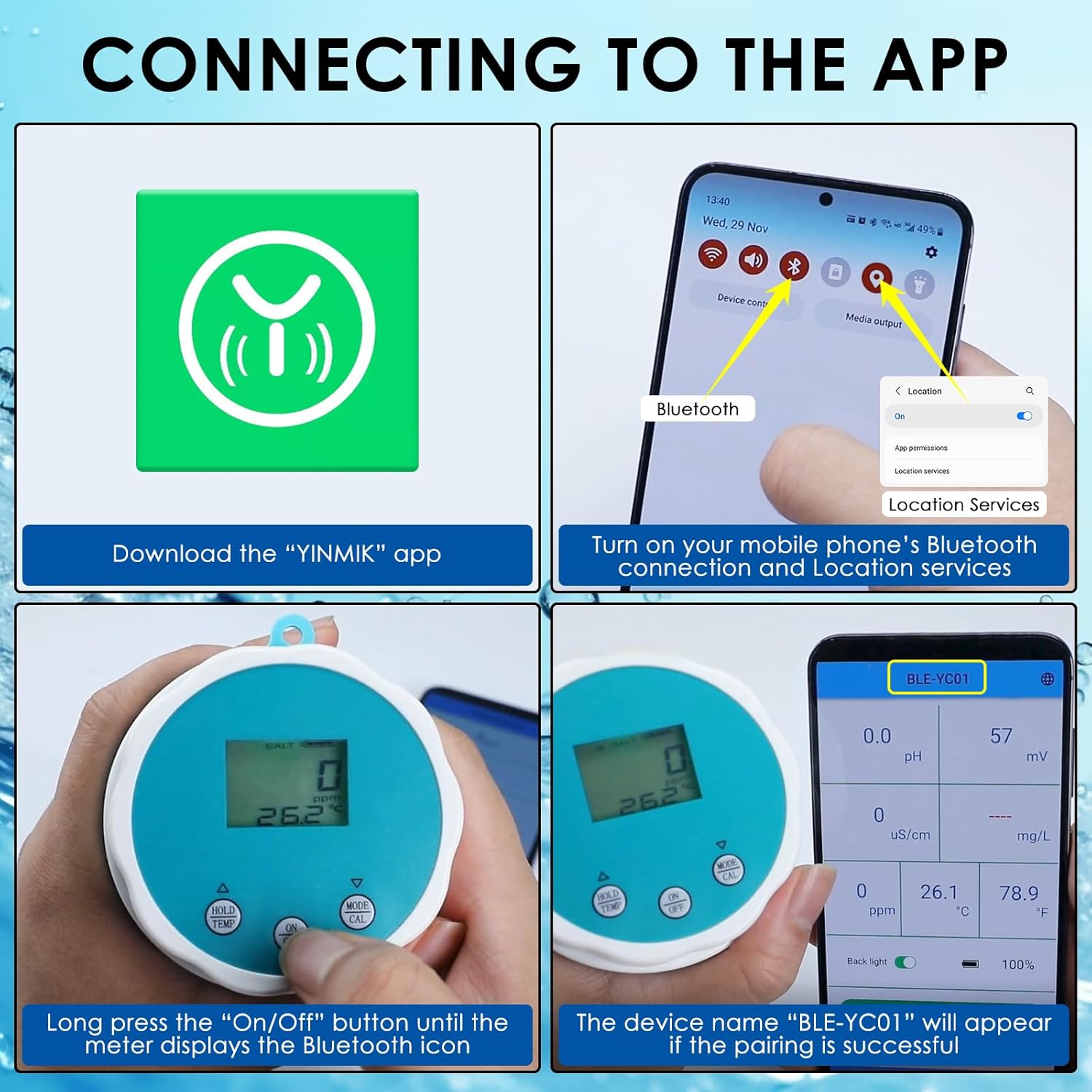
Figure 4: Visual guide for app download, Bluetooth activation, and device pairing.
4. Operating Instructions
4.1 Taking Measurements
Once the device is powered on and connected to the app:
- Place the electrode into the solution (pool, spa, or hydroponic system).
- Wait for the reading to stabilize on the device's LCD screen or within the YINMIK app.
- Switch between measurement modes (pH, SALT, EC, CL, ORP) as needed using the device buttons or the app interface.
4.2 Measurement Modes and Ranges
The DANOPLUS 6-in-1 Wireless Water Quality Tester provides readings for the following parameters:
| Parameter | Range | Resolution | Accuracy |
|---|---|---|---|
| pH | 0-14 pH | 0.1 pH | ±0.1 pH |
| EC | 0-1999 µS/cm; 2000-10000 µS/cm; 10.01-20.0 mS/cm | 1 µS/cm; 10 µS/cm; 0.01 mS/cm | ±2% F.S |
| ORP | ±1200mV | 1mV | ±15mV |
| Chlorine (CL) | 0.1-4.0 mg/L | 0.1 mg/L | |
| Salinity | 0-999 PPM; 1000-9990 PPM | 1 PPM; 10 PPM | ±2% F.S |
| Temperature | 0.0-60.0°C (32.0-140.0°F) | 0.1°C; 0.1°F | ±0.5°C |

Figure 5: Overview of measurement modes and pH level interpretation.

Figure 6: Comprehensive table of all 6 parameters, their ranges, resolutions, and accuracies.
4.3 Data Logging and Alerts
The monitor features a data memory storage capacity of up to 1000 records, allowing you to track and analyze historical water parameter data over time. Easily monitor changes and trends in water quality for effective maintenance and treatment. You can also set maximum and minimum limit values for pH, EC, ORP, and Chlorine, and receive alerts and notifications on your connected device when the values exceed or fall below the desired range.

Figure 7: Data synchronization and sharing capabilities of the app.

Figure 8: App interface showing calibration records and options to set parameter limits.
5. Maintenance
To ensure the longevity and accuracy of your DANOPLUS Water Quality Tester, proper maintenance is essential. Always ensure the battery cover is tightly closed after replacing batteries to prevent water ingress, which can damage the internal components.
5.1 Calibration
Regular calibration of the pH, EC, and ORP sensors is recommended to maintain accuracy. Use the provided buffer powders mixed with the appropriate amount of water for calibration. Refer to the app's calibration section for detailed instructions.
6. Troubleshooting
If you encounter any issues with your DANOPLUS 6-in-1 Wireless Water Quality Tester, please consider the following general troubleshooting steps:
- No Power/Display: Check battery installation and ensure the battery cover is securely fastened.
- Bluetooth Connection Issues: Verify Bluetooth is enabled on your phone and location services are active for the YINMIK app. Try restarting both the device and your phone.
- Inaccurate Readings: Ensure the probe is clean and properly calibrated. Refer to the calibration section in the app or manual.
- Water Ingress: If water is observed inside the device, immediately remove batteries and allow it to dry completely. Ensure the battery cover is sealed correctly for future use.
For persistent issues, please contact customer support.
7. Specifications
| Feature | Detail |
|---|---|
| Brand | DANOPLUS |
| Model Number | KIB0369 |
| Measurement Parameters | pH, EC, ORP, Chlorine, Salinity, Temperature |
| pH Range | 0-14 |
| Temperature Range | 0.0-60.0°C (32.0-140.0°F) |
| Connectivity | Bluetooth (iOS & Android App) |
| Data Storage | Up to 1000 records |
| Design | Floating, Backlight function |
| Material | Plastic |
| Package Dimensions | 7.72 x 4.72 x 3.62 inches |
| Item Weight | 13.44 ounces |
8. Warranty and Support
For warranty information, technical support, or any inquiries regarding your DANOPLUS 6-in-1 Wireless Water Quality Tester, please refer to the contact information provided in the product packaging or visit the official DANOPLUS website. Keep your purchase receipt for warranty claims.