
1Mii B08Pro
1Mii B08Pro Hi-Fi Bluetooth Stereo Amplifier
User Manual
Product Overview
The 1Mii B08Pro is a versatile Hi-Fi Bluetooth 5.3 Stereo Amplifier designed to deliver high-resolution audio to your home stereo system. Featuring LDAC and aptX HD/LL codecs, a high-fidelity DAC chip, and powerful 100W x 2 channel output, it provides an immersive listening experience. This manual will guide you through the setup, operation, and maintenance of your device.

Front view of the 1Mii B08Pro Bluetooth Stereo Amplifier, showing the control knobs and input switch.

The compact size of the 1Mii B08Pro amplifier, easily held in one hand.
Safety Information
Please read and follow all safety instructions carefully to prevent damage to the device or personal injury.
- Do not expose the device to water or excessive moisture.
- Avoid placing the device near heat sources or in direct sunlight.
- Ensure proper ventilation to prevent overheating.
- Use only the provided power adapter.
- Do not attempt to disassemble or repair the device yourself. Contact qualified personnel for service.
Package Contents
Verify that all items are present in your package:
- 1Mii B08Pro Bluetooth Stereo Amplifier
- Power Adapter (Input: 100-240V~50/60Hz 2.5A, Output: 24V 4.2A 100W)
- User Manual
- RCA Audio Cable (Red/White)
- 3.5mm to RCA Audio Cable
Product Components
Familiarize yourself with the amplifier's layout:

Detailed diagram showing the input and output ports of the 1Mii B08Pro amplifier, including RCA input, speaker outputs, and power input.
- Front Panel:
- AUX/BT Switch: Toggles between auxiliary input and Bluetooth mode.
- Treble Knob: Adjusts high-frequency audio levels.
- Bass Knob: Adjusts low-frequency audio levels.
- Volume Knob: Controls the overall audio output volume.
- Rear Panel:
- RCA IN (L/R): For connecting audio sources via RCA cables.
- SPK OUT (L/R): Speaker output terminals for connecting passive speakers.
- DC 12-24V: Power input port.
- Antennas: For Bluetooth signal reception.
Setup Instructions
Follow these steps to set up your 1Mii B08Pro amplifier for optimal performance.
1. Power Source Connection
Connect the power adapter to the amplifier and a power outlet.
- Connect one end of the power adapter to a power source (e.g., wall outlet or power strip).
- Connect the other end of the power adapter to the DC 12-24V power input port on the rear of the B08Pro amplifier.
Video demonstrating the power source connection for the 1Mii B08Pro amplifier. The video shows plugging the power adapter into a power strip and then into the amplifier's DC input port.
2. Speaker Connection
Connect your passive speakers to the amplifier's speaker output terminals.
- Connect the black (negative) terminal of your left channel speaker to the black "L" terminal of the B08Pro with the black speaker wire.
- Connect the red (positive) terminal of your left channel speaker to the red "L" terminal of the B08Pro with the red speaker wire.
- Repeat the process for the right channel speaker, connecting its black (negative) terminal to the black "R" terminal and its red (positive) terminal to the red "R" terminal of the B08Pro.

Rear view of the 1Mii B08Pro amplifier showing RCA input and speaker wire connections for two passive speakers, highlighting its 100W x 2 output capability.
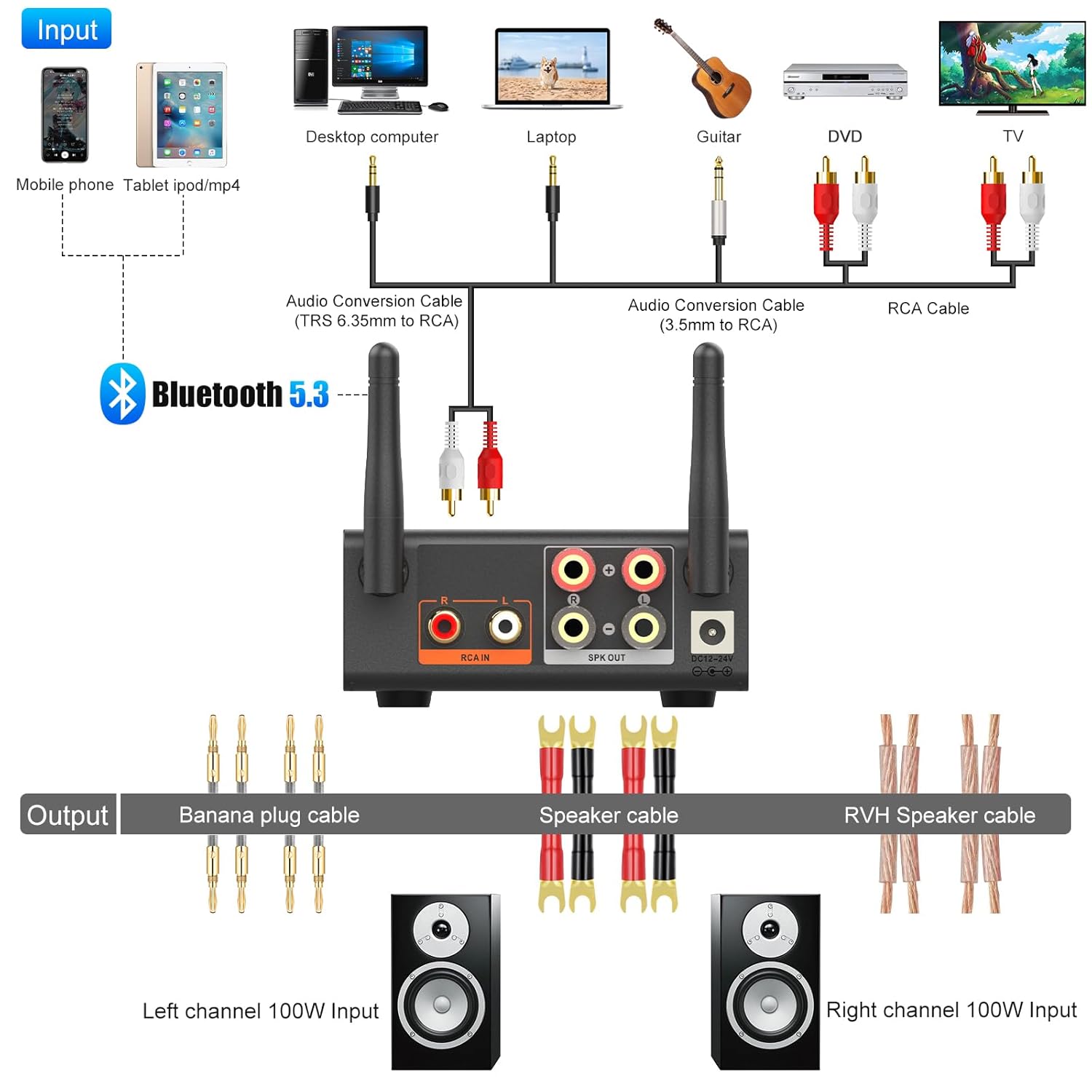
3. Audio Source Connection (AUX Mode)
Connect your audio source (e.g., computer, CD player, phone) to the amplifier using the appropriate cables.
- For RCA input: Connect the RCA white plug to the white RCA input jack on the B08Pro. Connect the RCA red plug to the red RCA input jack on the B08Pro.
- Connect the other end of the audio cable (e.g., 3.5mm jack or RCA) to the audio output port of your sound source device (e.g., laptop headphone jack, CD player RCA output).
- Push the silver switch on the front panel to the upper "AUX" position to select auxiliary input.

A comprehensive diagram illustrating various input sources (mobile phone, desktop computer, laptop, guitar, DVD, TV) connecting to the 1Mii B08Pro via Bluetooth or audio cables, and then outputting to speakers.
Operating Instructions
1. Power On/Off and Mode Selection
Once connected, the amplifier will power on. Use the AUX/BT switch on the front panel to select your desired input mode:
- AUX Mode: For wired connections via RCA.
- BT Mode: For wireless Bluetooth connections.
2. Bluetooth Pairing
To connect via Bluetooth:
- Switch the amplifier to "BT" mode. The Bluetooth indicator light will blink, indicating it's in pairing mode.
- On your device (smartphone, tablet, etc.), enable Bluetooth and search for "1Mii B08Pro" in the list of available devices.
- Select "1Mii B08Pro" to pair. Once connected, the Bluetooth indicator light will become solid.
The 1Mii B08Pro amplifier connected wirelessly via Bluetooth 5.3, demonstrating its ultra-long range capability up to 60 meters in an open environment.
3. Audio Playback and Adjustment
After connecting your audio source, you can begin playback and adjust the sound.
- Start playing music or audio from your connected device.
- Use the Volume knob on the front panel to control the overall loudness. Turn clockwise to increase volume, counter-clockwise to decrease.
- Use the Treble knob to adjust the high-frequency response of the audio.
- Use the Bass knob to adjust the low-frequency response of the audio.
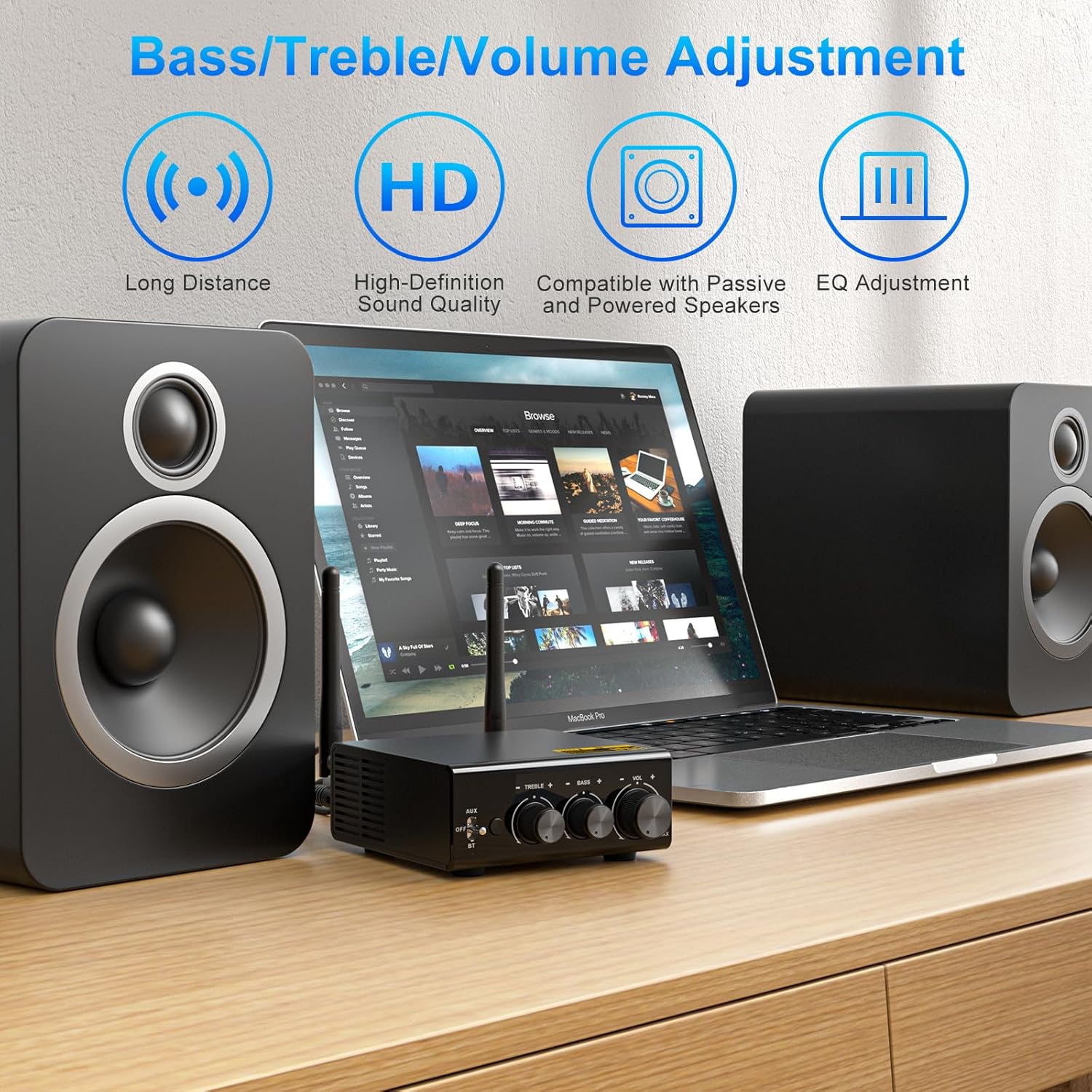
The front panel of the 1Mii B08Pro amplifier, highlighting the bass, treble, and volume adjustment knobs for personalized sound control.

A setup showing the 1Mii B08Pro amplifier connected to speakers and a turntable, illustrating its capability to provide a Hi-Fi listening experience with various audio sources.
Maintenance
To ensure the longevity and optimal performance of your 1Mii B08Pro amplifier, follow these maintenance guidelines:
- Cleaning: Use a soft, dry cloth to wipe the exterior of the amplifier. Do not use liquid cleaners or aerosol sprays.
- Ventilation: Ensure the ventilation holes on the device are not blocked. Proper airflow prevents overheating.
- Storage: When not in use for extended periods, store the amplifier in a cool, dry place away from direct sunlight and extreme temperatures.
- Connections: Periodically check all cable connections to ensure they are secure and free from dust or corrosion.
Troubleshooting
If you encounter issues with your 1Mii B08Pro amplifier, refer to the following common problems and solutions:
| Problem | Possible Cause | Solution |
|---|---|---|
| No sound output. |
|
|
| Bluetooth connection unstable or unable to pair. |
|
|
| Distorted sound. |
|
|
Specifications
- Brand: 1Mii
- Model: B08Pro
- Bluetooth Version: 5.3
- Audio Codecs: LDAC, aptX HD, aptX LL, aptX, AAC, SBC
- Output Power: 100W x 2 Channel
- DAC Chip: ESS9018K2M
- Working Range: Up to 196ft (unobstructed outdoors), 50-65ft (indoors without obstacles)
- Input Voltage: 24 Volts (DC)
- Mounting Type: Freestanding
- Dimensions: 7.01 x 4.69 x 3.86 inches
- Weight: 1.83 Pounds
- Country of Origin: China
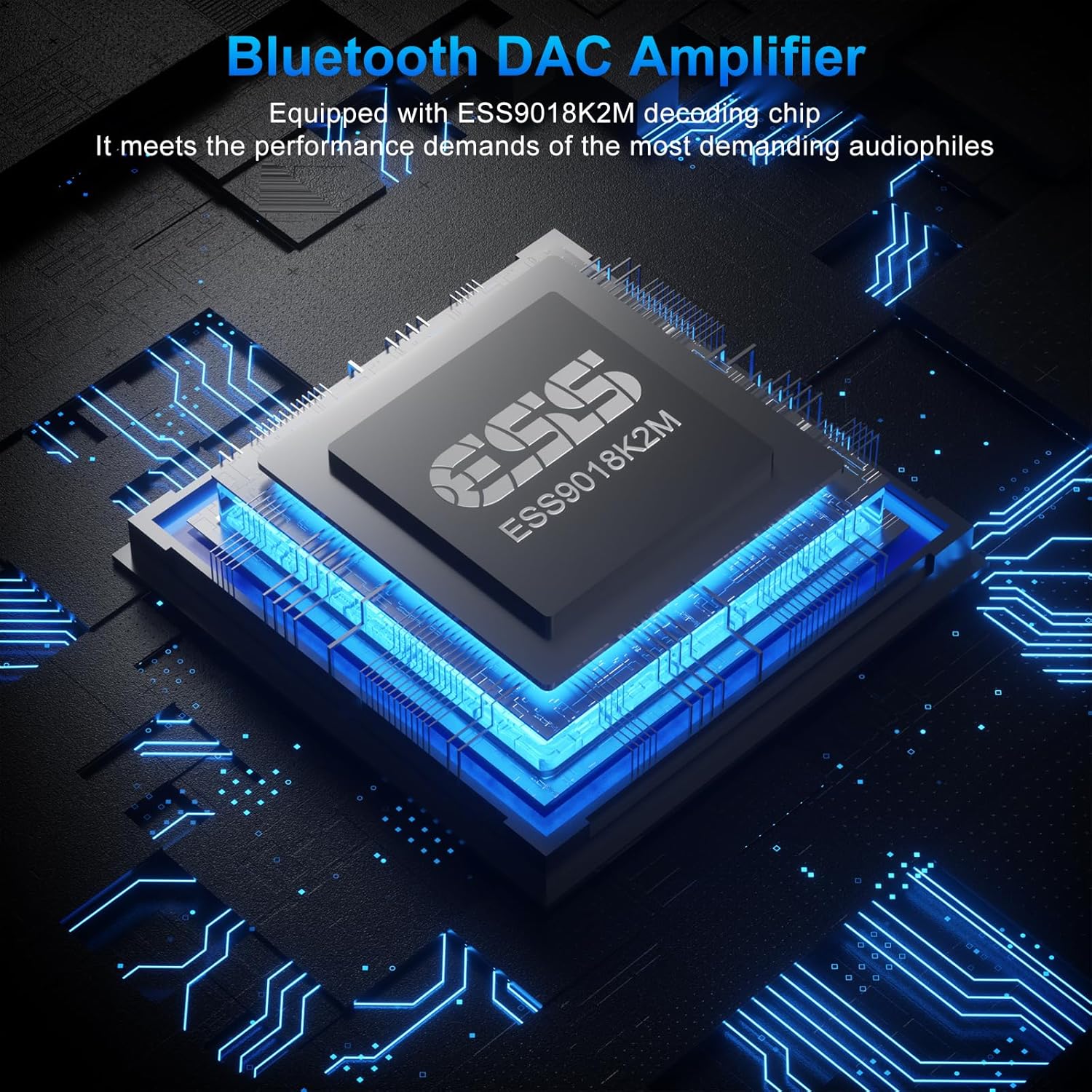
An illustration of the ESS9018K2M decoding chip, emphasizing its role in providing a high-fidelity audio experience for audiophiles.
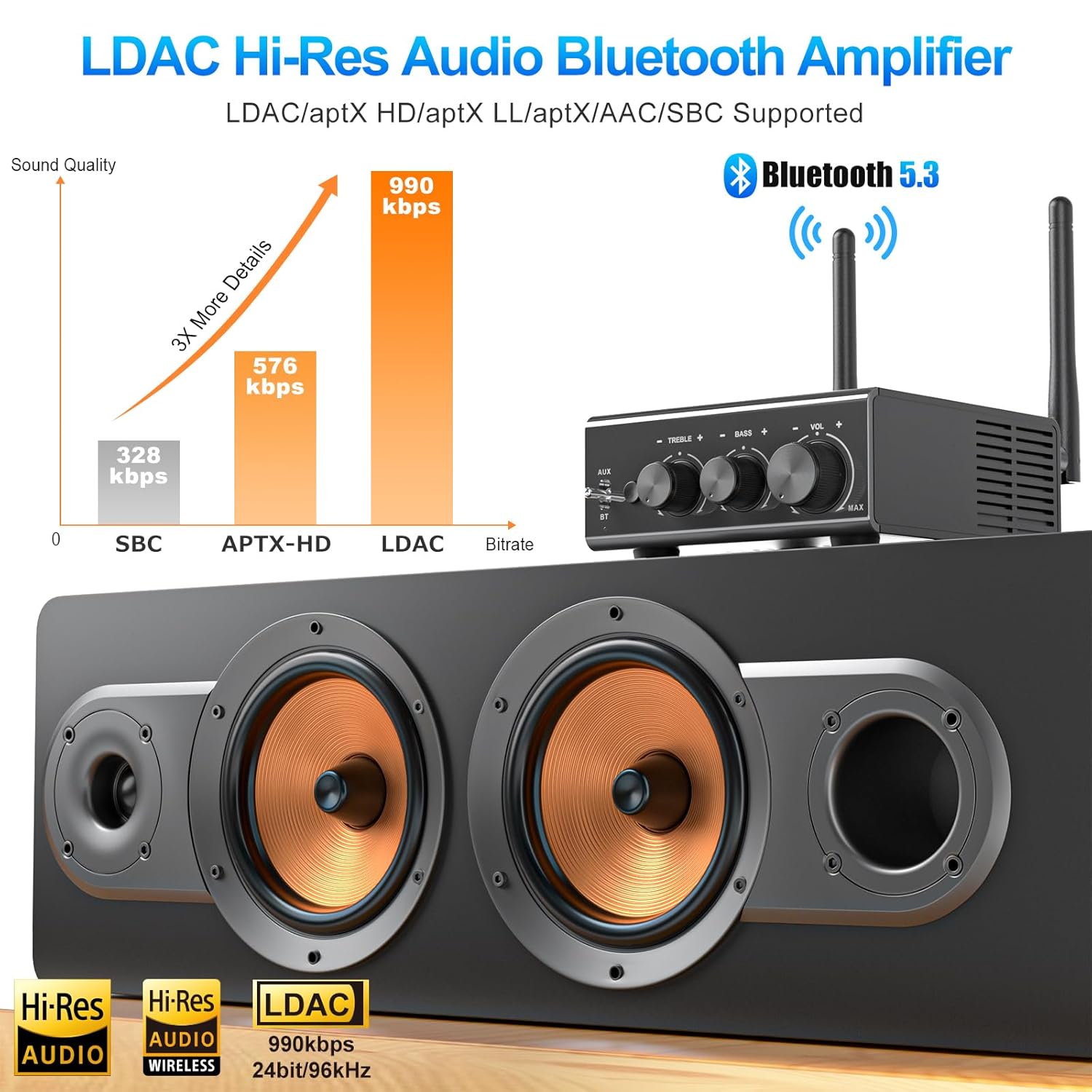
A graphic comparing audio bitrates (SBC, aptX-HD, LDAC), showing LDAC's superior 990kbps transmission for Hi-Res Audio, supported by Bluetooth 5.3.
Warranty and Support
1Mii products are designed for reliability and performance. For warranty information, technical support, or service inquiries, please refer to the contact information provided on the product packaging or visit the official 1Mii website. Keep your purchase receipt for warranty claims.
For additional support, you may also refer to the official 1Mii store on Amazon: 1Mii Amazon Store.
Related documentsB08Pro


Ask a question about this manual
Ask about setup, troubleshooting, compatibility, parts, safety, or missing instructions. Manuals+ will review the question and use this page’s manual context to help answer it.