
Introduction
Thank you for choosing the BOZYBO Digital Atomic Alarm Clock, Model KA002-W. This clock is designed to provide accurate time, date, day of the week, indoor temperature, and moon phase information with a large, easy-to-read display. It features WWVB atomic time synchronization for automatic time correction and up to six programmable alarms. This manual will guide you through the setup, operation, and maintenance of your new clock.
Product Features
- Large, Colorful HD Display: 7.5-inch screen with adjustable backlight for clear visibility from various angles.
- Six Programmable Alarms: Set up to six distinct alarms for daily scheduling. Includes three DIY label stickers for customization.
- WWVB Atomic Time Synchronization: Automatically adjusts time nightly for precise accuracy, including Daylight Saving Time (DST) changes. Supports four time zones (PST, MST, CST, EST).
- Comprehensive Display Information: Shows time (12HR/24HR), day of the week, date, year, indoor temperature, DST indicator, time zone, and moon phase.
- Dual Power Options: Operates via DC adapter for continuous display and includes battery backup for seamless use during power outages.
- Easy Operation: Accessible buttons and snooze function for convenient setup and daily use.
- Versatile Placement: Suitable for desk placement or wall mounting.
Package Contents
- BOZYBO Digital Atomic Alarm Clock (KA002-W)
- DC Power Adapter
- User Manual
- Three DIY Alarm Label Stickers
Product Overview
Familiarize yourself with the clock's display elements and controls.

Image: Display elements of the BOZYBO Digital Atomic Alarm Clock, showing WWVB signal, DST, atomic time, day of week, six alarm indicators, indoor temperature, calendar, and moon phase.

Image: The BOZYBO Digital Atomic Alarm Clock displaying time and date, with an illustration of six alarm icons and customizable DIY stickers.
Setup
1. Powering the Clock
The clock can be powered by the included DC adapter for continuous operation or by batteries for backup during power outages.
- DC Adapter: Connect the DC adapter to the clock's power input port and plug it into a standard wall outlet. The display will illuminate continuously.
- Battery Backup: Open the battery compartment on the back of the clock. Insert the required batteries (e.g., AA batteries, not included) according to the polarity markings. In battery-only mode, the display will light up for 10 seconds when the snooze button is touched.

Image: Illustrations showing the clock powered by a DC adapter for continuous display and by batteries for backup, with the battery compartment open.
2. Initial Time Synchronization (WWVB Atomic Clock)
The clock will attempt to synchronize with the WWVB atomic time signal automatically. This process typically occurs overnight.
- Place the clock in an area with good reception, away from electronic interference.
- The clock will automatically search for the WWVB signal. A signal icon will appear on the display when it is attempting to synchronize.
- For best results, allow the clock one night to adjust the time automatically. Once synchronized, the time will be accurate to the second.
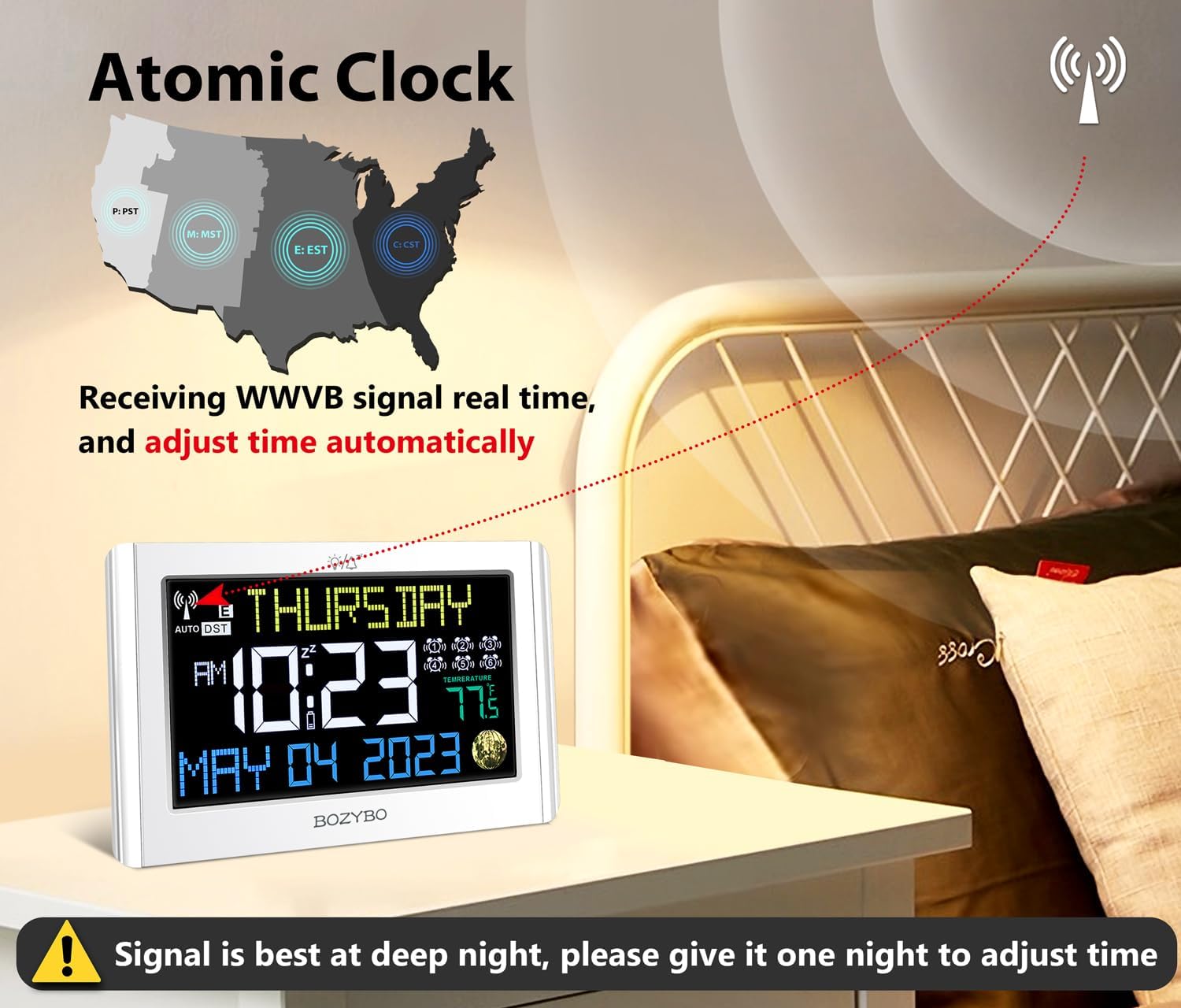
Image: The BOZYBO Digital Atomic Alarm Clock receiving a WWVB signal, illustrating automatic time adjustment. A map shows the coverage areas for PST, MST, CST, and EST time zones.
Operating Instructions
1. Setting Time Zone
The atomic clock supports four time zones: Pacific (PST), Mountain (MST), Central (CST), and Eastern (EST). Refer to the clock's control buttons (usually labeled 'TIME ZONE' or similar) to select your desired time zone. The clock will then adjust the atomic time accordingly.
2. Manual Time and Date Setting (If WWVB Signal is Unavailable)
If the atomic signal is weak or unavailable, you can manually set the time and date.
- Press and hold the 'SET' button (or similar) to enter time setting mode.
- Use the '+' or '-' buttons to adjust the hour, minute, year, month, and day.
- Press 'SET' again to confirm each setting and move to the next.
- Exit setting mode by pressing 'SET' one last time or waiting for the clock to time out.
3. Setting Alarms (Up to 6)
The clock allows you to set up to six individual alarms.
- Press the 'ALARM' button (or similar) to cycle through the alarm settings (AL1, AL2, etc.).
- When the desired alarm (e.g., AL1) is displayed, press and hold the 'ALARM' button to enter its setting mode.
- Use the '+' or '-' buttons to set the desired alarm hour and minute.
- Press 'ALARM' again to confirm and move to the next setting (e.g., alarm ON/OFF).
- Repeat for other alarms as needed.
- To activate or deactivate an alarm, press the 'ALARM' button to select it, then press the '+' or '-' button to toggle it ON/OFF. The corresponding alarm icon will appear/disappear on the display.
4. Adjusting Display Brightness
The clock features an adjustable backlight. Locate the 'BRIGHTNESS' or 'LIGHT' button (or similar) on the clock. Pressing this button will cycle through different brightness levels (e.g., OFF, LOW, HIGH) to suit your preference.
5. Snooze Function
When an alarm sounds, press the 'SNOOZE' button to temporarily silence the alarm. The alarm will sound again after a set snooze interval (typically 5-10 minutes). To turn off the alarm completely, press any other button.
6. Daylight Saving Time (DST)
With DST ON, the clock will automatically adjust for Daylight Saving Time. Ensure the DST setting is enabled if your region observes DST. The WWVB function will handle the adjustment automatically.
Maintenance
- Cleaning: Wipe the clock's surface with a soft, dry cloth. Do not use abrasive cleaners or solvents.
- Battery Replacement: If using battery backup, replace batteries annually or when the display becomes dim in battery-only mode. Ensure correct polarity.
- Storage: If storing the clock for an extended period, remove the batteries to prevent leakage.
Troubleshooting
| Problem | Solution |
|---|---|
| Clock not displaying / No power. |
|
| Time is incorrect. |
|
| Alarm does not sound. |
|
| Display is dim or difficult to read. |
|
Specifications
- Model: KA002-W
- Brand: BOZYBO
- Display Type: Digital, Colorful HD
- Screen Size: 7.5 inches
- Product Dimensions: 22.86 x 3.81 x 11.94 cm (9.0 x 1.5 x 4.7 inches)
- Item Weight: 454 g (1 lb)
- Special Features: Atomic Time (WWVB), 6 Alarms, Indoor Temperature, DST, Moon Phase, Adjustable Brightness
- Power Source: DC Adapter (included), Battery Backup (batteries not included)
Warranty and Support
BOZYBO products are manufactured with quality in mind. For any questions, technical support, or warranty inquiries, please refer to the contact information provided with your purchase or visit the official BOZYBO website. Please retain your proof of purchase for warranty claims.