
1. Product Overview
The FORGING MOUNT TV wall mount is designed for large and valuable LCD/LED televisions ranging from 50 to 90 inches. This dual-arm mount features a robust construction with six arms, providing superior load-bearing capacity compared to single-arm mounts. The metal components are made from 3mm thick steel, ensuring exceptional strength and durability.
This full-motion wall mount can support TVs up to 75kg (165 lbs) and has passed rigorous UL safety tests, including a 3x maximum load capacity test, demonstrating its earthquake resistance and outstanding strength. It is particularly recommended for large TVs such as 60, 65, 70, 75, 80, 85, 86, and 90-inch models. The mount is compatible with a wide range of VESA patterns, from 200x100mm up to 600x400mm.

Figure 1.1: FORGING MOUNT TV Wall Mount and included accessories.

Figure 1.2: The robust six-arm structure of the wall mount, designed for enhanced stability and load capacity.
2. Safety Information
Before installation, carefully read and understand all instructions. If you have any questions, contact customer support. Ensure the wall structure can safely support the combined weight of the mount and your television. This mount is designed for installation on wood stud walls (12-16 inches on center), concrete walls, or brick walls. DO NOT install this mount on drywall (plasterboard) alone without wood studs or concrete backing.
Always verify the VESA pattern and weight of your TV are within the specified limits of this mount (VESA 200x100mm to 600x400mm, max 75kg). Use appropriate safety gear during installation, including eye protection and gloves. It is recommended to have at least two people for installation, especially when lifting the television.

Figure 2.1: Compatible wall types include wood stud walls, brick walls (requires plastic anchors), and concrete walls (requires plastic anchors). Drywall without studs is not suitable.
3. Package Contents
The FORGING MOUNT TV wall mount comes with all necessary parts for installation. Please verify that all items listed below are present before beginning installation:
- TV Wall Mount Assembly
- Mounting Hardware Kit (various screws, washers, spacers for TV and wall)
- HDMI Cable
- 3-Axis Bubble Level
- Cable Ties
- Illustrated Japanese Instruction Manual
4. Installation Guide
Installation is designed to be straightforward. Follow these general steps. Refer to the detailed illustrated manual included in the package for specific hardware and wall-type instructions.
- Attach TV Brackets to TV: Secure the vertical TV brackets to the back of your television using the appropriate screws, washers, and spacers from the hardware kit. Ensure the brackets are centered and level.
- Mount Wall Plate to Wall: Locate the desired mounting position on your wall. Use a stud finder for wood studs. Mark and drill pilot holes. Secure the wall plate assembly to the wall using the provided lag bolts and washers. For concrete or brick walls, use the appropriate plastic anchors. Ensure the wall plate is level and securely fastened.
- Hang TV onto Wall Plate: Carefully lift the television with the attached TV brackets and hook them onto the wall plate. Engage any safety locks or screws to secure the TV to the mount.
The included 3-axis bubble level will assist in ensuring a perfectly level installation.

Figure 4.1: Illustration of two individuals installing the television onto the pre-mounted wall bracket.

Figure 4.2: Simplified diagram of the three main installation steps: 1. Attach TV bracket to TV, 2. Mount wall plate to wall, 3. Hang TV onto VESA plate.
5. Adjustments and Operation
This full-motion TV wall mount offers extensive adjustability to achieve the optimal viewing angle from various positions in your room. The long arm extends up to 76.5cm (30 inches) from the wall, allowing for significant flexibility.
- Extension: The mount can extend from 6.3cm (2.5 inches) to 76.5cm (30 inches) from the wall.
- Tilt: Adjust the vertical tilt from +5° (upward) to -12° (downward) to reduce glare and optimize viewing.
- Swivel: The mount allows for a 180° horizontal swivel, enabling you to turn the TV left or right to face different areas of a room.
- Level Adjustment: Fine-tune the horizontal level by ±3° after installation to ensure a perfectly straight display.
These adjustments help maximize viewing pleasure and solve common viewing angle issues, making it ideal for homes, schools, offices, hospitals, exhibitions, and hotels. The design also helps create a more spacious feel in your room and simplifies cleaning underneath the TV.

Figure 5.1: Visual representation of the mount's adjustable features, including extension, vertical tilt, horizontal swivel, and fine-tuning for level.
6. Maintenance
To ensure the longevity and proper function of your FORGING MOUNT TV wall mount, follow these simple maintenance guidelines:
- Cleaning: Regularly wipe the mount with a soft, dry cloth to remove dust and debris. Avoid using abrasive cleaners or solvents, as they may damage the finish.
- Hardware Check: Periodically check all screws and bolts to ensure they remain tight. Over time, vibrations or adjustments may cause them to loosen slightly.
- Movement Check: Test the tilt, swivel, and extension mechanisms occasionally to ensure smooth operation. If any resistance is felt, check for obstructions or loose parts.
7. Troubleshooting
If you encounter any issues with your FORGING MOUNT TV wall mount, consider the following general troubleshooting steps:
- TV Not Level: Use the ±3° level adjustment feature to fine-tune the horizontal position. Ensure the wall plate itself was installed level.
- Difficulty Adjusting: Check for any cables or obstructions that might be hindering movement. Ensure all pivot points are free from debris. Do not force adjustments.
- Mount Feels Loose: Immediately re-check all mounting screws and bolts on both the wall plate and the TV brackets. Ensure they are securely tightened. If the issue persists, consult a professional installer.
For persistent issues or concerns, please refer to the 'Warranty and Support' section for contact information.
8. Specifications
| Feature | Specification |
|---|---|
| Model Number | HY9456-JP |
| Compatible TV Sizes | 50-90 inches |
| Maximum Load Capacity | 75 kg (165 lbs) |
| VESA Compatibility | 200x100mm to 600x400mm |
| Wall Distance (Extension) | 6.3 cm - 76.5 cm (2.5 in - 30 in) |
| Tilt Angle | +5° / -12° |
| Swivel Angle | 180° |
| Level Adjustment | ±3° |
| Material | High-durability Carbon Steel (3mm thick) |
| Color | Black |
| Mounting Type | Wall Mount |
| Product Dimensions (Packaged) | 83 x 29 x 8.5 cm; 11 kg |
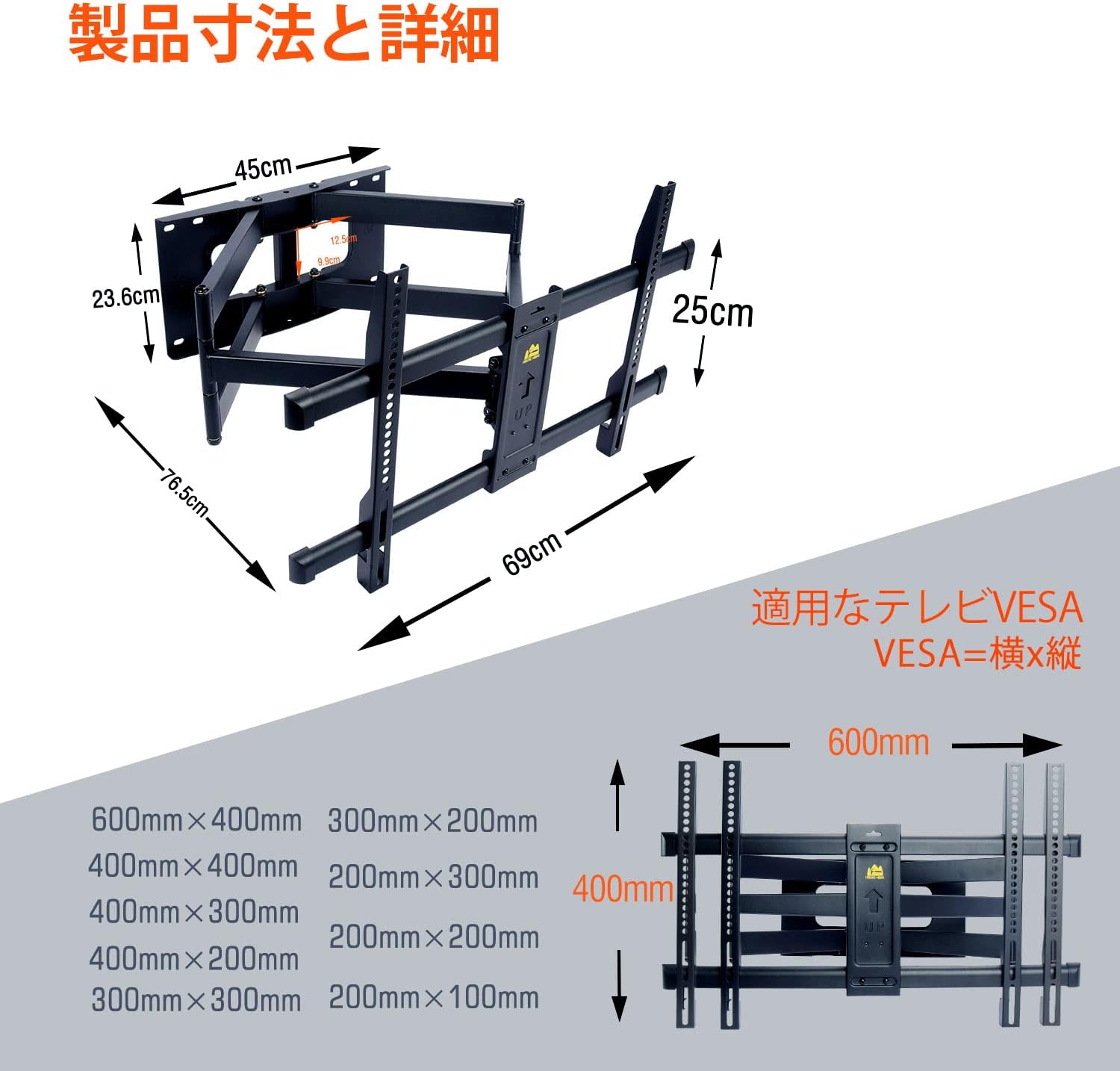
Figure 8.1: Detailed dimensions and VESA mounting patterns supported by the mount.
9. Warranty and Support
FORGING MOUNT provides a 5-year quality warranty for this TV wall mount. We are committed to ensuring your satisfaction with our products.
If you have any questions, concerns, or require assistance with the product, please do not hesitate to contact us. You can reach our customer support team through your Amazon account:
- Go to 'Account Service'
- Select 'Order History'
- Find your purchase of this product
- Click on 'Seller' and then 'Ask a Question'
Our team will be happy to assist you.


