
1. Introduction
Thank you for choosing the Fastrack Analog-Digital Watch, Model 68029PP03. This manual provides comprehensive instructions for the proper setup, operation, and maintenance of your watch. Please read this manual carefully to ensure optimal performance and longevity of your timepiece.
2. Product Overview
The Fastrack Analog-Digital Watch combines traditional analog time display with modern digital functionalities. It features a durable construction and a range of useful functions for daily wear.
Key Features:
- Analog and Digital Time Display
- 10 ATM Water Resistance
- Alarm Function
- Stopwatch Function
- EL Backlight for Digital Display
- Calendar Display
- Hourly Chime
Watch Components:
Refer to the image below for an illustration of the watch components.

Figure 2.1: Front view of the Fastrack Analog-Digital Watch, highlighting the analog hands, digital display, and control buttons.
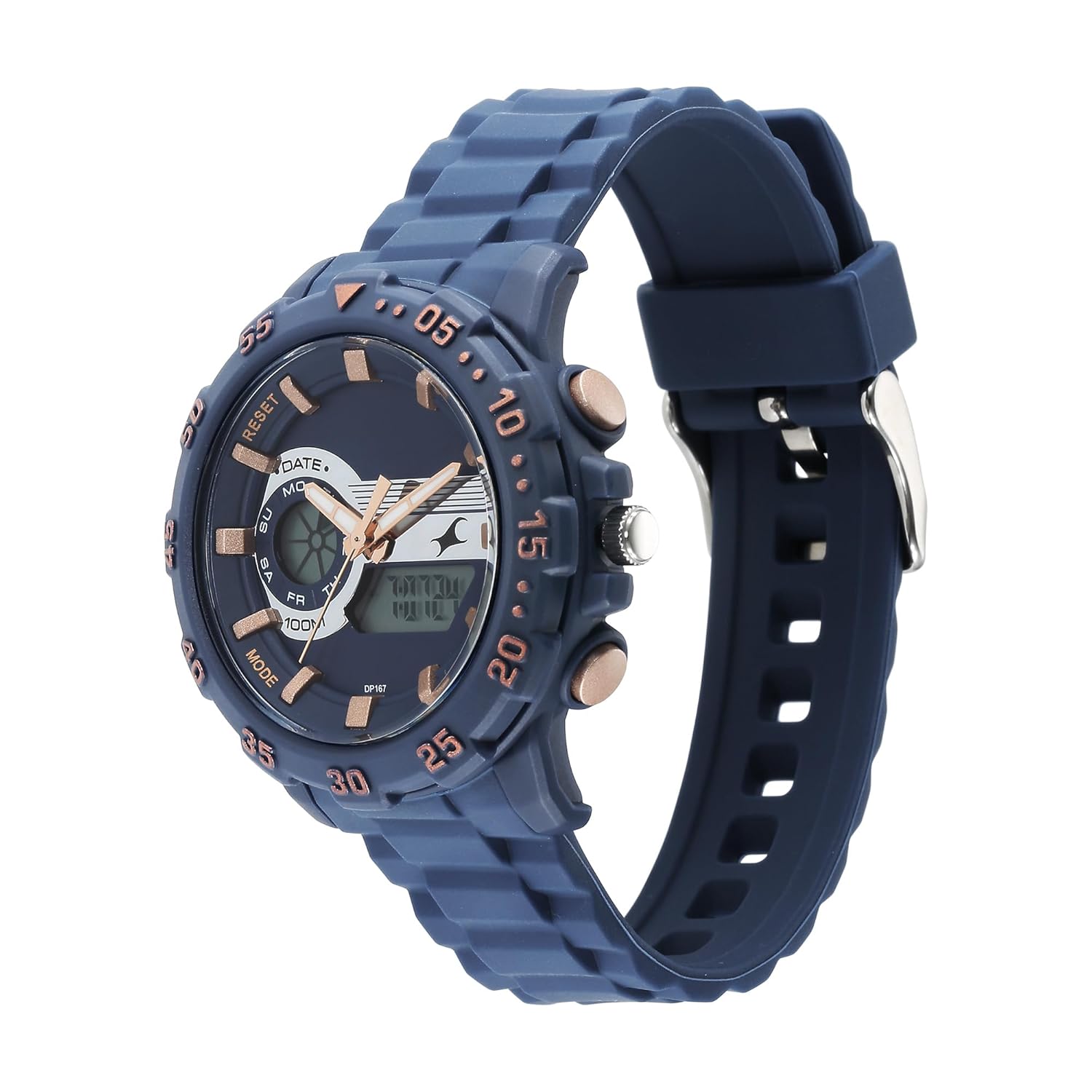
Figure 2.2: Side view illustrating the crown (for analog time setting) and push buttons (for digital functions).
- Crown: Used for setting analog time.
- Button A (Top Left): Typically used for Mode selection or Reset.
- Button B (Bottom Left): Typically used for Light or Adjust.
- Button C (Top Right): Typically used for Start/Stop or setting increments.
- Button D (Bottom Right): Typically used for setting decrements or switching display.
3. Setup
3.1 Initial Setup
Your watch comes with a pre-installed Lithium Polymer battery. No initial charging or battery installation is required. If the digital display is blank or analog hands are not moving, the battery may need replacement (refer to Section 5.2).
3.2 Setting Analog Time
- Pull the crown out to the first position.
- Rotate the crown to set the hour and minute hands to the desired time.
- Push the crown back into its normal position to start the analog timekeeping.
3.3 Setting Digital Time and Date
- Press Button A repeatedly until the digital display shows the Time Setting mode (usually indicated by flashing digits).
- Press Button C to select the digit you wish to adjust (e.g., seconds, hours, minutes, month, date, day). The selected digit will flash.
- Use Button D to increase the value or Button B (if applicable) to decrease the value of the flashing digit.
- Repeat steps 2 and 3 to set all desired time and date parameters.
- Once all settings are complete, press Button A to exit the Time Setting mode.
4. Operating Instructions
4.1 Alarm Function
- Press Button A to cycle through modes until you reach the Alarm mode (indicated by 'AL' or a bell icon).
- In Alarm mode, press Button C to select the hour or minute digits for setting.
- Use Button D to adjust the flashing digits to your desired alarm time.
- Press Button A to confirm and exit alarm setting.
- To activate/deactivate the alarm, press Button D while in Alarm mode. A bell icon will appear/disappear to indicate status.
- To stop a sounding alarm, press any button.
4.2 Stopwatch Function
- Press Button A to cycle through modes until you reach the Stopwatch mode (indicated by 'ST' or 'STOP').
- Press Button C to start the stopwatch.
- Press Button C again to stop the stopwatch.
- Press Button D to reset the stopwatch to zero.
4.3 EL Backlight
To illuminate the digital display in low-light conditions, press Button B. The backlight will remain active for a few seconds.
4.4 Calendar Display
The digital display automatically shows the current date (month, day, day of the week) in the normal timekeeping mode. No manual adjustment is typically needed unless the initial setup was incorrect or after a battery change.
4.5 Hourly Chime
To activate or deactivate the hourly chime, press Button A to navigate to the normal timekeeping mode. Then, press and hold Button D (or a combination of buttons as per specific model) until the chime indicator (e.g., a small icon) appears or disappears on the digital display. Consult the watch's specific button configuration if this method does not work.
5. Water Resistance Guidelines
Your Fastrack watch is rated for 10 ATM (100 meters) water resistance. This means it is suitable for:
- Everyday use, including splashes, rain, and showering.
- Swimming and snorkeling.
It is not suitable for:
- High-impact water sports.
- Scuba diving or deep-sea diving.
Important: Do not operate any buttons or the crown while the watch is submerged in water or wet, as this can compromise the water resistance seal.
6. Maintenance
6.1 Cleaning
Wipe the watch case and strap regularly with a soft, dry cloth. For stubborn dirt, a slightly damp cloth can be used, followed by immediate drying. Avoid using chemical cleaners, as they may damage the watch's finish or seals.
6.2 Battery Replacement
The watch uses 1 Lithium Polymer battery. When the digital display fades or the analog hands stop, it indicates a low battery. Battery replacement should be performed by a qualified watch technician to ensure proper sealing and water resistance. Attempting to replace the battery yourself may void the warranty and damage the watch.
6.3 Storage
When not in use for extended periods, store your watch in a cool, dry place away from direct sunlight, extreme temperatures, and strong magnetic fields.
7. Troubleshooting
| Problem | Possible Cause | Solution |
|---|---|---|
| Analog hands not moving | Low battery; Crown pulled out. | Push crown in; Replace battery by a professional. |
| Digital display blank or dim | Low battery; Extreme temperature. | Replace battery by a professional; Return to normal operating temperature. |
| Time is incorrect | Time not set correctly; Accidental button press. | Refer to Section 3.2 and 3.3 to reset time. |
| Water inside watch | Crown/buttons operated underwater; Damaged seal. | Immediately take to a service center for inspection and repair. |
8. Specifications
| Feature | Detail |
|---|---|
| Brand | Fastrack |
| Model Name | 68029PP03 |
| Display Type | Analog-Digital |
| Water Resistance | 10 ATM (100 meters) |
| Power Source | Battery Powered |
| Battery Type | Lithium Polymer (1 required, included) |
| Special Features | Alarm, Stopwatch, EL Backlight, Calendar, Chime |
| Product Dimensions | 14 x 7 x 10 cm |
| Item Weight | 150 g |
| Country of Origin | India |
| Manufacturer | Titan Co Ltd No |
9. Warranty and Support
Your Fastrack watch is covered by a manufacturer's warranty against defects in materials and workmanship. Please refer to the warranty card included with your purchase for specific terms, conditions, and duration. For warranty claims, service, or technical support, please contact Fastrack customer service or visit an authorized service center.
For more information, you may visit the official Fastrack website: www.fastrack.in