
Introduction
Welcome to the user manual for your new USHINING T180 4G Senior Mobile Phone. This phone is designed with simplicity and ease of use in mind, featuring large buttons, a clear display, and essential functions tailored for elderly users. Please read this manual carefully to understand how to operate your device safely and efficiently.

Image: The USHINING T180 4G Senior Mobile Phone shown alongside its convenient charging dock. The phone features a simple design with large, easy-to-read buttons and a clear display.
Package Contents
Please check the box for the following items:
- 1 x USHINING T180 4G Senior Mobile Phone (Blue)
- 1 x 1000 mAh Battery
- 1 x Charging Dock
- 1 x USB-C Charging Cable
- 1 x User Guide
Key Features
User-Friendly Design
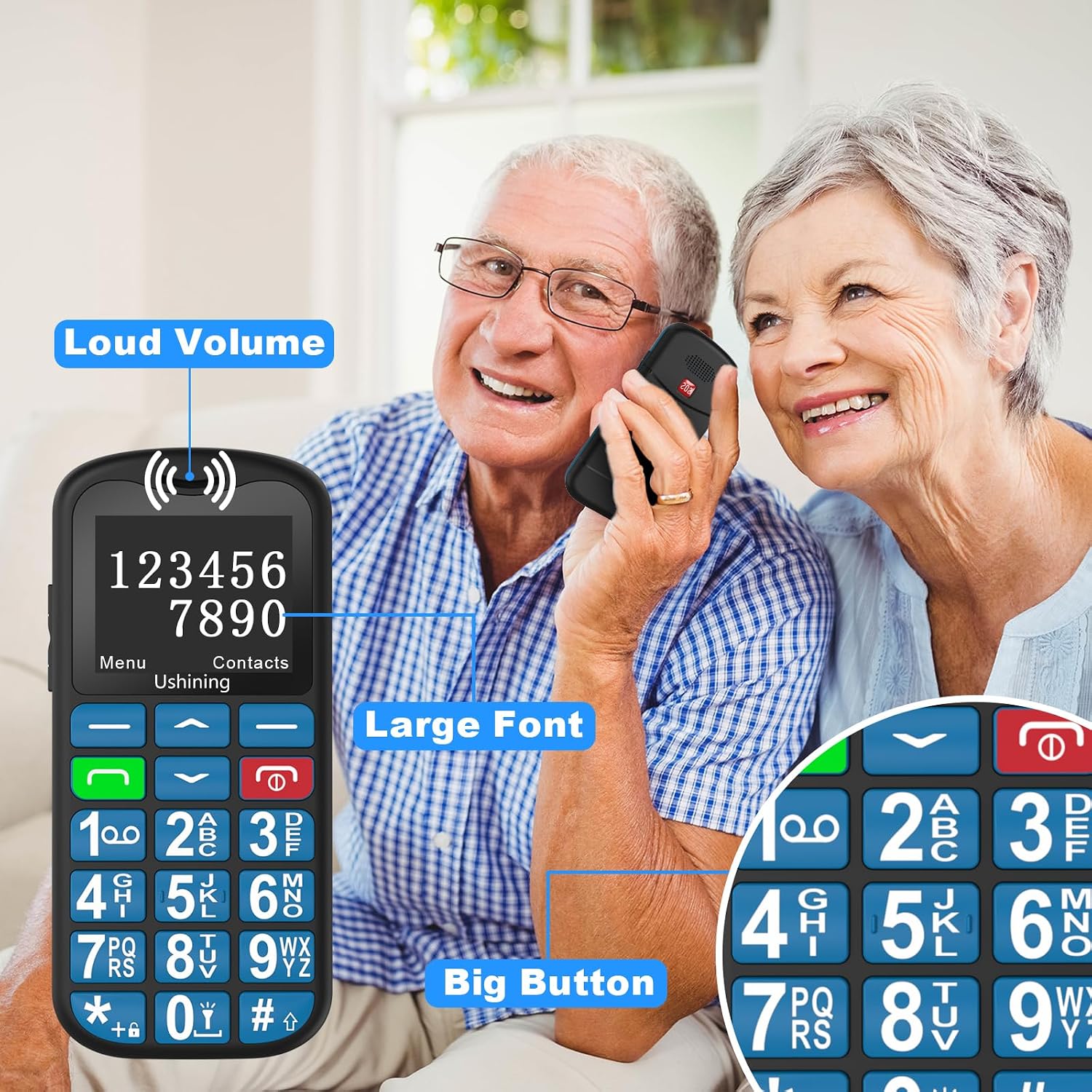
Image: An elderly couple happily using the USHINING T180 4G phone, highlighting its loud volume, large font display, and big, easy-to-press buttons.
The USHINING T180 4G features enhanced large buttons, large icons, and large fonts, making it easier to dial, read, and compose SMS messages. The high volume and quality speakers ensure clear communication during calls.
4G LTE Connectivity
This 4G senior mobile phone is contract-free and compatible with SIM cards from most European operators (e.g., T-Mobile, Vodafone, O2, Movistar, Orange, Bouygue, SFR, Tim, Tre, Wind, Iliad). It supports 4G, 4G VoLTE, 3G WCDMA, and 2G GSM networks, ensuring a stable phone signal.
SOS Emergency Function

Image: A visual representation of the SOS emergency function, showing a hand pressing the SOS button on the back of the phone, with icons for five pre-set emergency contacts (Son, Daughter, Husband/Wife, Doctor, First Aid).
The phone includes a dedicated SOS emergency call button. You can set up to 5 SOS contact numbers. In an emergency, pressing this button will automatically call and send an SMS to your pre-defined emergency contacts, providing immediate assistance.
Long-Lasting Battery & Convenient Charging

Image: Two illustrations demonstrating the charging methods for the USHINING T180 4G phone: direct USB-C cable charging and charging via the included dock, emphasizing ease and safety for seniors.

Image: The USHINING T180 4G phone displaying its battery status, with text indicating a 1000mAh battery capacity, over 5 hours of call time, and over 100 hours of standby time.
Equipped with a powerful 1000 mAh battery, the phone offers extended standby time. A full charge provides approximately 300 minutes of talk time or 200 hours of standby time. The included charging dock allows for easy and safe charging, simply by placing the phone upright in the cradle. The USB-C charging port further simplifies connection.
Additional Functions

Image: A hand holding the USHINING T180 4G phone with its flashlight activated, illuminating a dark outdoor scene, demonstrating its utility.

Image: The USHINING T180 4G phone displaying its keypad, with keys 2-9 highlighted to illustrate the speed dial function, allowing quick access to frequently called numbers.
The phone includes practical features such as a flashlight, Bluetooth connectivity, FM radio, calculator, alarm clock, and calendar. It can store up to 500 contacts in the phonebook. Speed dial is supported for keys 2-9.
Setup Guide
1. Installing the SIM Card and Battery
- Carefully remove the back cover of the phone.
- Insert your 4G compatible SIM card into the designated SIM card slot. Ensure it is correctly oriented.
- Insert the 1000 mAh battery into the battery compartment, aligning the gold contacts.
- Replace the back cover until it clicks securely into place.
2. Initial Charging
Before first use, fully charge the phone.
- Connect the USB-C charging cable to the phone's USB-C port, or place the phone securely in the charging dock.
- Connect the other end of the cable to a power adapter (not included) and plug it into a wall outlet.
- The battery indicator on the screen will show charging progress. Once fully charged, the indicator will show a full battery.
Operating Instructions
Power On/Off
- To power on: Press and hold the Power/End Call button (red button) until the screen lights up.
- To power off: Press and hold the Power/End Call button until the power off options appear, then select "Power off".
Making and Receiving Calls
- To make a call: Dial the number using the keypad and press the Call button (green button).
- To receive a call: Press the Call button when the phone rings.
- To end a call: Press the Power/End Call button.
Using the SOS Emergency Function
- To set SOS numbers: Navigate to Settings > SOS Settings and add up to 5 emergency contacts.
- To activate SOS: In an emergency, press and hold the SOS button on the back of the phone for a few seconds. The phone will automatically call and send an SMS to your pre-set emergency contacts.
Speed Dial
- To set speed dial numbers: Go to Contacts > Options > Speed Dial. Assign contacts to keys 2-9.
- To use speed dial: Press and hold the assigned number key (2-9) to quickly dial the corresponding contact.
Flashlight
- To turn on/off the flashlight: Locate the dedicated flashlight button on the side of the phone (if available) or access it through the phone's menu.
FM Radio
- To use FM Radio: Navigate to Multimedia > FM Radio. You may need to connect headphones (not included) to act as an antenna.
Maintenance
- Cleaning: Use a soft, dry cloth to clean the phone's surface. Avoid using liquid cleaners or abrasive materials.
- Battery Care: To prolong battery life, avoid exposing the phone to extreme temperatures. Do not leave the phone fully discharged for extended periods.
- Storage: When not in use for a long time, store the phone in a cool, dry place.
- Water Resistance: This phone is not water-resistant. Avoid exposure to water or high humidity.
Troubleshooting
| Problem | Possible Cause | Solution |
|---|---|---|
| Phone does not turn on. | Battery is low or depleted. | Charge the phone for at least 30 minutes. |
| No signal or poor signal. | Out of network coverage; SIM card not properly inserted. | Move to an area with better reception; Reinsert SIM card correctly. |
| Cannot hear caller or caller cannot hear me. | Volume too low; Microphone/speaker blocked. | Adjust call volume; Ensure microphone/speaker are not covered. |
| SOS function not working. | SOS numbers not set; Insufficient balance (for SMS). | Verify SOS numbers in settings; Check SIM card balance. |
Specifications
| Feature | Detail |
|---|---|
| Brand | USHINING |
| Model Name | T180 4G |
| Color | Blue |
| Screen Size | 1.8 Inches |
| Operating System | Android or iOS (Note: This typically refers to the underlying OS compatibility, not a full smartphone OS) |
| RAM | 1 GB |
| Storage Capacity | 32 GB |
| Battery Composition | Lithium-ion (1000 mAh) |
| Connectivity | 4G, 4G VoLTE, 3G WCDMA, 2G GSM, Bluetooth |
| Charging Port | USB Type C |
| Special Features | SOS Emergency Call Button, Large Keys, Charging Dock, Flashlight, FM Radio, Calculator, Alarm, Calendar |
Warranty and Support
For any questions, technical support, or warranty inquiries regarding your USHINING T180 4G Senior Mobile Phone, please refer to the contact information provided with your purchase or visit the official USHINING website.
Please retain your proof of purchase for warranty purposes.