
JOYING JY-UZS15N8
Instruction Manual for Joying Car Radio
Model: JY-UZS15N8
Introduction
This manual provides comprehensive instructions for the installation, operation, and maintenance of your Joying Car Radio. This single-din car stereo features an ultra-thin 15.1-inch touchscreen with 1920x1080 resolution, offering Carplay and Android Auto compatibility, Bluetooth, Mirror Link, AM/FM Radio, and a 48-Band EQ. Please read this manual thoroughly before using the product to ensure proper functionality and safety.
Safety Precautions
To ensure your personal safety and the safety of others, please observe the following basic requirements:
- When driving, adjust the sound volume to an appropriate level to ensure you can perceive the driving situation and traffic conditions.
- Ensure safe driving and avoid violating traffic laws. Do not watch videos or operate the machine while driving.
- Avoid placing objects that may obstruct ventilation or cause damage to the unit.
- Do not disassemble or modify the device. Unauthorized disassembly or modification may void the warranty and cause damage.
- For installation, you may require an installation frame kit, special ISO harness, amplifier adapter, or CAN bus decoder, depending on your car's specific situation.
- This unit does not support factory car GPS antenna, backup rear camera, Bluetooth, USB, and microphone.
- Only use Joying accessories for optimal compatibility and performance (DAB+ digital radio adapter, DVR, OBDII scanner, reverse camera, TPMS, and steering wheel controller are not included and must be ordered separately).
- Do not expose the unit to extreme temperatures, direct sunlight for prolonged periods, or high humidity.
- Do not try to connect the power supply other than the car battery to the product, as it may burn the internal components.
- Avoid strong impacts or vibrations.
- If the screen is dirty, wipe it with a soft, clean cloth. For stubborn stains, use a mild detergent.
What's in the Box
The following items are included in your package:
- 15.1 inch Head Unit x 1
- ISO Wire Harness x 1
- 4G Antenna x 2
- USB Cable x 2
- External Mic x 1
- GPS Antenna x 1
- User Manual x 1
- Installation kit x 1

Figure 1: Included accessories and wiring diagram.
Product Overview
The Joying Car Radio (JY-UZS15N8) is an advanced single-din car stereo featuring a large 15.1-inch ultra-thin touchscreen. It runs on Android 12 with a Qualcomm Snapdragon 6125 processor, providing a powerful and responsive user experience.
Key Features:
- Display: 15.1-inch Ultra-Thin Full-fit Touchscreen, 1920x1080 resolution, 60Hz refresh rate, 240dpi.
- Processor: Qualcomm Snapdragon 6125 (QCM6125 Octa Core 64bit ARM, 4xA73@2.0GHz, 4xA53@1.8GHz) with Adreno™ 610@950 MHz GPU.
- Memory: 8GB RAM + 128GB ROM.
- Operating System: Android 12.
- Connectivity: Built-in 4G Module (supports FDD-LTE: B2/B4/B5/B7/B12/B13/B14/B17/B25/B26/B38/B66/B71, TDD-LTE: B41), Wi-Fi (Wi-Fi 5, up to 600 Mbps DL 802.11ac), Bluetooth 5.0, USB, Ethernet, HDMI.
- Audio: Built-in DSP (Digital Sound Processor) with 48-band EQ, preset sound effects, DTS 5.1 panoramic surround sound. Optical Fiber and Coaxial Digital Output for enhanced sound quality.
- Navigation: Precise GPS engines with included GPS antenna, support for offline maps.
- Smartphone Integration: Wireless CarPlay and Android Auto.
- Camera Support: AR Camera function for front and rear camera views (Joying's AR camera recommended).
- User Interface: Two customizable UI options, split-screen multitasking.

Figure 2: Joying 15.1-inch Car Radio main display showing navigation and multimedia.

Figure 3: Overview of the core specifications including screen size, Android OS, and processor.

Figure 4: Precision 4-layer Motherboard Structure, highlighting key components like the Qualcomm Snapdragon processor and audio chips.
Setup & Installation
Proper installation is crucial for the optimal performance of your Joying Car Radio. It is recommended to have the installation performed by a qualified professional.
Pre-Installation Checklist:
- Verify all components listed in "What's in the Box" are present.
- Ensure your vehicle's electrical system is compatible.
- Disconnect the vehicle's battery before starting installation to prevent electrical shorts.
- Acquire any necessary vehicle-specific installation frame kits, ISO harnesses, amplifier adapters, or CAN bus decoders.
Physical Installation:
- Carefully remove your existing car stereo unit and dashboard trim.
- Connect the provided ISO Wire Harness to your vehicle's wiring. Ensure all connections are secure.
- Connect the 4G Antennas, USB Cables, External Mic, and GPS Antenna to the corresponding ports on the head unit. Refer to the wiring diagram in Figure 1.
- The screen is removable and adjustable. It can be moved up and down by 2.5cm depending on your installation requirements. This allows for flexible positioning within your vehicle's dashboard.
- Mount the head unit securely into the single-din slot using the provided installation kit.
- Reinstall the dashboard trim.
- Reconnect the vehicle's battery.

Figure 5: Removable screen feature for flexible installation.
Operating Instructions
Initial Boot-up and Fast Boot:
The first boot-up may take approximately 30-40 seconds. Subsequent boot-ups will be significantly faster, entering the user interface in about 2 seconds once the car key is inserted.
User Interface (UI):
The unit offers two customizable user interfaces (UI 1 and UI 2) to suit your preferences. You can switch between them in the settings menu.
- UI 1: Features a clean layout with prominent widgets for navigation, music, and speed. You can customize widgets and access all apps.
- UI 2: Presents a grid of applications, allowing for easy access to all installed apps. You can long-press the home interface to add widgets, slide up from the middle of the screen to access all apps, and create folders for sorting.

Figure 6: User Interface 1, optimized for quick access to essential functions.

Figure 7: User Interface 2, providing a comprehensive app overview.
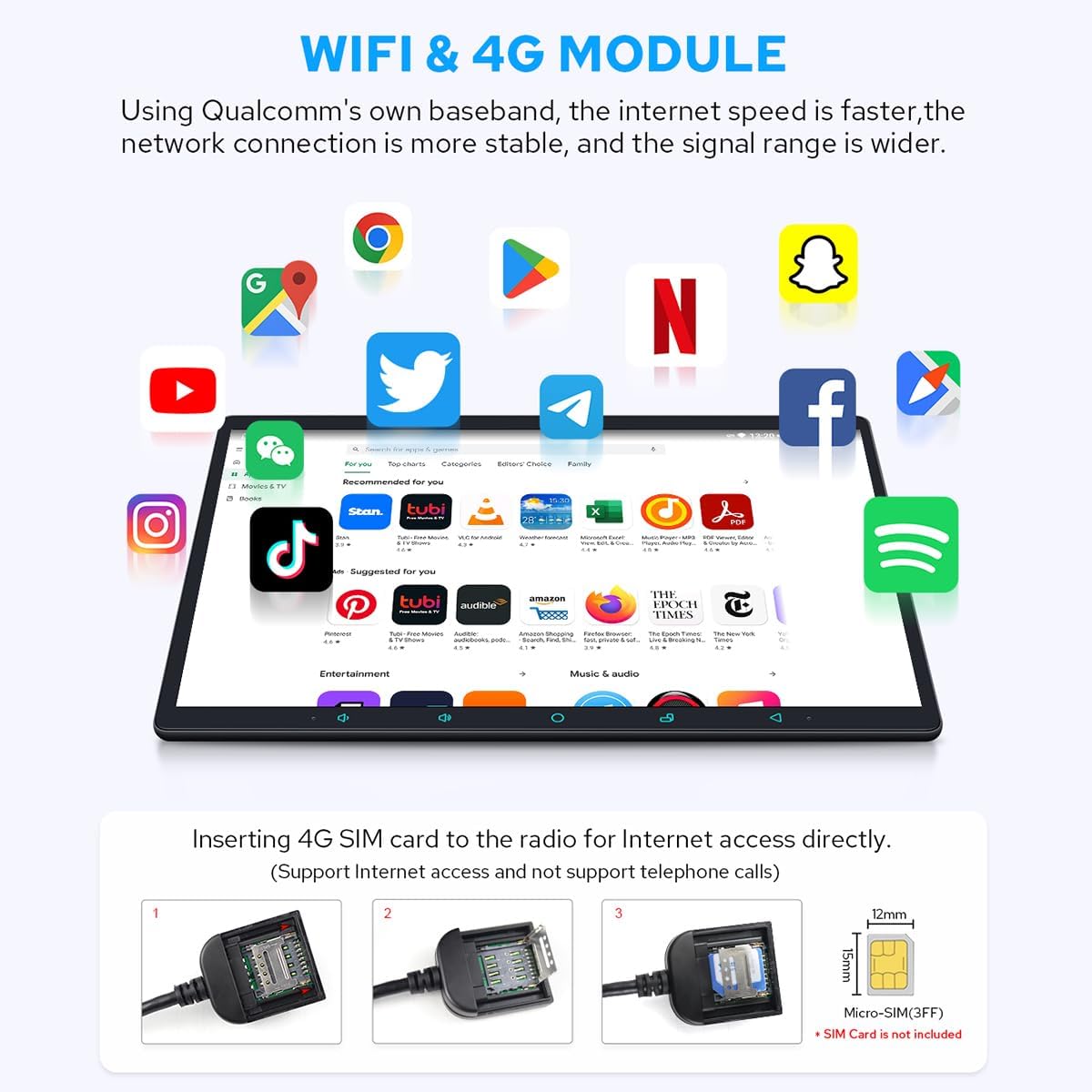
Figure 8: Split-screen Multitasking, allowing two applications to run side-by-side.
Audio Settings (DSP & EQ):
The built-in Digital Sound Processor (DSP) allows for precise audio customization. Access the "Sound effects" menu to adjust settings.
- 48-Band EQ: Fine-tune your audio with a comprehensive 48-band equalizer. You can select from preset sound effects (e.g., Hip hop, Jazz, Rock) or create custom profiles.
- DTS Scenes: Experience immersive surround sound with DTS 5.1 panoramic surround sound effects and sound field correction.
- Fad-Bal: Adjust the fader and balance to optimize sound distribution within your vehicle.
- Bass Boost: Enhance low-frequency output for a richer bass experience.
- Optical Fiber and Coaxial Digital Output: Connect to external amplifiers with these inputs for ultimate sound quality.

Figure 9: Built-in DSP interface for sound effects and equalization.

Figure 10: EQ settings and DTS Scenes for advanced audio configuration.
Connectivity:
- 4G Module: Insert a SIM card (not included) for direct internet access. Note that it does not support phone calls or SMS.
- Wi-Fi: Connect to available Wi-Fi networks for internet access.
- Bluetooth: Pair your mobile phone for hands-free calling and audio streaming.
- CarPlay & Android Auto: Connect your smartphone via USB cable or Bluetooth to mirror apps, access navigation, make calls, and listen to music on the larger screen.

Figure 11: Built-in 4G Module for direct internet access.

Figure 12: Car-smartphone Connectivity via Wireless CarPlay and Android Auto.
Navigation:
The unit includes precise GPS engines and a dedicated GPS antenna for accurate positioning. You can use pre-installed navigation apps or download others from the Play Store.
- Offline Maps: Download map data for specific areas to use navigation without an internet connection.
- Synchronize Mobile Phone Map Data: Use CarPlay or Android Auto to display your phone's navigation on the head unit.
Multimedia Playback:
The car radio supports various multimedia formats for video and audio playback.
- Video Formats: Supports AVI, MKV, MP4, WMV, RMVB, MPG.
- HDMI Output: Connect external displays (e.g., headrest monitors) via HDMI for synchronized video output. Note: A straight-head HDMI cable is not supported due to space constraints.

Figure 13: HDMI Output for connecting external displays.
Video 1: Demonstration of the Joying Car Radio's user interface, multimedia playback, and sound settings. This video showcases the responsiveness of the touchscreen, the clarity of the display when playing 4K UHD content, navigation features, radio functionality, and the extensive sound adjustment options including EQ and DTS settings.
AR Camera Function:
The unit supports an AR Camera function, allowing you to switch between front and rear camera views to observe your driving environment. For optimal performance, it is recommended to use Joying's optimized AR camera.

Figure 14: AR Camera interface displaying front and rear views for enhanced driving awareness.
Maintenance
Regular maintenance helps prolong the life of your car radio.
- Keep the display screen clean by wiping it with a soft, clean cloth. Avoid abrasive cleaners.
- Ensure proper ventilation around the unit to prevent overheating.
- Periodically check all cable connections for security.
- Keep the unit away from dust, steam, smoke, or excessive moisture.
Troubleshooting
If you encounter issues with your Joying Car Radio, refer to the following common troubleshooting steps:
| Problem | Possible Cause | Solution |
|---|---|---|
| Unit does not power on. | Loose power connection, blown fuse, vehicle battery issue. | Check power cables and connections. Inspect vehicle fuses. Ensure car battery is charged. |
| No sound or distorted sound. | Incorrect wiring, speaker issues, audio settings misconfigured. | Verify speaker wiring. Check audio settings (EQ, volume, fader/balance). Reset audio settings to default. |
| Touchscreen unresponsive or inaccurate. | Software glitch, screen calibration needed, physical damage. | Restart the unit. Perform a screen calibration if available in settings. Contact support if issue persists. |
| GPS signal weak or inaccurate. | GPS antenna obstruction or faulty, outdated map data. | Ensure GPS antenna has a clear view of the sky. Check antenna connection. Update map data. |
| Bluetooth not connecting. | Device not in pairing mode, interference, software issue. | Ensure Bluetooth is enabled on both devices and in pairing mode. Restart both devices. Clear Bluetooth cache if possible. |
| 4G/Wi-Fi connectivity issues. | Incorrect SIM card, weak signal, network settings. | Verify SIM card is correctly inserted and compatible. Check network settings. Move to an area with better signal. |
If the problem persists after attempting these solutions, please contact Joying customer support for further assistance.
Specifications
| Feature | Detail |
|---|---|
| Brand | JOYING |
| Model Number | JY-UZS15N8 |
| Screen Size | 15.1 inches |
| Screen Resolution | 1920 x 1080 |
| Operating System | Android 12 |
| Processor | Qualcomm Snapdragon 6125 (Octa Core) |
| RAM & ROM | 8GB RAM + 128GB ROM |
| Connectivity Technology | Bluetooth, Wi-Fi, USB, Ethernet, HDMI, 4G Module |
| Controller Type | Android |
| Special Features | DSP, RDS, Android Auto, Apple CarPlay, Equalizer |
| Compatible Devices | Mobile Phone |
| Total HDMI Ports | 1 |
| Connector Type | Optical, Coaxial |
| Audio Output Mode | Stereo |
| Surround Sound Channel Configuration | 5.1 |
| Video Encoding | Supports AVI, MKV, MP4, WMV, RMVB, MPG. |
| Item Weight | 6.6 pounds |
| Package Dimensions | 15.83 x 11.14 x 6.14 inches |
Warranty and Support
JOYING products come with a standard manufacturer's warranty. For specific warranty terms and conditions, please refer to the warranty card included with your product or visit the official JOYING website. For technical support, troubleshooting assistance, or to inquire about additional accessories, please contact JOYING customer service through their official channels. Keep your purchase receipt as proof of purchase for warranty claims.
You can visit the official JOYING store for more information: JOYING Official Store
Ask a question about this manual
Ask about setup, troubleshooting, compatibility, parts, safety, or missing instructions. Manuals+ will review the question and use this page’s manual context to help answer it.