
Auxmir BM-2219
Auxmir Portable Travel Makeup Mirror User Manual
Model: BM-2219 | Brand: Auxmir
Introduction
Welcome to your new Auxmir Portable Travel Makeup Mirror. This manual provides essential information for setup, operation, and maintenance to ensure optimal performance and longevity of your device. Please read this manual thoroughly before using the product.
Key Features
- Portable and Foldable Design: Lightweight and compact for easy travel and storage.
- Adjustable LED Lighting: Equipped with 72 high-quality LED pieces.
- 3 Light Colors: Natural (4500K-5000K), Warm (3000K-3500K), and Cool (6000K-6500K) for various makeup needs.
- Stepless Dimming: Brightness adjustable from 1% to 100%.
- Dual Touch Buttons: Sensitive touch controls for power, brightness, and color temperature.
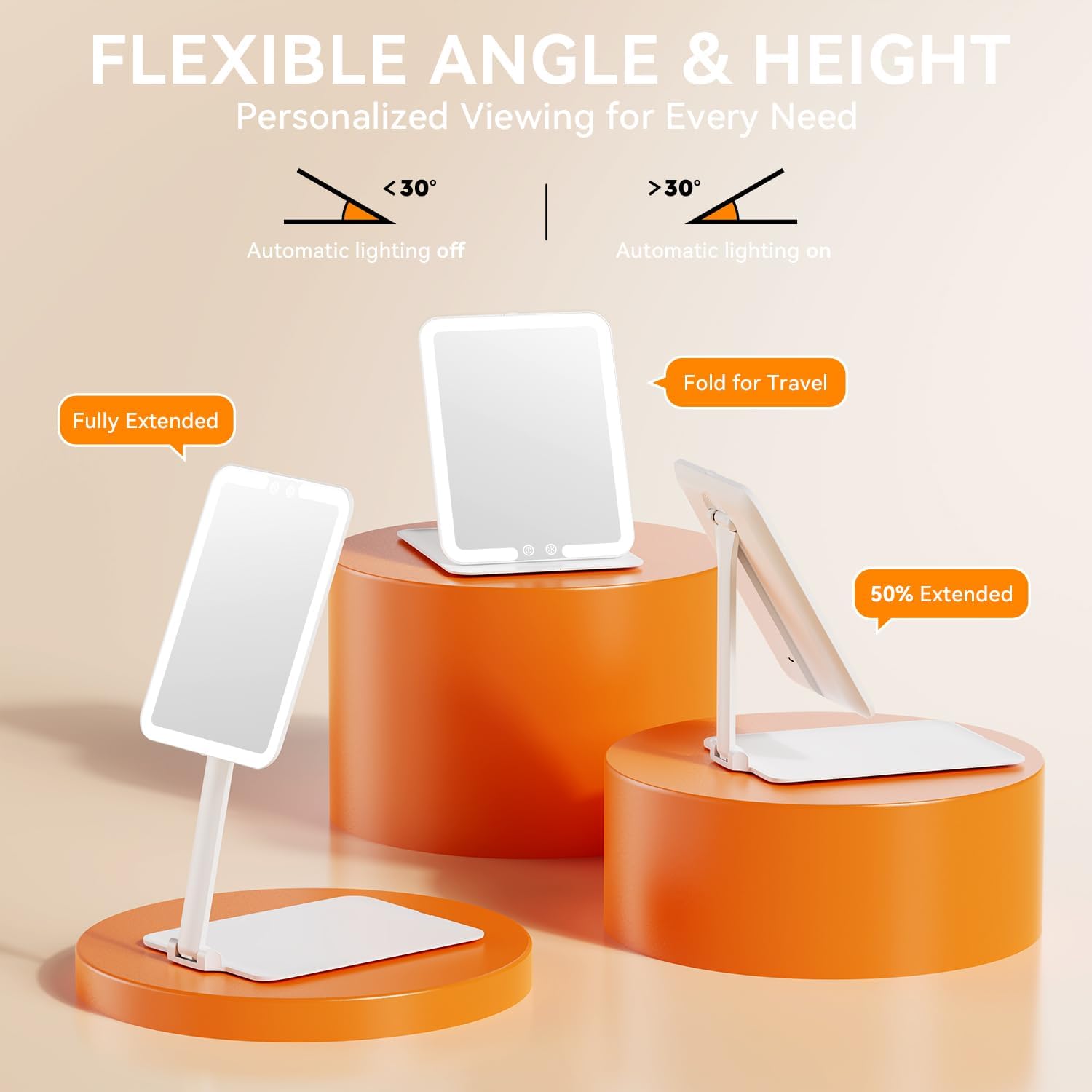
- Hall Sensor Design: Automatic light activation when unfolded beyond 30 degrees, and automatic shut-off when folded below 30 degrees.
- Built-in Rechargeable Battery: 1500mAh lithium battery for cordless use.
- USB Type-C Charging: Convenient and universal charging.
- Automatic Shut-off: Light turns off automatically after 30 minutes of inactivity to save energy.
- High-Definition Mirror: Provides clear reflection for precise makeup application.
Package Contents
- Auxmir Portable Travel Makeup Mirror (Model BM-2219)
- USB Type-C Charging Cable
- User Manual
Setup
1. Unpack the mirror and all accessories from the packaging.
2. Place the mirror on a stable, flat surface. Unfold the mirror to your desired viewing angle. The Hall sensor will automatically turn on the light when the mirror is unfolded to an angle greater than 30 degrees from its base.

Operating Instructions
Power On/Off and Brightness Adjustment
Locate the two touch buttons on the bottom center of the mirror surface.
- To Power On/Off: Briefly touch the left button (power icon).
- To Adjust Brightness: While the light is on, press and hold the left button to cycle through brightness levels (1% to 100%). Release the button when the desired brightness is achieved.

Light Color Adjustment
Briefly touch the right button (light mode icon) to switch between the three light color temperatures:
- Warm Light (3000K-3500K): Ideal for evening makeup, dating, or dinner settings.
- Natural Light (4500K-5000K): Suitable for daily skincare, general makeup, or outdoor settings.
- Cool Light (6000K-6500K): Best for formal occasions, office makeup, or detailed work.

Automatic Sensor Function
The mirror is equipped with a Hall sensor for intelligent operation:
- When the mirror surface is unfolded to an angle greater than 30 degrees from its base, the light will automatically turn on.
- When folded to an angle less than 30 degrees, the light will automatically turn off.

Energy Saving Feature
To conserve battery life, the mirror's light will automatically turn off after 30 minutes of continuous inactivity.
Charging
The mirror is equipped with a built-in 1500mAh lithium battery for convenient cordless use.
- Connect the provided USB Type-C charging cable to the charging port located on the back of the mirror.
- Plug the other end of the USB cable into a compatible USB power source, such as a wall adapter, power bank, or laptop.
- A full charge typically takes approximately 120 minutes (2 hours).
- Once fully charged, the mirror can operate for up to 720 minutes (12 hours) on the lowest light setting.

Maintenance
Cleaning
- To clean the mirror surface, gently wipe with a soft, lint-free cloth.
- For stubborn marks, slightly dampen the cloth with water or a mild, non-abrasive glass cleaner. Avoid harsh chemicals or abrasive materials.
- Ensure the mirror is completely dry before folding or storing.
Storage
- When not in use, fold the mirror flat to protect the mirror surface and conserve battery life.
- Store the mirror in a cool, dry place away from direct sunlight and extreme temperatures.
Troubleshooting
| Problem | Possible Cause | Solution |
|---|---|---|
| Light does not turn on. | Battery is low or depleted. | Charge the mirror using the provided USB Type-C cable. |
| Light does not turn on automatically when unfolded. | Mirror not unfolded past 30 degrees. | Ensure the mirror is unfolded to an angle greater than 30 degrees. |
| Light flickers or is dim. | Low battery. | Recharge the mirror. |
| Touch buttons are unresponsive. | Mirror surface is wet or dirty. | Clean and dry the touch button area. |
| Light turns off unexpectedly. | Automatic shut-off activated (30 min inactivity). | Briefly touch the power button to turn it back on. |
| Light turns off unexpectedly. | Mirror folded to less than 30 degrees. | Unfold the mirror to an angle greater than 30 degrees. |
Specifications
| Feature | Detail |
|---|---|
| Model Number | BM-2219 |
| Dimensions (Folded) | 21L x 15.5W x 0.6H cm (approx. 8.3L x 6.1W x 0.2H inches) |
| Weight | 381 grams (approx. 0.84 lbs) |
| LED Quantity | 72 pieces |
| Battery Capacity | 1500mAh Lithium Battery |
| Charging Port | USB Type-C |
| Light Colors | Warm (3000K-3500K), Natural (4500K-5000K), Cool (6000K-6500K) |
| Special Features | Rechargeable, Adjustable Brightness, LED Lights, Tabletop, Portable, Travel, Illuminated, Hall Sensor |
| Material | Acrylonitrile Butadiene Styrene (ABS) |
| Country of Origin | China |


For detailed energy information, please refer to the EPREL database: EPREL Product Information
Warranty and Support
Warranty
This Auxmir product comes with a 3-year warranty covering return or replacement for manufacturing defects. Please retain your proof of purchase for warranty claims.
Customer Support
For any questions, issues, or support needs, please contact Auxmir customer service. Lifetime assistance and 24/7 customer service are available to ensure your satisfaction.
You can visit the official Auxmir brand store for more information and contact details: Auxmir Brand Store.
Related documentsBM-2219


Ask a question about this manual
Ask about setup, troubleshooting, compatibility, parts, safety, or missing instructions. Manuals+ will review the question and use this page’s manual context to help answer it.