
Kidcia 1:16 Scale RC Monster Truck
Kidcia 1:16 Scale RC Monster Truck
Instruction Manual
1. Introduction
Thank you for choosing the Kidcia 1:16 Scale RC Monster Truck. This remote control vehicle is designed for exciting off-road adventures, featuring a powerful motor, 2.4GHz control system, and durable construction. Please read this manual carefully before operating the truck to ensure safe and optimal performance.
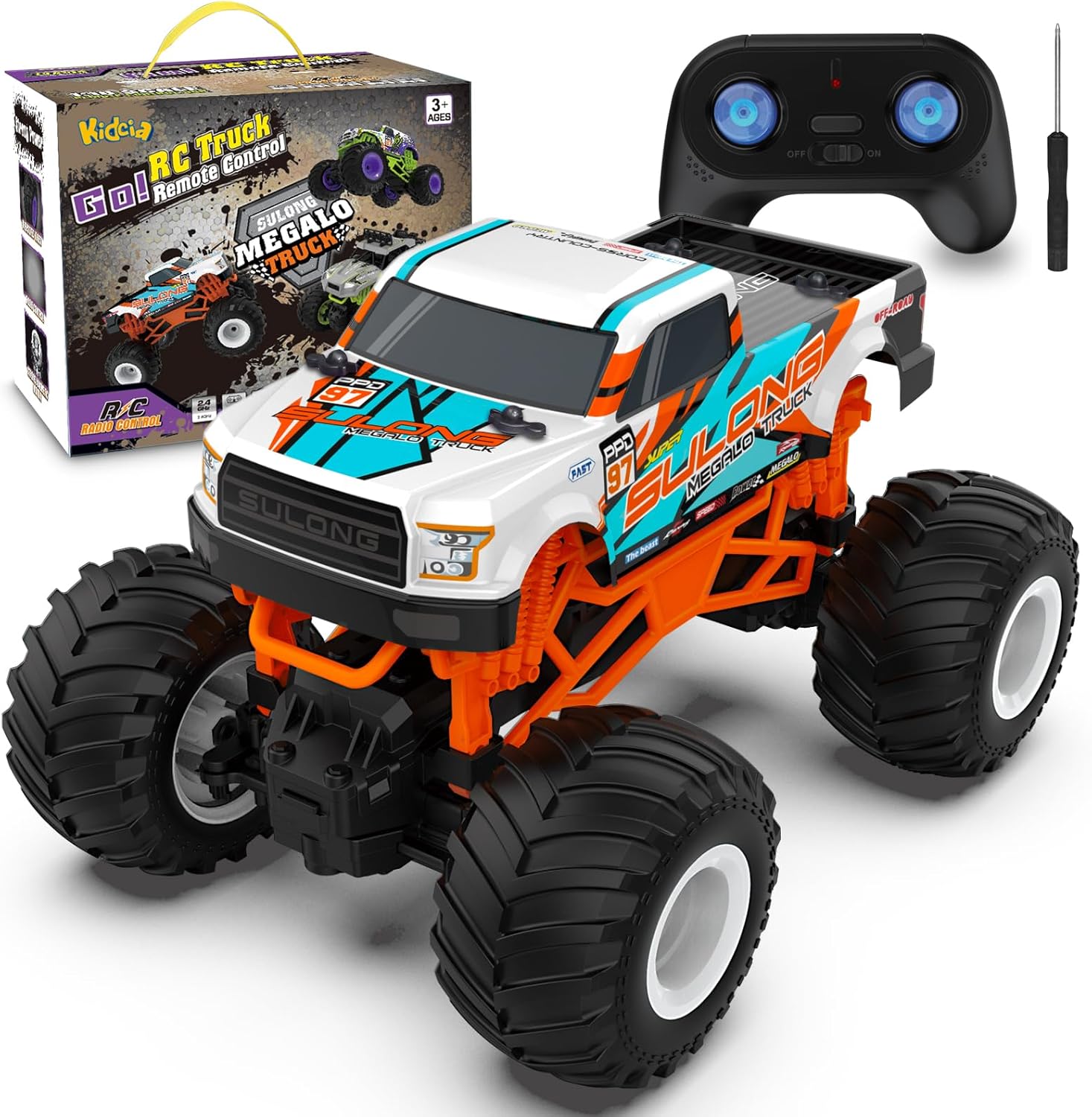
Image: The Kidcia 1:16 Scale RC Monster Truck in orange, with its remote control and a small screwdriver.
2. Safety Information
To prevent injury or damage, always observe the following safety precautions:
- Age Recommendation: This product is suitable for users aged 36 months to 16 years. Adult supervision is recommended for younger children.
- Battery Safety: Use only the specified batteries and charging cable. Do not mix old and new batteries, or different types of batteries. Do not short-circuit battery terminals.
- Operating Environment: Avoid operating the truck near people, pets, or obstacles. Do not operate in wet conditions or on public roads.
- Handling: Do not touch the motor immediately after use, as it may be hot. Keep fingers, hair, and loose clothing away from moving parts.
- Storage: Remove batteries from the truck and remote control when not in use for extended periods. Store in a cool, dry place.
3. Package Contents
Please verify that all items are present in your package:
- 1 x Kidcia 1:16 Scale RC Monster Truck
- 1 x 2.4GHz Remote Control
- 1 x Charging Cable
- 1 x Screwdriver (for battery compartment)
4. Setup
4.1 Charging the Truck Battery
- Locate the battery compartment on the underside of the truck.
- Open the battery compartment cover using the provided screwdriver.
- Connect the truck's battery to the charging cable.
- Plug the charging cable into a suitable USB power source (e.g., computer USB port, USB wall adapter).
- The indicator light on the charging cable will show charging status (refer to cable instructions for specific light behavior).
- Once fully charged, disconnect the battery from the charging cable and place it back into the truck's compartment. Secure the cover.
4.2 Installing Remote Control Batteries
- Locate the battery compartment on the back of the remote control.
- Open the battery compartment cover.
- Insert 2 x AA batteries (not included) into the compartment, ensuring correct polarity (+/-).
- Close the battery compartment cover.

Image: The underside of the RC truck, highlighting the battery compartment and the differential steering adjustment dial.
4.3 Pairing the Remote Control
- Ensure both the truck and the remote control have fresh or fully charged batteries.
- Turn on the truck using the ON/OFF switch located on its underside.
- Turn on the remote control using its ON/OFF switch.
- The remote control and truck should automatically pair. If not, turn both off and repeat the steps. The 2.4GHz frequency allows multiple trucks to operate without interference.
5. Operating the RC Monster Truck
5.1 Basic Controls
- Forward/Backward: Use the left joystick on the remote control to move the truck forward or backward.
- Turn Left/Right: Use the right joystick on the remote control to steer the truck left or right.

Image: Two children, a boy and a girl, are happily playing with their Kidcia RC Monster Trucks indoors, demonstrating the ease of use and multi-player capability.
5.2 Driving Tips
- All-Terrain Capability: The truck is designed for various surfaces including grass, sand, and bumpy roads. Its oversized rubber tires provide strong grip and shock absorption.
- Speed: The truck can reach speeds up to 20 km/h. Practice in open areas before attempting high-speed maneuvers.
- Steering Adjustment: If the truck does not drive straight, use the steering trim adjustment dial on the underside of the truck to fine-tune its alignment.

Image: The Kidcia RC Monster Truck is shown on different surfaces, including a wooden path and a stone road, illustrating its all-terrain capabilities.
6. Maintenance
- Cleaning: After use, especially in dirty or dusty environments, gently wipe down the truck with a dry or slightly damp cloth. Do not use harsh chemicals or immerse the truck in water.
- Battery Care: Always fully charge the battery before use. Do not overcharge. If storing for a long period, charge the battery to about 50% capacity.
- Body Durability: The truck features a flexible and solid PVC shell, designed to withstand impacts. Inspect the body and chassis regularly for any damage.

Image: A hand demonstrating the flexibility and durability of the PVC truck body by gently bending it.
7. Troubleshooting
| Problem | Possible Cause | Solution |
|---|---|---|
| Truck does not turn on. | Battery not charged or incorrectly installed. | Ensure truck battery is fully charged and correctly connected. Check ON/OFF switch. |
| Remote control not responding. | Remote batteries low or incorrectly installed. | Replace remote control batteries, ensuring correct polarity. Check ON/OFF switch. |
| Truck and remote not pairing. | Interference or pairing sequence issue. | Turn off both truck and remote, then turn them on again in sequence (truck first, then remote). Ensure no other 2.4GHz devices are causing strong interference nearby. |
| Truck drives slowly or lacks power. | Low truck battery. | Recharge the truck battery. |
| Truck does not drive straight. | Steering trim needs adjustment. | Adjust the steering trim dial on the underside of the truck until it drives straight. |
8. Specifications
- Model: 1:16 Scale RC Monster Truck
- Brand: Kidcia
- Product Dimensions: 6.5 x 7.73 x 9.5 inches
- Item Weight: 1.32 pounds
- Control Frequency: 2.4GHz
- Max Speed: Up to 20 km/h
- Control Range: Up to 160 feet
- Recommended Age: 36 months - 16 years
- Material: Flexible PVC shell, durable components

Image: The Kidcia RC Monster Truck with its key dimensions (length, width, height) clearly labeled.
9. Warranty and Support
For any questions, concerns, or support needs regarding your Kidcia 1:16 Scale RC Monster Truck, please refer to the product listing on the retailer's website or contact the manufacturer directly. Information regarding specific warranty periods or additional protection plans may be available at the point of purchase or through the manufacturer's official channels.
Manufacturer: Kidcia
ASIN: B0C9LXYX61
Ask a question about this manual
Ask about setup, troubleshooting, compatibility, parts, safety, or missing instructions. Manuals+ will review the question and use this page’s manual context to help answer it.