
1. Introduction
Thank you for choosing the Gatenear DC Motor Automatic Sliding Gate Opener, Model GOCA-14DC. This system is designed to provide reliable and efficient automation for your sliding gate, enhancing convenience and security for residential, commercial, courtyard, farm, and ranch settings. Please read this manual thoroughly before installation and operation to ensure proper use and safety.

Figure 1: Gatenear DC Motor Automatic Sliding Gate Opener main unit.
2. Safety Information
Important Safety Instructions:
- Always ensure the gate area is clear before operating the opener.
- Do not allow children to play near the gate or operate the remote controls.
- Keep remote controls out of reach of children.
- Regularly inspect the gate and opener for any signs of wear, damage, or misalignment.
- Disconnect power before performing any maintenance or repairs.
- Installation should be performed by qualified personnel to prevent injury or damage.
- Ensure all safety devices, such as photo eye beam sensors, are correctly installed and functioning.
- This product is designed for sliding gates up to 1400 lbs and 40 feet in length. Do not exceed these limits.
3. Package Contents
Verify that all items listed below are included in your package. If any items are missing or damaged, please contact Gatenear customer support.
- 1x Gatenear DC Motor Automatic Sliding Gate Opener Unit
- 2x Remote Controls (ready for use)
- 1x 12V9A Backup Battery (pre-assembled in the motor shell)
- Mounting Hardware (screws, brackets, etc.)
- Roller Chains (for gate movement)
- Detailed Instruction Manual (this document)
- Note: Solar panels and solar panel controllers are not included and must be purchased separately for solar operation.

Figure 2: Included remote controls for convenient operation.
4. Setup and Installation
This section provides a general overview of the installation process. Refer to the detailed instruction manual included in your package for comprehensive, step-by-step guidance and diagrams.
4.1 Site Preparation
- Ensure the gate slides smoothly and is properly aligned before installing the opener.
- Clear any obstructions from the gate's path.
- Prepare a stable, level mounting surface for the gate opener unit.
4.2 Mounting the Opener Unit
- Position the opener unit near the gate, ensuring proper clearance for the chain and motor.
- Securely mount the unit to the prepared surface using the provided mounting hardware.
- Refer to the detailed manual for specific measurements and mounting techniques.

Figure 3: General installation diagram for the Gatenear sliding gate opener.
4.3 Attaching the Chain
- Attach the roller chain securely to the gate and the opener's sprocket.
- Ensure the chain is taut but not overly tight, allowing for smooth movement.
- Adjust the chain tension as per the instructions in the detailed manual.
4.4 Electrical Connection
- Connect the gate opener to a suitable AC/DC power source.
- If using solar power, connect the solar panels (not included) and solar panel controller (not included) according to their respective manuals and the gate opener's wiring diagram.
- The 12V9A backup battery is pre-assembled and will provide power during outages.

Figure 4: DC motor compatibility with solar panels and battery (solar components sold separately).
4.5 Limit Switch Adjustment
- Adjust the limit switches to define the gate's open and closed positions.
- Test the gate's movement to ensure it stops precisely at the desired points.
4.6 Remote Control Pairing
- Follow the instructions in the detailed manual to pair the included remote controls with the gate opener.
- The system supports up to 25 remote controls.
5. Operating Instructions
The Gatenear Automatic Sliding Gate Opener offers convenient operation via remote control.
5.1 Using the Remote Control
- Press the OPEN button to open the gate.
- Press the CLOSE button to close the gate.
- Press the STOP button to halt the gate's movement at any point.
- The remote controls have an operating range of up to 100 feet.
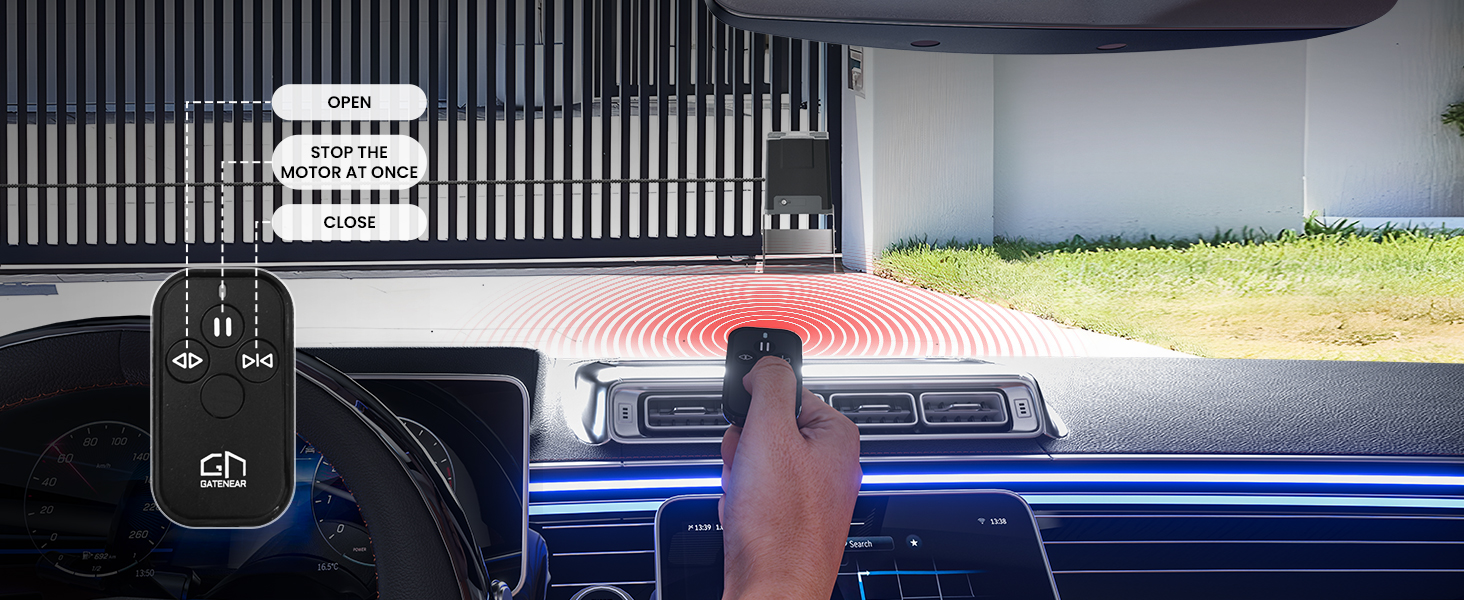
Figure 5: Operating the gate opener with the remote control from a vehicle.
5.2 Versatile Opening Modes
The system supports various operational modes for enhanced flexibility:
- Self-closing Setting: Adjustable self-closing times (e.g., 10/20/30/40/50 seconds).
- Photo Eye Beam Sensor: Included for obstacle sensing, ensuring safety by preventing the gate from closing on obstructions.
- Soft Start & Soft Stop: Provides smooth acceleration and deceleration, reducing wear and tear on the gate and motor.
- Left/Right Open: Configurable for gates opening to the left or right.
- Midway Mode: Allows the gate to open partially for pedestrian access.

Figure 6: Illustration of versatile gate opening modes.
6. Maintenance
Regular maintenance ensures the longevity and optimal performance of your Gatenear gate opener.
- Monthly: Inspect the gate's movement for any resistance. Check the chain for proper tension and lubrication. Ensure all mounting hardware is secure.
- Quarterly: Clean the photo eye sensors to ensure unobstructed operation. Test the backup battery by disconnecting main power and verifying the gate operates.
- Annually: Have a qualified technician inspect the entire system, including electrical connections and motor components.
- The unit is designed to be dust-resistant and water-resistant (IP44), but avoid direct high-pressure water spray.
7. Troubleshooting
If you encounter issues, refer to the table below for common problems and solutions. For complex issues, contact customer support.
| Problem | Possible Cause | Solution |
|---|---|---|
| Gate does not move. | No power, remote battery dead, obstruction, limit switch issue. | Check power supply. Replace remote battery. Clear obstructions. Adjust limit switches. |
| Gate stops unexpectedly. | Obstruction detected by photo eye, motor overheating, power fluctuation. | Clear photo eye path. Allow motor to cool. Check power stability. |
| Remote control not working. | Dead battery, out of range, not paired. | Replace battery. Move closer to the gate. Re-pair remote control. |
| Gate opens/closes slowly. | Low power, excessive gate friction, motor issue. | Check power supply. Lubricate gate rollers/tracks. Contact support if motor issue suspected. |
8. Specifications
| Feature | Detail |
|---|---|
| Model Number | GOCA-14DC |
| Motor Type | DC Motor |
| Motor Power | 280 Watts |
| Max Gate Weight | 1400 lbs |
| Max Gate Length | 40 feet |
| Opening Speed | 43 feet per minute |
| Power Source | AC/DC (Solar compatible) |
| Backup Battery | 12V9A (Included, provides up to 14 hours during power failure) |
| Remote Control Range | Up to 100 feet |
| Max Remote Controls | 25 |
| Operating Temperature | -40°F to 158°F |
| Protection Rating | IP44 (Dust-resistant, Water-resistant) |
| Sound Level | 56 Decibels |
| Dimensions (Unit) | 12.76 x 9.25 x 20.5 inches |
| Weight (Unit) | 42.7 pounds |

Figure 7: High-performance DC motor and dimensions.
9. Product Videos
9.1 Gatenear Automatic Sliding Gate Opener Overview
This video provides a comprehensive overview of the Gatenear Automatic Sliding Gate Opener, showcasing its features and capabilities for various gate sizes and weights.
9.2 Automate Your Gate with Ease
A short demonstration highlighting the ease of automating your gate with the Gatenear opener, emphasizing convenience and smooth operation.
10. Warranty and Support
Gatenear provides 24/7 consultation services for any inquiries or assistance you may need. For warranty information, please refer to the documentation included with your product or contact Gatenear customer service directly.
For further assistance, visit the official Gatenear Store: Gatenear Store on Amazon.