
Introduction
Thank you for choosing the Princess Smart Air Cooler. This appliance is designed to provide efficient and comfortable cooling for your home or office. Featuring a powerful 70W motor, three speed settings, a 3.5L water tank, and 50° oscillation, it offers versatile cooling options. With smart control capabilities via a dedicated app and remote control, managing your indoor climate has never been easier. This manual provides detailed instructions for setup, operation, maintenance, and troubleshooting to ensure you get the most out of your air cooler.

Image: Front view of the Princess Smart Air Cooler, showcasing its sleek, white tower design and control panel.
Important Safety Instructions
- Read all instructions carefully before using the appliance.
- Ensure the voltage indicated on the rating label matches your mains voltage.
- Do not immerse the appliance, cord, or plug in water or other liquids.
- Always unplug the appliance from the power outlet before cleaning, filling, or when not in use.
- Keep the appliance out of reach of children and pets.
- Do not operate the appliance with a damaged cord or plug, or after it malfunctions or has been damaged in any manner.
- Place the appliance on a stable, flat, and dry surface.
- Do not block air inlets or outlets. Ensure adequate ventilation around the unit.
- Only use the appliance indoors.
- Do not use the appliance near water, such as in bathrooms or near swimming pools.
- Use only accessories recommended by the manufacturer.
Package Contents
Please check the contents of the box upon unpacking:
- Princess Smart Air Cooler Unit
- Remote Control
- Ice Pack (2 included)
- Instruction Manual (this document)
Product Overview
Familiarize yourself with the components and control panel of your Princess Smart Air Cooler.

Image: Close-up view of the Princess Smart Air Cooler's top control panel, showing labeled buttons for Modes, Speed settings, On/off / Wi-Fi, Timer function, Swing function, and Cooling.
Control Panel Functions:
- On/Off Button / Wi-Fi Indicator: Powers the unit on or off. Also indicates Wi-Fi status.
- Speed Settings: Adjusts fan speed (Low, Medium, High).
- Modes: Cycles through Normal, Natural, and Sleep modes.
- Timer Function: Sets the operating time from 1 to 24 hours.
- Swing Function: Activates or deactivates the 50° oscillation.
- Cooling Function: Engages the evaporative cooling feature.
- Water Level Indicator: Located on the front, shows the water level in the tank (MIN/MAX).
Setup
Follow these steps for initial setup of your air cooler:
- Unpack: Carefully remove the air cooler and all accessories from the packaging.
- Positioning: Place the air cooler on a firm, level surface in the desired location. Ensure there is adequate space around the unit for proper airflow.
- Fill Water Tank:
- Pull out the water tank from the bottom rear of the unit.
- Fill the tank with clean, cool water. Do not exceed the 'MAX' fill line.
- For enhanced cooling, place the included ice packs in the freezer until frozen, then add them to the water tank.
- Carefully slide the water tank back into the unit until it clicks into place.
- Connect Power: Plug the power cord into a suitable electrical outlet.
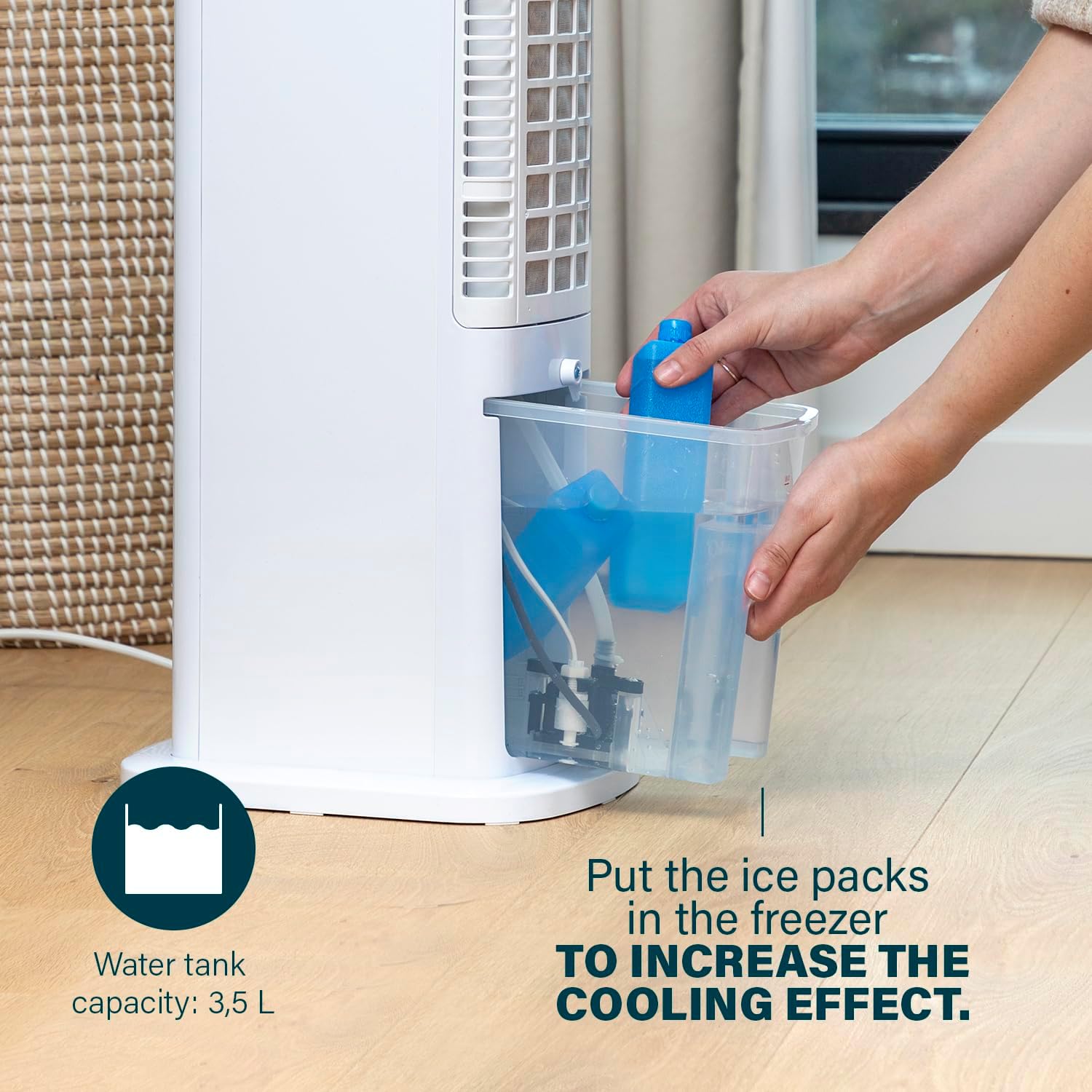
Image: A person's hands are shown placing blue ice packs into the clear water tank of the air cooler, illustrating the process to increase the cooling effect. The water tank capacity of 3.5L is also indicated.
Operating Instructions
Using the Control Panel:
Press the corresponding buttons on the top control panel to activate desired functions:
- Power: Press the power button to turn the unit on or off.
- Speed: Press the speed button repeatedly to cycle through Low, Medium, and High fan speeds.
- Mode: Press the mode button to select between Normal, Natural, and Sleep modes.
- Timer: Press the timer button to set the auto-off timer from 1 to 24 hours. Each press increases the time by one hour.
- Swing: Press the swing button to activate or deactivate the automatic 50° oscillation.
- Cooling: Press the cooling button to enable the evaporative cooling function. Ensure the water tank is filled.
Using the Remote Control:
The included remote control allows for convenient operation from a distance. Point the remote control towards the front of the air cooler and press the desired function buttons. Ensure batteries are installed (batteries not included).
Smart Control (App & Voice Assistant):
The Princess Smart Air Cooler can be controlled via the free Princess Home app on your smartphone or through voice assistants like Amazon Alexa and Google Home.
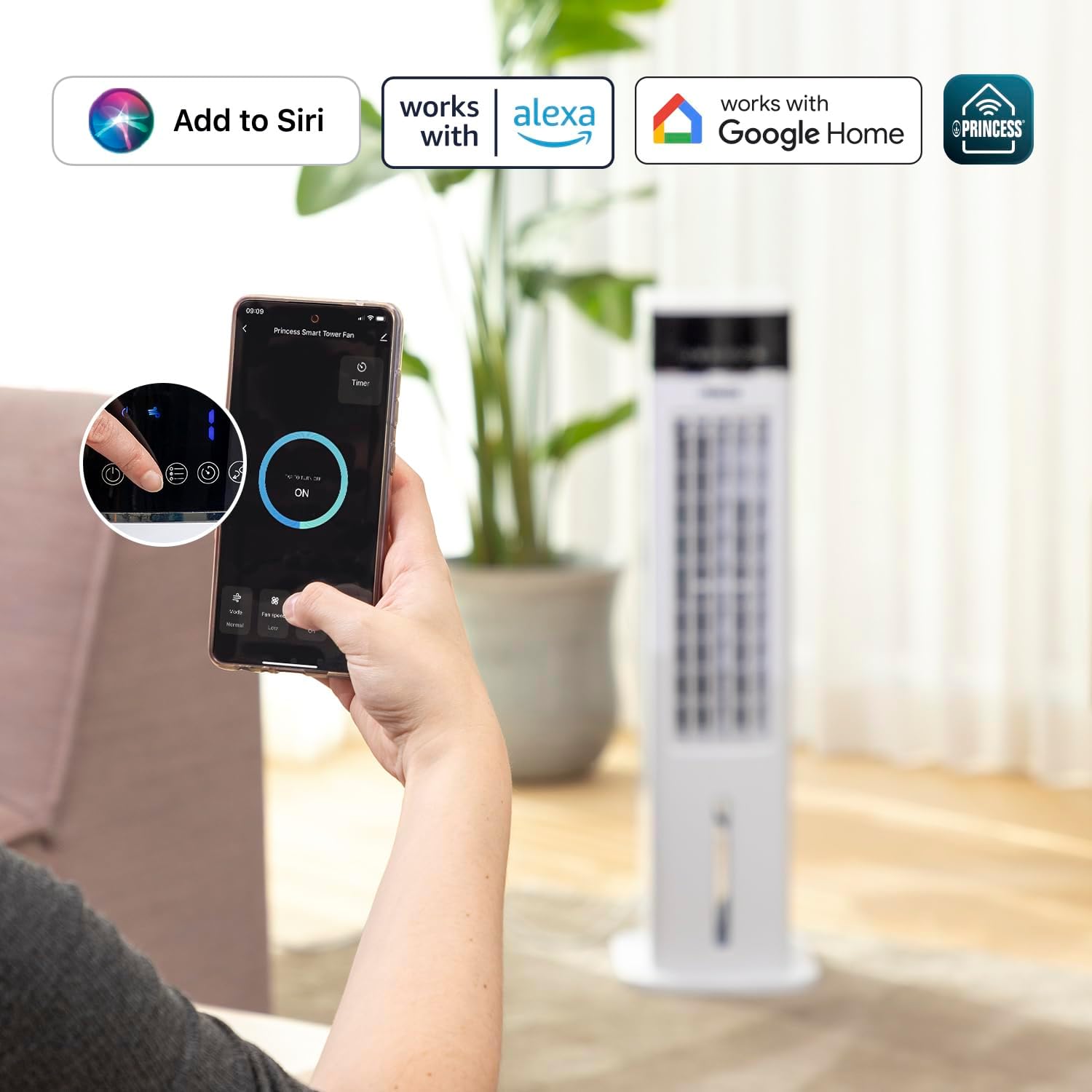
Image: A hand holding a smartphone displaying the Princess Smart Tower Fan app interface, with icons indicating compatibility with Siri, Alexa, and Google Home. The air cooler is visible in the background.
- Download App: Download the "Princess Home" app from your smartphone's app store (iOS or Android).
- Pairing: Follow the in-app instructions to pair your air cooler with your Wi-Fi network and the app. This typically involves putting the air cooler into pairing mode (refer to app for specific steps).
- Voice Assistant Integration: Once paired with the app, you can link the Princess Home app to your Amazon Alexa or Google Home account for voice control.
Understanding Modes and Functions:
- Normal Mode: Provides a constant airflow at the selected speed.
- Natural Mode: Simulates natural breeze by varying fan speed intermittently.
- Sleep Mode: Operates at a lower, quieter speed, ideal for nighttime use. The fan speed may gradually decrease over time.
- Oscillation (Swing): The unit oscillates 50 degrees horizontally to distribute cool air across a wider area.
- Timer: Allows you to set the appliance to automatically turn off after a specified period (1-24 hours), conserving energy.
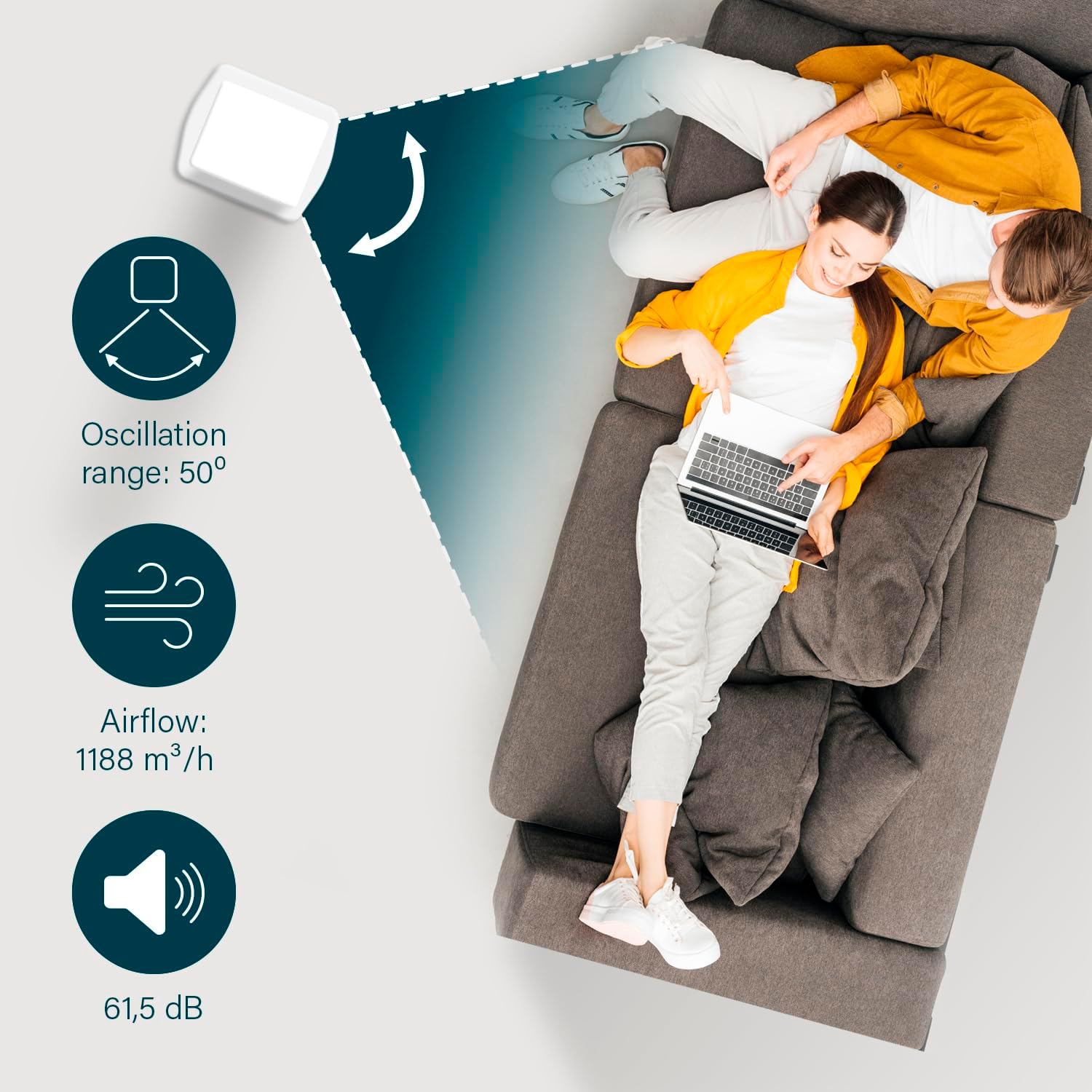
Image: An illustrative diagram showing the 50° oscillation range of the air cooler, an airflow capacity of 1188 m³/h, and a noise level of 61.5 dB, with two people relaxing on a sofa in the background.
Maintenance
Regular cleaning and maintenance will ensure optimal performance and extend the lifespan of your air cooler.
- Before Cleaning: Always unplug the air cooler from the power outlet before cleaning.
- Exterior Cleaning: Wipe the exterior surfaces of the unit with a soft, damp cloth. Do not use abrasive cleaners or solvents.
- Water Tank Cleaning:
- Remove the water tank from the unit.
- Empty any remaining water.
- Clean the tank with mild soap and water. Rinse thoroughly to remove any soap residue.
- Allow the tank to air dry completely before reinserting it.
- Dust Filter Cleaning: Periodically check and clean the dust filter (if applicable, usually located at the back). Gently remove dust with a vacuum cleaner or soft brush.
- Storage: If storing the unit for an extended period, ensure the water tank is empty and dry. Store in a cool, dry place, preferably in its original packaging.
Troubleshooting
Refer to the table below for common issues and their solutions.
| Problem | Possible Cause | Solution |
|---|---|---|
| Unit does not turn on. | No power supply; Power button not pressed. | Check if the power cord is securely plugged in. Press the power button. |
| No cooling effect. | Water tank empty; Cooling function not activated; Ice packs not used. | Fill the water tank. Activate the cooling function. Add frozen ice packs to the water tank. |
| Weak airflow. | Fan speed set too low; Air inlets/outlets blocked. | Increase fan speed. Ensure no obstructions around the unit. |
| Oscillation not working. | Swing function not activated. | Press the swing button on the control panel or remote. |
| Remote control not working. | Batteries are dead or incorrectly inserted. | Replace batteries with new ones, ensuring correct polarity. |
| App control issues. | Wi-Fi connectivity issues; App not paired correctly. | Check Wi-Fi connection. Re-pair the device with the app following in-app instructions. |
Specifications
Technical specifications for the Princess Smart Air Cooler:
| Feature | Detail |
|---|---|
| Model Number | 01.358640.02.001 |
| Power | 70 W |
| Voltage | 2.4E+2 Volts (AC) |
| Dimensions (D x W x H) | 28D x 22W x 76H cm |
| Item Weight | 5.99 kg |
| Water Tank Capacity | 3.5 Litres |
| Air Flow Capacity | 1188 CMPH (m³/h) |
| Number of Speeds | 3 |
| Oscillation Range | 50° |
| Special Features | Portable, Timer, Smart Control (App/Voice) |
| Included Components | Ice Pack, Remote Control |

Image: A diagram illustrating the dimensions (76 cm height, 28 cm depth, 22 cm width) and key specifications (4 kg weight, 70 W power) of the Princess Smart Air Cooler.
Warranty and Support
Princess products are manufactured to high quality standards. This product comes with a standard manufacturer's warranty. For detailed warranty terms and conditions, please refer to the warranty card included with your purchase or visit the official Princess website. For technical support, troubleshooting assistance, or spare parts, please contact Princess customer service through their official channels. Keep your proof of purchase for warranty claims.
For more information, visit the Princess Store on Amazon.


