
Introduction
The Google Pixel 7a is engineered by Google, featuring the Google Tensor G2 chip for fast, efficient, and secure performance. It includes an advanced Pixel Camera system for high-quality photos and videos, enhanced audio on phone calls, and robust security features with VPN by Google One and the certified Titan M2 security chip. The device offers a 6.1-inch display and a long-lasting Adaptive Battery.
What's in the Box
Upon unboxing your Google Pixel 7a, you will find the following items:
- Google Pixel 7a 5G Smartphone
- Charging cable (USB-C to USB-C)
- Adapter (USB-A to USB-C)
- SIM ejection tool
- Quick Start Guide and Safety Information
Setup
1. Powering On
Press and hold the power button on the right side of the device until the Google logo appears. Follow the on-screen prompts to select your language and region.
2. SIM Card Insertion
Locate the SIM card tray on the side of your Pixel 7a. Use the provided SIM ejection tool to open the tray. Insert your nano-SIM card into the tray with the gold contacts facing down. Close the tray securely.
3. Data Transfer & Google Account Setup
During the initial setup, you will be prompted to transfer data from an old device. You can use the included adapter and your old phone's cable for a wired transfer. You will also be guided through signing in with your Google account or creating a new one. This account is essential for accessing Google services, apps, and backups.
Operating Your Pixel 7a
Display and Performance
The Pixel 7a features a vibrant 6.1-inch display with a smooth 90Hz refresh rate for fluid scrolling and responsiveness. Powered by the Google Tensor G2 chip, the device offers enhanced speed, efficiency, and security for all your tasks, from browsing to gaming.
Image: The Google Tensor G2 chip, the core processor of the Pixel 7a.
Camera Features
The Pixel 7a is equipped with a dual rear camera system, including a 64MP main sensor and a 13MP ultrawide lens, along with an upgraded front camera. Advanced image processing capabilities allow for features such as:
- Photo Unblur: Sharpen blurry photos.
- Magic Eraser: Easily remove unwanted distractions from your images.
- Night Sight: Capture clear and detailed photos in low-light conditions.
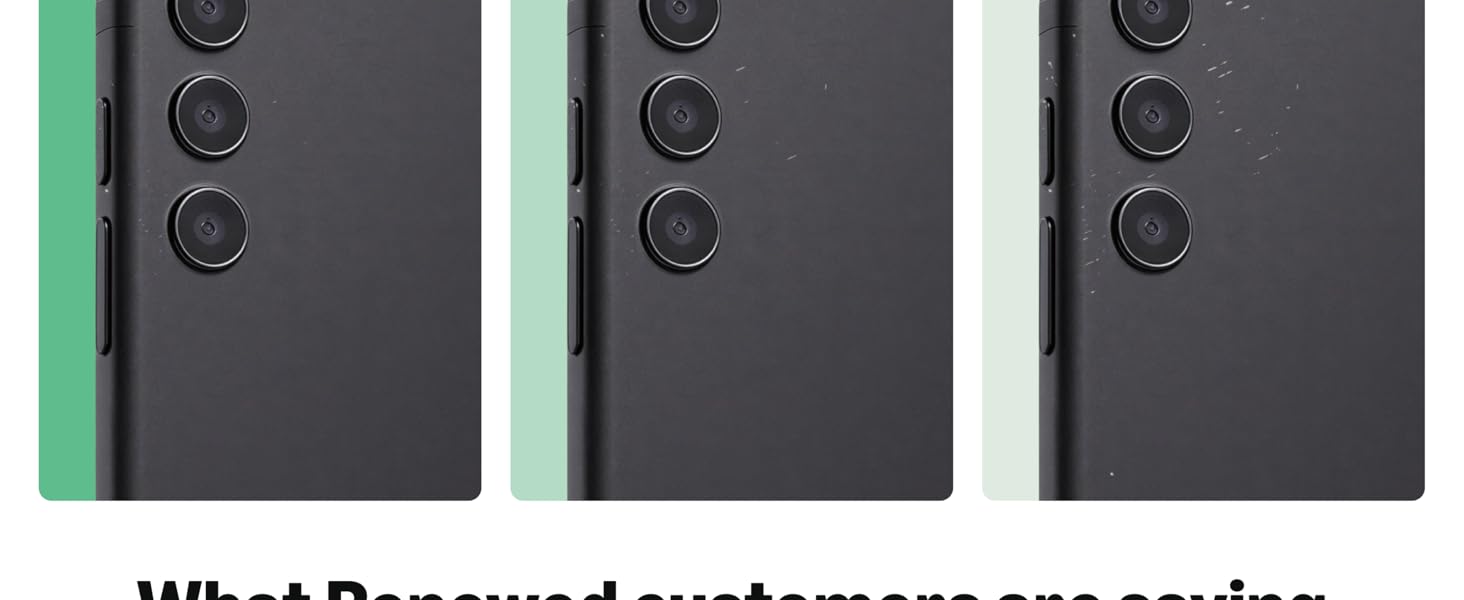
Image: Visual representation of Pixel 7a's camera capabilities including Photo Unblur, Magic Eraser, and Night Sight.
Battery Life
The Adaptive Battery is designed to last over 24 hours on a single charge. For extended use, enable Extreme Battery Saver mode to achieve up to 72 hours of battery life. The Pixel 7a also supports fast charging and wireless charging.

Image: A Google Pixel 7a smartphone charging wirelessly on a stand, illustrating its long-lasting battery and wireless charging capability.
Security Features
Pixel devices are highly rated for security. The Pixel 7a integrates the Google Tensor G2 and the certified Titan M2 security chip, providing multiple layers of hardware and software protection for your personal information. Additionally, VPN by Google One helps protect your online activity across any browser or app.

Image: A hand holding a Google Pixel 7a displaying its 'Security & privacy' settings, highlighting device lock, app security, and Google Security Checkup.
Live Translate
Communicate across language barriers with Live Translate. This feature allows for face-to-face conversations in 48 languages, real-time chat translation in messaging apps, and instant translation of menus or signs using your camera.

Image: A Google Pixel 7a displaying a translated conversation during a face-to-face interaction, demonstrating the Live Translate feature.
Call Assist
Call Assist features help manage your calls efficiently. It can screen calls from unknown numbers, suggest the best time to call a business, and even wait on hold for you, notifying you when a representative is available.

Image: A Google Pixel 7a displaying Call Assist features, including screening calls from unknown numbers, showing the best time to call a business, and waiting on hold.
Google Ecosystem Integration
The Google Pixel 7a seamlessly integrates with other Google Pixel devices such as watches, earbuds, and tablets, providing a connected and personalized experience throughout your day.

Image: A Google Pixel 7a smartphone displayed alongside a Pixel Watch and Pixel Buds, illustrating seamless integration within the Google ecosystem.
Maintenance
Software Updates
Keep your Pixel 7a updated to the latest Android version for optimal performance, security, and new features. Updates are typically delivered automatically, but you can manually check for them in Settings > System > System update.
Battery Care
To maximize battery lifespan, avoid extreme temperatures and fully draining the battery frequently. Utilize the Adaptive Battery feature and Extreme Battery Saver when needed.
Cleaning
Use a soft, lint-free cloth to clean your device. Avoid harsh chemicals or abrasive materials. For the screen, a screen cleaner designed for electronics can be used.
Troubleshooting
Common Issues
- Device Not Responding: Press and hold the power button for about 30 seconds to force a restart.
- Charging Problems: Ensure you are using a compatible charger and cable. Check the charging port for any debris.
- Network Connectivity Issues: Toggle Airplane Mode on and off. Check your SIM card insertion.
- Fingerprint Sensor Not Working: Ensure your finger is clean and dry. Re-register your fingerprints in settings if the issue persists.
Factory Reset
If you encounter persistent software issues, a factory reset may be necessary. Warning: This will erase all data on your device. Back up important information before proceeding. Go to Settings > System > Reset options > Erase all data (factory reset).
Specifications
| Feature | Detail |
|---|---|
| Model Name | Pixel 7a |
| Operating System | Android |
| CPU Model | Google Tensor G2 |
| RAM | 8 GB |
| Memory Storage Capacity | 128 GB |
| Screen Size | 6.1 Inches |
| Resolution | 1080 x 2400 |
| Battery Capacity | 4385 Milliamp Hours |
| Wireless Carrier | Unlocked |
| Connectivity Technologies | Bluetooth, NFC, USB, Wi-Fi |
| Special Features | 3G/4G/5G Data Capable, Always On Display, Face ID, Unlocked, Wireless Charging |
Warranty and Support
Product Condition
This Google Pixel 7a is a renewed product. Renewed products are fully functional and come with generic or original accessories and packaging. The specific product grade (e.g., Excellent, Good, Acceptable) indicates the cosmetic condition and minimum battery life.
Return Policy
This product is eligible for a 90-day refund or replacement policy from the date of purchase. Please refer to your retailer's specific return terms for detailed instructions.
Customer Support
For further assistance, technical support, or warranty claims, please visit the official Google Support website or contact your product retailer.


