
1. Introduction
The ELIVED EV1033 TV Wall Mount is designed to securely hold televisions ranging from 26 to 50 inches, with a maximum weight capacity of 25 kg. This full-motion mount offers versatile viewing angles, allowing you to swivel, tilt, and extend your television for optimal viewing from various positions in your room. It supports VESA mounting patterns from 75x75mm up to 300x300mm.
Compatibility Overview
This mount is compatible with most 26 to 50-inch LED, LCD, and OLED televisions. Ensure your TV's VESA pattern falls within the 75x75mm to 300x300mm range and its weight does not exceed 25 kg.

Figure 1: Recommended Compatibility. This image illustrates the recommended TV size range (26-50 inches), supported VESA patterns (Min 75x75mm, Max 300x300mm), and suitable wall types for installation, including single wood stud, concrete wall, and brick wall.
2. Safety Information
Please read and understand all instructions before installation and use. Failure to do so may result in personal injury, property damage, or voiding your warranty.
- Weight Capacity: Do not exceed the maximum weight capacity of 25 kg (55 lbs).
- TV Size: This mount is designed for TVs between 26 and 50 inches.
- VESA Compatibility: Ensure your TV's VESA mounting holes are within 75x75mm to 300x300mm.
- Wall Type: This mount is suitable for installation on single wood studs, concrete walls, and brick walls. It is NOT suitable for drywall alone.
- Professional Installation: If you are unsure about the installation process or your wall type, consult a qualified professional.
- Tools: Use appropriate tools for installation.
- Children: Keep children away from the installation area.
3. Package Contents
Verify that all components are present and undamaged before beginning installation. If any parts are missing or damaged, contact customer support.

Figure 2: Package Contents. This image displays the main components of the wall mount, including the wall plate, TV mounting arms, VESA extension adapters, and a selection of screws and wall anchors for installation.
- TV Wall Mount Assembly (Wall Plate and Articulating Arm)
- TV Brackets (for attaching to the back of the TV)
- VESA Extension Adapters (if needed for larger VESA patterns)
- Assorted TV Screws (M4, M6, M8)
- Wall Screws and Concrete Anchors
- Small Bubble Level
- Instruction Manual
4. Setup and Installation
Follow these steps carefully for a secure installation. It is recommended to have two people for certain steps, especially when mounting the TV.
4.1 Check VESA Compatibility
Before starting, measure the horizontal and vertical distance between the mounting holes on the back of your TV. This is your VESA pattern. Ensure it is between 75x75mm and 300x300mm.

Figure 3: Available VESA Range. This diagram shows different VESA configurations supported by the mount, from 75x75mm to 300x300mm, indicating how the mounting arms adjust to fit various TV back patterns.
4.2 Easy 3-Step Installation Guide

Figure 4: Easy 3-Step Installation. This visual guide simplifies the installation process into three main steps: attaching the brackets to the TV, securing the wall plate to the wall, and finally, hanging the TV onto the installed wall plate.
- Attach Brackets to TV Back:
Select the appropriate screws and spacers for your TV's VESA holes. Secure the TV brackets to the back of your television. Ensure they are firmly attached and aligned correctly. - Install Wall Plate:
Choose the desired location on your wall. Use the provided template (if included) or the wall plate itself to mark drilling points. Drill pilot holes, insert wall anchors (for concrete/brick), and securely fasten the wall plate to the wall using the provided wall screws. Use the bubble level to ensure the wall plate is perfectly horizontal. Remember, this mount is not for drywall-only installation. - Hang TV on Wall Plate:
Carefully lift the television with the attached brackets and hook it onto the wall plate assembly. Ensure the TV is securely seated. Engage any safety locks or screws to prevent accidental dislodgement.
5. Operating Instructions
The ELIVED EV1033 mount offers multiple adjustment options to customize your viewing experience.
5.1 Swivel Adjustment
The TV can be swiveled up to +/-90 degrees left or right, depending on your TV size and wall distance. Gently push or pull the TV to the desired angle.
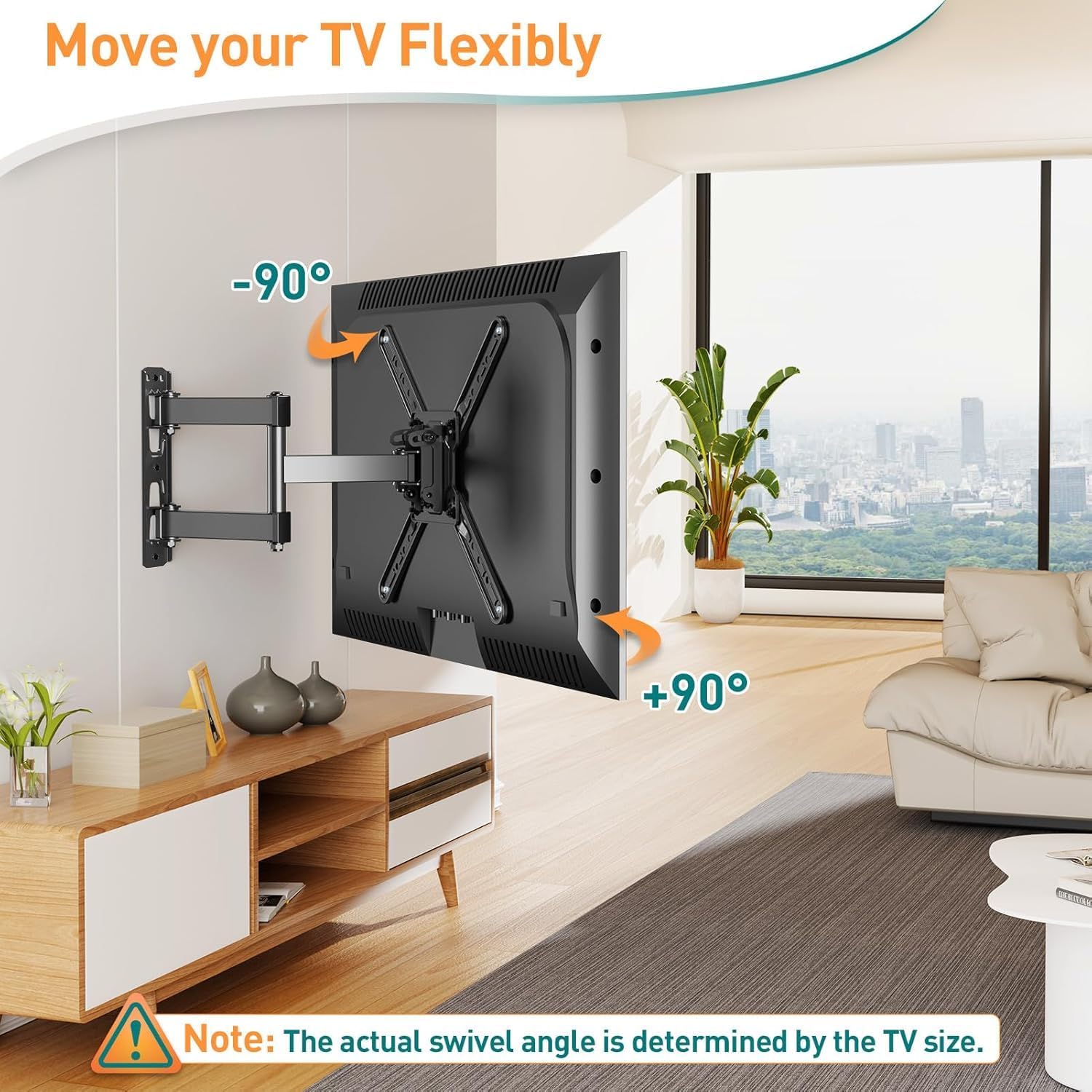
Figure 5: Swivel Functionality. This image illustrates the mount's ability to swivel the TV up to 90 degrees in either direction, providing flexible viewing angles. Note that the actual swivel angle may vary based on TV size.
5.2 Tilt Adjustment
Adjust the vertical viewing angle by tilting the TV +5 degrees upwards or -15 degrees downwards. This helps reduce glare and optimize your view.
Figure 6: Tilt and Extension. This image demonstrates the tilt range of the TV mount, allowing for adjustments from +5 degrees up to -15 degrees down. It also shows the extension capability, ranging from 72mm to 374mm from the wall.
5.3 Post-Installation Leveling
After installation, you can make minor horizontal adjustments of +/-3 degrees to ensure your TV is perfectly level.

Figure 7: Post-Installation Leveling. This image highlights the feature that allows for a fine-tuning of the TV's horizontal level by +/-3 degrees after the initial installation, ensuring a perfectly straight display.
5.4 Extension and Retraction
The mount allows the TV to extend up to 370mm from the wall and retract to approximately 65mm, saving space when not in use or for corner installations.
6. Maintenance
Regular maintenance ensures the longevity and safe operation of your TV wall mount.
- Cleaning: Wipe the mount with a soft, dry cloth. Avoid abrasive cleaners or solvents.
- Check Connections: Periodically check all screws and bolts to ensure they are tight and secure. Re-tighten if necessary.
- Inspect for Wear: Inspect the mount for any signs of wear, damage, or corrosion. If any issues are found, contact customer support.
7. Troubleshooting
If you encounter any issues during or after installation, refer to the following common problems and solutions.
- TV is not level after installation: Use the post-installation leveling feature (Section 5.3) to adjust the horizontal angle.
- Difficulty understanding instructions: Review the detailed steps and diagrams in Section 4. If issues persist, contact customer support for clarification.
- Mount feels unstable: Double-check all wall and TV connections. Ensure the wall type is appropriate and anchors are correctly installed. Verify TV weight is within limits.
- Limited swivel/tilt range: Ensure no cables are obstructing movement. The actual swivel range can be limited by the size of your TV and its distance from the wall.
8. Specifications
| Feature | Specification |
|---|---|
| Brand | ELIVED |
| Model | EV1033 |
| Compatible TV Sizes | 26 to 50 inches |
| Maximum Load Capacity | 25 kg |
| VESA Compatibility | 75x75mm, 100x100mm, 200x100mm, 200x200mm, 300x200mm, 300x300mm |
| Tilt Angle | +5° / -15° |
| Swivel Angle | +/-90° (TV size dependent) |
| Post-Installation Leveling | +/-3° |
| Extension from Wall | 65mm (retracted) to 370mm (extended) |
| Material | Metal |
| Product Dimensions | 25 x 21 x 6.5 cm |
| Product Weight | 2.27 kg |
9. Warranty and Support
ELIVED is committed to providing high-quality products and excellent customer service. Our professional customer service team is available to assist you with any questions before purchase and during installation. Please do not hesitate to contact us for any inquiries or support needs.
For specific warranty details or to contact support, please refer to the contact information provided with your product packaging or visit the official ELIVED website.
10. Product Overview Video
Watch this video for a visual summary of the ELIVED EV1033 TV wall mount's features and functionality.
Video: Product Summary. This video provides a summary of the ELIVED EV1033 TV wall mount's features and functionality, including its adjustable viewing angles and space-saving design.


