
1. Setup
Before first use, ensure the device is fully charged using the provided Type-C charging cable. A full charge allows dispensing of approximately 66 bottles of 750ml wine.
1.1 Attaching the Dispensing Tube and Adapter
- Unscrew the bottom part of the dispenser by turning it counter-clockwise.
- Select the appropriate silicone adapter (18-20mm, 21-23mm, or 28-30mm) that best fits your bottle's neck.
- Insert the selected adapter into the dispenser's base.
- Connect the retractable stainless steel tube to the adapter. Ensure it is securely fitted.
- Screw the bottom part back onto the dispenser by turning it clockwise until secure.


1.2 Inserting into Bottle
Carefully insert the assembled dispenser into the neck of your wine or liquor bottle. Ensure the tube extends to the bottom of the bottle for complete liquid extraction.

2. Operating Instructions
The Redsack Electric Wine Decanter offers precise and effortless dispensing with integrated aeration.
2.1 Powering On and Setting Volume
Press and hold the power button (usually the main button on top) for 2 seconds to turn on the device. The digital display will show the current volume setting in milliliters. Use the '+' and '-' buttons to adjust the desired dispensing volume from 1ml to 999ml.

2.2 Dispensing Wine
Place your glass under the spout. The device features a sensor that detects the glass. Once detected, the wine will begin to dispense the pre-set volume. The device will automatically stop when the set volume is reached.

2.3 Aeration Function
To activate the aeration function, press the 'A' button on the device. This will enhance the wine's flavor and aroma as it is dispensed. The aeration can be turned on or off as desired.

2.4 Continuous Pour
For a continuous pour, simply hold the glass under the sensor zone without setting a specific volume. The device will continue to dispense until the glass is removed or the power button is pressed again.
2.5 Video Demonstration
3. Maintenance
Proper cleaning ensures the longevity and hygiene of your Redsack Electric Wine Decanter.
3.1 Cleaning the Device
- Remove the dispenser from the bottle.
- Detach the dispensing tube and adapter.
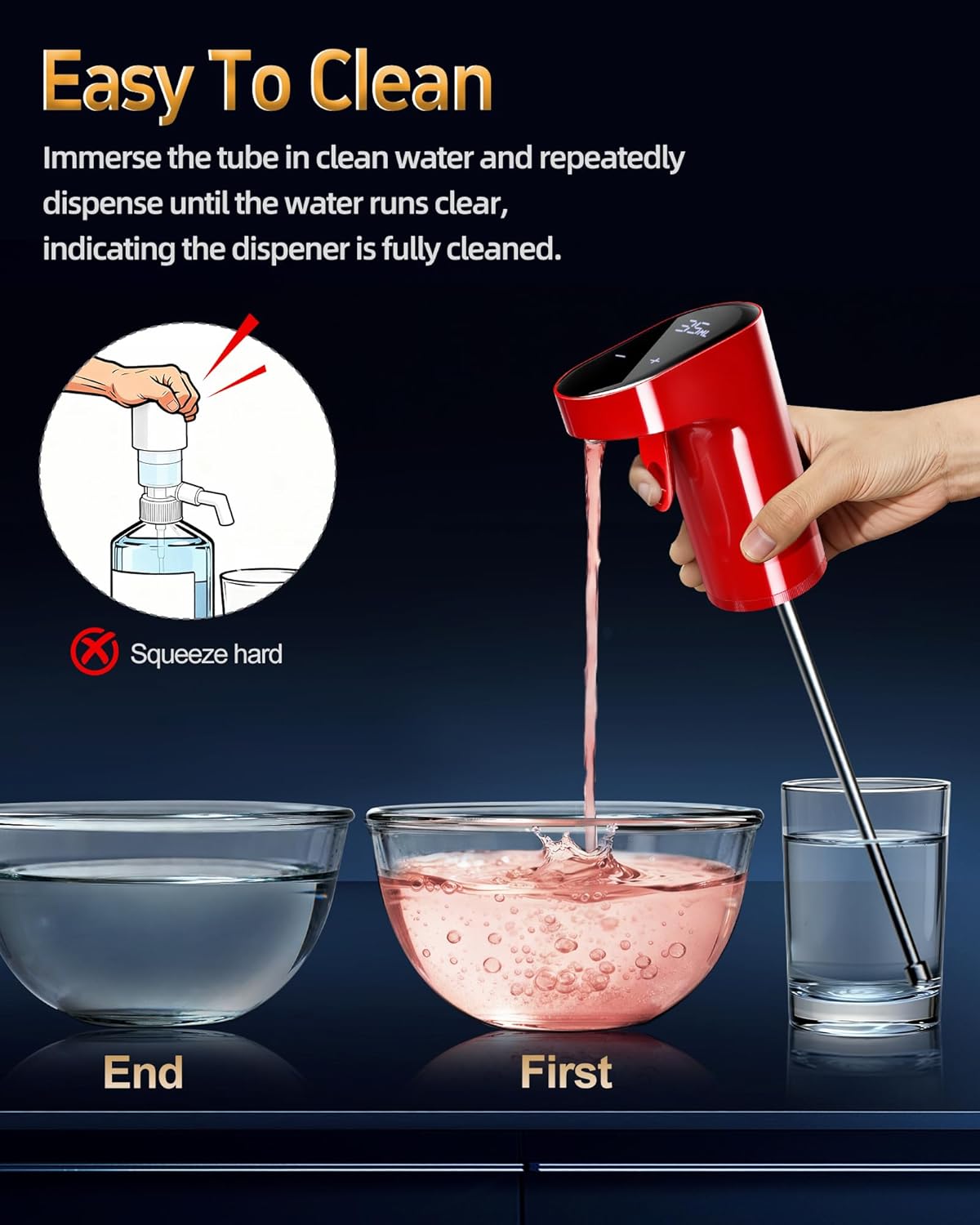
- Immerse the tube in clean water and repeatedly dispense until the water runs clear, indicating the dispenser is fully cleaned.
- Wipe the exterior of the device with a soft, damp cloth. Do not submerge the main unit in water.
4. Troubleshooting
- Device not turning on: Ensure the device is fully charged. Connect it to the Type-C charger and allow sufficient time for charging.
- No liquid dispensed: Check that the dispensing tube is correctly inserted and extends to the bottom of the bottle. Ensure the bottle contains enough liquid.
- Inaccurate dispensing volume: Verify the volume setting on the digital display. If issues persist, perform a cleaning cycle to ensure no blockages.
- Display not functioning: If the digital display is not working despite charging, contact customer support for assistance.
5. Specifications
| Brand | Redsack |
| Model Name | Wine Dispenser (WP-007) |
| Material | Plastic, Stainless Steel |
| Color | Red |
| Capacity | 1-999 Milliliters (Adjustable) |
| Product Dimensions | 4.2"W x 2.1"H |
| Item Weight | 13.7 ounces |
| Batteries | 1 A battery required (included) |
| Special Features | Adjustable Stopper, Custom Quantitation Settings, Quantitative adjustment, Lever sealed switch, Flow digital display, Retractable stainless steel tube, Touch settings button |
6. Warranty and Support
For any product inquiries, technical support, or warranty claims, please contact Redsack customer service. While specific warranty details are not provided in this manual, Redsack is known for responsive customer service and product replacement for verified issues.
Please refer to the contact information provided with your product packaging or visit the official Redsack website for the most up-to-date support details.