
Introduction
Thank you for choosing the DOEL Self-Cleaning Cat Litter Box. This automatic litter box is designed to provide a clean and odor-free environment for your cat and convenience for you. This manual provides essential information for the safe and efficient operation, setup, and maintenance of your device. Please read it thoroughly before use and retain it for future reference.
Safety Instructions
- Always place the litter box on a stable, level surface.
- Ensure the power cord is not damaged and is placed where it cannot be tripped over or chewed by pets.
- Do not immerse the main unit in water. The base unit contains electronic components and should only be wiped clean.
- Keep children and pets away from the device during operation to prevent injury.
- The device is equipped with infrared and gravity sensors to prevent cats from getting stuck. Do not attempt to interfere with these safety mechanisms.
- Use only clumping cat litter suitable for automatic litter boxes. Non-clumping litter may cause malfunctions.
- Unplug the device before performing any cleaning or maintenance.
Product Components
The DOEL Self-Cleaning Cat Litter Box package includes the following items:
- Main Litter Box Unit
- Power Adapter
- Waste Bags (initial supply)
- User Manual
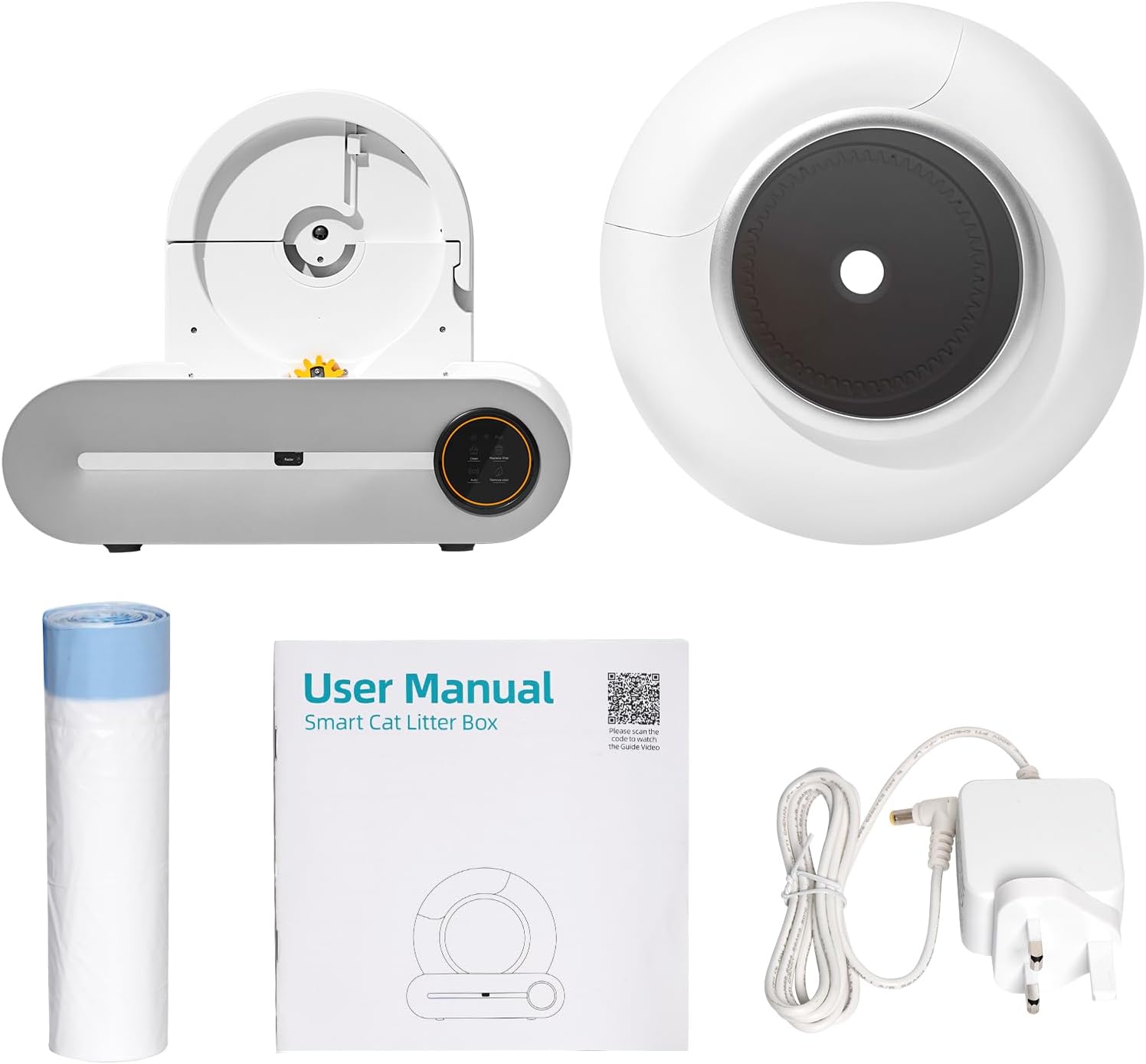
Setup Guide
- Unpack the Device: Carefully remove all components from the packaging.
- Position the Litter Box: Place the main unit on a firm, level surface in a suitable location, ensuring adequate space around it for access and ventilation.
- Install Waste Bag: Open the waste drawer and line it with one of the provided waste bags. Ensure the bag is securely fitted.
- Add Cat Litter: Pour clumping cat litter into the litter box. Do not exceed the maximum fill line indicated inside the drum.
- Connect Power: Plug the power adapter into the designated port on the back of the unit, then plug the adapter into a wall outlet. The device will perform an initial calibration.
- App Connection (Optional): Download the DOEL app from your smartphone's app store. Follow the in-app instructions to connect your litter box for remote control and health monitoring features. The device supports 2.4GHz Wi-Fi.

Operating Instructions
Automatic Cleaning Cycle
The DOEL Self-Cleaning Cat Litter Box automatically detects when your cat has used the litter box and initiates a cleaning cycle after a set delay (typically a few minutes) to allow the litter to clump. The internal mechanism sifts the litter, depositing waste into the sealed waste bin.
Manual Cleaning / Litter Change
To manually initiate a cleaning cycle or empty the litter for a full change, press the 'Clean' button on the control panel. This action will rotate the drum to sift waste or prepare for a full litter replacement.

Odor Removal Function
The device features an integrated ionic odor removal system. This system activates automatically or can be manually controlled via the app or control panel to neutralize odors and sterilize the environment.

App Control and Health Monitoring
Utilize the DOEL app for advanced control and monitoring. The app allows you to:
- Initiate cleaning cycles remotely.
- Monitor your cat's usage patterns and health data.
- Receive notifications regarding waste bin status or device alerts.
- Adjust settings such as cleaning delay and odor removal intensity.
Maintenance and Cleaning
Waste Bin Emptying
The 9-liter waste bin can hold waste for approximately 15 days for a single cat. When the waste bin is full, the app will notify you, or you can visually check the indicator. To empty:
- Unplug the device.
- Pull out the waste drawer.
- Seal and remove the full waste bag.
- Insert a new waste bag and close the drawer securely.
- Plug the device back in.

Litter Tray Cleaning
For a thorough cleaning of the litter tray:
- Unplug the device.
- Initiate a manual litter emptying cycle (if not already empty).
- Remove the litter drum from the base unit.
- Clean the interior of the drum with a mild detergent and water. Rinse thoroughly and ensure it is completely dry before reassembling.
Base Unit Cleaning
The base unit contains electronic components and should not be washed with water. Wipe the exterior and interior surfaces of the base unit with a damp cloth and mild, pet-safe cleaner. Ensure no moisture enters any openings.
Troubleshooting
| Problem | Possible Cause | Solution |
|---|---|---|
| Device not powering on | Power cord disconnected; Power outlet malfunction | Check power connections; Try a different outlet. |
| Litter box not cleaning automatically | Sensors obstructed; Incorrect litter type; Cat present in the box | Clean sensors; Ensure using clumping litter; Wait for cat to exit. |
| Odor persists | Waste bin full; Odor removal system off; Filter needs cleaning | Empty waste bin; Activate odor removal; Refer to app for filter status. |
| App connectivity issues | Incorrect Wi-Fi password; Router too far; 5GHz Wi-Fi network | Verify Wi-Fi credentials; Move device closer to router; Ensure 2.4GHz network is used. |
| Cat gets stuck or device stops mid-cycle | Safety sensors triggered | The device is designed to stop if a cat is detected. Remove cat and restart cycle if necessary. Ensure no obstructions. |
Specifications
- Model: B0C9CKTQMD
- Dimensions (L x W x H): 48 cm x 53 cm x 50.5 cm
- Item Weight: 9 kg
- Material: Polypropylene (PP)
- Waste Bin Capacity: 9 Liters
- Litter Drum Capacity: 65 Liters
- Connectivity: 2.4GHz Wi-Fi
- Batteries Required: No
- Color: White/Grey (Litter Box)
- Style: Modern

Warranty and Support
For warranty information or technical support, please refer to the contact details provided on the product packaging or the official DOEL website. Keep your purchase receipt as proof of purchase for warranty claims.

