
1. Introduction
This manual provides detailed instructions for the safe and efficient use of your Luxbird Heat Mat with Thermostat. This system is designed to create an optimal temperature environment for plant germination, seedling growth, and other applications requiring consistent warmth. Please read this manual thoroughly before operation and retain it for future reference.
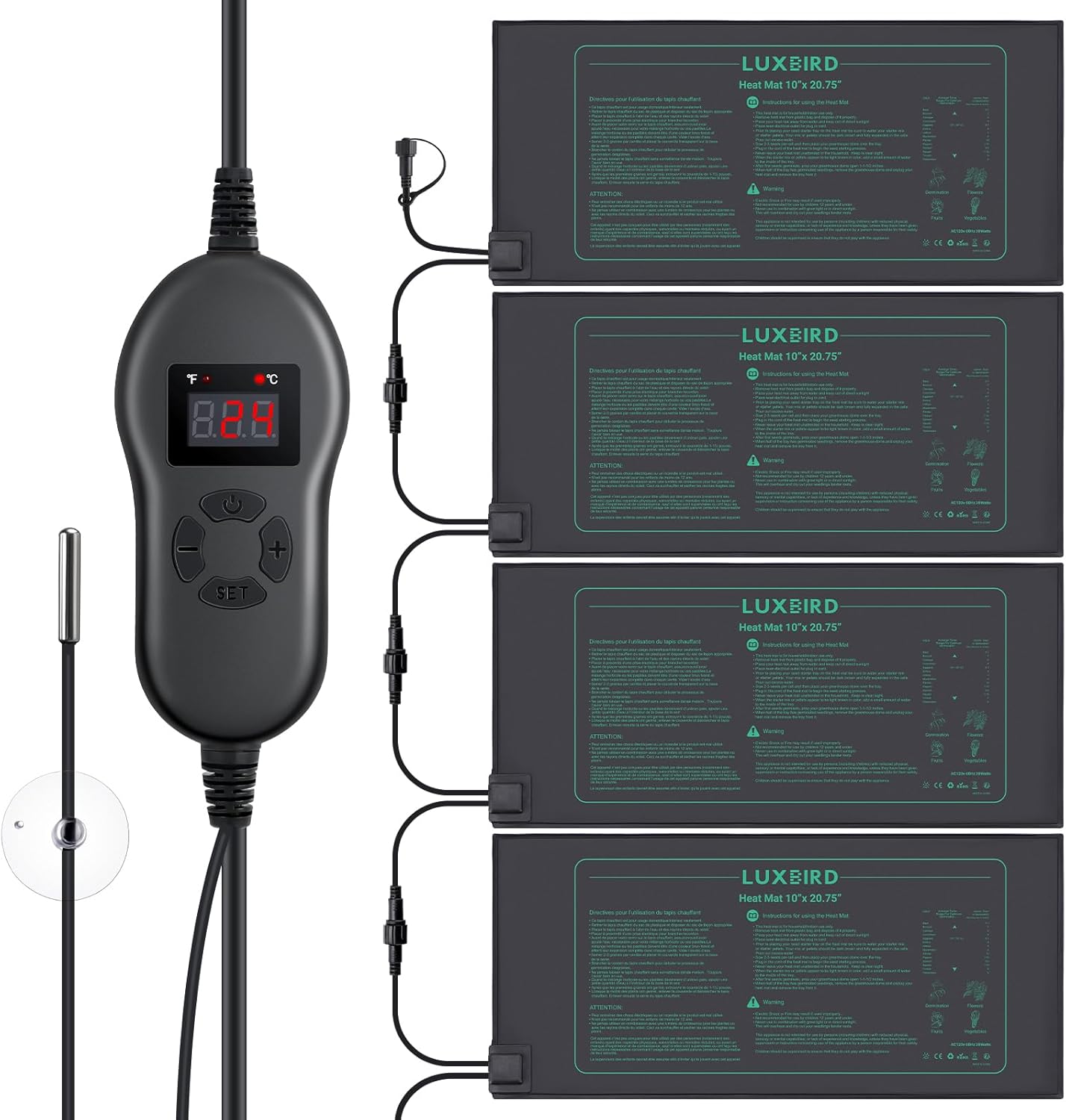
Image 1.1: Luxbird Heat Mat System Components. This image displays the main components of the Luxbird Heat Mat system, including the digital thermostat controller, four individual heat mats, and the NTC temperature probe.
2. Safety Instructions
WARNING: Failure to follow these safety instructions may result in electric shock, fire, or personal injury.
- This heat mat is for household/indoor use only.
- Ensure the power outlet matches the voltage requirements of the appliance.
- Do not immerse the controller in water. While the heat mats are IP67 waterproof, the controller is not designed for immersion.
- Avoid placing the heat mat in direct sunlight or combining it with grow lights, as this can lead to overheating.
- Do not fold, cut, or puncture the heat mat.
- Keep the heat mat and controller away from children and pets. This appliance is not intended for use by persons with reduced physical, sensory, or mental capabilities unless supervised by a responsible adult.
- Always unplug the heat mat system from the power outlet when not in use or before cleaning.
- Do not use if the mat or controller appears damaged.

Image 2.1: Heat Mat with Printed Safety Information. This image shows a detailed view of the heat mat surface, highlighting the printed safety warnings and usage instructions.
3. Package Contents
Verify that all items are present in your package:
- 4 x Luxbird Heat Mats (527 x 254 mm / 10" x 20.75")
- 1 x Digital Thermostat Controller
- 1 x NTC Temperature Probe
4. Product Features
- Parallel Connection: Control up to six heat mats simultaneously with a single thermostat controller, offering a practical and energy-efficient solution.
- Optimal Germination: Maintains root temperatures between 20°C to 30°C (68°F to 86°F), effectively increasing germination rates by up to 40%.
- Easy-to-Use Controller: Features a digital display and NTC probe for real-time soil temperature monitoring and precise control within a range of 0°C to 42°C (32°F to 108°F).
- Durable and Safe: Constructed from durable PVC with a fire-retardant surface. Mats are IP67 waterproof, abrasion-resistant, and dust-resistant, making them easy to clean and suitable for humid environments.
- Versatile Applications: Ideal for indoor gardening, seedling propagation, home brewing, DIY fermentation projects, and reptile terrariums.

Image 4.1: Key Features of the Heat Mat. This diagram highlights the stable and even heat distribution, optimal size for plant trays, large heating area, and 30W power efficiency of the Luxbird heat mat.
5. Setup Instructions
- Placement: Place the heat mats on a flat, dry surface. Ensure there is adequate insulation underneath the mats to prevent heat loss and maximize efficiency.
- Connect Heat Mats: Connect the individual heat mats to each other using the waterproof connectors. Then, connect the last mat in the series to the thermostat controller. The system supports up to six mats.
- Position Temperature Probe: Insert the NTC temperature probe into the growing medium (soil) of your plant tray, ensuring the probe tip is at the root level for accurate temperature readings. Use the included suction cup to secure the probe if needed.
- Power Connection: Plug the thermostat controller into a standard electrical outlet. The digital display on the controller will illuminate.

Image 5.1: System Connection Diagram. This image illustrates how multiple heat mats are connected in series to the thermostat controller, which then connects to the power source, along with the temperature probe.
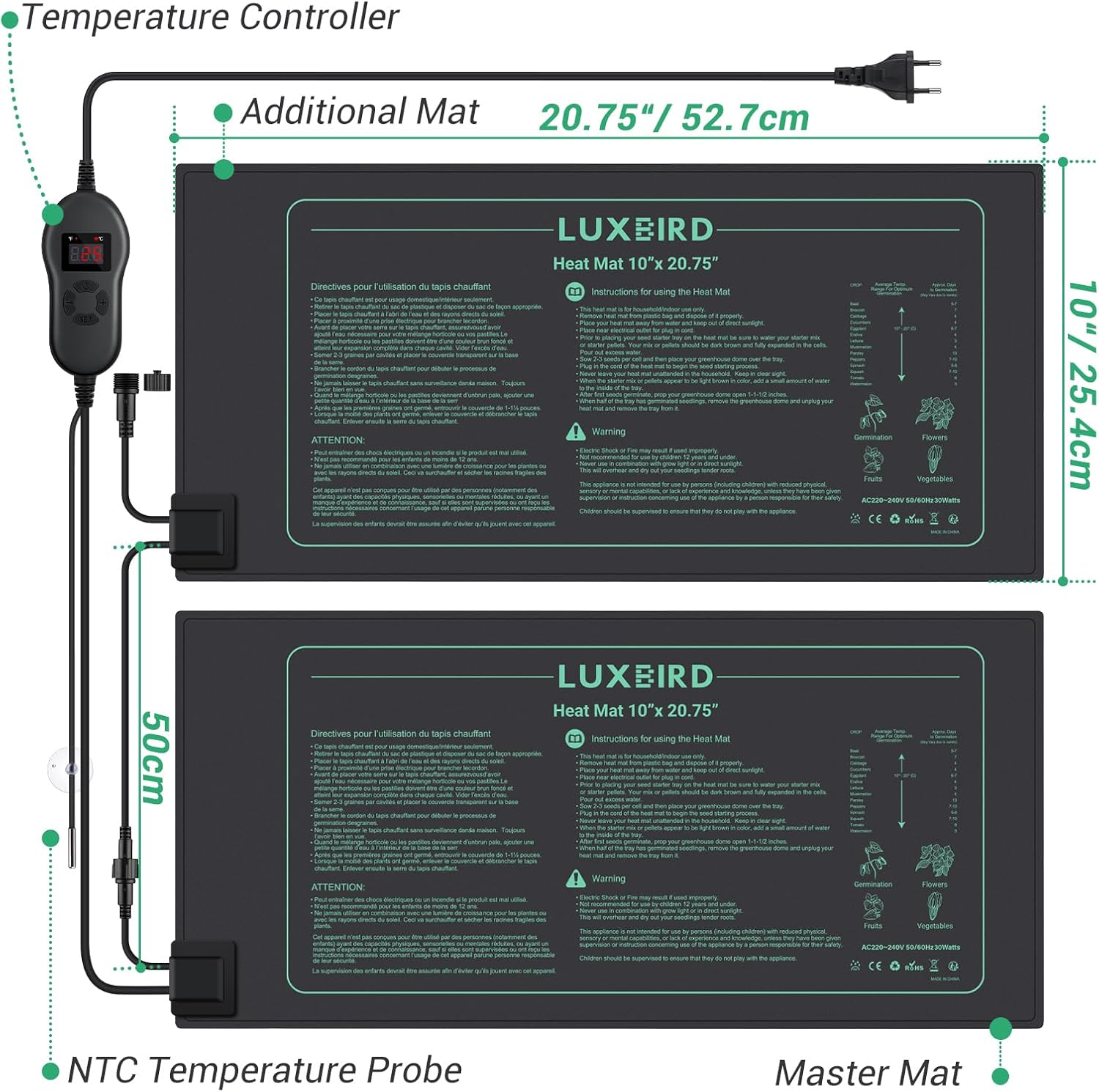
Image 5.2: Component Dimensions and Connections. This image provides a detailed view of the heat mat dimensions (10" x 20.75"), the controller, and the NTC temperature probe, illustrating how they connect.
6. Operating Instructions
- Power On: After connecting all components and plugging into the outlet, the controller will display the current temperature measured by the NTC probe.
- Set Temperature:
- Press the SET button once. The display will flash, showing the current set temperature.
- Use the + and - buttons to adjust the desired temperature.
- Press SET again to confirm your selection, or wait a few seconds for it to automatically save.
- Switch Temperature Unit (°C/°F): Press and hold the SET button for approximately 3 seconds to toggle between Celsius (°C) and Fahrenheit (°F).
- Monitoring: The controller will continuously display the current temperature. The heat mats will activate when the temperature drops below the set point and deactivate when it reaches the set point, maintaining a stable environment.

Image 6.1: Real-time Temperature Monitoring. This image shows the Luxbird heat mat system actively maintaining an optimal growing temperature for seedlings, with the controller displaying the current temperature.

Image 6.2: Thermostat Controller Interface. This image details the digital display and control buttons of the thermostat, along with the NTC probe, highlighting the temperature control range.
7. Maintenance
- Cleaning: Disconnect the power before cleaning. The heat mats can be wiped clean with a damp cloth. Do not use abrasive cleaners. Ensure the mats are completely dry before reconnecting power.
- Storage: When not in use, clean the mats and controller. Store them in a cool, dry place, away from direct sunlight and extreme temperatures. Avoid folding the mats tightly to prevent damage.
- Inspection: Regularly inspect the power cord, controller, and heat mats for any signs of damage, wear, or fraying. If any damage is found, discontinue use and contact customer support.

Image 7.1: Waterproof and Durable Design. This image showcases the IP67 waterproof and durable PVC material of the heat mat, emphasizing its resistance to water, abrasion, and dust, making it easy to clean.
8. Troubleshooting
| Problem | Possible Cause | Solution |
|---|---|---|
| Heat mats not heating. |
|
|
| Temperature reading is inaccurate. |
|
|
| Controller display is off or flickering. |
|
|
9. Specifications
- Model: Luxbird Heat Mat with Thermostat
- Heat Mat Dimensions: 527 x 254 mm (10" x 20.75")
- Power: 30W per mat
- Waterproof Rating: IP67 (Heat Mats only)
- Temperature Control Range: 0°C to 42°C (32°F to 108°F)
- Optimal Root Temperature: 20°C to 30°C (68°F to 86°F)
- Material: Durable PVC, Fire-retardant
- Manufacturer: Luxbird
- Country of Origin: China
- ASIN: B0C99HSQKY
10. Warranty and Support
For warranty information or technical support, please contact Luxbird customer service through the retailer where the product was purchased or visit the official Luxbird website. Please have your product model and ASIN (B0C99HSQKY) available when contacting support.
