1. Introduction
Thank you for choosing the LEKATO MPP-10 True Isolated Guitar Pedal Power Supply. This device is designed to provide stable, clean, and quiet power to your effect pedals, ensuring optimal performance without unwanted noise. With multiple isolated outputs and adjustable voltage options, the MPP-10 is a versatile solution for various pedalboard setups.
2. Package Contents
Please verify that all items listed below are included in your package:
- 1x LEKATO MPP-10 True Isolated Power Supply Unit
- 1x Power Adapter (100-240V AC input, 12V DC output)
- 10x DC Power Cables (standard barrel connectors)
- 1x 9V Battery Clip Converter Cable
- 1x Polarity Conversion Cable
- 1x 3.5mm Conversion Cable
- 1x User Manual (this document)
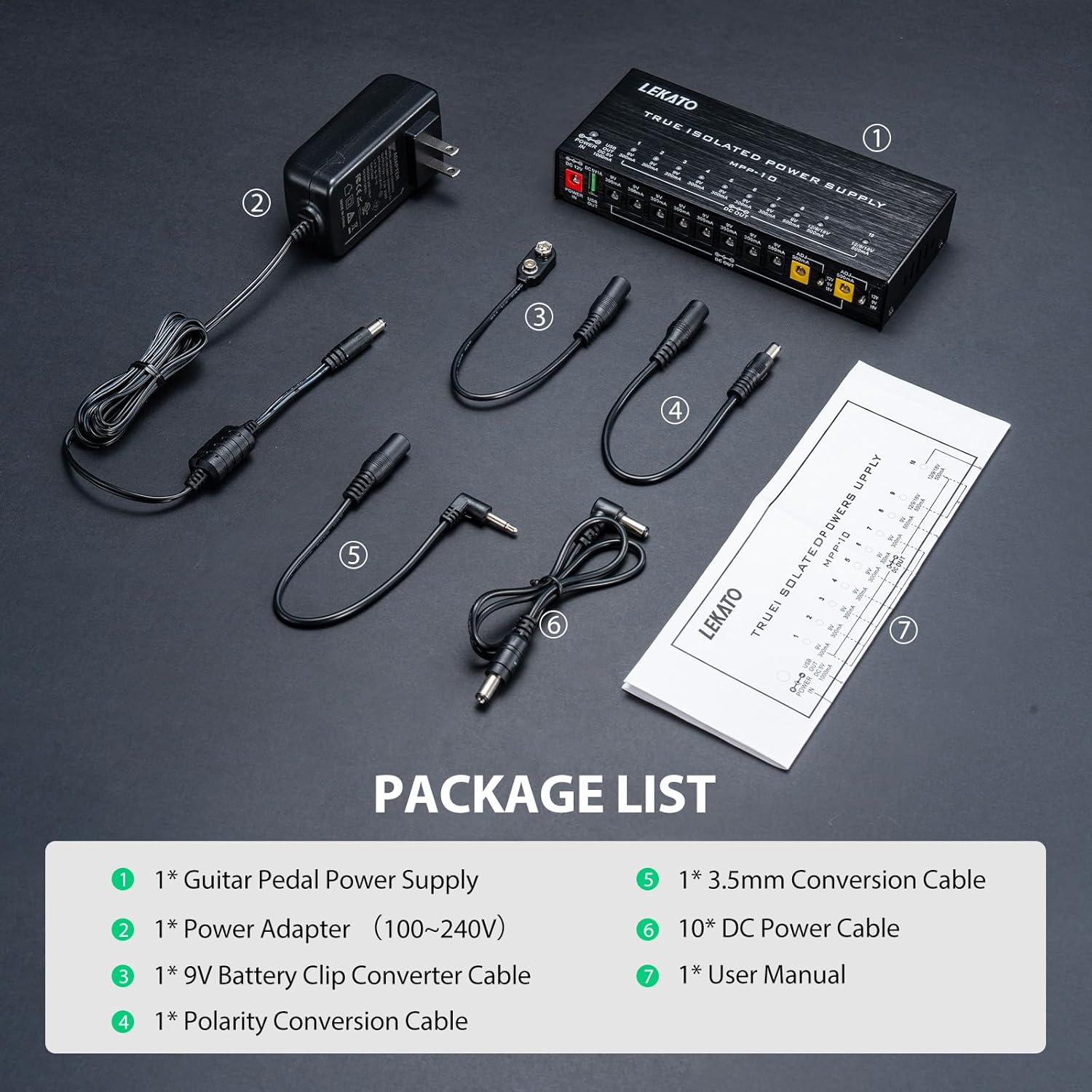
Figure 1: Contents of the LEKATO MPP-10 package.
3. Product Features
3.1 True Isolated Power Supply
The MPP-10 features true isolated outputs, meaning each output channel is electrically separated. This design prevents unwanted noise and hum from affecting your pedals, providing a clean and stable power source for optimal audio performance.

Figure 2: The MPP-10 unit highlighting its 10 isolated outputs and USB port.
3.2 Short Circuit and Over-Current Protection
Each of the 10 output channels is equipped with independent short-circuit and over-current protection. In the event of a short circuit on one output, only that specific output will be affected, and its LED indicator will turn off, while other channels continue to operate normally.
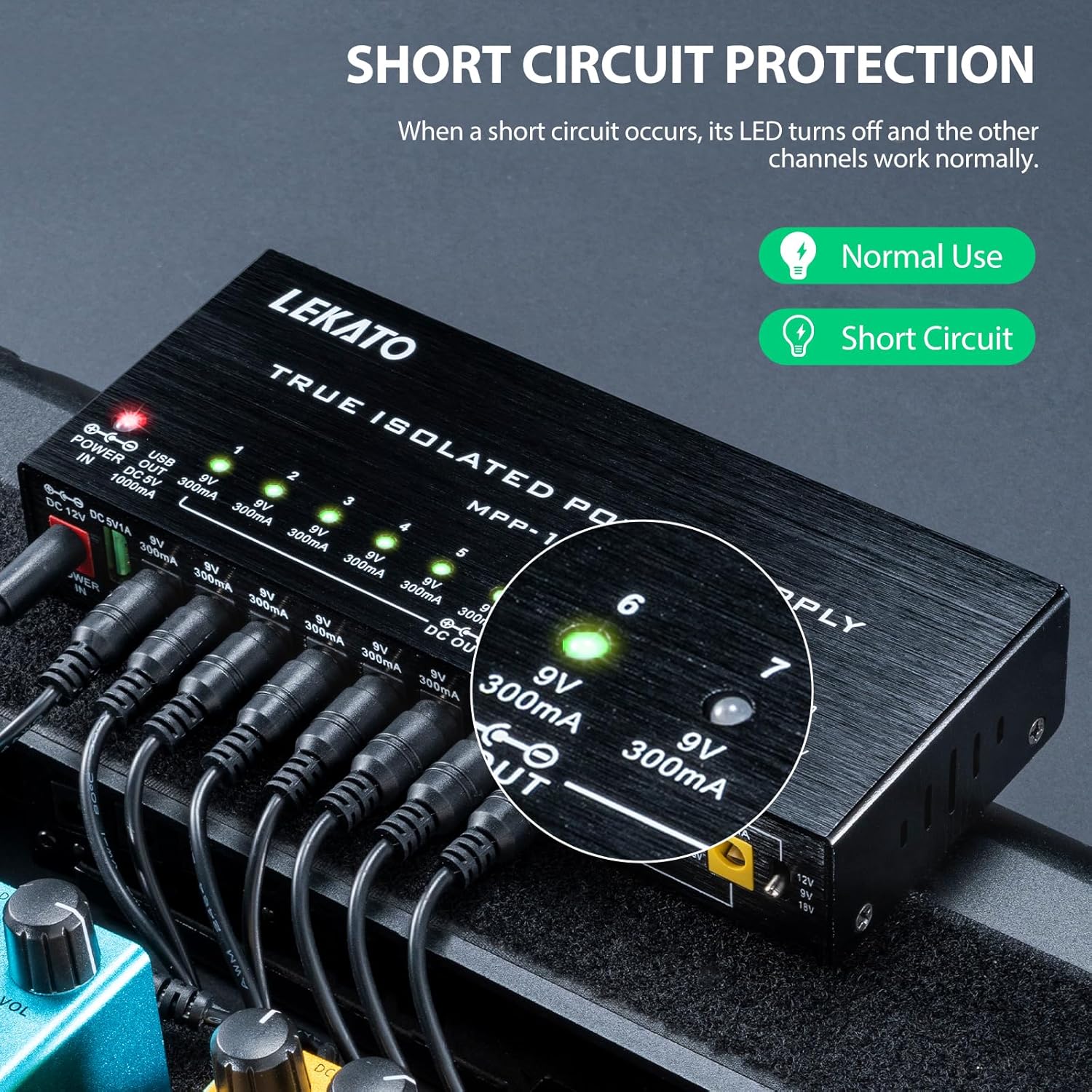
Figure 3: Visual representation of the short circuit protection feature, showing an LED turning off when a fault occurs.
3.3 Adjustable Voltage Outputs
Two dedicated output ports (9 and 10) offer adjustable voltage settings of 9V, 12V, or 18V, each providing up to 500mA. This allows compatibility with a wider range of effect pedals that require different voltage inputs.
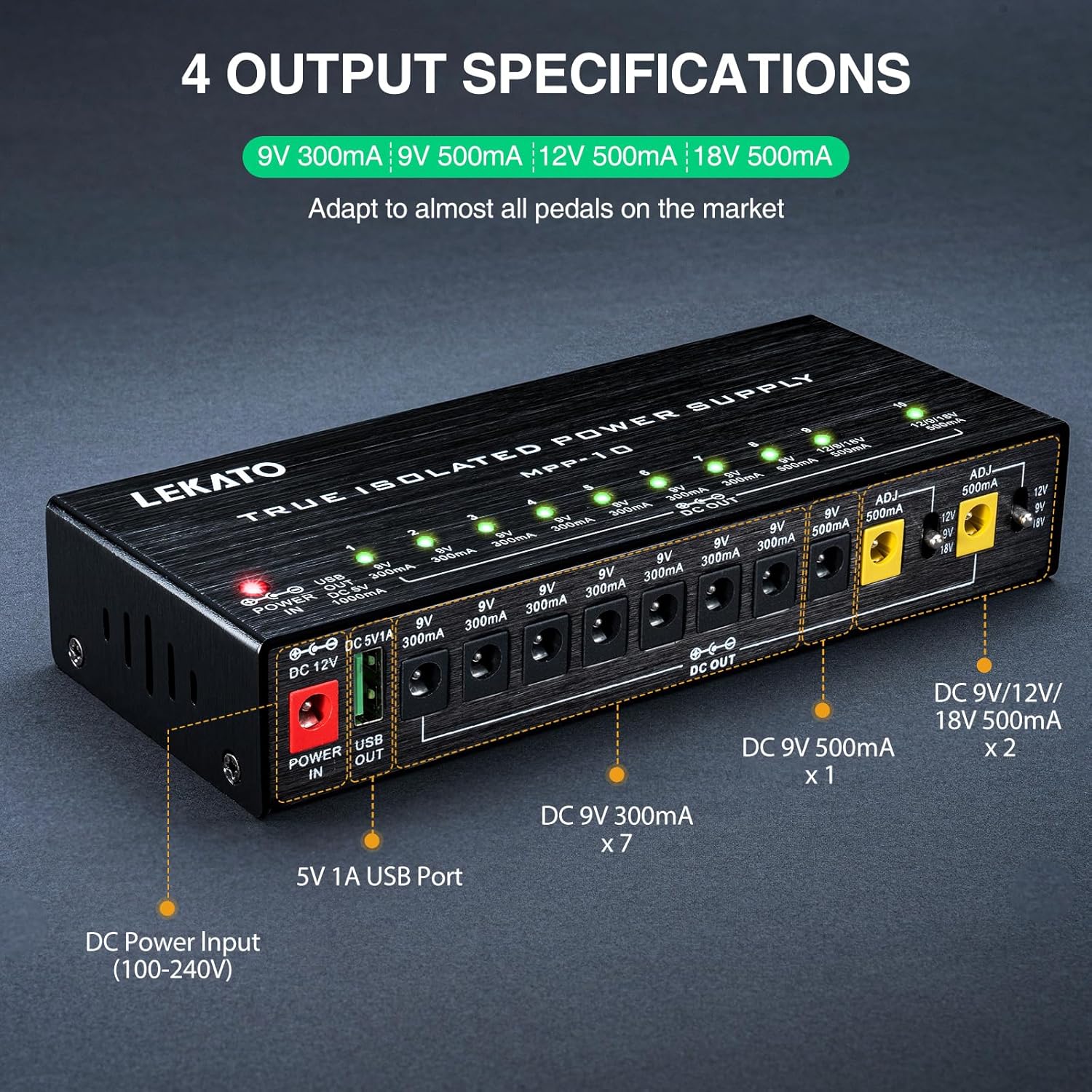
Figure 4: Detailed view of the MPP-10's output specifications, highlighting the adjustable voltage ports.
3.4 USB Charging Port
In addition to powering your pedals, the MPP-10 includes a 5V 1A USB output port, allowing you to conveniently charge mobile devices or power other USB-compatible accessories directly from your pedalboard.

Figure 5: The MPP-10's USB port in use, charging a mobile phone.
3.5 Durable Aluminum Alloy Housing
The unit is constructed with a heavy-duty aluminum alloy casing, providing excellent heat radiation and robust protection for the internal components, ensuring reliability and longevity.

Figure 6: The compact and durable aluminum alloy housing of the MPP-10.
4. Setup Instructions
- Connect the Power Adapter: Plug the included 12V DC power adapter into the "POWER IN" port (red connector) on the LEKATO MPP-10 unit. Then, plug the power adapter into a standard AC wall outlet. The red "POWER" LED on the unit will illuminate.
- Connect DC Power Cables: Use the provided DC power cables to connect your effect pedals to the output ports on the MPP-10. Ensure the correct polarity (center negative is standard for most guitar pedals). If a pedal requires center positive, use the included polarity conversion cable.
- Select Output Voltage (for adjustable ports): For outputs 9 and 10, use the small toggle switch next to each port to select the required voltage (9V, 12V, or 18V) for your specific pedal. Verify the pedal's voltage requirements before connecting.
- Verify Connections: Once all pedals are connected, the green LED indicator above each active output port will light up, confirming power delivery.

Figure 7: Important note on ensuring correct positive and negative polarity before wiring your pedals.

Figure 8: Example of the MPP-10 integrated into a guitar pedalboard.
5. Operating Instructions
5.1 Powering On/Off
The MPP-10 unit powers on automatically when connected to the main power adapter. There is no separate on/off switch on the unit itself. Disconnect the main power adapter to power off the unit.
5.2 LED Indicators
Each output port has a corresponding green LED indicator. When a pedal is correctly connected and receiving power, its LED will illuminate. If an LED is off, it may indicate a short circuit on that channel or an unconnected pedal.
5.3 Using Adjustable Voltage Outputs
For outputs 9 and 10, ensure the toggle switch is set to the correct voltage (9V, 12V, or 18V) required by your pedal. Incorrect voltage can damage your pedal. Always consult your pedal's manual for its power requirements.
5.4 USB Output
The USB OUT port provides 5V 1A power. Connect your USB-powered device using a compatible USB cable. This port is ideal for charging smartphones, tablets, or powering small USB accessories.
6. Output Specifications
| Output Port(s) | Voltage | Current | Notes |
|---|---|---|---|
| 1-7 | 9V DC | 300mA | Standard 9V outputs |
| 8 | 9V DC | 500mA | High current 9V output |
| 9-10 | 9V/12V/18V DC | 500mA | Adjustable voltage outputs |
| USB OUT | 5V DC | 1000mA (1A) | For charging/powering USB devices |
7. Safety and Troubleshooting
7.1 Important Safety Information
- Always verify the voltage and current requirements of your pedals before connecting them to the power supply. Incorrect voltage can cause permanent damage.
- Ensure correct polarity. Most guitar pedals use center-negative polarity. Use the provided polarity conversion cable if your pedal requires center-positive.
- Do not expose the unit to water, moisture, or extreme temperatures.
- Do not attempt to open or modify the unit. This will void the warranty and may cause electric shock.
7.2 Troubleshooting
- No Power to Pedal:
- Check if the main power adapter is securely plugged into the wall and the MPP-10.
- Ensure the DC power cable is firmly connected to both the MPP-10 output and the pedal.
- If using an adjustable output (9 or 10), confirm the correct voltage is selected.
- If the LED for a specific output is off, a short circuit may have occurred. Disconnect the pedal and cable from that output and check for faults.
- Unwanted Noise/Hum:
- The MPP-10 features true isolated outputs to minimize noise. If hum persists, check your guitar cables, instrument, and amplifier for other potential noise sources.
- Ensure all connections are secure and free from damage.
8. Specifications
| Feature | Detail |
|---|---|
| Model Number | MPP-10 (BCUS-2868) |
| Input Voltage | 12V DC (from included adapter) |
| Total Outputs | 10 Isolated DC Outputs + 1 USB Output |
| Output 1-7 | 9V DC, 300mA |
| Output 8 | 9V DC, 500mA |
| Output 9-10 | Adjustable 9V/12V/18V DC, 500mA |
| USB Output | 5V DC, 1000mA (1A) |
| Product Dimensions | 6.77 x 2.76 x 1.34 inches (17.1 x 7.0 x 3.4 cm) |
| Item Weight | 1.67 pounds (0.76 kg) |
| Housing Material | Aluminum Alloy |
| Special Features | True Isolated Outputs, Short Circuit Protection, Over-Current Protection, LED Indicators, USB Charging Port |
9. Maintenance
- Keep the unit clean by wiping it with a soft, dry cloth.
- Avoid using abrasive cleaners or solvents.
- Store the unit in a cool, dry place away from direct sunlight and extreme temperatures.
- Ensure proper ventilation around the unit to prevent overheating.
10. Official Product Videos
LEKATO True Isolated Power Supply Overview
This video provides a comprehensive overview of the LEKATO True Isolated Power Supply, detailing its features, benefits, and how it contributes to a noise-free pedalboard setup.
LEKATO Guitar Pedal Power Supply Demonstration
Watch a demonstration of the LEKATO Guitar Pedal Power Supply in action, showcasing its ease of use and performance with various guitar pedals.
LEKATO Pedal Power Supply Features Explained
This video delves into the specific features of the LEKATO Pedal Power Supply, including its isolated outputs, adjustable voltage, and protection mechanisms.
LEKATO 10 Isolated Pedal Power Supply Setup
A detailed guide on setting up the LEKATO 10 Isolated Pedal Power Supply, showing how to connect pedals and utilize its various outputs effectively.
11. Warranty and Support
For warranty information, technical support, or any inquiries regarding your LEKATO MPP-10 True Isolated Guitar Pedal Power Supply, please refer to the official LEKATO website or contact your authorized retailer. Keep your purchase receipt as proof of purchase for warranty claims.


