
1. Introduction
The LUXBIRD LB-HT06 6-Pack Seedling Heating Mats with Thermostat Controller is designed to provide optimal warmth for seed starting, germination, and rooting. This system allows for unified management of up to six heating mats, ensuring consistent temperatures for successful plant propagation. It is suitable for various applications including indoor gardening, home brewing, DIY fermentation, and reptile terrariums.
2. Safety Instructions
Please read and understand all safety instructions before using the product to prevent injury or damage.
- Indoor Use Only: This product is intended for indoor use only.
- Electrical Safety: The appliance has a polarized plug (one blade is wider than the other). To reduce the risk of electric shock, this plug is intended to fit in a polarized outlet only one way. If the plug does not fit fully in the outlet, reverse the plug. If it still does not fit, contact a qualified electrician. Do not modify the plug in any way.
- Avoid Water Immersion: DO NOT immerse the heating mat or controller in water. The mats are IP67 waterproof, but the controller is not designed for immersion.
- Proper Placement: DO NOT place heat mats or hot objects directly on top of the mat. Ensure the mat is placed on a well-drained surface without standing water.
- Prevent Damage: DO NOT puncture or tear the heat mat. Avoid placing sharp objects on the mat.
- Ventilation: DO NOT wrap or cover the heating mat with insulating materials, as this may cause overheating.
- Children and Pets: Not recommended for use by children 12 years and under. Keep out of reach of children and pets.
- Temperature Control: Always use the provided thermostat controller to regulate the temperature. Overheating can damage seedlings or other items.
3. Package Contents
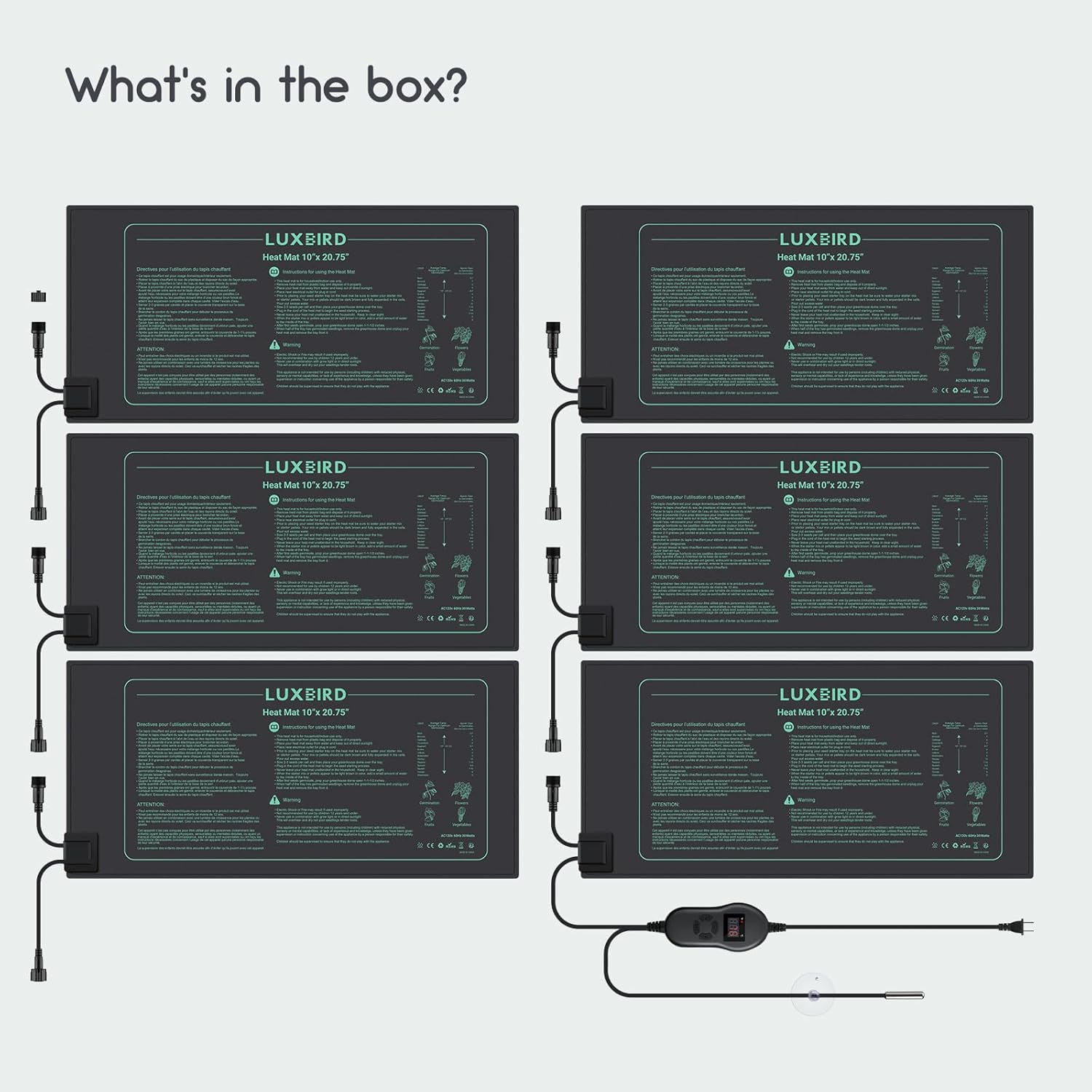
Your LUXBIRD LB-HT06 package includes the following items:
- 6 x LUXBIRD 10" x 20.75" Seedling Heating Mats
- 1 x Digital Thermostat Controller with NTC Temperature Probe
- Connection Cables for daisy-chaining mats

4. Product Features
- Optimal Size: Each mat measures 10" x 20.75", ideal for 1020 plant trays.
- Consistent Heat: Maintains root area temperature within an optimal range of 68-86℉ (20-30℃).
- Unified Control: One digital thermostat controller can manage up to six heating mats simultaneously.
- Enhanced Germination: Effectively increases germination rates by up to 40%.
- Precise Temperature Control: Digital thermostat supports a temperature range of 32℉~108℉ (0℃~42℃).
- Versatile Applications: Suitable for indoor gardening seed starting, hydroponics, home brewing, DIY fermentation, and reptile terrariums.
- Durable & Waterproof: Made of durable PVC material with a fireproof surface and IP67 waterproof rating, making them anti-abrasion, dustproof, and flame-resistant. Easy to clean.
- Daisy-Chain Design: Mats connect one by one through waterproof connectors for flexible setup in greenhouses and grow tents.
- Energy Efficient: Designed for efficient performance with 30W per mat.
- Real-time Monitoring: Includes an NTC probe to view and adjust soil temperature.


5. Setup Instructions
Follow these steps to set up your LUXBIRD seedling heating mats:
- Unpack: Carefully remove the heating mats and thermostat controller from their packaging.
- Placement: Place the heating mats on a flat, well-drained surface. Ensure there is no standing water. For warmer mat temperatures, place it on an insulated surface rather than a cold floor.
- Connect Mats: Connect the heating mats to each other using the waterproof connectors. The system allows for daisy-chaining up to six mats to a single controller.
- Connect Controller: Plug the main power cord of the thermostat controller into a standard 120V power outlet.
- Probe Placement: Insert the NTC temperature probe into the soil of one of your plant trays or directly into the growing medium. Secure the probe with the included suction cup if desired. Ensure the probe is not immersed in water.
- Position Trays: Place your seed starter trays or other containers directly on top of the heating mats. Covering your plant tray with a humidity cover or dome will also help keep the root area warmer and maintain humidity for better rooting.


6. Operating Instructions
The digital thermostat controller allows for precise temperature management:
- Power On: Once plugged in, the controller display will light up, showing the current temperature detected by the NTC probe.
- Set Temperature: Press the 'SET' button to enter temperature setting mode. Use the 'UP' and 'DOWN' buttons to adjust the desired temperature. Press 'SET' again to confirm.
- Temperature Unit: The controller supports both Celsius (℃) and Fahrenheit (℉). Refer to the controller's specific instructions for switching between units.
- Monitoring: The NTC probe continuously monitors the soil temperature, and the controller will activate or deactivate the heating mats to maintain the set temperature.
- Watering: Water your seedlings as needed. The mats are waterproof, but avoid excessive watering that could lead to standing water on the mat surface.

7. Maintenance
Proper maintenance ensures the longevity and performance of your heating mats:
- Cleaning: The mats are easy to clean. Simply wipe the surface with a damp cloth. Ensure the mat is unplugged and dry before storing.
- Storage: When not in use, roll up the mats for compact storage. Store in a dry place away from direct sunlight.
- Inspection: Regularly inspect the mats and cables for any signs of damage, cuts, or wear. Discontinue use if damage is found.
8. Troubleshooting
If you encounter issues with your heating mats, refer to the following:
- Mat Not Heating:
- Check if the controller is properly plugged into a working power outlet.
- Ensure all mats are securely connected in the daisy chain.
- Verify the thermostat controller is set to a temperature above the current ambient temperature.
- Uneven Heating:
- Ensure mats are placed on a flat, insulated surface. Cold surfaces can draw heat away.
- Check that the NTC probe is correctly positioned in the soil to accurately measure temperature.
- Controller Display Issues:
- Ensure the controller has power.
- If the display is blank or erratic, try unplugging and replugging the controller.
- Overheating:
- Ensure the mats are not covered with insulating materials.
- Verify the thermostat setting is appropriate for your plants.
- Check that the NTC probe is not exposed to direct sunlight or other external heat sources that could skew readings.
9. Specifications
| Feature | Specification |
|---|---|
| Model Number | LB-HT06 |
| Mat Dimensions (each) | 10" x 20.75" |
| Power (each mat) | 30W |
| Voltage | 120VAC, 60Hz |
| Thermostat Temperature Range | 32℉~108℉ (0℃~42℃) |
| Optimal Root Temperature | 68-86℉ (20-30℃) |
| Waterproof Rating | IP67 |
| Material | Durable PVC with fireproof surface |
| Item Weight (total) | 4.58 pounds |
| Package Dimensions | 11.02 x 6.46 x 6.38 inches |
| Manufacturer | Luxbird |
10. Warranty and Support
For warranty information or technical support, please refer to the product packaging or contact your retailer. Keep your purchase receipt for any warranty claims.