
1. Introduction
This manual provides essential information for the safe and effective use of your BOTORRO R7 Home Treadmill. Please read this manual thoroughly before assembly, operation, or maintenance. Keep this manual for future reference.
2. Safety Information
Always follow basic safety precautions when using electrical appliances to reduce the risk of fire, electric shock, and personal injury.
- Consult a physician before starting any exercise program.
- Keep children and pets away from the treadmill during operation.
- Place the treadmill on a solid, level surface with adequate clearance around it.
- Wear appropriate exercise clothing and athletic shoes.
- Do not operate the treadmill if it has a damaged cord or plug, or if it is not working properly.
- Use the safety key clip at all times during operation.
- Do not attempt to service the treadmill yourself. Contact qualified service personnel.
- The maximum user weight capacity for this treadmill is 136 kg (300 lbs).
3. Package Contents
Upon unpacking, ensure all components are present and undamaged. If any parts are missing or damaged, contact BOTORRO customer service.
- BOTORRO R7 Treadmill Main Unit
- User Manual (this document)
- Safety Key
- Assembly Tools (if required)
- Power Cord
4. Setup and Assembly
The BOTORRO R7 treadmill is designed for easy installation. Assembly typically involves securing the handlebars.
- Unpacking: Carefully remove the treadmill from its packaging. It is recommended to have two people for this step due to the weight of the unit.
- Placement: Position the treadmill on a flat, stable surface. Ensure there is at least 2 meters (6.5 feet) of clear space behind the treadmill and 0.6 meters (2 feet) on each side.
- Unfolding (if applicable): If the treadmill is in a folded position, carefully lower the running deck until it locks into place. Refer to the specific folding mechanism instructions if provided separately.
- Handlebar Assembly: The handlebars typically require tightening four screws. These screws are usually pre-inserted. Securely tighten them using the provided tools.
- Power Connection: Plug the power cord into a grounded electrical outlet.
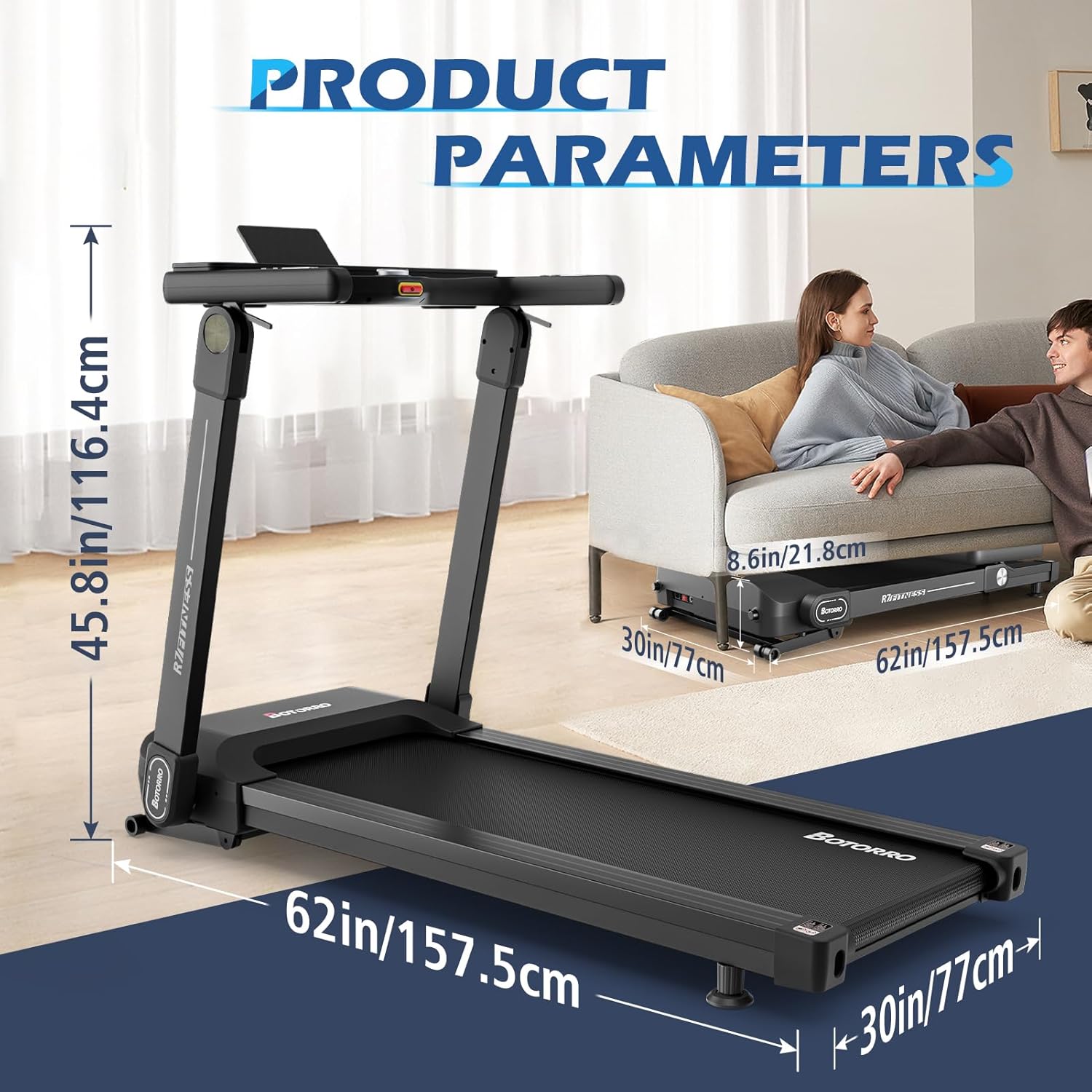
Image: Product dimensions, illustrating the treadmill's size when unfolded (157.5 x 77 x 116 cm) and folded (157.5 x 77 x 21.8 cm).
5. Operating Instructions
5.1. Control Panel Overview

Image: The LED touch screen control panel, displaying metrics like speed, pulse, time, incline, calories, and distance. A central smart adjustment knob allows for easy setting changes.
The BOTORRO R7 features an advanced LED touch screen that provides comprehensive workout information and easy control.
- LED Touch Screen: Displays speed, pulse, time, incline, calories burned, and distance.
- Smart Adjustment Knob: Allows for easy, one-handed adjustment of various parameters, including speed and incline.
- Quick Speed/Incline Buttons: Pre-set buttons for quick changes to speed and incline levels.
5.2. Starting a Workout
- Attach Safety Key: Clip the safety key to your clothing and insert the other end into the designated slot on the console. The treadmill will not operate without the safety key.
- Power On: Press the 'Start' button on the console. The belt will begin to move at a low speed after a short countdown.
- Adjust Speed: Use the speed adjustment buttons or the smart adjustment knob to increase or decrease the belt speed. The treadmill offers a speed range of 0.9 to 16 mph (1.5 to 25.7 km/h).
- Adjust Incline: Use the incline adjustment buttons or the smart adjustment knob to change the incline level. The R7 offers 18 levels of automatic incline adjustment.
5.3. Workout Programs
The treadmill includes 18 pre-set workout programs designed for various fitness levels and goals. Select a program from the console to automatically adjust speed and incline throughout your workout.
5.4. Bluetooth Connectivity and Kinomap

Image: Screenshots of the Kinomap application, demonstrating features like virtual routes, coaching, and structured workouts, accessible via Bluetooth connection.
The BOTORRO R7 treadmill features Bluetooth connectivity, allowing you to connect to fitness applications for tracking progress and accessing personalized training programs. It includes a 30-day free Kinomap subscription, offering a variety of virtual running routes.
- Enable Bluetooth: Ensure Bluetooth is enabled on your smartphone or tablet.
- Open App: Launch a compatible fitness app (e.g., Kinomap).
- Connect: Follow the app's instructions to pair with your BOTORRO R7 treadmill.
5.5. Stopping a Workout
To stop your workout, press the 'Stop' button on the console. The treadmill belt will gradually slow down and come to a complete stop. Alternatively, pulling the safety key will immediately stop the treadmill.
6. Maintenance
Regular maintenance ensures the longevity and optimal performance of your treadmill.
- Cleaning: Wipe down the console and other surfaces with a damp cloth after each use. Do not use abrasive cleaners.
- Belt Lubrication: The running belt may require periodic lubrication. Refer to specific instructions for your model regarding lubrication frequency and type of lubricant.
- Belt Tension and Alignment: Check the running belt tension and alignment regularly. Adjust as needed according to the instructions in the full manual or contact customer support.
- Storage: The treadmill can be folded for storage to save space. Ensure it is securely locked in the folded position before moving.
7. Troubleshooting
If you encounter issues with your BOTORRO R7 treadmill, refer to the following common solutions:
| Problem | Possible Cause | Solution |
|---|---|---|
| Treadmill does not start | Safety key not inserted; Power cord not plugged in; Power switch off. | Insert safety key; Check power cord connection; Turn on power switch. |
| Running belt slips | Belt tension too loose. | Adjust belt tension according to instructions. |
| Unusual noise during operation | Loose parts; Lack of lubrication; Motor issue. | Check for and tighten loose parts; Lubricate belt if needed; Contact customer service if noise persists. |
| Display not working | Loose cable connection; Power issue. | Check cable connections to the console; Ensure power supply is stable. |
If the problem persists after attempting these solutions, please contact BOTORRO customer support.
8. Specifications
The following table details the technical specifications of the BOTORRO R7 Home Treadmill:
| Feature | Specification |
|---|---|
| Model | R7 |
| Brand | BOTORRO |
| Motor Horsepower | 3.0 HP (Brushless) |
| Speed Range | 0.9 - 16 mph (1.5 - 25.7 km/h) |
| Incline Levels | 18 (Automatic) |
| Running Area (L x W) | 129.5 x 48.3 cm (51 x 19 inches) |
| Max User Weight Capacity | 136 kg (300 lbs) |
| Display Type | LED Touch Screen (7 inches) |
| Programs | 18 Pre-set Programs |
| Connectivity | Bluetooth (Kinomap compatible) |
| Frame Material | Carbon Steel, Alloy Steel |
| Product Dimensions (Unfolded) | 157.5 x 77 x 116 cm (L x W x H) |
| Product Dimensions (Folded) | 157.5 x 77 x 21.8 cm (L x W x H) |
| Item Weight | 55 kg |
| Special Features | 18% Automatic Incline, Dual Shock Absorption, Large Running Platform, Bluetooth, LED Display |

Image: Illustration of the 3.0 HP brushless motor, indicating stable, efficient, and quiet operation. It also shows speed ranges for walking (0.6-4.5 mph), jogging (4.5-6.0 mph), and running (6.0-10 mph), along with 0-18 auto incline levels.
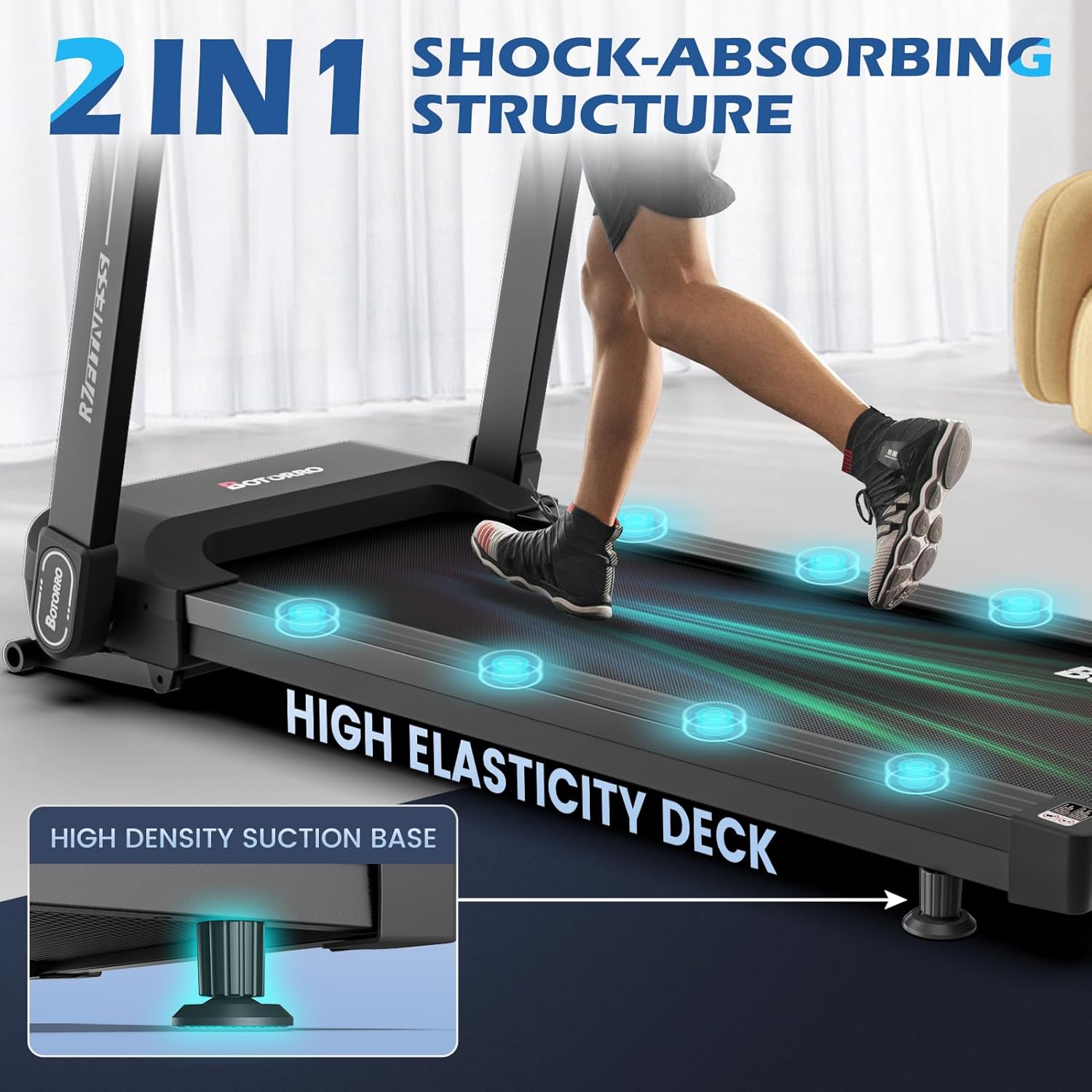
Image: Depiction of the treadmill's 2-in-1 shock-absorbing structure, featuring a high elasticity deck and high-density suction base pads to minimize impact on joints.

Image: Close-up of the treadmill's light commercial belt and deck, highlighting the 19-inch (480mm) width, non-slip texture, and industrial-grade multi-layer material construction.

Image: Illustration emphasizing the treadmill's solid build for commercial grade use, featuring 65mm x 25mm steel column pipes and a 70mm thick running deck, supporting up to 300 lbs (136 kg).
9. Warranty and Support
BOTORRO offers a one-year warranty for the R7 treadmill, ensuring peace of mind for your purchase. This warranty covers manufacturing defects and provides timely assistance and solutions for any issues that may arise during the warranty period.
For warranty claims, technical support, or any inquiries, please contact BOTORRO customer service through the official website or your purchase platform. Please have your model number (R7) and proof of purchase ready when contacting support.


