
Rolanstar BF008-BK-F-RR-VC
Rolanstar Full Size Bed Frame with Charging Station and LED Lights - Instruction Manual
Model: BF008-BK-F-RR-VC
1. Introduction
Thank you for choosing the Rolanstar Full Size Bed Frame. This manual provides detailed instructions for assembly, operation, and maintenance of your new bed frame, featuring a PU leather headboard with integrated charging station, LED lights, and storage shelves. Designed for durability and convenience, this bed frame offers a stable and noise-free foundation for your mattress without requiring a box spring.

Image: The Rolanstar Full Size Bed Frame, showcasing its integrated LED lighting, headboard storage, and charging station.
2. Safety Information
- Maximum Weight Capacity: This bed frame is designed to support a maximum weight of 1200 lbs. Do not exceed this limit to prevent damage or injury.
- Ensure all bolts and connections are securely tightened before use and periodically check for tightness.
- Keep children away from small parts during assembly.
- Do not use power tools for assembly as this may overtighten or strip screws.
- Place the bed frame on a level surface.
- Keep electrical components (LED lights, charging station) away from water or excessive moisture.
3. Package Contents
Please verify that all components are present before beginning assembly. If any parts are missing or damaged, please contact customer support.
- Headboard with integrated LED lights and charging station
- Side rails (left and right)
- Footboard
- Metal support slats
- Center support beam(s)
- Support legs
- Hardware pack (screws, bolts, Allen keys)
- Power adapter for LED lights and charging station
- Instruction manual
4. Assembly Instructions
Assembly is designed to be straightforward with a bolt-free quick-lock system for the slats. It is recommended to have two people for easier assembly, though it can be completed by one person.
- Unpack Components: Carefully remove all parts from the packaging and lay them out on a clean, soft surface to prevent scratches. Identify each part using the provided parts list.
- Assemble Headboard: Attach the headboard frame components as per the diagrams in your included paper manual. Ensure the PU leather panels are correctly oriented.
- Attach Side Rails: Connect the side rails to the assembled headboard using the provided hardware. Do not fully tighten bolts until all major components are connected.
- Attach Footboard: Connect the footboard to the side rails. Once all frame components are loosely connected, gradually tighten all bolts.
- Install Center Support: Place the center support beam(s) and attach the support legs.
- Install Slats: Utilize the bolt-free quick-lock assembly system to install the metal slats across the frame. Ensure each slat is securely seated in its designated slot.
- Connect Electrical Components: Route the power cable for the LED lights and charging station. Connect the power adapter to a suitable wall outlet.
- Final Check: Verify all connections are secure and the frame is stable.

Image: Illustration of the bolt-free quick-lock assembly system for slats and the steel baffle design to prevent mattress sliding.

Image: Visual guide demonstrating the ease of assembly for the bed frame.
Assembly Video
Video: An official Rolanstar video demonstrating the assembly process and features of the storage bed frame with LED and charging station.
5. Operating Instructions
5.1 LED Lights
The bed frame features integrated RGB LED lights in the headboard and under the bed. The lights are controlled by a line controller conveniently located on the headboard.
- Power Button: Press to turn the LED lights ON or OFF.
- Mode Button: Cycle through 12 different scene modes, offering various color patterns and effects.
- Brightness/Speed Button: Adjust the brightness of the lights (3 modes) or the speed of the scene modes (3 levels).
- The lights support 7 static colors and various dynamic modes.
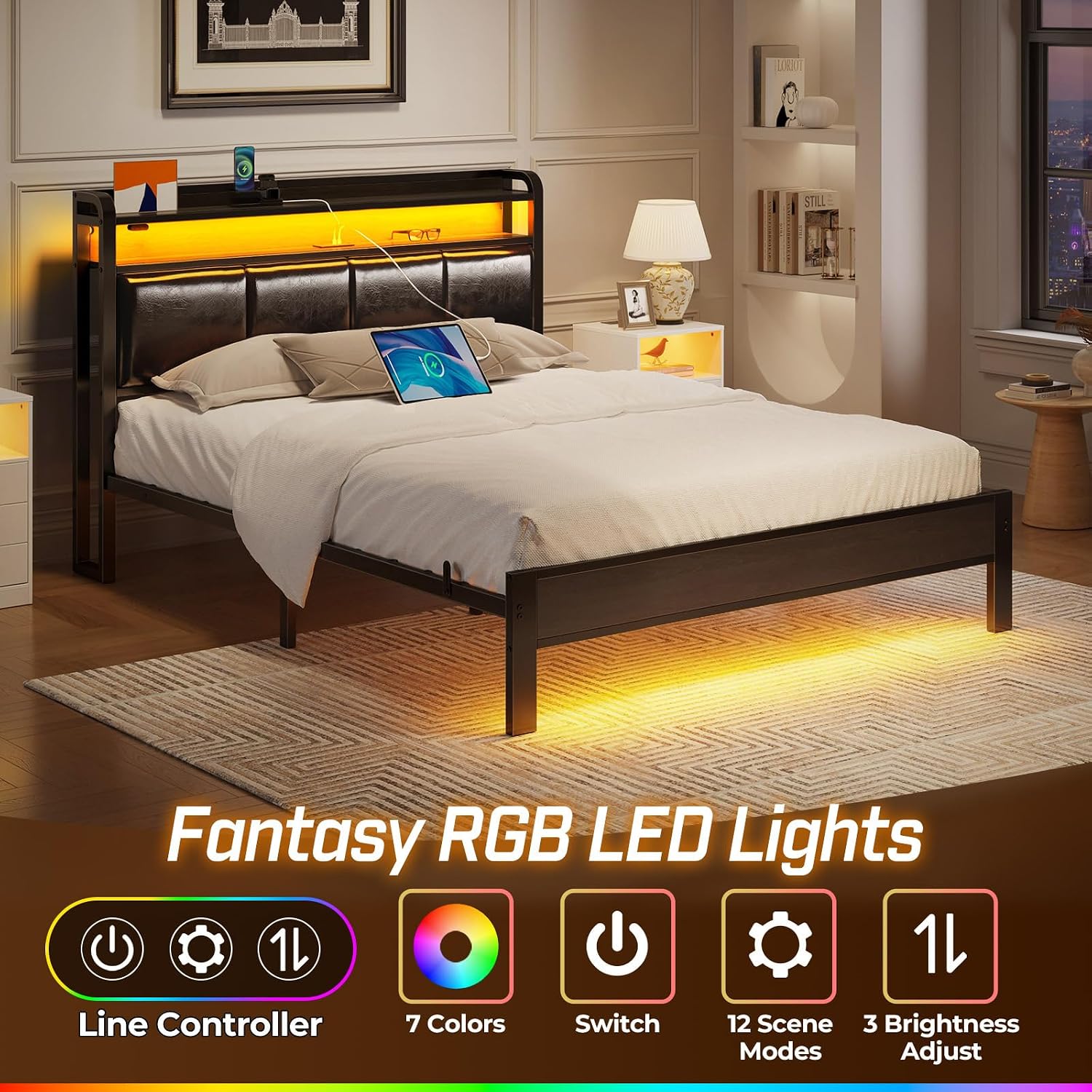
Image: Overview of the RGB LED lights and the functions of the line controller (Power, 7 Colors, Switch, 12 Scene Modes, 3 Brightness Adjust).

Image: A close-up view of the integrated control system for the LED lights, showing the buttons for power, mode, and brightness/speed adjustment.
5.2 Charging Station
The headboard includes a built-in charging station with 2 USB ports (5V/2.4A) and 1 USB-C port (5V/3A) for convenient charging of your mobile devices.
- Ensure the bed frame is connected to a power outlet for the charging station to function.
- Plug your device's charging cable into the appropriate USB or USB-C port.
- The charging station is designed for standard mobile device charging.

Image: The headboard featuring a 2-tier storage shelf and the integrated charging station with USB and USB-C ports.
5.3 Storage Features
The bed frame offers multiple storage solutions:
- Headboard Shelves: Two tiers of shelves are integrated into the headboard, providing convenient space for small items such as phones, glasses, books, or decorative items.
- Under-Bed Storage: The design allows for approximately 10.4 inches of clearance beneath the bed, suitable for storing luggage, shoe cases, or storage boxes. This space also accommodates most sweeping robots for easy cleaning.

Image: A visual representation of the 10.4-inch under-bed clearance, ideal for storing various items.

Image: Example of under-bed storage space utilized with baskets and luggage.
Operation Video
Video: An official Rolanstar video showcasing the LED lights, storage shelves, and charging station features of the bed frame.
6. Maintenance
- Cleaning: Wipe the bed frame surfaces with a damp cloth. Avoid using harsh chemicals or abrasive cleaners, which may damage the finish or PU leather.
- Hardware Check: Periodically inspect all bolts and connections to ensure they remain tight. Re-tighten if necessary to maintain stability and prevent noise.
- Electrical Components: Ensure the power cord and connections for the LED lights and charging station are not pinched or damaged.
7. Troubleshooting
| Problem | Possible Cause | Solution |
|---|---|---|
| Bed frame is wobbly or noisy. | Loose bolts or uneven placement. | Ensure all assembly bolts are securely tightened. Place the bed frame on a level surface. |
| LED lights are not working. | Power connection issue or controller malfunction. | Check if the power adapter is securely plugged into the wall outlet and the bed frame. Ensure the controller cable is properly connected. If issues persist, contact customer support. |
| Charging station is not charging devices. | Power connection issue or device compatibility. | Verify the bed frame is powered. Try a different USB cable or device to rule out cable/device issues. Ensure your device is compatible with standard USB charging. |
| Mattress slides on the frame. | Lack of anti-slip measures. | The frame includes a steel baffle design to prevent mattress slipping. Ensure these are correctly installed. Consider using a non-slip mattress pad for additional grip if needed. |
8. Specifications
| Feature | Detail |
|---|---|
| Model Number | BF008-BK-F-RR-VC |
| Size | Full |
| Product Dimensions (L x W x H) | 82.28" x 54.53" x 43.3" |
| Material | Metal frame, PU Leather headboard |
| Color | Black |
| Weight Capacity | 1200 lbs |
| Under-Bed Clearance | 10.4 inches |
| Charging Ports | 2 x USB (5V/2.4A), 1 x USB-C (5V/3A) |
| LED Lights | RGB, 12 scene modes, 3 speed levels, 3 brightness modes |
| Assembly Required | Yes (Bolt-free quick-lock system for slats) |
| Certifications | FSC-Certified wood (for frame components) |

Image: Technical drawing showing the full dimensions of the Rolanstar Full Size Bed Frame.
9. Warranty and Support
For any questions, missing parts, or assistance with your Rolanstar bed frame, please contact our customer support team.
- Returns: This product is eligible for 30-day easy returns. Please refer to your purchase platform's return policy for details.
- Protection Plans: Extended protection plans (2-Year or 3-Year) may be available for purchase separately. Refer to your retailer for more information.
- Contact: For direct support, please visit the Rolanstar Store on Amazon or contact Homelly Direct, the seller.
Ask a question about this manual
Ask about setup, troubleshooting, compatibility, parts, safety, or missing instructions. Manuals+ will review the question and use this page’s manual context to help answer it.