
1. Product Overview
This manual provides instructions for the Kircuit 2-Prong 5V AC/DC Adapter, designed to provide reliable power for compatible devices. This adapter is specifically compatible with the Happy Nuts The Ballber Groin Trimmer, which features a waterproof and rechargeable Li-ion battery.
Key features of this adapter include:
- Input: 100V-240V AC, suitable for various power outlets.
- Output: DC5V 1A (5.0V 1.0A) for efficient charging.
- Built-in Dynamic IC, Charger IC, and Power fuse for rapid charging and overcharge protection.
2. Package Contents
Verify that all items listed below are included in your package:
- 1 x Kircuit 2-Prong 5V AC/DC Adapter
- 1 x USB Charging Cable (Note: While the product listing mentions "2 x USB Cable", the primary product image and typical adapter bundles suggest one adapter and one compatible cable for charging.)

Image 2.1: The Kircuit 2-Prong 5V AC/DC Adapter shown with its compatible USB charging cable. The adapter is black with two flat prongs for wall outlets, and the cable features a standard USB-A connector on one end and a 2-prong charging connector on the other.
3. Setup
Follow these steps to set up your Kircuit AC/DC Adapter:
- Connect the USB Cable: Insert the USB-A end of the charging cable into the USB port on the Kircuit 2-Prong 5V AC/DC Adapter. Ensure it is firmly seated.
- Connect to Device: Insert the 2-prong charging connector end of the cable into the charging port of your Happy Nuts The Ballber Groin Trimmer.
- Plug into Power Outlet: Insert the 2-prong adapter into a standard 100V-240V AC wall power outlet.
- Verify Connection: Confirm that the device indicates it is charging (e.g., an LED indicator on the trimmer).
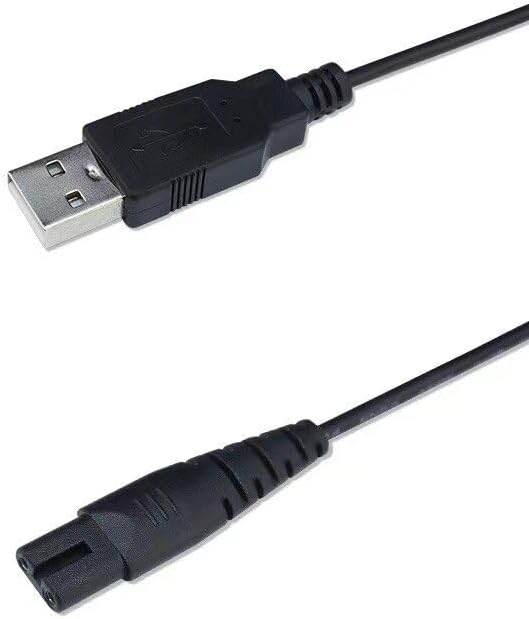
Image 3.1: A close-up view of the USB-A connector and the 2-prong charging connector of the cable, illustrating the connection points.
4. Operating Instructions
Once connected, the adapter will begin charging your compatible device. The charging process is automatic. Always ensure the adapter and cable are used in a dry environment.
- Do not expose the adapter or cable to water or excessive moisture.
- Avoid using the adapter if the cable or adapter housing is damaged.
- Unplug the adapter from the wall outlet when not in use or when the device is fully charged.
5. Maintenance
Proper maintenance ensures the longevity and safe operation of your adapter.
- Cleaning: Disconnect the adapter from the power outlet and the device before cleaning. Use a dry, soft cloth to wipe the adapter and cable. Do not use liquid cleaners or abrasive materials.
- Storage: Store the adapter and cable in a cool, dry place away from direct sunlight and extreme temperatures. Avoid tightly coiling the cable to prevent damage.
- Inspection: Periodically inspect the adapter and cable for any signs of wear, cuts, or damage. If damage is observed, discontinue use immediately.

Image 5.1: Illustration of the durable design of the power cable, highlighting its high-quality materials and thick insulation layer for protection against wear and external factors.
6. Troubleshooting
If you encounter issues with your Kircuit AC/DC Adapter, refer to the following common problems and solutions:
| Problem | Possible Cause | Solution |
|---|---|---|
| Device not charging. | Loose connection, faulty outlet, incompatible device, damaged cable/adapter. |
|
| Adapter feels hot during charging. | Normal operation, excessive load, poor ventilation. |
|
| Charging is slow. | Cable quality, device battery condition, power source instability. |
|
7. Specifications
| Brand | Kircuit |
| Model Number (ASIN) | B0C9964CYL |
| Input Voltage | 100V-240V AC |
| Output Voltage | 5.0V DC |
| Output Current | 1.0A |
| Wattage | 5 Watts |
| Compatible Devices | Happy Nuts The Ballber Groin Trimmer, Rechargeable Li-ion Battery Ball Shaver |
| Manufacturer | Shenzhen Waweis Technology Co., Ltd |
8. Safety Information
Your Kircuit AC/DC Adapter is designed with multiple safety features to protect both the adapter and your connected device. Adhere to the following safety guidelines:
- Do not disassemble or modify the adapter.
- Avoid extreme temperatures, direct sunlight, and humid environments.
- Keep out of reach of children.
- Unplug during lightning storms or when unused for long periods.
- Ensure proper ventilation around the adapter during use.

Image 8.1: An illustration detailing the built-in safety protections of Kircuit products, including safeguards against short circuits, excess voltage, over temperature, and overcurrent.

Image 8.2: A visual comparison highlighting the robust and secure design of the Kircuit adapter plug compared to less durable alternatives, emphasizing UL standard quality.
9. Warranty and Support
For warranty information or technical support, please refer to the documentation provided with your original purchase or contact the manufacturer directly. Keep your purchase receipt as proof of purchase.
Manufacturer: Shenzhen Waweis Technology Co., Ltd