1. Product Overview
The iKeener Handheld Light Therapy Device utilizes advanced Low-Level Light Therapy (LLLT) technology, combining 650nm red lights and 808nm infrared lights. This device is designed to provide targeted pain relief for joints, tissues, and muscles in both humans and various animals, including dogs, cats, and horses.
The device is lightweight, portable, and features an ergonomic design for ease of use at home, in the office, or while traveling.

Image 1.1: The iKeener Handheld Light Therapy Device and safety goggles.
2. Safety Information
Important: Please read all safety instructions before using the device.
- Eye Protection: Always wear the provided safety goggles during operation to protect your eyes from direct exposure to the light. Do not look directly into the light source.
- Skin Sensitivity: If you experience any discomfort, excessive heat, or skin irritation during use, discontinue treatment immediately.
- Medical Conditions: Consult a healthcare professional before use if you have any underlying medical conditions, are pregnant, or are taking photosensitizing medications.
- Children and Pets: Keep the device out of reach of children. When using on pets, ensure they are calm and cooperative, and monitor their reaction closely.
- Device Integrity: Do not use the device if it appears damaged or is not functioning correctly. Do not attempt to open or repair the device yourself.
- Legal Disclaimer: Statements regarding dietary supplements have not been evaluated by the FDA and are not intended to diagnose, treat, cure, or prevent any disease or health condition. This device is not intended to replace professional medical advice or treatment.
3. Package Contents
Upon opening the package, verify that all items listed below are present:
- iKeener Handheld Light Therapy Device
- Portable Carrying Case
- Safety Goggles
- USB-C Charging Cable
- Power Adapter (U.S.)
- User Manual
- Warranty Card

Image 3.1: All items included in the iKeener Handheld Light Therapy Device package.
4. Setup and Charging
4.1 Initial Charge
- Connect the USB-C charging cable to the device's charging port.
- Plug the other end of the USB-C cable into the provided power adapter.
- Insert the power adapter into a standard electrical outlet.
- The battery indicator on the device's display will show charging status. Charge the device fully before first use.
4.2 Preparing for Use
- Ensure the device is fully charged.
- Put on the safety goggles before turning on the device.
- Clean the treatment area on the skin or fur if necessary.
5. Operating Instructions
5.1 Device Controls
The device features a simple interface with a display and control buttons.
- Power Button: Press and hold to turn the device ON/OFF.
- TIME Button: Press to adjust the treatment duration. The display will show the selected time (e.g., 5 min, 10 min, 15 min).

Image 5.1: Key features of the iKeener Handheld Light Therapy Device.
5.2 Treatment Application
- Turn on the device using the Power button.
- Select the desired treatment time using the TIME button.
- Position the light emitting surface of the device directly over the target area, maintaining a small distance from the skin or fur.
- Hold the device steady during the treatment duration. The device will automatically turn off once the set time has elapsed.
- For optimal results, apply the device to areas such as the neck, back, shoulders, arms, knees, feet, and for various animal applications.

Image 5.2: Examples of device application on humans and animals.

Image 5.3: Common application areas for pain relief.

Image 5.4: Versatile use for both humans and various animals.
5.3 Light Therapy Mechanism
The device combines two specific wavelengths:
- 650nm Red Light: Visible to the human eye, these lights are designed to improve blood circulation and boost metabolism.
- 808nm Infrared Light: Invisible to the human eye, these lights penetrate deeper into subcutaneous tissues and muscles, aiding in tissue repair and reducing pain and inflammation.
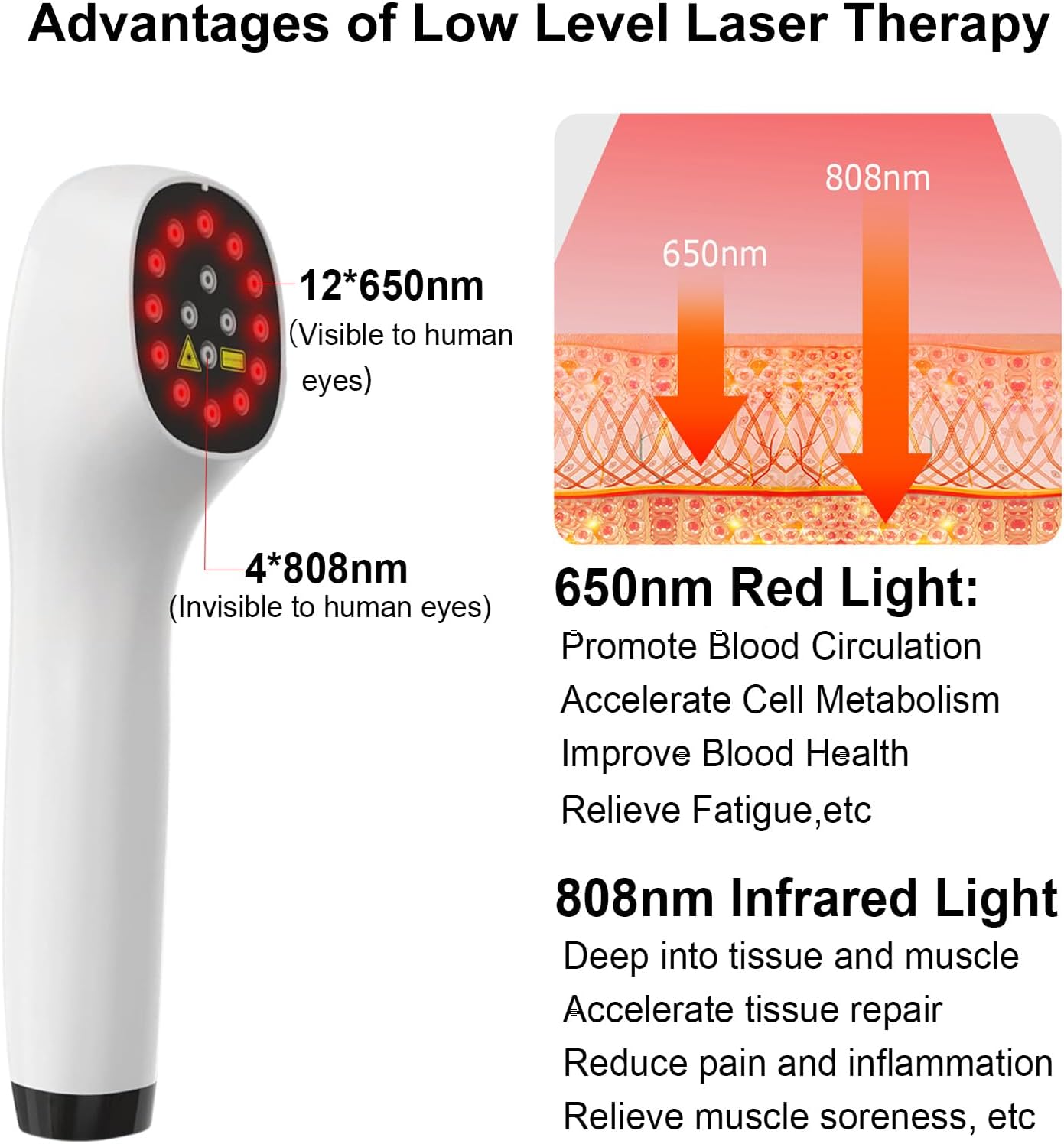
Image 5.5: Explanation of 650nm and 808nm light therapy benefits.
6. Maintenance
6.1 Cleaning
- Ensure the device is turned off and unplugged before cleaning.
- Wipe the device's surface with a soft, dry, or slightly damp cloth. Do not use abrasive cleaners or immerse the device in water.
- Clean the light emitting surface gently to ensure optimal performance.
6.2 Storage
- Store the device in its portable carrying case when not in use to protect it from dust and damage.
- Store in a cool, dry place, away from direct sunlight and extreme temperatures.
7. Troubleshooting
| Problem | Possible Cause | Solution |
|---|---|---|
| Device does not turn on. | Low battery or device not charged. | Charge the device fully using the provided cable and adapter. |
| Lights are dim or not working. | Low battery or device malfunction. | Ensure the device is fully charged. If the problem persists, contact customer support. |
| Device gets too hot during use. | Prolonged use or environmental factors. | Discontinue use and allow the device to cool down. Ensure proper ventilation. If overheating persists, contact customer support. |
| Skin irritation or discomfort. | Individual sensitivity or improper application. | Discontinue use immediately. Ensure the device is not pressed too firmly against the skin. Consult a healthcare professional if irritation persists. |
8. Product Specifications
- Model: Handheld Light Therapy Device
- Light Wavelengths: 12 x 650nm (Red Light), 4 x 808nm (Infrared Light)
- Battery: 1 Lithium Ion battery (included), 2600mAh
- Charging: Type-C USB
- Product Dimensions: 10.63 x 5.91 x 5.51 inches
- Weight: Approximately 6.53 oz (0.41 lbs) / 2.16 Pounds (device and packaging)
- Manufacturer: iKeener
- ASIN: B0C991B2WR
9. Warranty and Support
iKeener provides lifetime after-sales support for this product. Your purchase includes a warranty card with details regarding coverage.
If you encounter any questions or problems with your iKeener Handheld Light Therapy Device, please contact our customer service team immediately. We offer 24/7 online customer service to assist you.
For support, please refer to the contact information provided on your warranty card or visit the official iKeener website.


