
INFANS QLS-996
INFANS 3-in-1 Ride-on Push Car User Manual
Model: QLS-996 | Brand: INFANS
Introduction
Thank you for choosing the INFANS 3-in-1 Ride-on Push Car. This versatile product is designed to grow with your child, transforming from a stroller to a walking car and finally to a ride-on car. It features a licensed Lamborghini design, ensuring a stylish and enjoyable experience for children aged 18 to 60 months. This manual provides essential information for safe assembly, operation, and maintenance of your new ride-on car.

Figure 1: INFANS 3-in-1 Ride-on Push Car (White)
Safety Information
Please read all instructions carefully before assembly and use. Failure to follow these instructions may result in serious injury. Keep this manual for future reference.
- Adult Supervision Required: Always supervise children when they are using the ride-on car.
- Age and Weight Limit: Suitable for children aged 18 to 60 months, with a maximum weight capacity of 55 lbs (25 kg). Do not exceed these limits.
- Assembly: Adult assembly is required. Ensure all parts are securely fastened before use.
- Safety Features: Always use the detachable safety guardrail and footrest when operating in stroller or walking car modes to ensure child safety.
- Operating Environment: Use on flat, smooth surfaces. Avoid slopes, stairs, busy roads, and uneven terrain.
- Protective Gear: Children should wear appropriate safety gear, such as a helmet, when riding.
- Battery Safety: The car requires 4 x 1.5V AA batteries (not included) for sound and light functions. Ensure batteries are inserted with correct polarity. Do not mix old and new batteries or different types of batteries. Remove batteries if the product is not used for a long period.
- Material Compliance: This product is compliant with US CPSIA and ASTM requirements, made from non-toxic materials free from BPA, PVC, Phthalates, Lead, Latex, and Formaldehyde.
Product Components
Familiarize yourself with the main components of your INFANS Ride-on Push Car:
- A. Main Car Body: The base structure of the ride-on car.
- B. Steering Wheel: Controls the front wheels and features sound effects and music buttons.
- C. Detachable Safety Bar: Provides security for younger children.
- D. Removable Push Handle: Allows parents to control the car in stroller and walking modes.
- E. Foot Pedals/Footrest: Provides a place for the child's feet.
- F. Wheels: Wear-resistant wheels suitable for various surfaces.
- G. Convenience Hook: Located on the push handle for carrying small bags or water bottles.
- H. Under-Seat Storage: A hidden compartment for toys or snacks.

Figure 2: Key components of the ride-on car.
Setup and Assembly
Follow these steps for initial assembly:
- Unpack Components: Carefully remove all parts from the packaging and verify against the component list.
- Attach Wheels: Securely attach all four wheels to the main car body. Ensure they click into place or are fastened according to specific instructions (if provided in a real manual).
- Install Steering Wheel: Insert the steering wheel into its designated slot on the car body. Connect any necessary wiring for electronic functions.
- Attach Safety Bar: If using the stroller or walking car mode, attach the detachable safety bar around the seat.
- Insert Push Handle: Slide the removable push handle into the rear slot of the car body until it locks securely.
- Install Batteries: Open the battery compartment (usually under the steering wheel or seat) and insert 4 x 1.5V AA batteries, observing correct polarity. Close the compartment securely.
- Final Check: Before first use, ensure all connections are secure and all parts are properly installed.
Operating Instructions
The INFANS Ride-on Push Car offers three modes of operation to adapt to your child's growth and development:
1. Stroller Mode (18-24 Months)
In this mode, the car functions as a comfortable stroller, allowing parents to push and steer the child. The safety bar and footrest provide maximum security.
- Ensure the detachable safety guardrail and footrest are securely attached.
- The removable push handle should be fully extended and locked into place.
- Parents can control the direction using the push handle. The detachable steering wheel allows for parent control of direction.

Figure 3: Stroller Mode in use.
2. Walking Car Mode (24-36 Months)
As your child begins to walk, this mode allows them to push the car themselves, aiding in balance and coordination. The safety bar can be removed if desired.
- The push handle can remain attached for parental assistance or removed for independent walking.
- The child can use the car as a support to push themselves forward.
3. Ride-on Car Mode (36-60 Months)
For older children, this mode allows them to sit and propel themselves using their feet, fostering independence and motor skills. The safety bar and push handle are typically removed for this mode.
- Remove the safety guardrail and push handle.
- The child sits on the seat and uses their feet to push the car forward.
- The steering wheel allows the child to control direction.

Figure 4: The 3-in-1 functionality of the ride-on car.
Electronic Features
- Power Switch: Located on the control panel near the steering wheel. Turn on to activate lights and sound.
- Music Buttons: Press buttons on the steering wheel or control panel to play built-in melodies and engine sounds.
- USB Port: Allows connection of a USB device for playing external audio. (Note: Some devices may only charge, not play music, as per user feedback).
- Power Display: Indicates battery level.
- Headlights: Functional headlights enhance the realistic driving experience.

Figure 5: Control panel and steering wheel features.
Additional Features
- Hidden Storage Space: Lift the seat to access a convenient storage compartment for small items.
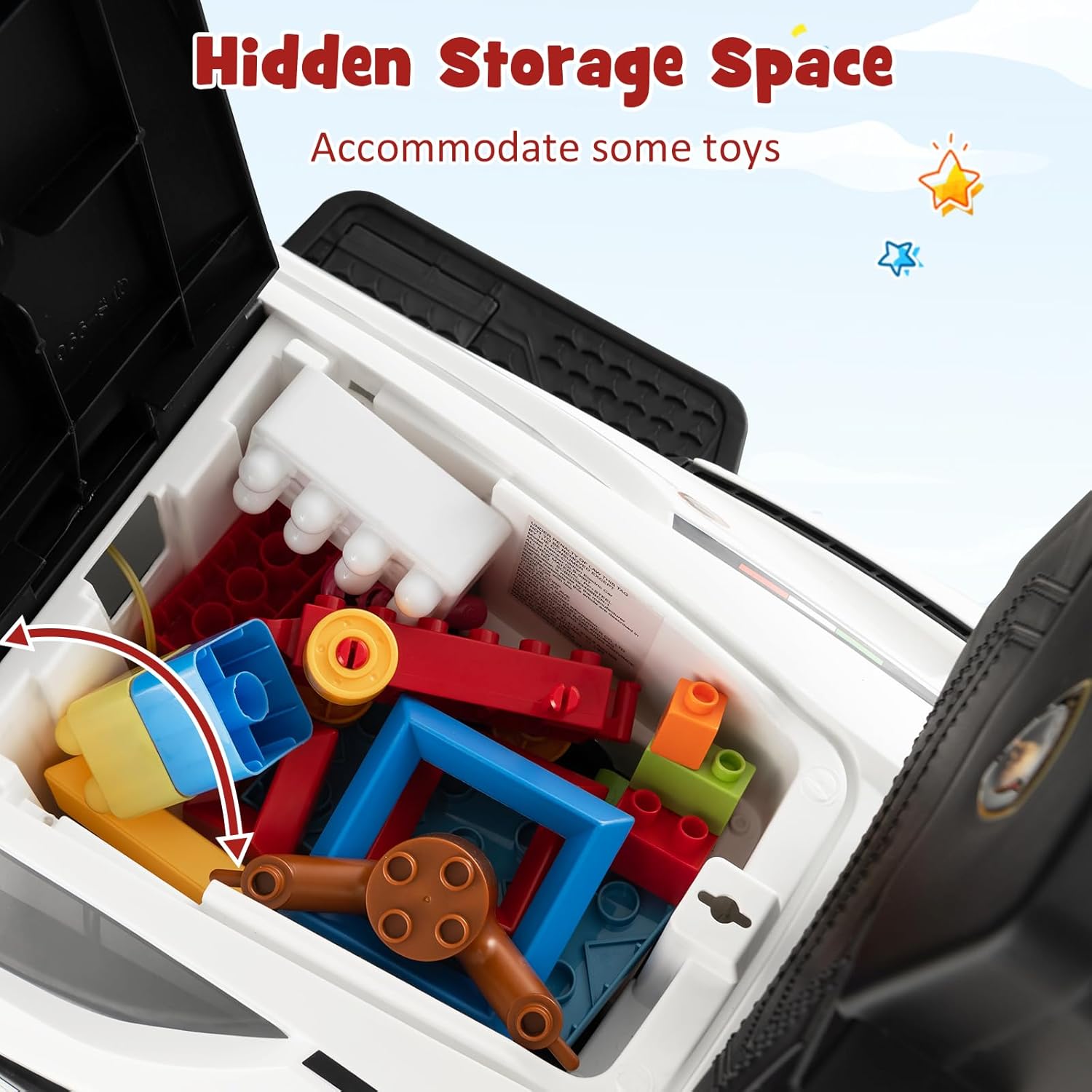
Figure 6: Under-seat storage compartment.
- Wear-Resistant Wheels: Designed for durability and smooth operation on various surfaces including brick, wooden, and tar roads.

Figure 7: Wear-resistant wheels and compatible surfaces.
Maintenance
- Cleaning: Wipe the car with a damp cloth and mild soap. Do not use abrasive cleaners or solvents.
- Storage: Store the car in a cool, dry place away from direct sunlight when not in use.
- Battery Replacement: Replace batteries when sound and light functions become weak or stop working. Always use new batteries of the specified type (4 x 1.5V AA).
- Regular Checks: Periodically check all screws, bolts, and connections to ensure they are tight and secure. Inspect wheels for wear and tear.
Troubleshooting
| Problem | Possible Cause | Solution |
|---|---|---|
| No sound or lights | Batteries are dead or incorrectly installed. | Check battery polarity. Replace with new 4 x 1.5V AA batteries. |
| Car does not move smoothly | Wheels are dirty or obstructed. Used on unsuitable surface. | Clean wheels. Ensure use on flat, smooth surfaces. |
| USB port not playing music | Device incompatibility or port designed for charging only. | Ensure your USB device is compatible for audio playback. Note that some USB ports on this model may primarily function for charging. |
| Parts feel loose | Screws or connections are not tight. | Inspect and tighten all screws and connections. Refer to assembly instructions. |
Specifications
| Feature | Detail |
|---|---|
| Model Number | QLS-996 |
| Product Dimensions | 37 x 17 x 33 inches (L x W x H) |
| Item Weight | 11 pounds |
| Recommended Age | 18 months - 5 years |
| Maximum Weight Capacity | 55 lbs |
| Battery Requirement | 4 x 1.5V AA batteries (not included) |
| Material | Non-toxic materials, BPA, PVC, Phthalates, Lead, Latex, Formaldehyde FREE |
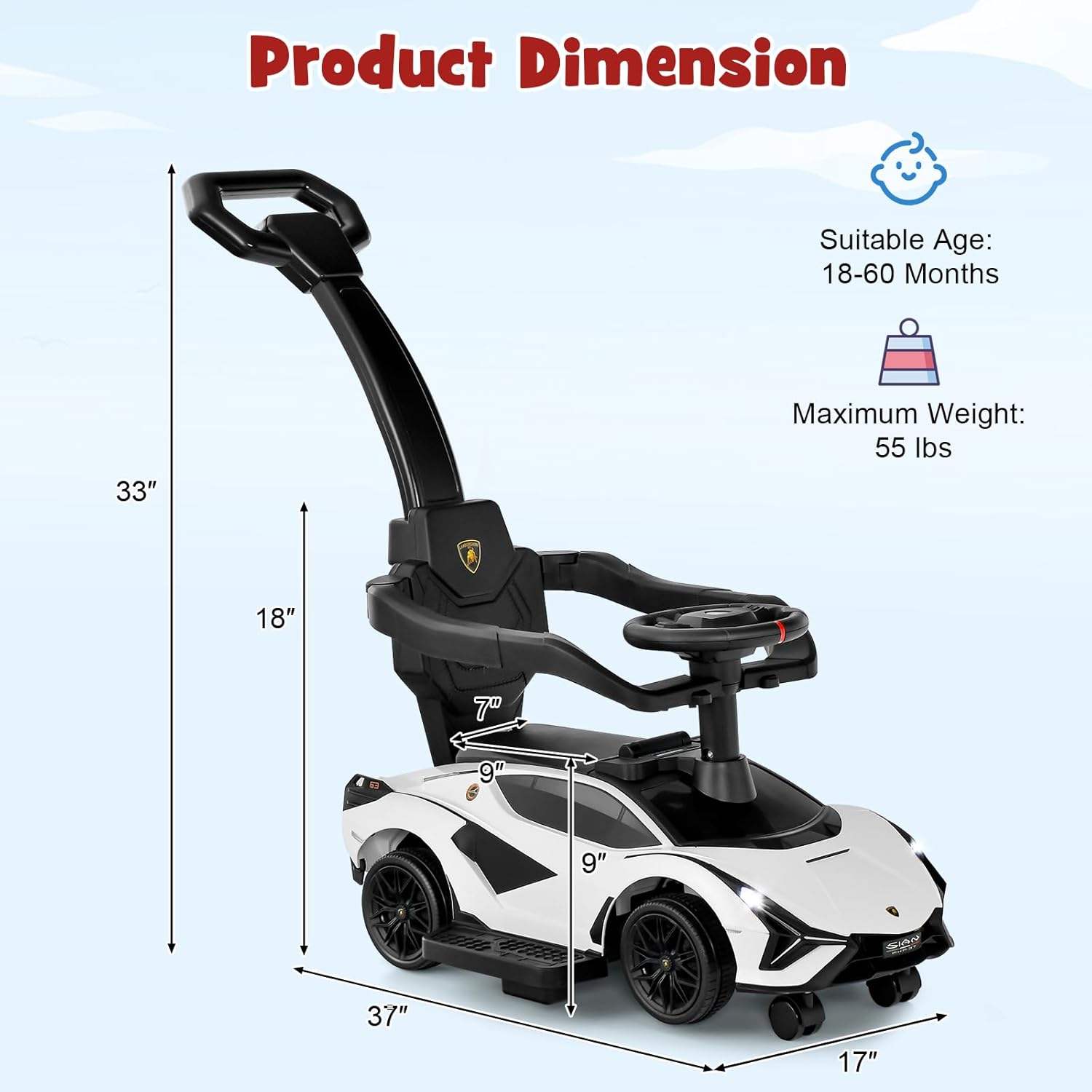
Figure 8: Product Dimensions.
Warranty and Support
While specific warranty details are not provided in this manual, INFANS is committed to providing quality products. For any questions, concerns, or support needs regarding your INFANS 3-in-1 Ride-on Push Car, please contact INFANS customer service directly.
You can often find support information on the official INFANS brand store or website:
Product Videos
No official product videos from the seller were found with relevant instructional content to embed in this manual.
Ask a question about this manual
Ask about setup, troubleshooting, compatibility, parts, safety, or missing instructions. Manuals+ will review the question and use this page’s manual context to help answer it.