
1. Introduction and Overview
Thank you for choosing the Wipcool 2F0 Double Stage Vacuum Pump. This professional-grade vacuum pump is designed for efficient evacuation of air conditioning and refrigeration systems. Its robust construction and innovative features ensure reliable performance and ease of use.
The F series vacuum pumps are engineered for a superior user experience, featuring a built-in solenoid valve and an overhead vacuum meter as standard. The patented anti-dumping structure prevents oil leakage, even if the pump is accidentally tilted during operation or transport. The powerful and lightweight DC motor provides high efficiency, ensuring optimal performance even in lower ambient temperatures.
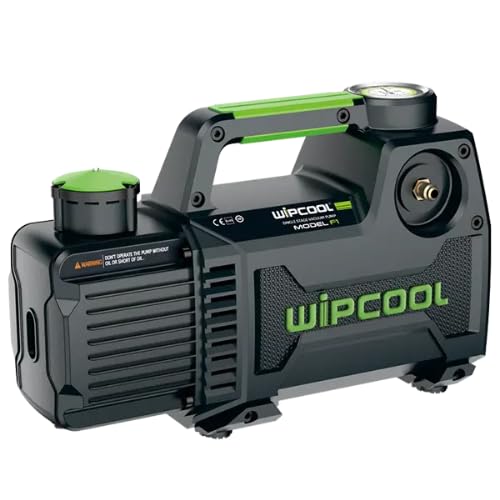
Figure 1: The Wipcool 2F0 Double Stage Vacuum Pump. This image displays the overall design of the pump, highlighting its compact and robust construction with green accents.
2. Safety Instructions
Please read and understand all safety instructions before operating the Wipcool 2F0 vacuum pump. Failure to follow these instructions may result in electric shock, fire, serious injury, or property damage.
- Electrical Safety: Ensure the power supply matches the pump's voltage requirements. Do not operate the pump with a damaged power cord or plug. Always disconnect power before servicing.
- Personal Protective Equipment (PPE): Always wear safety glasses and gloves when handling refrigerants and vacuum pump oil.
- Ventilation: Operate the pump in a well-ventilated area to prevent the accumulation of refrigerant vapors.
- Refrigerant Handling: This pump is suitable for R12, R22, R134a, and R410a. Always follow proper procedures for handling refrigerants to prevent environmental release.
- Oil Level: Regularly check the oil level and ensure it is within the recommended range to prevent damage to the pump.
- Hot Surfaces: The pump may become hot during operation. Avoid touching hot surfaces.
- Stability: Place the pump on a stable, level surface to prevent tipping.
3. Product Features
The Wipcool 2F0 vacuum pump incorporates several advanced features for enhanced performance and user convenience:
- Built-in Solenoid Valve: Prevents oil backflow into the system, protecting against contamination.
- Patented Anti-Dumping Structure: Designed to prevent oil leakage even if the pump is tilted, ensuring clean operation and transport.
- Overhead Vacuum Gauge: Provides clear and easy-to-read vacuum data without needing to bend down.
- Reinforced Aluminum Alloy Oil Tank: Offers effective heat dissipation and resistance to chemical corrosion.
- Oversized Sight Glass: Allows for easy monitoring of oil color and level.
- Powerful and Lightweight DC Motor: Ensures easy starting and high efficiency, even in lower ambient temperatures.
- Versatile Application: Ideal for split systems, light duties in automotive, and small commercial applications.
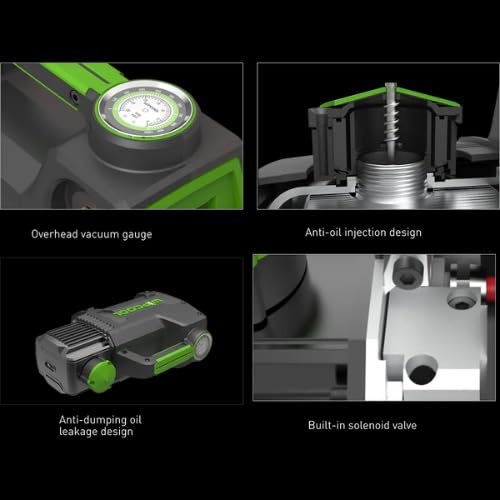
Figure 2: Key features of the Wipcool 2F0 Vacuum Pump. This image illustrates the overhead vacuum gauge, anti-oil injection design, anti-dumping oil leakage design, and the built-in solenoid valve.
4. Setup
4.1 Unpacking
- Carefully remove the vacuum pump and all accessories from the packaging.
- Inspect the pump for any signs of damage during transit. If damaged, do not operate and contact your supplier.
- Retain packaging for future storage or transport.
4.2 Adding Vacuum Pump Oil
The pump is shipped without oil. It is essential to fill the pump with high-quality vacuum pump oil before first use.
- Ensure the pump is on a level surface and powered off.
- Locate the oil fill cap (usually marked 'OIL' or with an oil symbol).
- Remove the oil fill cap.
- Slowly pour vacuum pump oil into the oil reservoir until the oil level is between the 'MIN' and 'MAX' marks on the sight glass. Do not overfill.
- Replace the oil fill cap securely.
4.3 Power Connection
- Connect the power cord to the pump's power inlet.
- Plug the power cord into a grounded electrical outlet with the correct voltage.
5. Operating Instructions
Follow these steps for safe and effective operation of your Wipcool 2F0 vacuum pump:
- Prepare the System: Ensure the refrigeration or AC system is properly isolated and depressurized before connecting the vacuum pump.
- Connect Hoses: Connect appropriate vacuum hoses from the system's service ports to the inlet ports of the vacuum pump. Ensure all connections are tight to prevent leaks.
- Check Oil Level: Verify the oil level is correct in the sight glass.
- Start the Pump: Turn the power switch to the 'ON' position. The pump will begin to operate.
- Monitor Vacuum: Observe the overhead vacuum gauge to monitor the evacuation process. Continue running the pump until the desired vacuum level is achieved.
- Isolate System: Once the target vacuum is reached, close the service valves on the system to isolate it from the pump.
- Shut Down Pump: Turn the power switch to the 'OFF' position.
- Disconnect Hoses: Carefully disconnect the vacuum hoses from the pump and the system.
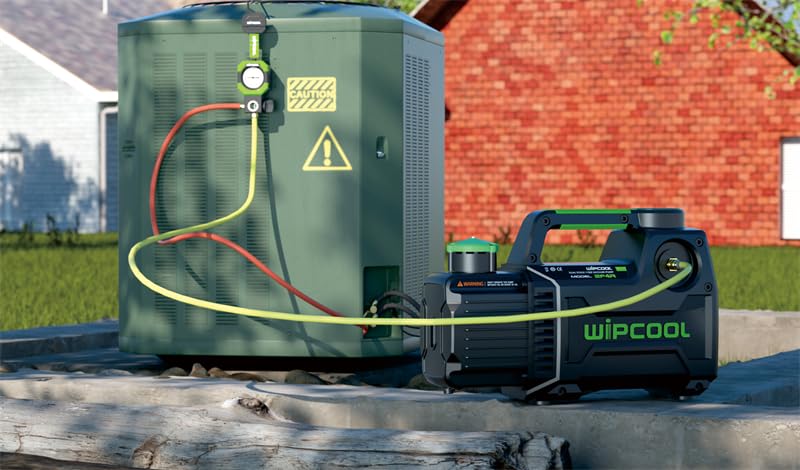
Figure 3: The Wipcool 2F0 Vacuum Pump connected to an outdoor AC unit. This image demonstrates a typical setup for evacuating an air conditioning system.
6. Maintenance
Regular maintenance ensures the longevity and optimal performance of your Wipcool 2F0 vacuum pump.
6.1 Oil Level Check
- Check the oil level before each use. The oil should be between the 'MIN' and 'MAX' marks on the sight glass.
- Add oil if necessary, ensuring to use only high-quality vacuum pump oil.
6.2 Oil Change
Change the vacuum pump oil regularly, especially if it appears cloudy, discolored, or contaminated. Contaminated oil reduces pump efficiency and can cause damage.
- Ensure the pump is warm (run for a few minutes) to allow oil to drain easily.
- Place a suitable container under the oil drain plug.
- Remove the oil drain plug and the oil fill cap to allow air to enter and oil to drain completely.
- Once drained, replace the oil drain plug securely.
- Refill with new vacuum pump oil as described in Section 4.2.
- Dispose of used oil responsibly according to local regulations.
6.3 Cleaning
- Keep the exterior of the pump clean and free from dust and debris.
- Use a soft, damp cloth for cleaning. Do not use harsh chemicals or solvents.
- Ensure ventilation openings are clear and unobstructed.
7. Troubleshooting
This section provides solutions to common issues you might encounter with your Wipcool 2F0 vacuum pump.
| Problem | Possible Cause | Solution |
|---|---|---|
| Pump does not start | No power supply Damaged power cord/plug Motor issue | Check power connection and outlet Inspect and replace if damaged Contact service center |
| Poor vacuum performance | Low or contaminated oil Leaking connections/hoses System leak Worn pump components | Check/change oil Tighten all connections, inspect hoses Check system for leaks Contact service center |
| Excessive noise/vibration | Low oil level Pump not on level surface Internal mechanical issue | Check/add oil Place on stable, level surface Contact service center |
| Oil leakage | Loose oil drain plug/fill cap Damaged seals Overfilled oil | Tighten plugs/caps Contact service center Drain excess oil |
If you encounter a problem not listed here or if the suggested solutions do not resolve the issue, please contact customer support.
8. Specifications
| Specification | Detail |
|---|---|
| Model Number | 2F0 |
| Manufacturer | Wipcool |
| Wattage | 230 Watts |
| Item Weight | 4.7 kg |
| Flow Rate (Capacity) | 42 L/min (1.5 CFM) |
| Stages | Double Stage |
| Compatible Refrigerants | R12, R22, R134a, R410a |
9. Warranty and Support
9.1 Warranty Information
The Wipcool 2F0 Double Stage Vacuum Pump comes with a 1 Year Warranty from the date of purchase. This warranty covers defects in materials and workmanship under normal use. It does not cover damage resulting from misuse, abuse, unauthorized modification, or failure to follow operating instructions.
Please retain your proof of purchase for warranty claims.
9.2 Customer Support
For technical assistance, warranty claims, or inquiries regarding your Wipcool 2F0 vacuum pump, please contact your retailer or the authorized service center. Provide your model number (2F0) and purchase details when contacting support to expedite assistance.


