
1. Introduction
This manual provides comprehensive instructions for the safe and efficient use of your Generico TECHMADE Smartwatch model TM-STEPS-GDBK. Please read this manual thoroughly before operating the device and retain it for future reference. Understanding the features and functions will ensure optimal performance and longevity of your smartwatch.
2. Safety Information
- Do not attempt to disassemble, repair, or modify the device. This may void the warranty and cause damage.
- Keep the device away from extreme temperatures, direct sunlight, and high humidity.
- Avoid exposing the smartwatch to strong impacts or drops.
- Use only the provided charging cable or a certified equivalent.
- If you experience skin irritation, discontinue use and consult a physician.
- This device is not a medical instrument and should not be used for medical diagnosis or treatment.
3. Package Contents
Please check the package contents upon unboxing. If any items are missing or damaged, contact your retailer.
- Generico TECHMADE Smartwatch TM-STEPS-GDBK
- USB Charging Cable
- User Manual (this document)
4. Product Overview
Familiarize yourself with the components of your smartwatch.
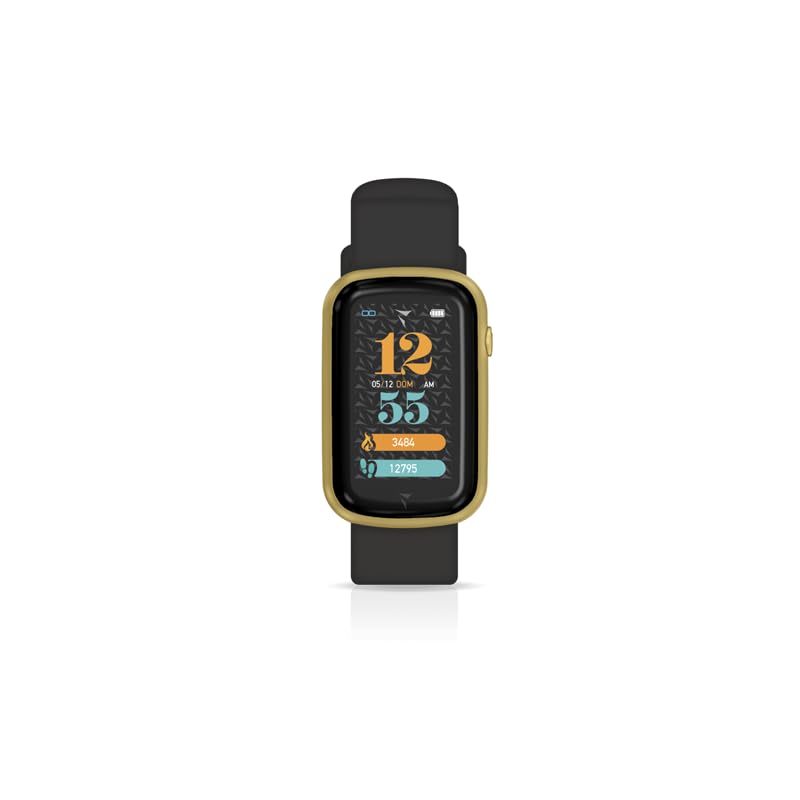
Figure 4.1: Front view of the Generico TECHMADE Smartwatch TM-STEPS-GDBK. The display shows the time (12:55), date (05/12 DOM), and activity metrics such as calories burned (3484) and steps taken (12795). The watch features a gold-colored casing and a black silicone strap.

Figure 4.2: Angled view of the Generico TECHMADE Smartwatch TM-STEPS-GDBK, highlighting the sleek design of the gold-colored watch case and the texture of the black strap. A side button is visible on the right side of the casing.
Key Components:
- Touchscreen Display: For interacting with the watch interface.
- Side Button: Typically used for power on/off, screen wake, or returning to the home screen.
- Sensors: Located on the back for health tracking (e.g., heart rate, steps).
- Charging Contacts: On the back for connecting the charging cable.
- Adjustable Strap: For comfortable wear.
5. Setup
5.1. Charging the Smartwatch
- Connect the USB charging cable to a power adapter (not included) or a computer's USB port.
- Align the magnetic charging pins of the cable with the charging contacts on the back of the smartwatch. The cable will snap into place.
- The watch display will show a charging indicator. Allow approximately 2-3 hours for a full charge.
- Disconnect the charger once fully charged.
5.2. Powering On/Off
- Power On: Press and hold the side button for a few seconds until the screen lights up.
- Power Off: From the watch face, swipe down (or up, depending on UI) to access quick settings, or navigate to the 'Settings' menu. Select 'Power Off' and confirm. Alternatively, press and hold the side button and select 'Power Off' if prompted.
5.3. App Installation and Pairing
To unlock the full potential of your smartwatch, download the companion app on your smartphone. Refer to the packaging or the watch's initial setup screen for the specific app name (e.g., "TechMade Steps App").
- Download and install the companion app from the App Store (iOS) or Google Play Store (Android).
- Ensure Bluetooth is enabled on your smartphone.
- Open the app and follow the on-screen instructions to create an account or log in.
- In the app, navigate to 'Add Device' or 'Pair Device'.
- Select your smartwatch (e.g., "TM-STEPS-GDBK") from the list of available Bluetooth devices.
- Confirm the pairing request on both your smartphone and smartwatch if prompted.
- Once paired, the watch will synchronize time and data with your phone.
6. Operating Instructions
6.1. Basic Navigation
- Swipe Up/Down: Scroll through menus or notifications.
- Swipe Left/Right: Access different widgets or quick functions (e.g., activity data, heart rate).
- Tap: Select an item or confirm an action.
- Press Side Button: Return to the watch face or wake the screen.
6.2. Key Features
- Activity Tracking: The smartwatch automatically tracks steps, distance, calories burned, and active minutes. View your daily progress on the watch or in the companion app.
- Sleep Monitoring: Wear the watch to bed to track your sleep patterns. Data is available in the app.
- Heart Rate Monitoring: Access the heart rate function from the menu to measure your current heart rate. Continuous monitoring may be available via app settings.
- Notifications: Receive call, SMS, and app notifications directly on your wrist. Manage notification settings through the companion app.
- Water Resistance: The device is waterproof. It is suitable for daily use and can withstand splashes, rain, and brief immersion. Avoid hot water, steam, or prolonged submersion in deep water.
7. Maintenance
7.1. Cleaning
- Wipe the watch screen and body with a soft, damp, lint-free cloth.
- For the strap, use mild soap and water if necessary, then rinse thoroughly and dry completely before wearing.
- Do not use harsh chemicals, abrasive cleaners, or solvents.
7.2. Battery Care
- Avoid fully discharging the battery frequently.
- Charge the device regularly, even if not in use, to maintain battery health.
- Store the device in a cool, dry place when not in use for extended periods.
8. Troubleshooting
| Problem | Possible Solution |
|---|---|
| Smartwatch does not turn on. | Ensure the device is fully charged. Connect it to the charger for at least 30 minutes. |
| Cannot pair with smartphone. |
|
| Inaccurate activity data. |
|
| Notifications not received. |
|
9. Specifications
- Brand: Generico
- Model Name: TM-STEPS-GDBK (also referred to as TM STEPS GPCOW in some specifications)
- Wireless Communication Standard: Bluetooth
- Water Resistance Level: Waterproof (suitable for daily use, splashes, rain, brief immersion)
- Item Dimensions (LxPxA): 25 x 3 x 1 cm
10. Warranty and Support
For warranty information, please refer to the documentation provided at the time of purchase or contact your retailer. If you encounter any issues not covered in this manual, or require further assistance, please contact Generico customer support or your point of purchase.
Note: Product specifications and features are subject to change without prior notice.