1. Introduction
This manual provides essential information for the safe and efficient operation, installation, and maintenance of your Ariston ALTEAS ONE+ NET 30 wall-mounted boiler. This advanced condensation boiler is designed to provide both heating and domestic hot water, featuring integrated connectivity and a Sensys HD control panel for enhanced user experience.
Please read this manual thoroughly before installation or operation and retain it for future reference. Proper installation and maintenance are crucial for the longevity and optimal performance of the appliance.
2. Safety Information
Important: Installation, first start-up, and maintenance must be carried out by qualified and authorized personnel in accordance with local regulations and standards.
- Professional Installation: This appliance must be installed by a certified technician. Incorrect installation can lead to serious injury or damage.
- Electrical Safety: Ensure the appliance is properly grounded. Do not operate with damaged power cords. Disconnect power before any maintenance.
- Gas Safety: If you smell gas, immediately shut off the gas supply, open windows, and evacuate the premises. Do not operate electrical switches or phones. Contact your gas supplier and a qualified technician.
- Water Pressure: Regularly check the system pressure. Refer to the installation guide for recommended pressure levels.
- Children and Vulnerable Persons: Keep children and individuals with reduced physical, sensory, or mental capabilities away from the appliance unless supervised.
- Flammable Materials: Do not store flammable materials near the boiler.
3. Product Overview
The Ariston ALTEAS ONE+ NET 30 is a high-efficiency wall-mounted boiler designed for modern homes. It combines advanced condensation technology with smart connectivity features.
3.1 Key Features
- Condensation Technology: Maximizes energy efficiency by recovering heat from exhaust gases.
- Integrated Connectivity: Allows for remote control and monitoring via a smartphone application (requires compatible app and internet connection).
- Sensys HD Control Panel: Intuitive interface for managing heating and hot water settings.
- Wall-Mounted Design: Space-saving and suitable for various installations.
3.2 Components
The system consists of the main boiler unit and the external Sensys HD control panel.
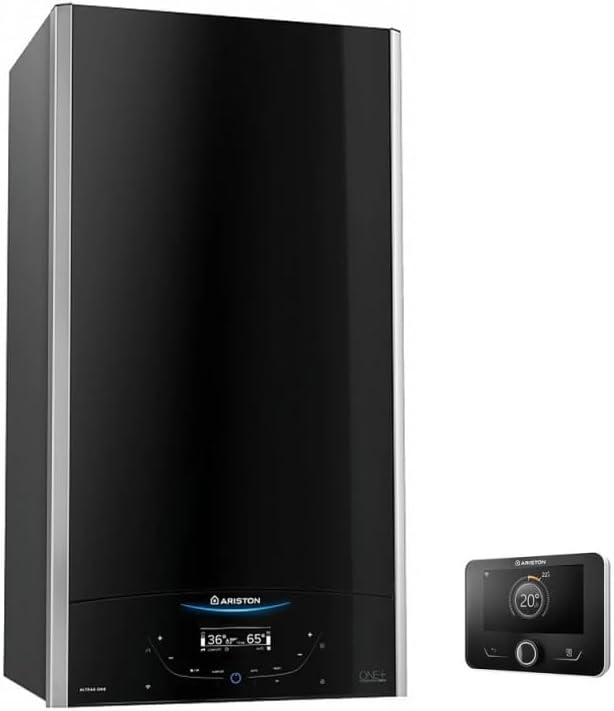
Image 1: Ariston ALTEAS ONE+ NET 30 wall-mounted boiler with Sensys HD control panel. This image displays the Ariston ALTEAS ONE+ NET 30 wall-mounted boiler, featuring a sleek black design with silver trim. To the right, the Sensys HD control panel is shown, indicating a temperature of 20 degrees Celsius.
4. Setup
4.1 Installation
The installation of the Ariston ALTEAS ONE+ NET 30 boiler must be performed by a qualified and certified professional. This includes:
- Mounting the boiler securely on a suitable wall.
- Connecting the gas supply in compliance with local regulations.
- Connecting the heating and domestic hot water pipes.
- Installing the flue system for exhaust gases.
- Making electrical connections and ensuring proper grounding.
- Connecting and configuring the Sensys HD control panel.
- Filling the heating system and checking for leaks.
Refer to the separate installation manual provided with the product for detailed instructions and diagrams.
4.2 Initial Start-up
After installation, the first start-up procedure must be carried out by a qualified technician. This typically involves:
- Checking all connections for integrity and leaks.
- Purging air from the system.
- Verifying gas pressure and combustion parameters.
- Testing safety devices.
- Configuring initial operating parameters on the Sensys HD control panel.
5. Operating Instructions
The Ariston ALTEAS ONE+ NET 30 is controlled via the Sensys HD control panel, which offers an intuitive interface for managing your heating and hot water.
5.1 Basic Operation (Sensys HD Control Panel)
- Power On/Off: Use the designated button on the control panel to switch the boiler on or off.
- Adjusting Heating Temperature: Navigate to the heating settings menu. Use the rotary knob or arrow buttons to set your desired room temperature. The boiler will modulate its output to maintain this temperature.
- Adjusting Domestic Hot Water (DHW) Temperature: Access the DHW settings menu. Set the desired hot water temperature. The boiler will prioritize hot water production when a tap is opened.
- Operating Modes: Select between different operating modes such as 'Comfort', 'Economy', or 'Anti-freeze' as available on your control panel.
5.2 Integrated Connectivity
The integrated connectivity feature allows you to control and monitor your boiler remotely using a compatible smartphone application. Follow these general steps:
- Download the App: Download the official Ariston connectivity app from your device's app store.
- Register and Connect: Follow the in-app instructions to register your account and connect your boiler to your home Wi-Fi network. This may involve scanning a QR code or entering a serial number.
- Remote Control: Once connected, you can adjust heating schedules, set temperatures, monitor energy consumption, and receive alerts directly from your smartphone.
6. Maintenance
Regular maintenance ensures the safe, efficient, and long-lasting operation of your Ariston ALTEAS ONE+ NET 30 boiler.
6.1 User Maintenance
- Cleaning: Clean the exterior of the boiler and the Sensys HD control panel with a soft, damp cloth. Do not use abrasive cleaners or solvents.
- System Pressure Check: Periodically check the system pressure gauge (usually located on the boiler or control panel). Maintain pressure within the recommended range (typically 1.0 to 1.5 bar when cold). If pressure is too low, consult your installer or the installation manual for instructions on how to repressurize the system.
- Visual Inspection: Regularly inspect the boiler for any visible signs of leaks, corrosion, or damage. Report any concerns to a qualified technician.
6.2 Professional Servicing
It is highly recommended to have your boiler serviced annually by a qualified and certified technician. Professional servicing typically includes:
- Cleaning of the heat exchanger and burner.
- Checking and adjusting gas pressure and combustion.
- Inspecting and testing all safety devices.
- Checking for leaks in the gas and water circuits.
- Verifying the proper operation of all components.
7. Troubleshooting
This section provides guidance on common issues. For complex problems or error codes, always contact a qualified service technician.
| Problem | Possible Cause | Solution |
|---|---|---|
| No heating or hot water | No power supply Low system pressure Thermostat set too low Boiler in lockout/error mode | Check power supply and fuse Check pressure gauge, repressurize if needed (consult manual) Increase thermostat setting Note error code and contact technician |
| Boiler making unusual noises | Air in the system Limescale build-up Pump issue | Bleed radiators (if applicable) Contact technician for descaling Contact technician |
| Leakage from boiler | Loose connection Damaged component | Immediately turn off water supply to boiler and contact technician |
| Error code displayed | Specific fault detected | Note the error code and consult the boiler's technical manual or contact a qualified technician, providing the code. |
8. Specifications
| Feature | Detail |
|---|---|
| Brand | Ariston |
| Model | ALTEAS ONE+ NET 30 |
| Model Number | 3301771 |
| Product Dimensions (L x W x H) | 40 x 40 x 74.5 cm |
| Item Weight | 20 Kilograms |
| Wattage | 21500 Watts (21.5 kW) |
| Mounting Type | Wall |
| Special Features | Condensation Technology, Integrated Connectivity |
| Color | Black |
| Energy Class (Heating) | A+ (Based on similar models in product description) |
| Energy Class (DHW) | A (Based on similar models in product description) |
9. Warranty and Support
For warranty information, please refer to the warranty card included with your product or visit the official Ariston website. Keep your proof of purchase for warranty claims.
For technical support, spare parts, or to schedule a service appointment, please contact Ariston customer service or an authorized service center in your region. Contact details can typically be found on the Ariston website or in the product packaging.


