
Introduction
The Jebao CP-120 Cross Flow Pump is designed to create natural wave-like water movement in your aquarium, promoting a healthy environment for aquatic life. Its unique cross-flow technology ensures even water distribution without dead spots. This manual provides detailed instructions for installation, operation, and maintenance.
Safety Information
- Always disconnect power before performing any maintenance or installation.
- Ensure the pump is fully submerged in water during operation.
- Do not operate the pump if the power cord or plug is damaged.
- Keep the controller dry and away from water splashes.
- This product is designed for indoor aquarium use only.
Package Contents
- Jebao CP-120 Cross Flow Pump
- Controller
- AC Adapter
- Mounting Magnets

Image: The package includes the Jebao CP-120 cross-flow pump, its dedicated controller, and the AC power adapter.
Product Overview
The CP-120 features a cylindrical design with grilles on both sides for water intake and output, facilitating its cross-flow action. The pump attaches to the aquarium glass via strong magnets. The external controller allows for mode selection and speed adjustment.

Image: A close-up view of the Jebao CP-120 cross-flow pump, showing its cylindrical shape and water grilles.

Image: The Jebao CP-120 pump with its attached power cable, ready for connection to the controller.
Setup and Installation
- Mounting the Pump: Position the pump inside the aquarium, ensuring it is fully submerged. Use the external magnet to secure the pump to the aquarium glass. Ensure the magnet is placed directly opposite the pump's internal magnet for a secure hold.
- Connecting the Controller: Connect the pump's power cable to the designated port on the controller.
- Power Connection: Connect the AC adapter to the controller, then plug the AC adapter into a suitable power outlet.
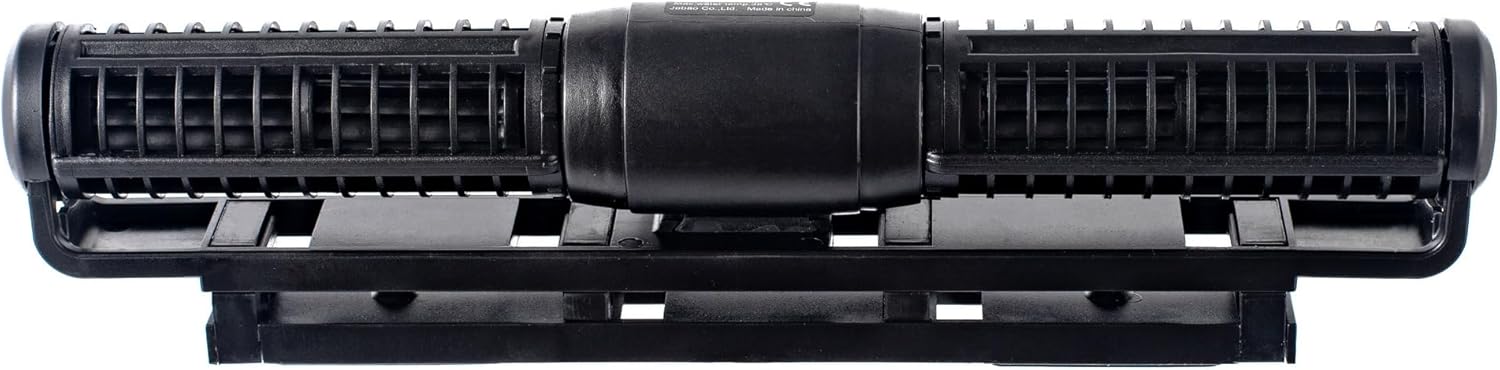
Image: The Jebao CP-120 pump shown with its magnetic mounting system, illustrating how it attaches to the aquarium wall.
Operating Instructions
The controller allows you to select various flow modes and adjust the intensity.
Controller Functions
- Mode Button: Press to cycle through different operating modes.
- Speed Adjustment Knob: Rotate to increase or decrease the flow rate/intensity.
Operating Modes
- Mode H (Normal Flow): Provides a constant, steady flow rate at the set speed.
- Mode W1 (Wave Box Function): Generates a pulse mode, ideal for creating wave box effects. The frequency can be adjusted.
- Mode W2 (Normal Mode with Clockwise Flow): Operates in a normal flow pattern, with a clockwise rotation cycle adjustable from 4 to 99 minutes.
- Mode W3 (Normal Mode with Reef Mode): A normal flow mode designed for reef environments.
- Feed Mode: Activates a 10-minute pause in pump operation to allow for feeding without food being immediately swept away.
Maintenance
- Regular Cleaning: Periodically remove the pump from the aquarium and disassemble it for cleaning. Rinse all components with clean water to remove algae and debris.
- Impeller Inspection: Check the impeller for any blockages or wear. Clean any buildup around the impeller to ensure optimal performance.
- Cable Inspection: Regularly inspect the power cord and connections for any signs of damage.
Troubleshooting
| Problem | Possible Cause | Solution |
|---|---|---|
| Pump not operating | No power | Check power connections, ensure adapter is plugged in. |
| Weak flow | Impeller blocked or dirty | Clean the impeller and pump housing. |
| Excessive noise | Impeller obstruction or wear | Clean the impeller. If noise persists, inspect for damage. |
| Controller not responding | Power issue or malfunction | Ensure power is connected. If issue persists, contact support. |
Specifications
- Model: CP-120
- Dimensions: 11.5" x 2.5" x 1.75"
- Input Voltage: 100V-240V, 50/60Hz
- Output: DC 24V, 40W
- Flow Rate: Approximately 4300 to 4600 GPH (Gallons Per Hour)
- Power Source: Corded Electric
- Item Weight: 3.1 pounds (approx. 1.41 kg)
Warranty and Support
For warranty information and technical support, please refer to the documentation provided with your purchase or contact Jebao customer service directly. Keep your purchase receipt for warranty claims.


