
Introduction
This user manual provides essential information for the safe and efficient operation, setup, and maintenance of your Sanctuary Diamond Series 1.25 cu ft Home & Office Safe (Model: SA-DIA2DP). Please read this manual thoroughly before using the safe and retain it for future reference.
The Sanctuary Diamond SA-DIA2 is designed to provide secure storage for your valuables, including letter and legal-sized documents. It features a robust construction with fire and water resistance capabilities.
Safety Information
Always follow basic safety precautions when handling and operating the safe. This product is heavy; ensure proper lifting techniques or assistance when moving. Keep the safe locked when not in use to prevent unauthorized access.
Proposition 65 Warning: This product can expose you to chemicals including lead, which is known to the State of California to cause cancer and birth defects or other reproductive harm. For more information go to www.P65Warnings.ca.gov.
Product Overview
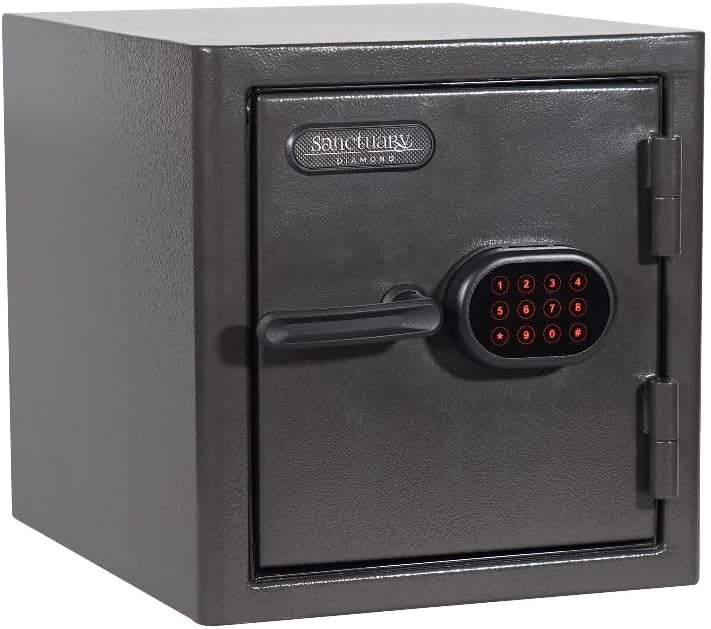
Figure 1: Front view of the Sanctuary Diamond Series 1.25 cu ft Home & Office Safe with the door closed, showing the electronic keypad and handle.

Figure 2: Interior view of the Sanctuary Diamond Series 1.25 cu ft Home & Office Safe with the door open, revealing the adjustable shelves and internal storage space.

Figure 3: Side view of the Sanctuary Diamond Series 1.25 cu ft Home & Office Safe illustrating its external dimensions: 17.5 inches deep, 14.5 inches wide, and 15 inches high.
Key Features:
- Fire Rated 90 min at 1,800° F
- 1.25 Cubic Feet interior volume
- Waterproof for 7 days up to handle
- Electronic Lock Face with Illuminated Touchpad
- Designed to store both letter and legal sized documents
Setup
Unpacking:
- Carefully remove the safe from its packaging.
- Inspect the safe for any signs of damage during transit. Report any damage to the retailer immediately.
- Remove all packing materials from around and inside the safe.
Battery Installation:
The electronic lock requires batteries for operation. Batteries are not included and must be purchased separately.
- Locate the battery compartment on the back of the electronic keypad or inside the safe door.
- Insert the required number of AA alkaline batteries, ensuring correct polarity (+/-).
- Close the battery compartment cover securely.
Placement:
- Place the safe on a flat, stable surface. It can be freestanding or tabletop mounted.
- Ensure the location is dry and away from direct heat sources or excessive humidity.
- For added security, consider bolting the safe to the floor or wall using the pre-drilled anchor holes (hardware not included).
Operating Instructions
Initial Access and Setting Your Code:
Upon first use, the safe will have a factory default code. Refer to the quick start guide included with your safe for the specific default code and detailed instructions on how to change it to your personal code. It is highly recommended to change the default code immediately.
- Enter the default code on the illuminated touchpad.
- Turn the handle clockwise to open the safe door.
- With the door open, locate the reset button (usually a small red or green button) on the inside of the door or near the lock mechanism.
- Press the reset button. The keypad will beep, indicating it's ready for a new code.
- Enter your new 4-8 digit personal code, then press the '#' or 'ENTER' button.
- Test your new code with the door open to ensure it works correctly before closing the safe.
Opening the Safe:
- Press any key to activate the illuminated touchpad.
- Enter your personal code.
- If the code is correct, the indicator light will turn green, and you will hear a click.
- Within 5 seconds, turn the handle clockwise to open the door.
Closing and Locking the Safe:
- Close the safe door firmly.
- Turn the handle counter-clockwise until it is fully engaged and the door is securely locked.
- Verify the safe is locked by gently pulling on the door.
Maintenance
Battery Replacement:
When the batteries are low, the keypad may emit a warning beep or the lights may dim. Replace batteries promptly to avoid being locked out.
- Open the battery compartment.
- Remove old batteries and dispose of them according to local regulations.
- Insert new AA alkaline batteries, observing correct polarity.
- Close the compartment.
Cleaning:
- Wipe the exterior of the safe with a soft, damp cloth.
- Do not use abrasive cleaners or solvents, as they may damage the finish or electronic components.
- Keep the keypad clean and free of dust or debris.
Door Hinge Lubrication:
Periodically check the door hinges for smooth operation. If they become stiff or noisy, apply a small amount of silicone-based lubricant to the hinge pins.
Troubleshooting
| Problem | Possible Cause | Solution |
|---|---|---|
| Safe does not open with code. | Incorrect code entered. Low or dead batteries. Handle not turned within 5 seconds. | Re-enter code carefully. Replace batteries. Enter code and turn handle immediately. |
| Keypad is unresponsive. | Dead batteries. Keypad malfunction. | Replace batteries. Contact customer support. |
| Door does not close properly. | Obstruction in door frame. Misaligned door. | Check for obstructions and remove. Contact customer support if misalignment persists. |
Specifications
| Feature | Detail |
|---|---|
| Brand | Sanctuary |
| Model Number | SA-DIA2DP |
| Product Dimensions | 17.5"D x 14.5"W x 15"H |
| Item Weight | 71.4 pounds |
| Capacity | 1.25 Cubic Feet |
| Lock Type | Electronic |
| Color | Black |
| Special Features | Waterproof, Fire Resistant |
| Fire Rating | 90 minutes at 1,800° F |
| Water Resistance | 7 days up to handle |
| Mounting Type | Freestanding, Tabletop |
| Batteries Required | Yes (AA, not included) |
| UPC | 813204027106 |
Warranty Information
Specific warranty details for the Sanctuary Diamond Series Safe are typically provided with the product packaging or can be found on the manufacturer's official website. Generally, safes come with a limited warranty covering defects in materials and workmanship. Please retain your proof of purchase for warranty claims.
For detailed warranty terms and conditions, please refer to the documentation included with your safe or visit the Sanctuary brand website.
Customer Support
If you encounter any issues or have questions regarding your Sanctuary Diamond Series Safe that are not covered in this manual, please contact customer support.
- Manufacturer: Sports Afield (as per product specifications)
- Online Support: Visit the official Sanctuary or Sports Afield website for FAQs, support articles, and contact forms.
- Phone Support: Refer to the product packaging or manufacturer's website for current contact numbers.
When contacting support, please have your model number (SA-DIA2DP) and proof of purchase readily available.