
1. Introduction
This manual provides essential information for the safe and efficient use of your Whirlpool WL S2260 NE Induction Hob. Please read these instructions carefully before installation and use, and keep them for future reference.
The Whirlpool WL S2260 NE is a glass-ceramic induction hob designed for modern kitchens. It features intuitive controls and advanced cooking technologies to enhance your culinary experience.
2. Safety Information
Important Safety Instructions:
- Ensure the appliance is installed by a qualified technician in accordance with local regulations.
- Do not allow children to operate the hob unsupervised.
- Use only induction-compatible cookware.
- Do not place metallic objects on the hob surface as they may heat up.
- Clean the hob regularly to prevent grease buildup, which can be a fire hazard.
- Disconnect the appliance from the power supply before any maintenance or cleaning.
Refer to the full safety guidelines provided in the included manual for comprehensive information.
3. Product Overview and Features
The Whirlpool WL S2260 NE Induction Hob offers several features designed for convenience and efficiency:
- Shortcut with Sliders: A user interface with dedicated buttons and sliders for each cooking zone, providing intuitive control.
- Power Regulator: Allows adjustment of the hob's power level to prevent electrical overload.
- Flush-mounted Design: Enables seamless integration into your kitchen countertop.
- Induction Technology: Heats cookware directly, offering energy efficiency and fast cooking.
- FlexiCook: Combines two cooking zones into one large area, ideal for larger pots or pans.
- Melting Function: Maintains very low temperatures for delicate tasks like melting chocolate or butter.
- Keep Warm Function: Keeps prepared dishes warm at a low power setting.
- Cooking Function: Designed for slow cooking recipes, preventing food from sticking.
- Front Control: Easily accessible controls located at the front of the hob.

Image: Top-down view of the Whirlpool WL S2260 NE Induction Hob, showcasing its sleek glass-ceramic surface and control layout.
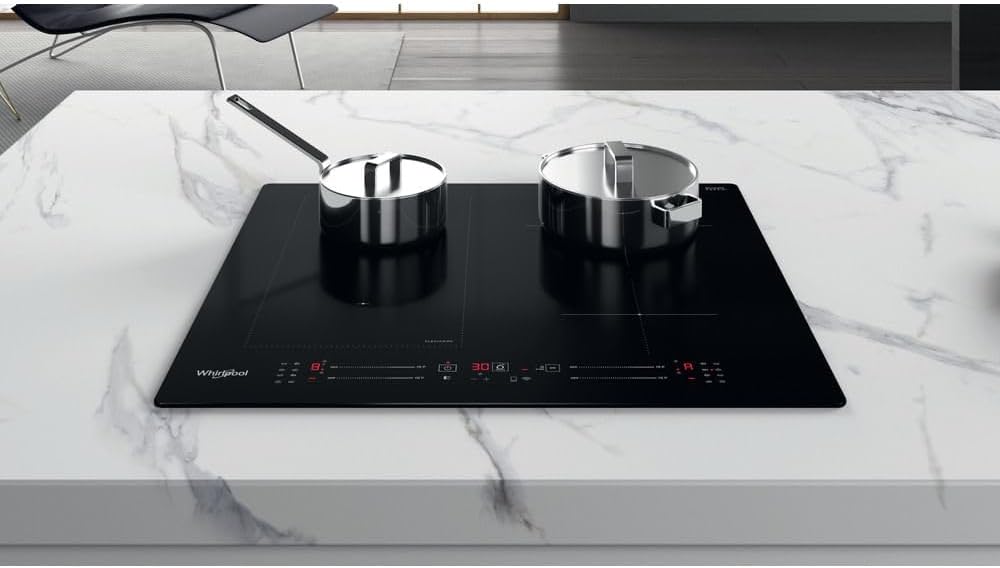
Image: The Whirlpool Induction Hob in use, demonstrating the FlexiCook zone with two pots, highlighting its adaptability for various cookware sizes.
4. Setup and Installation
The Whirlpool WL S2260 NE Induction Hob is designed for flush-mounted installation. It is crucial that installation is performed by a qualified electrician or technician to ensure proper electrical connection and safety.
4.1 Unpacking
- Carefully remove the hob from its packaging.
- Check for any damage during transit. If damage is found, do not install and contact your retailer.
- Ensure all components listed in the 'What's in the Box' section are present.
4.2 Electrical Connection
The hob requires a 230 Volts electrical supply. The electrical connection must comply with local wiring regulations. A dedicated circuit breaker is recommended.
4.3 Countertop Integration
Ensure the countertop cutout dimensions match the hob's specifications for a secure and flush fit. Apply the provided sealing gasket around the edge of the hob before lowering it into the cutout.

Image: Angled view of the Whirlpool WL S2260 NE Induction Hob, showing its profile and readiness for flush installation into a countertop.
5. Operating Instructions
5.1 Turning On/Off
- To turn on, press the main power button. The display will illuminate.
- To turn off, press the main power button again.
5.2 Selecting a Cooking Zone and Power Level
- Place an induction-compatible pan on the desired cooking zone.
- Select the cooking zone using its dedicated button or slider.
- Adjust the power level using the corresponding slider control for that zone.
5.3 Using FlexiCook
- To activate FlexiCook, place a large pot or two smaller pots across the designated FlexiCook zone.
- Press the FlexiCook button. The two zones will merge into a single large cooking area, controlled by one set of controls.
5.4 Special Functions (Melting, Keep Warm, Cooking)
- Melting: Select a cooking zone and press the 'Melting' function button. The hob will maintain a low, consistent temperature.
- Keep Warm: Select a cooking zone and press the 'Keep Warm' function button to maintain food at serving temperature.
- Cooking: Select a cooking zone and press the 'Cooking' function button for optimized slow cooking.

Image: A close-up view of the Whirlpool Induction Hob's control panel, showing the slider controls and function buttons, with pots on the cooking zones.
6. Maintenance and Cleaning
Regular cleaning and maintenance will ensure the longevity and optimal performance of your induction hob.
6.1 Daily Cleaning
- After each use, allow the hob to cool down completely.
- Wipe the glass-ceramic surface with a damp cloth and a small amount of mild detergent.
- Rinse with a clean, damp cloth and dry thoroughly with a soft cloth to prevent streaks.
6.2 Removing Stubborn Stains
- For burnt-on food or stubborn stains, use a specialized ceramic hob scraper (plastic or metal, held at a shallow angle).
- Apply a ceramic hob cleaner and polish with a soft cloth.
- Avoid abrasive cleaners, scouring pads, or harsh chemicals as they can damage the surface.
6.3 General Care
- Do not drop heavy objects on the hob surface.
- Avoid dragging pots and pans across the surface to prevent scratches.
7. Troubleshooting
If you encounter issues with your hob, refer to the following common troubleshooting steps:
| Problem | Possible Cause | Solution |
|---|---|---|
| Hob does not turn on | No power supply; main power switch off. | Check the circuit breaker; ensure the hob is properly plugged in and the main power button is pressed. |
| Cooking zone not heating | Non-induction compatible cookware; pan not centered; zone not selected. | Use induction-compatible cookware; center the pan on the zone; select the correct cooking zone. |
| Display shows an error code | Internal fault; overheating. | Turn off the hob, wait a few minutes, then turn it back on. If the error persists, consult the full manual or contact customer support. |
| Unusual noises during operation | Normal operation of induction technology (e.g., humming, clicking). | These sounds are typically normal. If the noise is excessively loud or unusual, contact customer support. |
For more detailed troubleshooting, refer to the comprehensive manual included with your product.
8. Specifications
| Feature | Detail |
|---|---|
| Brand | Whirlpool |
| Model Number | WL S2260 NE |
| Burner Type | Induction |
| Material | Ceramic (Glass-ceramic) |
| Control Type | Button, Slider |
| Voltage | 230 Volts |
| Item Weight | 9.5 Kilograms |
| Included Components | Cable, Kit, Manual |
9. Warranty and Support
For warranty information, please refer to the warranty card included with your product or visit the official Whirlpool website. Keep your proof of purchase for warranty claims.
If you require technical assistance, spare parts, or service, please contact Whirlpool customer support. Contact details can typically be found in the product manual or on the Whirlpool website.
You can visit the official Whirlpool store for more information: Whirlpool Store on Amazon.


