
Homall 72P0
Homall Recliner Chair Model 72P0 Instruction Manual
Model: 72P0 | Brand: Homall
Introduction
Thank you for choosing the Homall Recliner Chair Model 72P0. This manual provides detailed instructions for the assembly, operation, maintenance, and troubleshooting of your new recliner. Please read this manual thoroughly before use to ensure proper function and longevity of your product.
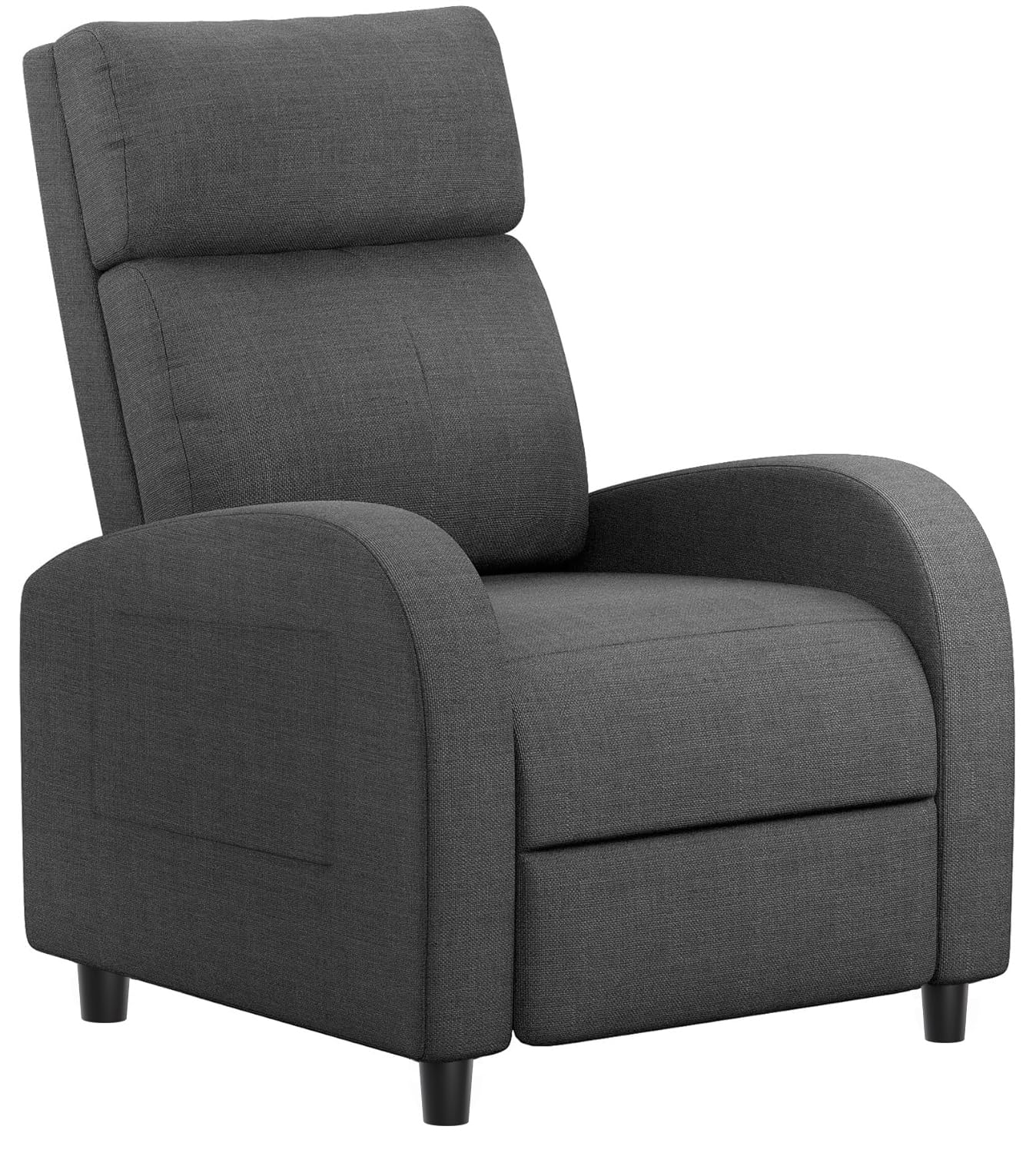
Figure 1: Homall Recliner Chair Model 72P0 (Grey Textile)
This image shows the Homall Recliner Chair Model 72P0 in a grey textile finish, positioned in a modern living space. The chair features a padded backrest, seat, and armrests, designed for comfort.
Important Safety Information
- Maximum Weight Capacity: Do not exceed the maximum weight capacity of 265 lbs (120 kg). Exceeding this limit may cause damage to the chair or personal injury.
- Assembly: Ensure proper assembly to maintain stability and avoid tipping. Follow all assembly instructions carefully.
- Children and Pets: Keep children and pets away from the reclining mechanism to prevent injury.
- Movement: Do not move the chair while someone is seated in it.
- Placement: Place the recliner on a level surface. Avoid placing it near heat sources or in direct sunlight to prevent material degradation.
Package Contents
Before beginning assembly, please verify that all parts are present and undamaged. If any parts are missing or damaged, contact Homall customer support.
- 1 x Recliner Chair (Backrest, Seat Base with Armrests, Footrest mechanism)
- 1 x Installation Hardware Kit
- 1 x Installation Manual (this document)
Setup and Assembly
The Homall Recliner Chair is designed for easy assembly. It typically involves connecting two main pieces. It is recommended to have a second person assist with aligning the top with the base.
- Unpack Components: Carefully remove all components from the packaging. Place them on a soft, clean surface to prevent scratches.
- Attach Backrest: Align the metal brackets on the backrest with the corresponding slots on the seat base. Slide the backrest down firmly until it clicks into place. Ensure both sides are securely locked.
- Verify Connection: Gently lift the backrest to ensure it is firmly attached and does not wobble.
- Position Chair: Move the assembled recliner to its desired location. Ensure there is enough space behind the chair for it to recline fully without obstruction.
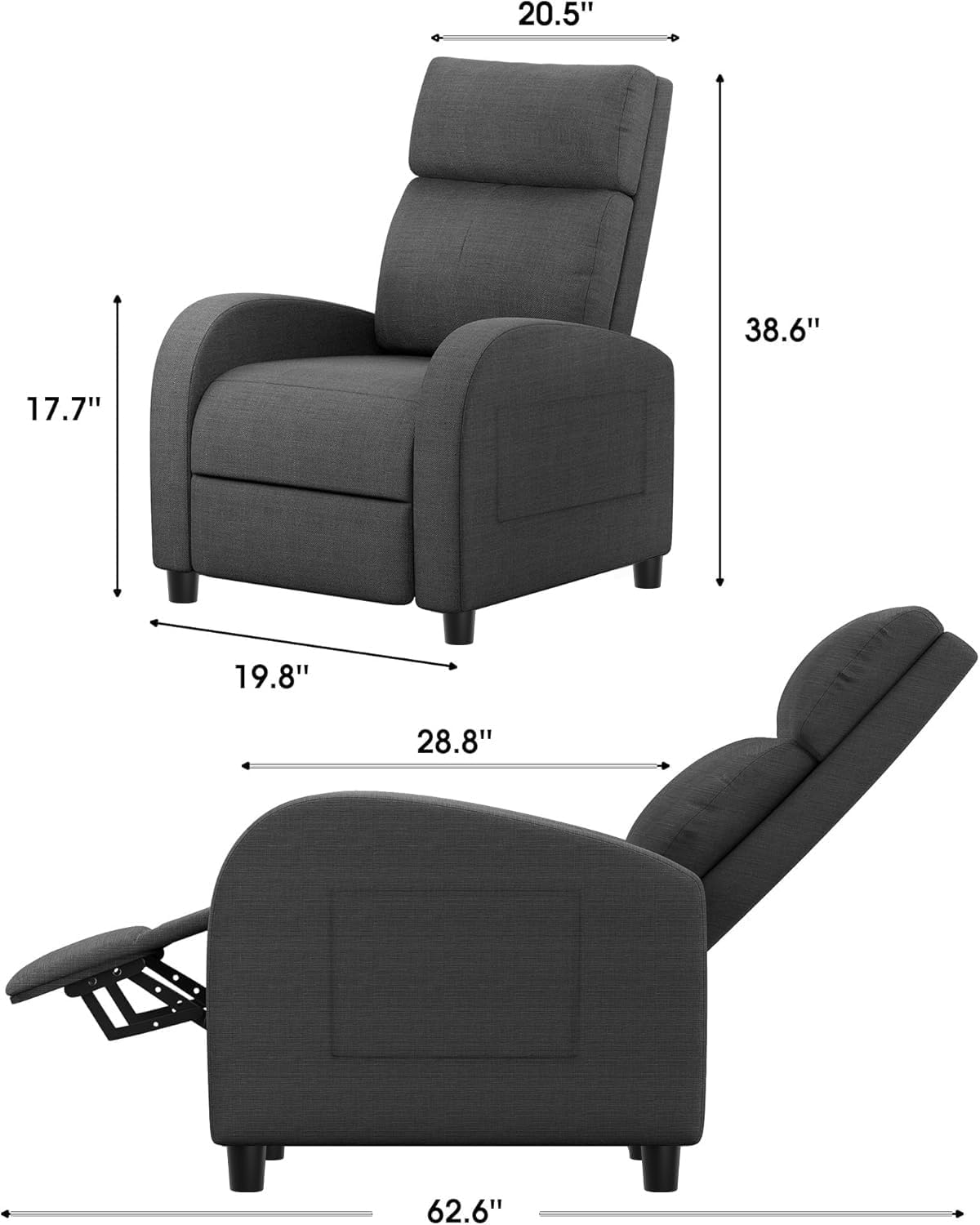
Figure 2: Recliner Chair Dimensions
This diagram illustrates the key dimensions of the Homall Recliner Chair in both upright and fully reclined positions, including height, width, and depth measurements.
Operating Instructions
The Homall Recliner Chair offers multiple reclining positions for your comfort.
- Upright Position (90°): Sit upright with your back against the backrest. The footrest will be retracted. This position is suitable for reading or working.
- Partial Recline (120°): To recline, gently push back on the backrest with your body weight. The footrest will extend. This position is ideal for watching TV or light relaxation.
- Full Recline (150° - Napping Time): Continue to push back further to achieve the full recline position. The footrest will be fully extended, and the backrest will be at its maximum angle. This position is designed for napping or deep relaxation.
- Returning to Upright: To return to the upright position, lean forward and push the footrest down with your legs until it locks into place. The backrest will follow.
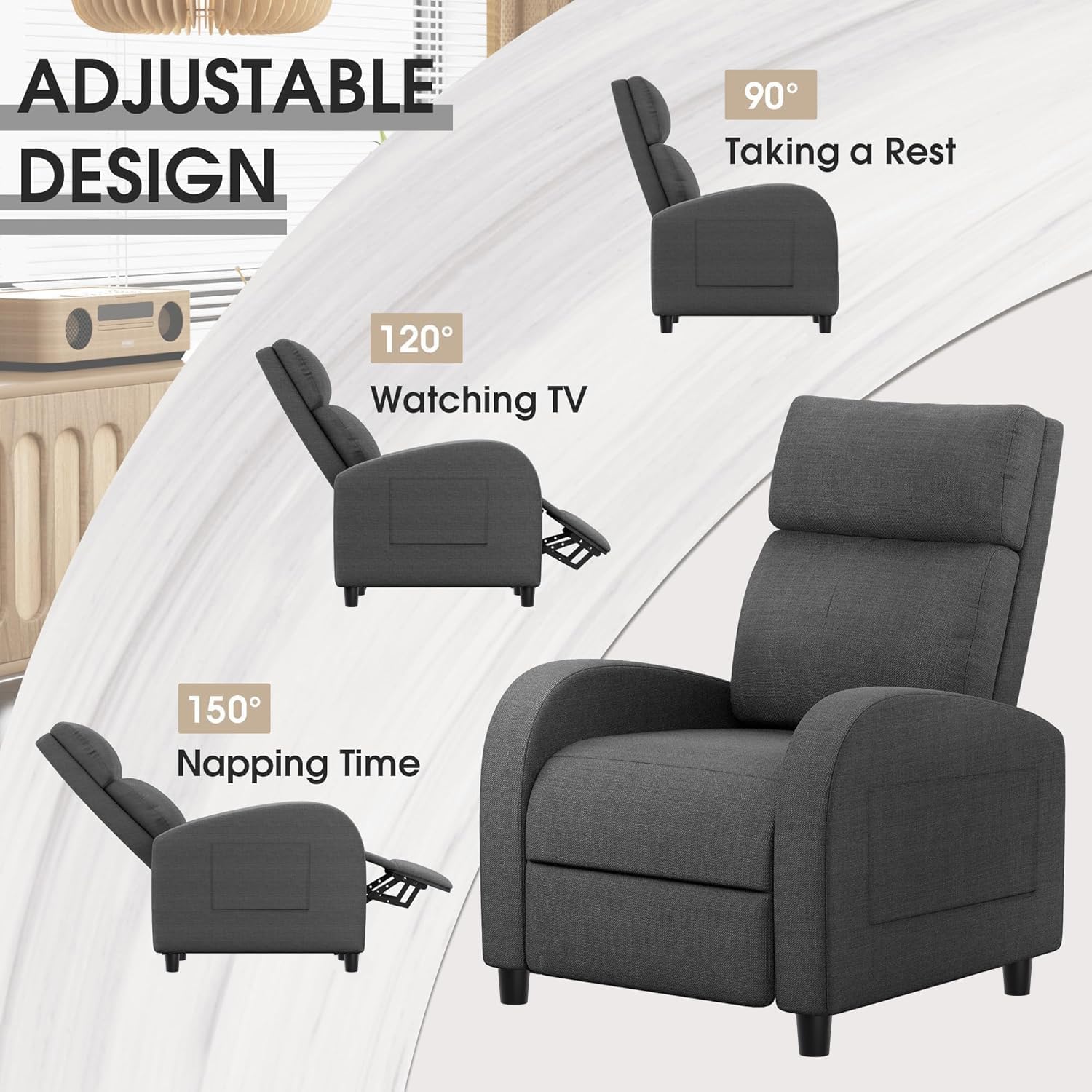
Figure 3: Adjustable Recliner Positions
This image illustrates the three adjustable positions of the Homall Recliner Chair: 90 degrees for resting, 120 degrees for watching TV, and 150 degrees for napping.
Maintenance and Care
Proper care will extend the life and appearance of your Homall Recliner Chair.
- Cleaning (Textile Fabric): For general cleaning, wipe the fabric with a clean, damp cloth. For spills, blot immediately with a clean, dry cloth. Avoid harsh chemicals or abrasive cleaners, as these can damage the fabric.
- Frame: Periodically check all bolts and screws to ensure they are tight. Retighten if necessary.
- Moving the Chair: When moving the chair, lift it rather than dragging it to prevent damage to the legs and floor.
- Sunlight Exposure: Avoid prolonged exposure to direct sunlight to prevent fading of the fabric.

Figure 4: Soft Textile Fabric Detail
A close-up view highlighting the soft, grey textile fabric of the Homall Recliner Chair, emphasizing its texture and comfort.
Troubleshooting
| Problem | Possible Cause | Solution |
|---|---|---|
| Chair does not recline smoothly. | Mechanism obstruction or loose connections. | Check for any objects obstructing the reclining mechanism. Ensure all assembly connections are secure. Apply gentle, even pressure when reclining. |
| Chair feels unstable or wobbly. | Loose assembly bolts or uneven placement. | Verify that the backrest is fully engaged with the seat base. Tighten all assembly hardware. Ensure the chair is placed on a flat, level surface. |
| Fabric appears damaged or snagged. | Sharp objects, pet claws, or rough handling. | Avoid contact with sharp objects. If you have pets, consider using a protective cover. Minor snags can sometimes be carefully trimmed with scissors. |
Specifications
| Feature | Detail |
|---|---|
| Model Number | 72P0 |
| Brand | Homall |
| Material | Textile fabric, high-density sponge filling, steel frame |
| Color | Grey |
| Maximum Capacity | 265 lbs (120 kg) |
| Seat Height | 17.7 inches (45 cm) |
| Seat Dimensions (W x D) | 19.7 inches x 22.1 inches (50 cm x 56 cm) |
| Back Dimensions (W x H) | 20.6 inches x 29.1 inches (52 cm x 74 cm) |
| Closed Dimensions (W x D x H) | 27.6 inches x 35.8 inches x 38.6 inches (70 cm x 91 cm x 98 cm) |
| Open Dimensions (W x D x H) | 27.6 inches x 64.2 inches x 27.9 inches (70 cm x 163 cm x 71 cm) |
| Item Weight | 54 lbs (24.5 kg) |
| Reclining Positions | 3 (90°, 120°, 150°) |
| Assembly Required | Yes |
| Product Care | Wipe Clean |
Warranty and Support
For warranty information, please refer to the documentation included with your purchase or contact Homall customer support directly. Homall is committed to providing satisfactory furniture and customer service.
If you encounter any issues or have questions regarding your Homall Recliner Chair Model 72P0, please contact Homall customer support through the retailer where the product was purchased or visit the official Homall website for contact details.
Homall Direct Customer Support: Contact Seller (Homall Direct)
Related documents72P0


Ask a question about this manual
Ask about setup, troubleshooting, compatibility, parts, safety, or missing instructions. Manuals+ will review the question and use this page’s manual context to help answer it.