
1. Introduction
This manual provides detailed instructions for the installation, operation, and maintenance of your PopBloom 3xH75 Reef Marine Aquarium LED Lighting System. Designed for 96-118 inch tanks, this full-spectrum LED light features smart control capabilities, allowing for customized lighting schedules to support optimal coral growth and marine life coloration. Please read this manual thoroughly before use to ensure proper function and longevity of your product.
2. Product Overview
Key Features:
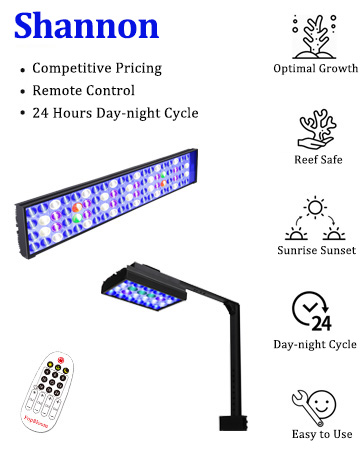
- Auto Running: 24-hour, 30-day, four-season, and yearly automatic running programs.
- Natural Environment Simulation: Mimics sunrise, sunset, moon cycles, and hemisphere lighting.
- Easy Use: Quick 3-second setup with 4 preset programs for various tank types.
- High Power: Each panel provides 90W, sufficient for corals, reefs, LPS, SPS, and other marine biological needs.
- DIY Programming: Customize lighting with 8 time points to design your desired light cycles.
- Full Spectrum 4 Channels: Optimized for coral growth and coloration.
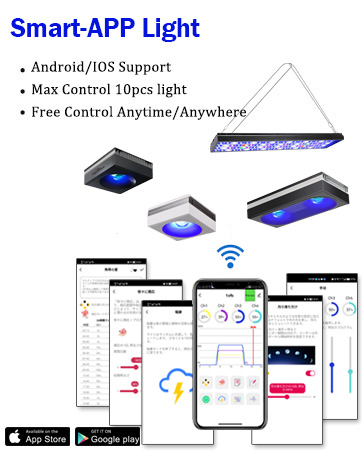
- WiFi Smart Control: Built-in Wi-Fi for steady signal, multiple light grouping (up to 10 lights), and app control anytime, anywhere.
- Efficient Heat Dissipation: Aluminum finned cooling design ensures optimal performance without noise.
- Engineered Diffuser: Improves color mixing with minimal PAR output reduction.
- High-Efficiency Reflector: Energy-saving, uniform, and optimal lighting distribution.
Specifications:
| Brand | PopBloom |
| Model Name | Hertz H75 |
| Product Dimensions | 29.5"D x 4.7"W x 1.4"H (75cm x 12cm x 3.6cm) |
| Wattage | 90 watts per lamp |
| Light Source Type | LED |
| Number of Light Sources | 336 |
| Shade Color | Full Spectrum |
| Control Method | Remote (Smart App) |
| Material | Aluminum |
| Water Resistance Level | Not Water Resistant |


3. What's in the Box
Upon unpacking, please verify that all the following components are included:
- 3x 75CM Light Units
- 6x Arm Kits
- 3x Power Supplies
- 3x Power Plugs
- 1x User Manual (this document)
4. Setup Instructions
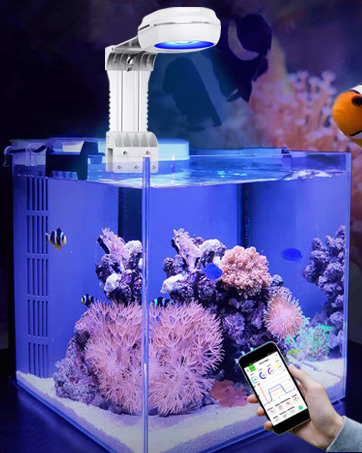
The PopBloom H75 lighting system offers versatile mounting options to suit various aquarium setups. Ensure the light is securely mounted before connecting power.
4.1 Arm Kit Assembly and Mounting
The universal arm kit allows for easy installation on both rimmed and rimless tanks. The arm length and height are adjustable up to 35cm.
- Attach the arm kit components to the light unit using the provided hardware.
- Securely fasten the arm kit to the edge of your aquarium. Adjust the height and position as needed for optimal light coverage.
- Ensure the light unit is level and stable to prevent accidental falls.

4.2 Alternative Mounting Options:
- Hanging: Each light comes with 2 sets of hang kits. The total length is 80cm, with a hanging height of 40cm.
- Easy Fit: The ultra-thin design allows it to fit in tank covers/lids or be nailed to a bar/bracket.

4.3 Power Connection:
Connect the power supply to the light unit, then plug the power adapter into a suitable electrical outlet. Ensure all connections are secure.
5. Operating Instructions
The PopBloom H75 features smart control via a dedicated mobile application, offering extensive customization for your aquarium lighting.
5.1 Smart App Control
Download the control app to your iOS or Android device. The app allows you to manage your lighting schedule, intensity, and special effects.
- Download the App: Scan the QR codes below or visit the provided links to download the Smart Life or Tuya Smart app.


5.2 Light Channels and Spectrum
The H75 features 4 independent channels, each with specific LED types and wattages to create a full spectrum suitable for marine environments.
| Channel | LEDs | Watts | Functions |
| Channel 1 | White | 16 W | 12000K White |
| Channel 2 | Purple | 11 W | Moonlight |
| Channel 3 | Blue | 46 W | REEF GROW Blue |
| Channel 4 | Red/Green/Yellow | 18 W | Vivid Color |

5.3 Preset Modes
The app includes various preset modes to simplify lighting management for different needs:
- Tropical Spring, Summer, Autumn, Winter
- Temperate Spring, Summer, Autumn, Winter
- Kelvin@5m, Kelvin@10m, Kelvin@15m
- Reduce Algae
- SPS Dominant, LPS & Soft Coral
- Fish & Plants
- Cut & Frag

5.4 Manual Mode
Adjust individual channel intensities manually to create custom lighting effects. Remember to save your custom settings if you wish to reuse them.
5.5 Lunar Cycle
Activate the 29-day lunar cycle feature to simulate natural moon intensity. Set the date of the lunar cycle, and the app will automatically update the moonlight intensity (Channel 2 represents the moon).
5.6 Acclimation Mode
The acclimation schedule helps corals, fish, and plants adapt to new lighting by gradually increasing intensity over a set period. You can adjust the duration and initial intensity within the app.
5.7 Group Control System
Control multiple PopBloom lights simultaneously (up to 10 units) using the group control feature in the app, ideal for larger or multiple tank setups.

5.8 Product Videos:
Video 5.1: Demonstrates the vibrant coloration achieved in a reef tank using the PopBloom T75 light.
Video 5.2: Overview of the H75 WiFi Full Spectrum Saltwater Coral Light features and functionality.
6. Maintenance
Regular maintenance ensures optimal performance and extends the lifespan of your PopBloom H75 LED light.
- Cleaning: Periodically wipe the light unit and lenses with a soft, damp cloth to remove salt creep, dust, and water spots. Ensure the unit is unplugged before cleaning. Do not use abrasive cleaners.
- Ventilation: Ensure the aluminum fins are free from obstructions to allow for proper heat dissipation.
- Connections: Regularly check all power and control cable connections to ensure they are secure and free from corrosion.
7. Troubleshooting
If you encounter issues with your PopBloom H75 LED light, refer to the following troubleshooting steps:
- Light Not Turning On:
- Check if the power plug is securely connected to the outlet and the light unit.
- Verify that the power outlet is functional.
- Ensure the power supply is correctly connected and receiving power.
- App Connection Issues:
- Ensure your smartphone's Wi-Fi is enabled and connected to the same network as the light.
- Restart the app and try reconnecting.
- If issues persist, try resetting the light's Wi-Fi connection (refer to app instructions for specific steps).
- Inconsistent Lighting:
- Check your programmed schedule in the app for any unintended settings.
- Ensure no physical obstructions are blocking the light output.
For further assistance, please contact PopBloom customer support.
8. Safety Information
- This product is designed for indoor use only.
- The light unit is NOT WATER RESISTANT. Avoid direct contact with water to prevent electrical shock or damage.
- Always unplug the light before performing any maintenance, cleaning, or installation tasks.
- Do not operate the light if any part is damaged or if the power cord is frayed.
- Keep out of reach of children and pets.
- Ensure proper ventilation around the light unit to prevent overheating.
9. Warranty and Support
For warranty information, product support, or to purchase replacement parts, please visit the official PopBloom website or contact their customer service department. Keep your purchase receipt as proof of purchase for warranty claims.