
Smoby 7600350242
Smoby Supermarket Maxi (Model 7600350242) Instruction Manual
Your guide to setting up, operating, and maintaining your Smoby Supermarket Maxi.
1. Introduction
The Smoby Supermarket Maxi is a comprehensive play set designed to simulate a real supermarket experience. It features various play areas including a checkout, a refrigerated section, and fruit and vegetable displays. This manual provides essential information for assembly, operation, and care of your product.

Figure 1.1: The Smoby Supermarket Maxi play set, including the main market stand and a separate shopping trolley.
2. Important Safety Information
WARNING:
- Not suitable for children under 3 years of age due to small parts that may present a choking hazard.
- Adult supervision is recommended during assembly and play.
3. What's in the Box
Carefully unpack all components and verify that all items listed below are present. If any parts are missing or damaged, please contact customer support.
- 1 x Smoby Supermarket Maxi Main Unit
- 1 x Shopping Trolley
- Approximately 50 x Accessories, including:
- 8 dummy boxes (e.g., cereals, pasta, cookies, milk)
- 2 cans
- 2 yoghurts
- 6 fruits and vegetables (e.g., carrot, cucumber, lemon, orange, apple, red pepper)
- 2 macarons
- 2 tarts
- 1 bread
- 1 electronic barcode scanner with sound and light function
- 4 receipts
- 1 credit card
- 9 coins
- 12 bills

Figure 3.1: A selection of the included accessories, such as play food, scanner, money, and receipts.

Figure 3.2: The included shopping trolley, designed for easy maneuverability.
4. Setup and Assembly
Assembly of the Smoby Supermarket Maxi requires adult supervision. Follow these general steps for assembly. Refer to the detailed graphical instructions provided in the product packaging for specific part connections.
- Unpack Components: Carefully remove all parts from the packaging and lay them out on a clean, flat surface.
- Assemble Main Structure: Connect the base, side panels, and counter sections of the supermarket unit. Ensure all connections are secure.
- Install Shelving: Attach the various shelves and display units for fruits, vegetables, and packaged goods.
- Integrate Special Features: Install the cash register, mechanical weighing scales, and the refrigerated area.
- Battery Installation (Scanner): The electronic barcode scanner requires 2 AAA batteries (not included). Locate the battery compartment, insert the batteries with correct polarity, and secure the cover.
- Assemble Trolley: Attach the wheels and handle to the shopping trolley.
- Place Accessories: Arrange the play food, boxes, and other accessories on the shelves and in the designated areas.

Figure 4.1: Assembled dimensions of the Smoby Supermarket Maxi (W80 x D59.6 x H89.6cm) and shopping trolley (H44cm).
5. Operating Instructions
The Smoby Supermarket Maxi offers various interactive features for an engaging play experience.
5.1. Cash Register and Scanner
- Electronic Barcode Scanner: Press the button on the scanner to activate sound and light effects, simulating scanning products.
- Cash Register: The cash register includes a money drawer that can be opened to store play coins and bills.
- Credit Card Reader: Use the included credit card with the card reader for pretend transactions.
- Dummy Microphone: The microphone is for pretend announcements within the supermarket.
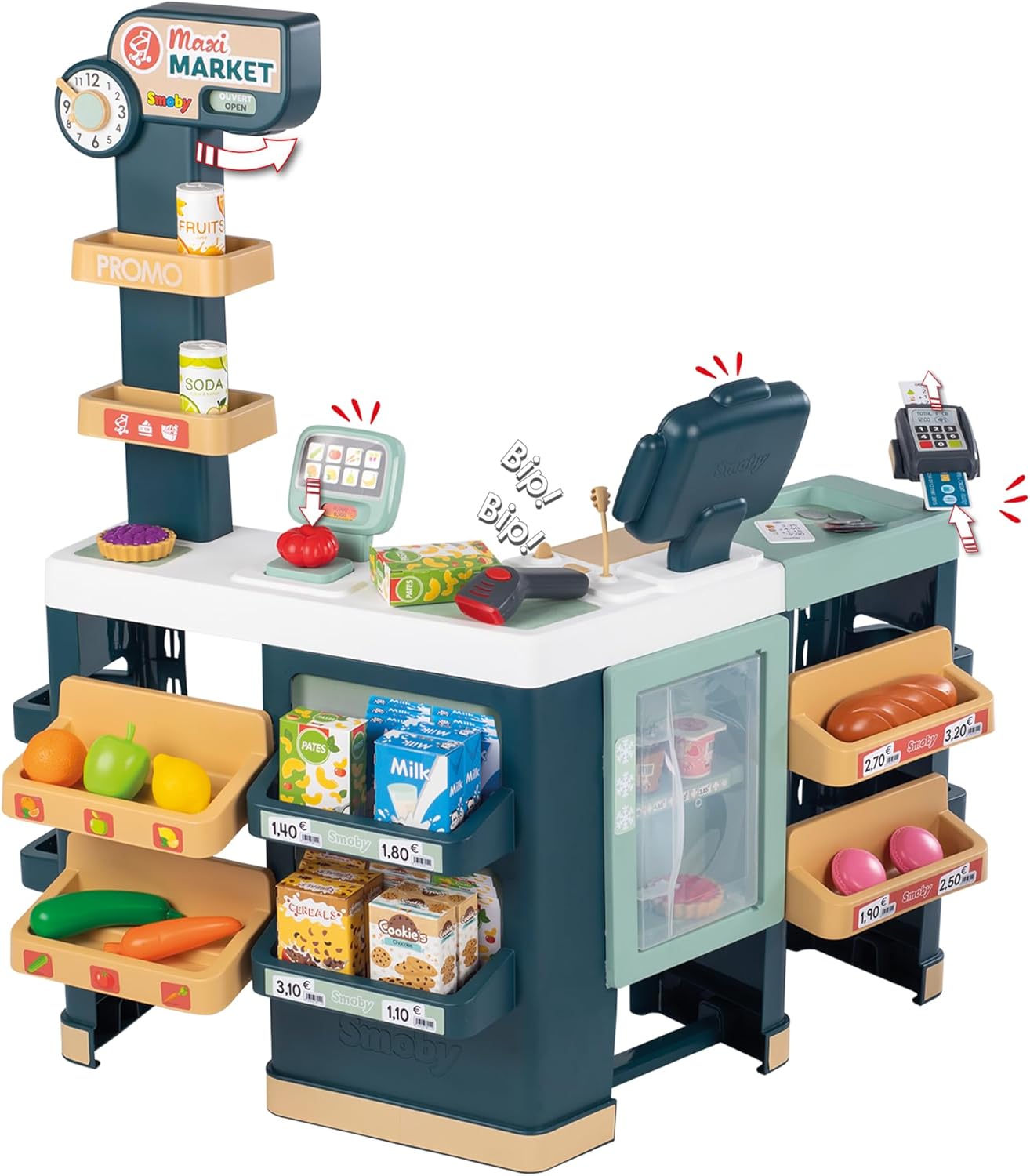
Figure 5.1: The cash register area, showing the electronic scanner with its sound and light features.
5.2. Weighing Scales
Place play fruits and vegetables on the mechanical weighing scales. The displayed weight adjusts to simulate real weighing, enhancing the play experience.
5.3. Clock and Sign Panel
Adjust the clock and the "Open/Closed" sign panel to indicate the supermarket's operating hours or status.
5.4. Product Display
Utilize the various shelves, fruit and vegetable bins, and the refrigerated area to organize and display the included play food items.

Figure 5.2: A child interacting with the supermarket, demonstrating product placement and role-play.

Figure 5.3: Two children engaging in role-play, one at the cash register and another with the shopping trolley.
6. Maintenance and Care
- Cleaning: Wipe down all surfaces with a damp cloth and mild soap. Avoid abrasive cleaners or harsh chemicals.
- Drying: Ensure all parts are thoroughly dry before storage or continued play.
- Storage: Store the play set in a cool, dry place away from direct sunlight to prevent material degradation.
- Battery Replacement: Replace AAA batteries in the scanner when sound and light effects become weak or cease to function.
7. Troubleshooting
| Problem | Possible Cause | Solution |
|---|---|---|
| Scanner not making sound/light. | Batteries are dead or incorrectly installed. | Check battery polarity. Replace with new AAA batteries. |
| Parts do not fit together during assembly. | Incorrect orientation or wrong parts being used. | Refer to the detailed assembly instructions. Ensure parts are aligned correctly. Do not force parts. |
| Weighing scale not moving. | Mechanism might be jammed or scale is not level. | Ensure no debris is obstructing the mechanism. Place on a flat, stable surface. |
8. Specifications
- Model Number: 7600350242
- Brand: Smoby
- Assembled Dimensions (Supermarket): W80 x D59.6 x H89.6 cm (approximately 31.5 x 23.5 x 35.3 inches)
- Item Weight: 3.17 pounds (approximately 1.44 kg)
- Recommended Age: 36 months - 7 years
- Batteries Required: 2 x AAA (for electronic scanner, not included)
- Manufacturer: SMOBY
9. Warranty and Support
For warranty information or technical support, please refer to the contact details provided in the product packaging or visit the official Smoby website. Keep your proof of purchase for warranty claims.
Ask a question about this manual
Ask about setup, troubleshooting, compatibility, parts, safety, or missing instructions. Manuals+ will review the question and use this page’s manual context to help answer it.