
Introduction
This manual provides comprehensive instructions for the Graywind 15-Channel Timing Remote Controller (Model CAPJ-BD15). This remote is designed to operate Graywind smart roller shades, zebra blinds, shangrila shades, roman shades, dual shades, curtains, and panel track blinds. Please read this manual thoroughly before use to ensure proper operation and to maximize the functionality of your remote controller.
Product Features
- Multi-Channel Control: Capable of controlling up to 15 smart shades individually or in groups.
- Light Adjustment: Dedicated function buttons for flexible light adjustment.
- Favorite Position: Allows setting and recalling a preferred shade position.
- Timing Function: Supports up to 20 date-time groups for automatic shade control.
- Ergonomic Design: Features an all-black, ergonomic design with a backlight for clear display in low light conditions.
- Versatile Use: Can be used handheld or wall-mounted. Includes a removable silicone case.

Image: The Graywind 15-Channel Timing Remote Controller, showcasing its ergonomic design and digital display.
Package Contents
The Graywind 15-Channel Timing Remote Controller package typically includes:
- 1 x Graywind 15-Channel Timing Remote Controller (Model CAPJ-BD15)
- Mounting Hardware (for wall-mounting option)
- User Manual (this document)

Image: The retail packaging for the Graywind 15-Channel Timing Remote Controller, indicating included features like 20 timing groups and 15 channels.
Setup
1. Initial Power-On
Ensure the remote has sufficient power. If applicable, insert batteries according to the polarity markings inside the battery compartment. The remote's display should illuminate.
2. Pairing with Shades
Refer to the specific instructions provided with your Graywind smart shades for pairing procedures. Generally, this involves a sequence of button presses on both the remote and the shade motor to establish a connection. The remote can be paired with up to 15 individual shades or groups of shades.
3. Wall Mounting (Optional)
If you choose to wall-mount the remote, use the provided mounting hardware. Select a convenient location, ensuring the remote is easily accessible. Secure the mounting bracket to the wall and then attach the remote controller.
Operating Instructions
The remote controller features an intuitive button layout for easy operation of your Graywind shades.

Image: A detailed diagram illustrating the buttons on the Graywind remote control and their respective functions, including Open, Close, Stop, Channel selection, Function buttons, and Favorite Position.
- Open Button: Raises the selected shade(s) to the fully open position.
- Close Button: Lowers the selected shade(s) to the fully closed position.
- Stop Button (||): Halts the movement of the selected shade(s) at the current position.
- Channel +/- Buttons: Used to select individual channels (1-15) or the group channel (00) for controlling multiple shades simultaneously.
- Function Buttons (Circular Arrows): Used for advanced settings such as adjusting light levels or navigating menus. Refer to the shade's specific manual for detailed use.
- Favorite Position Button (Heart Icon): Moves the selected shade(s) to a pre-set favorite position. To set a favorite position, move the shade to the desired height, then press and hold the Favorite Position button until the shade briefly jogs.
Timing Schedule
The remote supports setting up to 20 date-time groups for automated shade operation. Consult the remote's on-screen menu and your shade's manual for detailed instructions on programming timing schedules. This feature allows shades to open or close at specific times, enhancing convenience and energy efficiency.
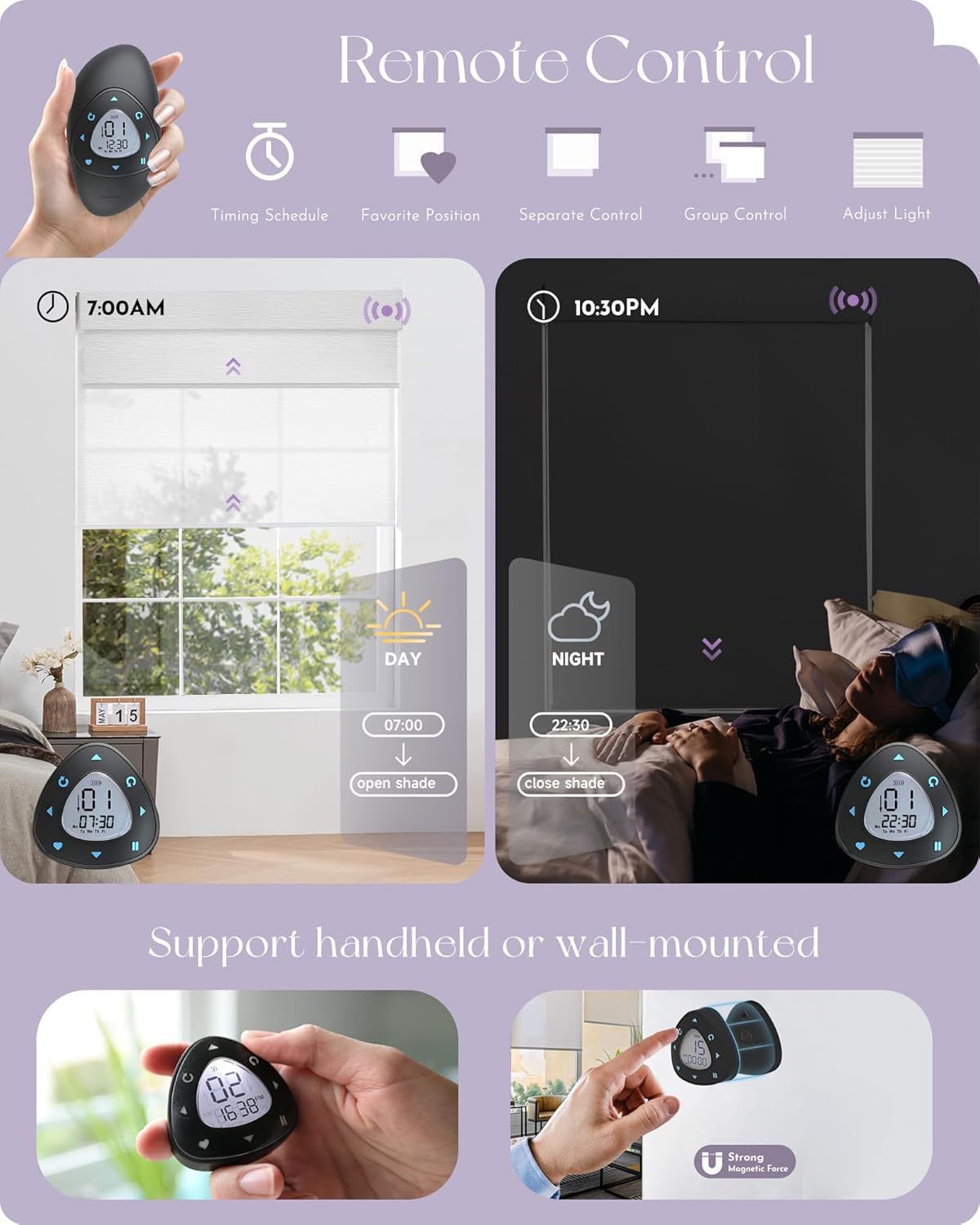
Image: An infographic showing the remote's capabilities, including timing schedules for opening shades in the morning and closing them at night, along with separate and group control options.
Maintenance
- Cleaning: Spot clean the remote controller only. Use a soft, dry cloth. Avoid abrasive cleaners or solvents.
- Battery Replacement: If the display dims or the remote becomes unresponsive, replace the batteries. Refer to the battery compartment for the correct battery type and polarity.
- Storage: Store the remote in a dry place away from direct sunlight and extreme temperatures.
Troubleshooting
| Problem | Possible Cause | Solution |
|---|---|---|
| Remote not responding. | Low or dead batteries. Remote not paired. Obstruction between remote and shade. | Replace batteries. Re-pair the remote with the shade (refer to pairing instructions). Ensure a clear line of sight. |
| Shade not moving to favorite position. | Favorite position not set or incorrectly set. | Re-set the favorite position (see Operating Instructions). |
| Timing function not working. | Incorrect time/date setting. Schedule not programmed correctly. | Verify time and date settings on the remote. Review and re-program the timing schedule. |
| Difficulty controlling multiple shades. | Incorrect channel selected. Shades not grouped properly. | Ensure the correct channel (1-15 for individual, 00 for group) is selected. Verify shade grouping in pairing process. |
Specifications
| Model Number | CAPJ-BD15 |
| Brand | Graywind |
| Control Type | Remote |
| Number of Channels | 15 |
| Timing Groups | Up to 20 date-time groups |
| Material | Plastic |
| Product Dimensions | Approximately 5"L x 5"W |
| Item Weight | 6.7 ounces (0.19 Kilograms) |
| Recommended Uses | Indoor control of smart shades |
| Mounting Type | Handheld or Wall Mount |
| Product Care | Spot Clean Only |
Warranty and Support
Graywind offers a 5-year extended warranty on its products. For warranty claims, technical support, or any inquiries regarding your Graywind 15-Channel Timing Remote Controller, please contact Graywind customer service. Contact information can typically be found on the product packaging or the official Graywind website.
For additional resources and product information, visit the official Graywind store: Graywind Store on Amazon.