
Introduction
This manual provides comprehensive instructions for the installation, configuration, and operation of your Reolink RLC-811WA 4K 8MP Outdoor Security Camera. Please read this manual carefully before using the product to ensure proper setup and functionality. Keep this manual for future reference.
The Reolink RLC-811WA is a high-performance outdoor security camera featuring 4K Ultra HD resolution, 5X optical zoom, dual-band Wi-Fi connectivity, color night vision, and intelligent detection capabilities for humans, vehicles, and pets. It also includes two-way audio and IP67 weatherproofing for reliable outdoor surveillance.
What's in the Box
Verify that all components are present in the package before proceeding with installation.

Image: The image displays the Reolink RLC-811WA camera along with its accessories: power adapter, 1m network cable, 4.5m power extension cable, surveillance sticker, quick start guide, mounting hole template, screw pack, and wrench.
- Reolink RLC-811WA Camera
- Power Adapter
- 1m Network Cable
- 4.5m Power Extension Cable
- Surveillance Sticker
- Quick Start Guide
- Mounting Hole Template
- Pack of Screws
- Wrench
- Waterproof Lid
Setup Instructions
- Mounting the Camera:
Choose a suitable location for your camera, ensuring it has a clear view of the area you wish to monitor. Use the provided mounting hole template and screws to securely attach the camera to a wall or ceiling. Ensure the camera is positioned to avoid direct sunlight or strong light sources that could affect image quality.

Image: The Reolink RLC-811WA camera is shown mounted on an exterior wall, demonstrating its robust, weather-resistant design suitable for outdoor use in various conditions, indicated by the IP67 rating and temperature range.
- Power Connection:
Connect the power adapter to the camera's power port and plug it into a power outlet. Use the 4.5m power extension cable if needed to reach a power source.
- Network Connection:
For initial setup, it is recommended to connect the camera to your router using the provided 1m network cable. After initial setup, you can configure Wi-Fi connectivity.
- App Installation and Configuration:
Download the Reolink App from your smartphone's app store (iOS or Android). Follow the in-app instructions to add your camera. This typically involves scanning a QR code on the camera or manually entering its UID.
- Wi-Fi Setup:
Once the camera is added to the app, navigate to the camera settings to configure its Wi-Fi connection. The RLC-811WA supports both 2.4GHz and 5GHz dual-band Wi-Fi. Choose the appropriate band for your network. 5GHz offers faster speeds for closer distances, while 2.4GHz provides a wider range.

Image: This diagram illustrates the benefits of Wi-Fi 6 in a home environment, showing how 2.4GHz provides wider coverage and 5GHz offers faster speeds for devices like the Reolink camera. A router supporting Wi-Fi 6 is recommended for optimal performance.
Operating Instructions
4K UHD Video and 5X Optical Zoom
The RLC-811WA captures video in 4K (8MP) Ultra HD resolution, providing clear and detailed images. The 5X optical zoom allows you to magnify distant objects without compromising image quality. Use the zoom function within the Reolink App to adjust the view.
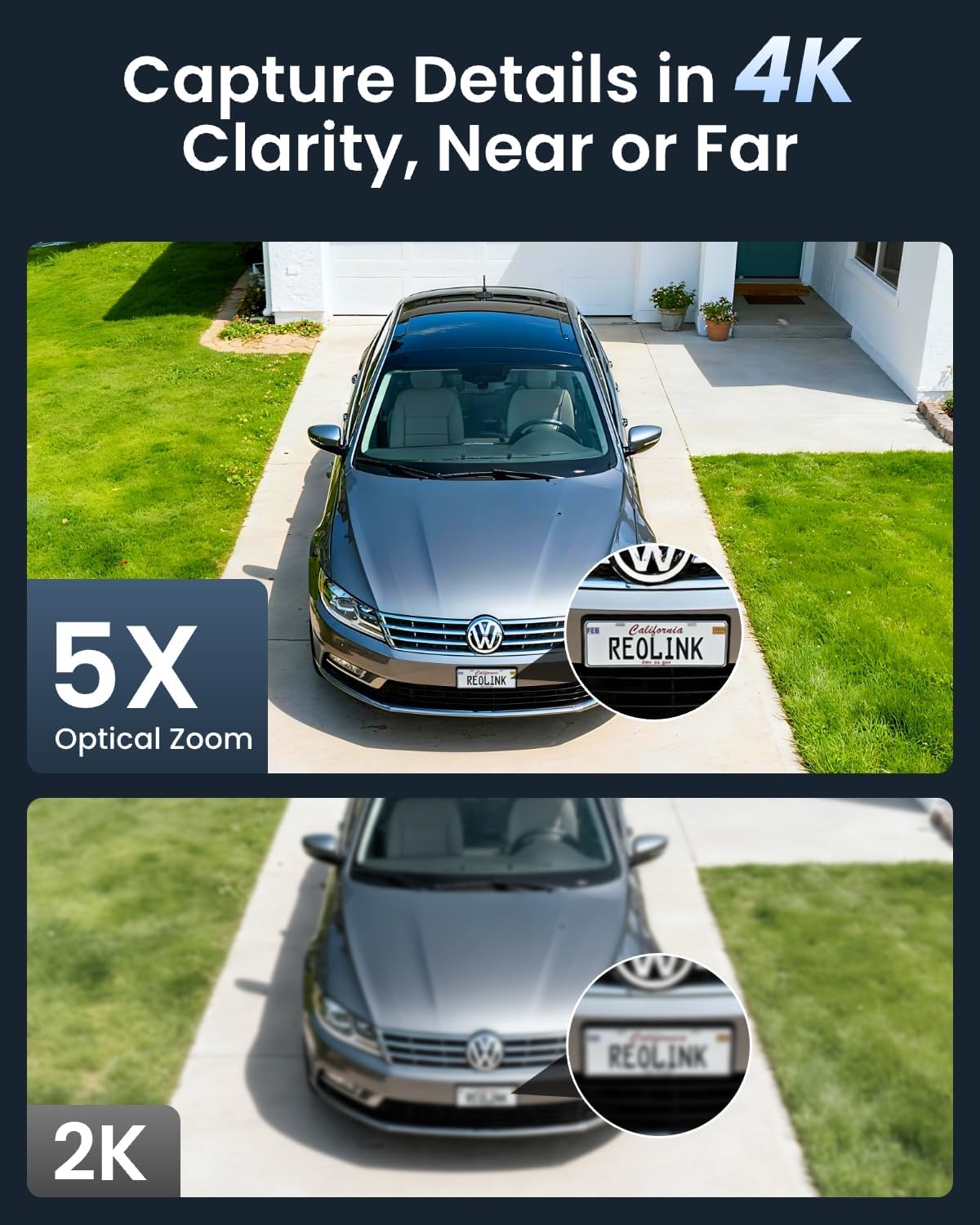
Image: This image demonstrates the superior clarity of 4K resolution with 5X optical zoom, showing a car's license plate clearly visible, compared to a less detailed 2K image of the same scene.
Color Night Vision
Equipped with spotlights, the camera can capture full-color video even in low-light conditions, extending up to 30 meters. This feature enhances visibility and detail compared to traditional black-and-white infrared night vision.

Image: The top panel shows a house at night with the camera's spotlights on, providing vivid color night vision. The bottom panel shows the same scene with spotlights off, resulting in standard black-and-white night vision up to 30 meters.
Smart Detection and Alerts
The camera features intelligent detection for humans, vehicles, and pets, minimizing false alarms triggered by irrelevant movements. When motion is detected, you will receive instant alerts on your smartphone.

Image: A smartphone screen displays a notification from the Reolink app indicating detection of a person, vehicle, and animal by the RLC-811WA camera, highlighting its smart alert capabilities.
Two-Way Audio and Active Deterrence
Utilize the built-in microphone and speaker for two-way communication. You can speak to visitors or deter intruders remotely. The camera's spotlights and customizable siren can be activated automatically upon detection to warn off potential threats.

Image: The top panel shows a user interacting with a delivery person via two-way audio. The bottom panel illustrates the camera's active deterrence with spotlights and a siren warning off an intruder at night.
Multiple Storage Options
Recordings can be stored locally on a microSD card (up to 256GB, not included), on a Reolink NVR (Network Video Recorder), or uploaded to an FTP server. The camera supports 24/7 continuous recording.
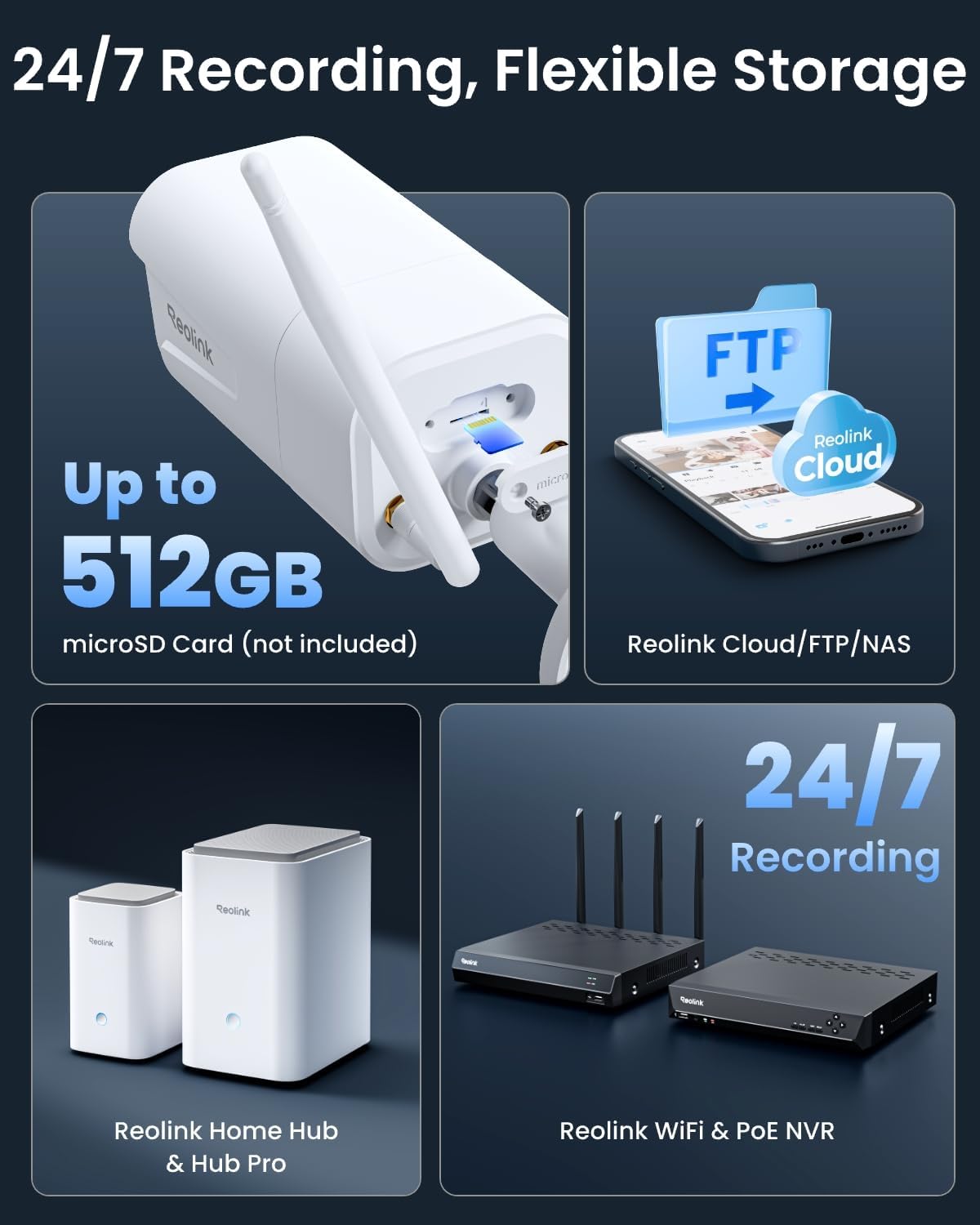
Image: This graphic illustrates the flexible storage solutions for Reolink cameras, including direct microSD card storage (up to 512GB), cloud services (Reolink Cloud, FTP, NAS), and integration with Reolink NVRs and Home Hubs for 24/7 recording.
Maintenance
- Cleaning: Regularly clean the camera lens with a soft, damp cloth to ensure optimal image clarity. Avoid using harsh chemicals.
- Firmware Updates: Check for and install firmware updates via the Reolink App to ensure your camera has the latest features and security enhancements.
- Cable Management: Ensure all cables are securely connected and protected from environmental elements. Use the waterproof lid for cable connections.
- Power Supply: Use only the original Reolink power adapter to prevent damage to the camera.
Troubleshooting
- Camera Offline:
Check the power connection and ensure the camera is receiving power. Verify your Wi-Fi network is operational and the camera is within range. If using 5GHz Wi-Fi, ensure your router supports it and the camera is close enough. Try restarting your router and the camera.
- Poor Image Quality:
Clean the camera lens. Ensure there are no obstructions in the camera's field of view. Check your network bandwidth; a stable and sufficient internet connection is crucial for 4K streaming. Adjust camera settings for resolution and bitrate if necessary.
- False Alarms:
Adjust the sensitivity settings for human, vehicle, and pet detection in the Reolink App. Define specific motion zones to exclude areas with frequent irrelevant movement (e.g., public roads, swaying trees).
- No Audio/Two-Way Audio Issues:
Ensure the microphone and speaker are enabled in the camera settings within the app. Check the volume levels on your device and in the app. Ensure there are no physical obstructions blocking the microphone or speaker on the camera.
Specifications
| Feature | Detail |
|---|---|
| Model Name | RLC-811WA |
| Video Resolution | 4K (8MP) |
| Optical Zoom | 5X |
| Night Vision Range | 30 Meters (Color Night Vision) |
| Wi-Fi Connectivity | 2.4GHz / 5GHz Dual-Band (Wi-Fi 6) |
| Detection Type | Motion, Person, Vehicle, Pet Detection |
| Audio | Two-Way Audio |
| Weather Resistance | IP67 Waterproof |
| Storage Options | MicroSD Card (up to 256GB), Reolink NVR, FTP |
| Power Source | Electric with cord (12V, 12W) |
| Dimensions | 23.8 x 8 x 7.2 cm |
| Operating Method | App |
| Video Compression | H.265 |
| Viewing Angle | 100 Degrees |
| Image Sensor | CMOS |
Warranty and Support
This Reolink RLC-811WA camera comes with a 2-year warranty from the date of purchase. Please retain your proof of purchase for warranty claims.
For technical support, troubleshooting assistance, or warranty inquiries, please visit the official Reolink support website or contact their customer service. You can find more information and resources on the Reolink Store on Amazon.


