
Introduction
This manual provides essential information for the safe and efficient operation of your APC Smart-UPS SMT3000C 3000VA Uninterruptible Power Supply. Please read this manual thoroughly before installation and use.
Important Safety Instructions
Please read and follow all safety instructions carefully to prevent injury or damage to the unit. Retain this manual for future reference.
- Electrical Safety: Connect the UPS to a grounded outlet only. Do not remove the grounding prong.
- Battery Safety: Batteries can present a risk of electrical shock and high short-circuit current. Observe proper polarity when connecting batteries.
- Installation: Install the UPS indoors in a controlled environment, free from excessive dust, corrosive fumes, and conductive contaminants.
- Servicing: Refer all servicing to qualified service personnel. There are no user-serviceable parts inside the UPS.
Package Contents
Verify that all items listed below are included in your package. If any items are missing or damaged, contact your dealer or APC.
- APC Smart-UPS SMT3000C Unit
- PowerChute Business Edition Software CD
- RS-232 Cable
- USB Cable
- Ethernet Cable
- Wire Ties
- Cleaning Kit
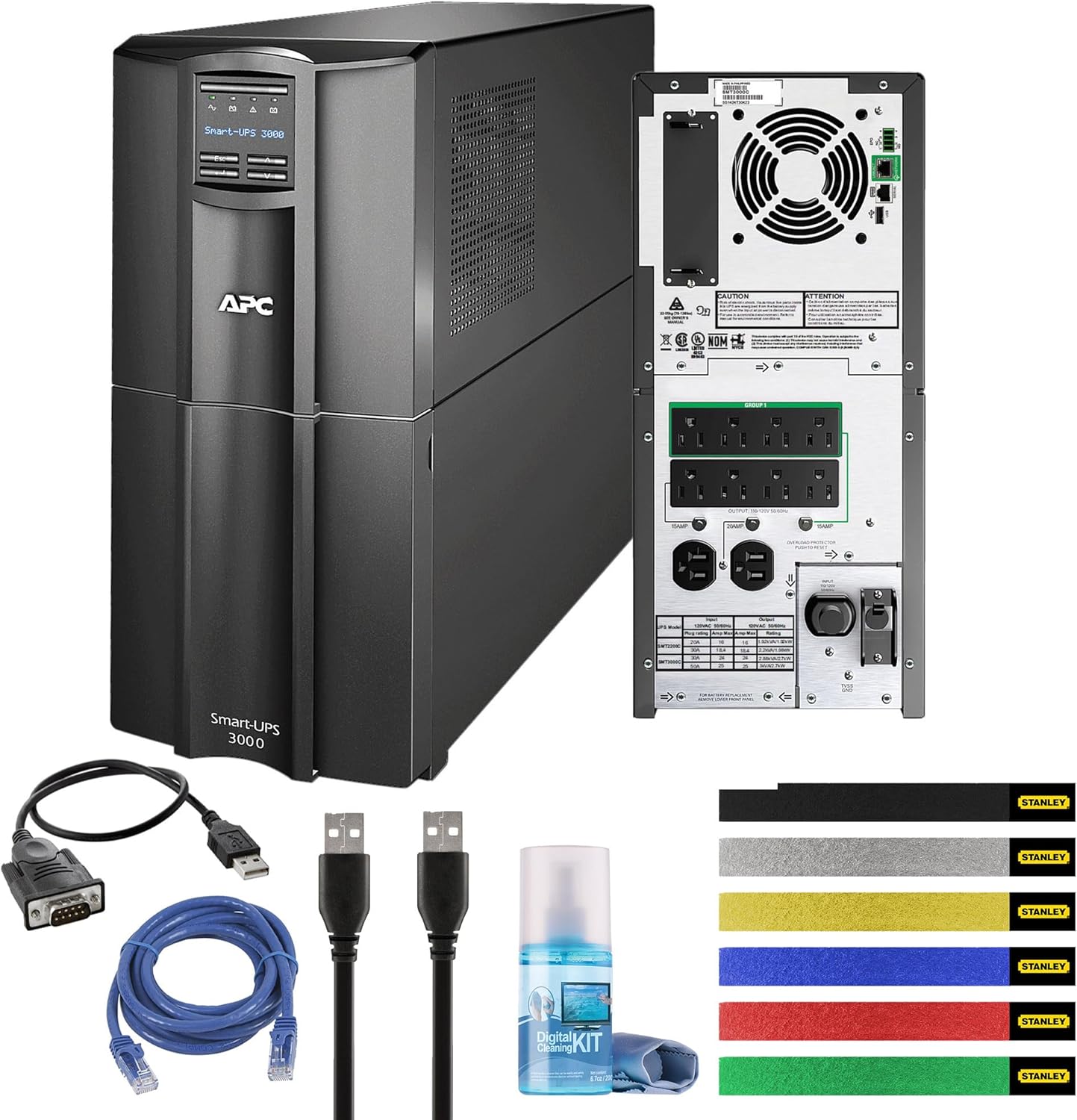
Figure 1: APC Smart-UPS SMT3000C unit shown with all included accessories: RS-232 cable, USB cable, Ethernet cable, wire ties, and a cleaning kit.
Product Overview
The APC Smart-UPS SMT3000C is a Line Interactive Uninterruptible Power Supply designed to provide reliable power protection for your electronic equipment. It features Automatic Voltage Regulation (AVR) and SmartConnect for remote monitoring.
Front Panel

Figure 2: Front view of the APC Smart-UPS SMT3000C, displaying the control panel and LCD screen for status monitoring.
Rear Panel
The rear panel provides all necessary connections for input power, protected outlets, and communication ports.
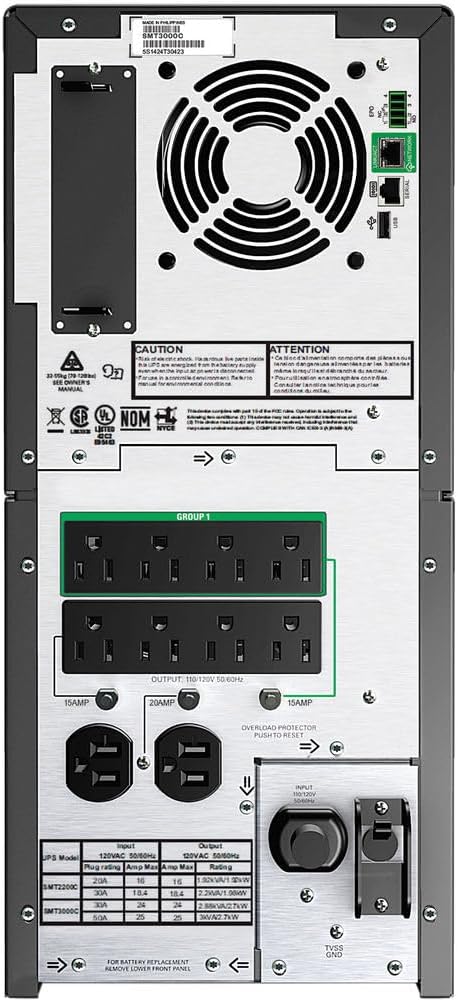
Figure 3: Rear view of the APC Smart-UPS SMT3000C, highlighting the NEMA 5-30P input, (8) NEMA 5-15R outputs, (2) NEMA 5-20R outputs, communication ports (RS-232, USB, Ethernet), and a circuit breaker.
- Input Power: NEMA 5-30P
- Output Outlets: (8) NEMA 5-15R, (2) NEMA 5-20R
- Communication Ports: RS-232, USB, Ethernet (for SmartConnect)
- Circuit Breaker: Overload protection
Setup
1. Placement
Place the UPS on a flat, stable surface in a cool, dry, and well-ventilated area. Ensure adequate clearance around the unit for proper airflow. Avoid direct sunlight, heat sources, and excessive moisture.
2. Battery Connection
The UPS is shipped with the internal battery disconnected for safety. Follow these steps to connect the battery:
- Remove the front bezel of the UPS.
- Locate the battery connector.
- Firmly push the battery connector together until it clicks into place.
- Replace the front bezel.
3. Connecting Equipment
Connect your critical equipment (computers, servers, network devices) to the UPS output outlets. Ensure that the total load does not exceed the UPS capacity (2700W).
- Battery Backup & Surge Protected Outlets: These outlets provide battery power during outages and surge protection. Connect critical equipment here.
4. Connecting to Utility Power
Plug the UPS power cord (NEMA 5-30P) into a dedicated, grounded 120V wall outlet. Avoid using extension cords or surge strips with the UPS input.
5. Initial Power-Up
Press the power button on the front panel to turn on the UPS. The LCD display will illuminate, and the UPS will perform a self-test. Allow the UPS to charge for at least 24 hours before relying on it for extended battery backup.
6. SmartConnect Setup
The APC SmartConnect feature allows for remote monitoring of your UPS. Connect an Ethernet cable from the UPS SmartConnect port to your network. Follow the instructions provided with the SmartConnect service to register your device and enable remote monitoring, automatic notifications, and firmware updates.
Operating the UPS
Power On/Off
- To Power On: Press and hold the power button on the front panel until the display illuminates.
- To Power Off: Press and hold the power button until the display turns off.
Automatic Voltage Regulation (AVR)
The UPS features Automatic Voltage Regulation (AVR), which automatically corrects minor voltage fluctuations (sags and surges) without using battery power. This helps to preserve battery life and ensures a stable power supply to connected equipment.
Runtime Information
The APC Smart-UPS SMT3000C provides varying runtimes depending on the connected load:
- 50W Load: Approximately 563 minutes
- 100W Load: Approximately 330 minutes
- 200W Load: Approximately 172 minutes
- 300W Load: Approximately 112 minutes
- 400W Load: Approximately 81 minutes
- 500W Load: Approximately 63 minutes
- 600W Load: Approximately 51 minutes
- 700W Load: Approximately 42.2 minutes
- 800W Load: Approximately 35.7 minutes
- 900W Load: Approximately 30.6 minutes
- 1000W Load: Approximately 26.7 minutes
- 1350W (Half Load): Approximately 17.5 minutes
- 1400W Load: Approximately 16.6 minutes
- 1600W Load: Approximately 13.5 minutes
- 1800W Load: Approximately 11.2 minutes
- 2000W Load: Approximately 9.4 minutes
- 2500W Load: Approximately 6.1 minutes
- 2700W (Full Load): Approximately 5.7 minutes
PowerChute Business Edition Software
Install the PowerChute Business Edition software on your connected computer to enable safe system shutdown during extended power outages, monitor UPS status, and configure various settings. Connect the UPS to your computer using the provided USB or RS-232 cable.
Maintenance
Battery Care
The UPS batteries are designed for a specific lifespan. Factors such as ambient temperature, number of discharge cycles, and discharge depth affect battery life. Replace batteries when the UPS indicates a battery fault or when runtime significantly decreases.
- Perform regular self-tests (via the UPS display or PowerChute software) to assess battery health.
- Avoid operating the UPS in environments with high temperatures, as this can shorten battery life.
Cleaning
Regularly clean the exterior of the UPS with a soft, dry cloth. Use the provided cleaning kit for gentle cleaning. Ensure the UPS is powered off and disconnected from utility power before cleaning. Do not use liquid or aerosol cleaners directly on the unit.
Troubleshooting
This section provides solutions to common issues you may encounter with your UPS. For more complex problems, contact APC technical support.
- UPS does not turn on: Ensure the battery is properly connected and the UPS is plugged into a live wall outlet. Check the input circuit breaker.
- UPS beeps continuously: This usually indicates an overload condition or a low battery. Reduce the connected load or allow the battery to charge.
- Connected equipment loses power during an outage: The UPS may be overloaded, or the battery may be depleted or faulty. Verify the load and battery status.
- SmartConnect not connecting: Ensure the Ethernet cable is securely connected and your network settings allow communication. Check the SmartConnect portal for device registration status.
Specifications
| Feature | Detail |
|---|---|
| Model Number | SMT3000C |
| Capacity | 3000VA / 2700W |
| Input Voltage | 120 Volts |
| Input Connection | NEMA 5-30P |
| Output Connections | (8) NEMA 5-15R, (2) NEMA 5-20R |
| Battery Type | Lead Acid |
| Product Dimensions | 6 x 6 x 6 inches |
| Item Weight | 124.9 pounds |
| Color | Black |
| Energy Star Certified | Yes |
Warranty and Support
APC provides a standard warranty for this product. For detailed warranty information, please refer to the warranty card included with your product or visit the official APC website. For technical support, product registration, or service inquiries, please contact APC customer support through their official channels.
The APC SmartConnect feature is free during the standard warranty period of the UPS, providing advanced support services and remote monitoring.


