
HERCHR HERCHRay3952u07i-11
HERCHR Retro Flip Digital Desk Clock User Manual
Model: HERCHRay3952u07i-11
Introduction
This manual provides detailed instructions for the setup, operation, and maintenance of your HERCHR Retro Flip Digital Desk Clock. Please read this manual thoroughly before using the product to ensure correct operation and longevity.
The HERCHR Retro Flip Digital Desk Clock features a minimalist vintage design with an automatic page-flipping mechanism. It is suitable for various environments such as living rooms, studies, offices, and collection displays. The clock utilizes a quartz movement for accurate timekeeping and operates quietly. Its large digital display ensures easy readability from a distance.
Product Overview
Familiarize yourself with the components and dimensions of your clock.

Image: Product dimensions and detailed components. The clock measures 21cm (8.2in) wide, 16cm (6.2in) high, and 8cm (3.1in) deep. Key components include a stainless steel clock body, rotation time adjustment knob, battery compartment, and PVC sheets for the numbers.

Image: Front and back view of the clock. The front shows the hour and minute display with the time adjustor. The back clearly indicates the battery compartment, which requires a D battery (not included).

Image: Detailed view of the clock's construction. It highlights the durable card details, the ABS material used for the body, and the sturdy, stable base.
Setup
Battery Installation
The clock is powered by one No. 1 (D-cell) battery. It is recommended to use carbon batteries instead of alkaline batteries, as alkaline batteries can reduce the lifespan of the clock. The battery life is approximately 5-6 months.
- Open the back cover of the battery compartment.
- Insert one No. 1 (D-cell) battery, ensuring correct polarity.
- Close the battery compartment cover securely.
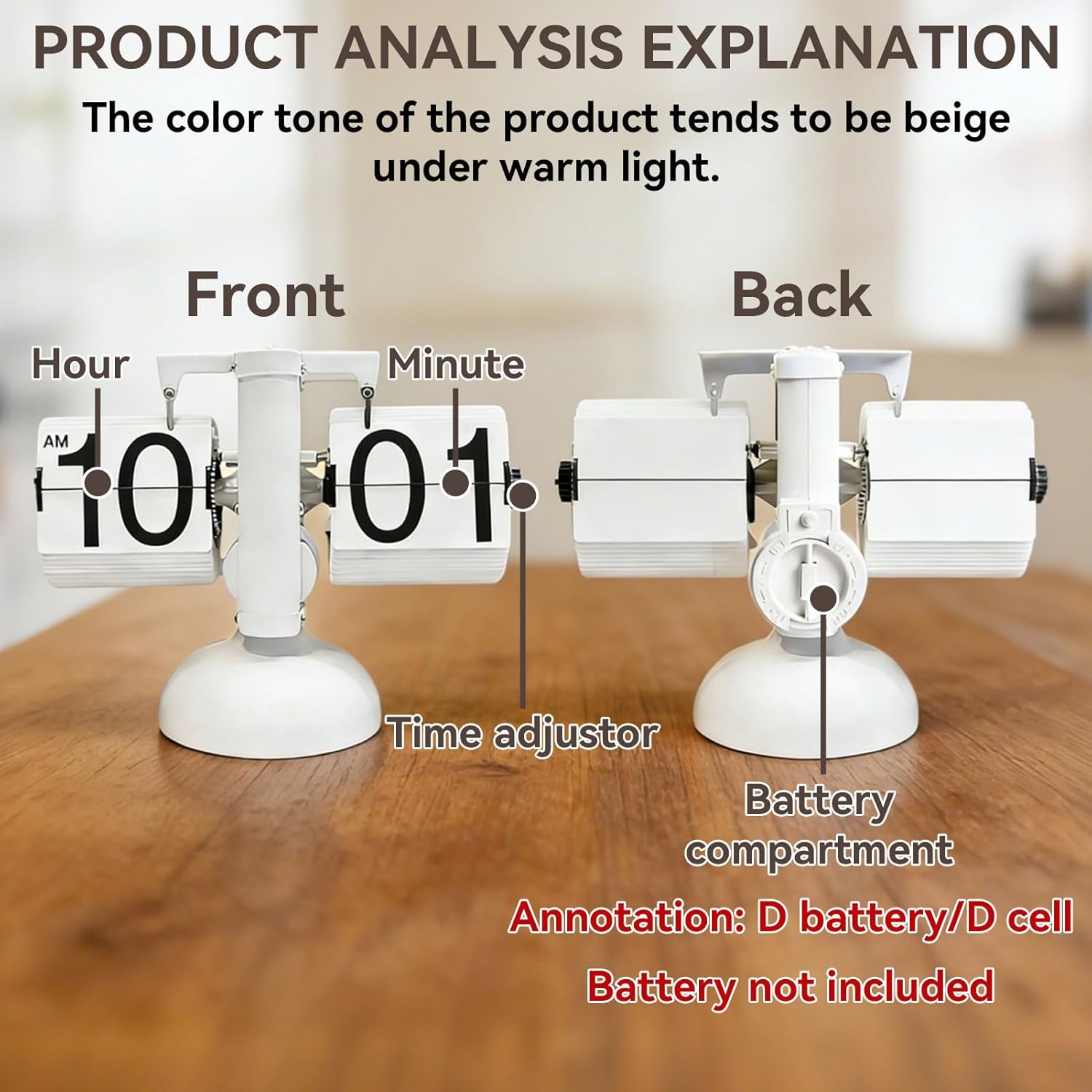
Image: Battery installation steps. This image illustrates opening the battery compartment, inserting the D-cell battery, and closing the cover. Note: Before inserting the battery, adjust the clock forward by 1 minute, as the battery will produce current 1 minute after insertion.
Operating Instructions
Setting the Time
To set the time, follow these steps:
- Adjust the time in hours/minutes by rotating the minute and time zone right rotation button counter-clockwise.
- The hour page cannot be adjusted directly; only the minute page can be used for time adjustment.
- The time adjustment needs to be advanced by 1 minute because it takes one minute for the battery to fully generate current inside.
- The time adjustment knob should be turned from back to front and cannot be turned in the opposite direction.
- Do not manually move the area marked in red circle (refer to image below), as it may affect the accuracy of the clock's timing.

Image: Time adjustment explanation. This image shows the sequence of adjusting the minute display to set the correct time. The adjustment button is on the left flip mechanism and should be turned counter-clockwise.

Image: Instructions for use. This image provides a visual summary of battery installation, time adjustment (rotating the right knob counter-clockwise), the correct direction for the time adjustment knob (back to front), and a warning against manually moving the internal mechanism.
Automatic Time Flipping
The clock automatically flips pages every minute and hour, providing a continuous display of the current time. There may be a slight error of up to 2 minutes in the initial synchronization, which is normal.
Video: Demonstration of the clock's automatic minute flipping mechanism, showing the smooth transition of the time display.
Video: Close-up of the mechanical flip clock in operation, highlighting the quiet sound of time flowing as the numbers change and the hourly flip.
Maintenance
- Cleaning: Wipe the clock with a soft, dry cloth. Avoid using abrasive cleaners or solvents, as they may damage the surface.
- Battery Replacement: Replace the D-cell battery every 5-6 months, or when the clock's operation becomes inconsistent. Always use carbon batteries for optimal performance and clock longevity.
- Storage: If storing the clock for an extended period, remove the battery to prevent leakage.
Troubleshooting
| Problem | Possible Cause | Solution |
|---|---|---|
| Clock does not operate or display time. | Battery is dead or incorrectly installed. | Check battery polarity and replace with a fresh D-cell carbon battery. |
| Time is inaccurate or falls behind. | Low battery power; internal mechanism interference. | Replace battery. Ensure no foreign objects are obstructing the flipping mechanism. Avoid manually moving the internal components. |
| Flipping mechanism is stuck. | Obstruction or mechanism misalignment. | Gently check for any visible obstructions. If the issue persists, contact customer support. |
Specifications
- Brand: HERCHR
- Model Number: HERCHRay3952u07i-11
- Color: White
- Material: ABS
- Display Type: Digital (Flip)
- Style: Retro
- Power Source: Battery Powered (1 x D-cell, not included)
- Item Weight: 590 g
- Dimensions: Approximately 21cm (W) x 16cm (H) x 8cm (D)
- Applicable Rooms: Home office, Bedroom, Kitchen, Living room
- Usage: Indoor
Warranty and Support
For warranty information or technical support, please refer to the retailer's policy or contact HERCHR customer service directly. Specific warranty details are not provided in this manual.
Please retain your purchase receipt for any warranty claims.
Ask a question about this manual
Ask about setup, troubleshooting, compatibility, parts, safety, or missing instructions. Manuals+ will review the question and use this page’s manual context to help answer it.