
1. Introduction
This manual provides detailed instructions for the assembly, operation, and maintenance of your Wnew 450mm Miter Gauge with Box Joint Jig. This precision woodworking tool is designed to enhance accuracy and safety when working with table saws, band saws, router tables, and jointers. Please read this manual thoroughly before use to ensure proper and safe operation.
2. Safety Information
Always prioritize safety when operating power tools and accessories. Failure to follow safety guidelines can result in serious injury.
- Always wear appropriate personal protective equipment (PPE), including safety glasses, hearing protection, and dust masks.
- Ensure your workpiece is securely clamped or held before making any cuts.
- Keep hands and fingers clear of cutting blades and moving parts.
- Disconnect power tools from the power source before making adjustments or changing accessories.
- Keep your work area clean and well-lit.
- Never operate tools while under the influence of drugs or alcohol.
- Refer to the safety manual of your primary power tool (table saw, router table, etc.) for additional safety instructions.
3. Package Contents
Verify that all components are present upon unpacking:
- 1 Set × Miter Gauge with Box Joint Jig
4. Specifications
| Feature | Specification |
|---|---|
| Product Name | Miter Gauge Aluminium Profile Fence |
| Material | Aluminum + Plastic (Brass Handle) |
| Screw Size | 6mm (M6) |
| Length | 450mm |
| Standard Slot Size | Width 3/4" (19 mm), Thick 3/8" (9.5 mm) |
| Compatibility | Suitable for Dewei 744, 745, Haiwei, steel table saws, band saws, and Makite 2705 table saw. |
| Model Number | CHU1834407 |
| Item Weight | 3.53 ounces |
| Product Dimensions | 10 x 2 x 2.7 inches |
5. Product Overview and Components
The Wnew Miter Gauge system consists of a main miter gauge body, an adjustable fence, and a box joint jig attachment. Key components include the angle adjustment mechanism, brass handle, and track stop.

Figure 1: Overall view of the Wnew 450mm Miter Gauge with Box Joint Jig. Shows the main body, fence, and angle scale.
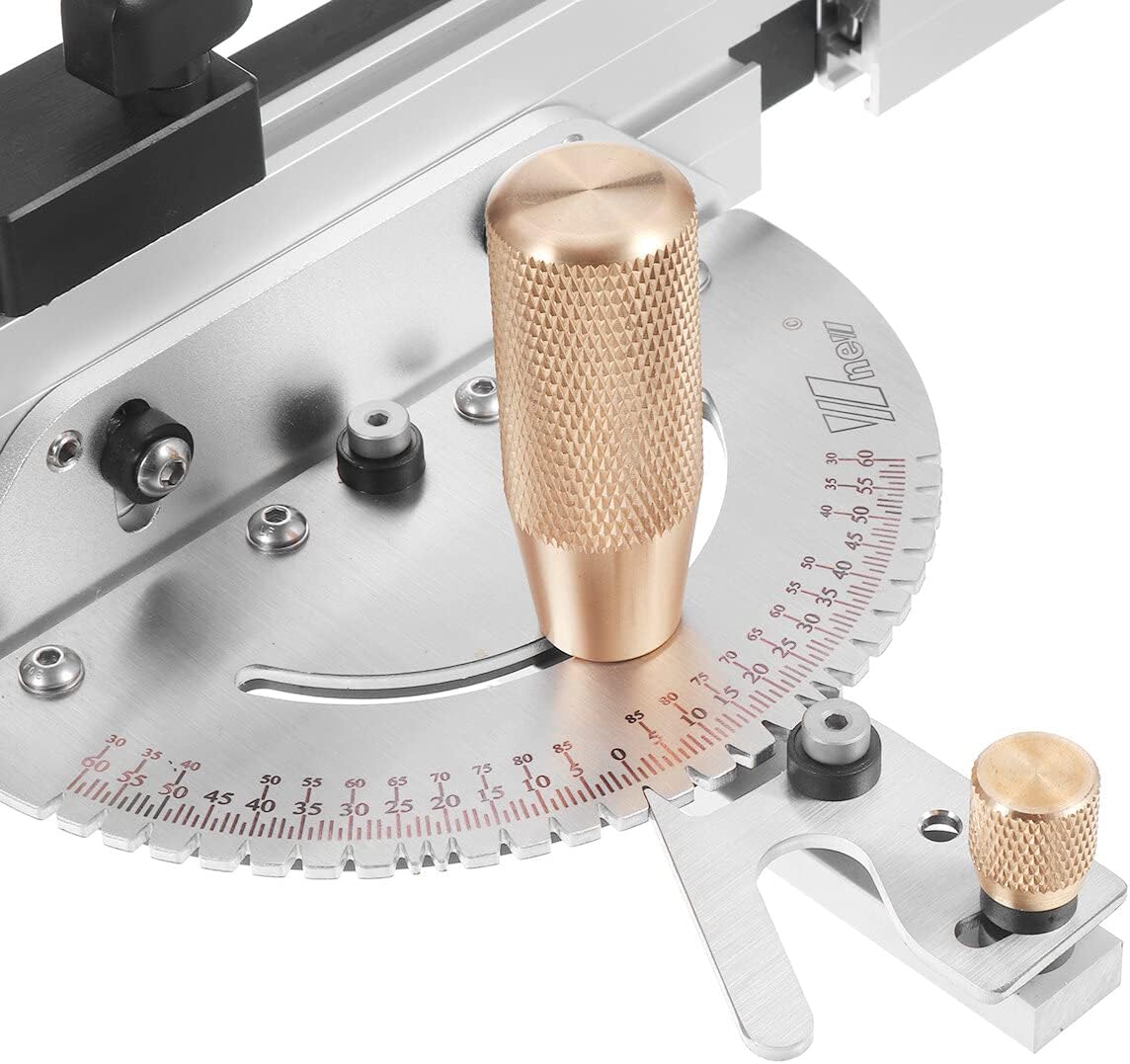
Figure 2: Close-up of the precision angle scale and the brass handle for angle locking. The scale allows for precise angle adjustments.

Figure 3: Underside view of the miter gauge bar. Note the four sprung-loaded ball bearings designed to keep the bar snug in the track and prevent side play.
6. Setup Instructions
Follow these steps to prepare your miter gauge for use:
- Unpack Components: Carefully remove all parts from the packaging and inspect for any damage.
- Familiarize with Parts: Identify the main miter gauge body, the 450mm aluminum fence, the brass handle, and the box joint jig components.
- Insert into Miter Slot: Slide the miter gauge bar into the standard 3/4" (19mm) miter slot of your table saw, router table, or band saw. The sprung-loaded ball bearings (Figure 3) will ensure a snug fit.
- Attach Fence (if separate): If the fence is not pre-attached, secure it to the miter gauge body using the provided fasteners. Ensure it is perpendicular to the miter gauge bar unless an angled setup is desired.
- Adjust for Fit: The ball bearings are designed to minimize play. If necessary, ensure they are properly seated and providing consistent pressure within the miter slot.
7. Operating Instructions
The Wnew Miter Gauge allows for precise angle cuts and box joint creation.
7.1. Setting the Angle for Miter Cuts
- Loosen Brass Handle: Rotate the main brass handle (Figure 2) counter-clockwise to loosen the locking mechanism for angle adjustment.
- Adjust Angle: Pivot the miter gauge head to the desired angle indicated on the precision scale. The scale typically ranges from 0 to 90 degrees in both directions, allowing for various miter cuts.
- Lock Angle: Once the desired angle is set, tighten the brass handle clockwise to securely lock the miter gauge head in position. Verify that the angle is firm and does not shift.
- Position Workpiece: Place your workpiece against the fence of the miter gauge. Use the track stop for repetitive cuts if needed.
- Make Cut: Carefully push the miter gauge and workpiece through the cutting tool, maintaining firm and consistent pressure.
7.2. Using the Box Joint Jig
The included box joint jig attachment facilitates the creation of precise box joints.
- Attach Jig: Secure the box joint jig attachment to the miter gauge fence according to its design. Ensure it is firmly mounted.
- Set Bit/Blade Height: Adjust your router bit or saw blade height to match the desired depth of your box joint fingers.
- First Cut: Position your workpiece against the jig and make the first cut.
- Index for Next Cut: Use the indexing pin or mechanism of the box joint jig to precisely space the next cut. This typically involves moving the workpiece over the previously cut finger.
- Repeat: Continue indexing and cutting until all fingers for one side of the joint are complete. Repeat the process for the mating piece.
8. Maintenance
Regular maintenance ensures the longevity and accuracy of your Wnew Miter Gauge.
- Cleaning: After each use, wipe down the miter gauge and fence with a clean, dry cloth to remove sawdust and debris. Avoid using harsh chemicals that could damage the aluminum or plastic components.
- Lubrication: Periodically apply a light coat of dry lubricant or silicone spray to the miter gauge bar and the miter slot to ensure smooth movement. Do not over-lubricate, as this can attract dust.
- Inspection: Regularly check all fasteners for tightness. Ensure the angle scale is clear and readable. Inspect the ball bearings for smooth operation.
- Storage: Store the miter gauge in a clean, dry environment, away from excessive moisture or extreme temperatures.
9. Troubleshooting
Refer to the table below for common issues and their solutions.
| Problem | Possible Cause | Solution |
|---|---|---|
| Miter gauge sticks in slot | Accumulated sawdust; insufficient lubrication; tight fit | Clean miter slot and bar; apply dry lubricant; check for debris in ball bearings. |
| Excessive play in miter slot | Ball bearings not properly seated or worn | Inspect ball bearings (Figure 3) for proper function; ensure they are clean and free of obstruction. |
| Angle not holding securely | Brass handle not tightened sufficiently; debris in locking mechanism | Ensure brass handle is fully tightened; clean locking mechanism if necessary. |
| Inaccurate cuts | Incorrect angle setting; fence not square; workpiece movement | Double-check angle setting with a reliable square; ensure fence is properly aligned; secure workpiece firmly. |
10. Warranty and Support
For warranty information or technical support, please refer to the documentation included with your purchase or contact WnewTools customer service through their official channels. Keep your purchase receipt as proof of purchase.