
MICTUNING C2 RGB+IC 12 POD
MICTUNING C2 Max RGB+IC Chasing Color LED Rock Lights - 12 Pods Kit User Manual
Model: C2 RGB+IC 12 POD
1. Introduction
Welcome to the MICTUNING C2 Max RGB+IC Chasing Color LED Rock Lights user manual. This kit is designed to provide dynamic and vibrant underglow lighting for your vehicle, enhancing its appearance with advanced RGB+IC technology and convenient app control. Please read this manual thoroughly before installation and operation to ensure proper use and longevity of your product.

Image: The MICTUNING C2 Max RGB+IC Chasing Color LED Rock Lights kit, showcasing the 12 pods, control unit, and a truck illuminated with multi-color underglow lighting.
2. Product Features
- Advanced RGB+IC Technology: Features dynamic DIY functions and individual chip control for chasing color effects.
- Super Bright Illumination: Each pod delivers 5W and 400LM, utilizing advanced 3-in-1 LED chips for optimal light output.
- Bluetooth Dual-Mode: Ensures excellent compatibility and stable connection for seamless control.
- Dual-Path Wiring Options: Supports both Series and Parallel Wiring (Parallel recommended) for flexible installation.
- Extensible System: Can be connected with up to 24 light pods (maximum 12 pods per side).
- Multiple Lighting Modes: Access 76 Pre-Set Dynamic Color Modes and customizable DIY options via the MICTUNING APP.
- Large Irradiation Area: Revolutionary Curved Surface Design provides up to 160° Ultra-Wide-Angle light for broader and brighter coverage.
- IP68 Waterproof & Enhanced Safety: Equipped with a 7.5A fuse and aviation-grade waterproof connectors, including end caps to prevent water ingress and electrical leakage.

Image: A Jeep showcasing the vibrant RGB+IC dynamic multi-color rock lights, highlighting the product's ability to create diverse lighting effects.

Image: Examples of various vehicle types (truck, RV, marine, fire engine, off-road) demonstrating the wide applicability of the rock lights.
3. Package Contents
The MICTUNING C2 Max 12 Pods Kit comes with all necessary components for installation and operation:
- 12 x RGB+IC LED Rock Light Pods
- 1 x Control Box
- 1 x Main Wiring Harness with 7.5A Fuse
- 6 x 9.8ft Extension Cords
- Mounting Hardware (Screws, Nuts, Washers)
- 1 x Allen Wrench

Image: A detailed layout of all components included in the MICTUNING C2 Max 12 Pods Kit, showing the rock light pods, wiring, control box, and mounting accessories.
4. Setup and Installation
Installation of the MICTUNING C2 Max rock lights is designed to be straightforward. Follow these general guidelines:
- Plan Placement: Determine the optimal locations under your vehicle for each rock light pod to achieve desired illumination.
- Mount Pods: Securely mount each rock light pod using the provided hardware. Ensure they are positioned to maximize the 160° ultra-wide-angle light spread.
- Wiring Options: The kit supports both Series and Parallel wiring. Parallel wiring is recommended for optimal performance and extensibility. Connect the pods to the control box using the main wiring harness and extension cords as needed. The system is extensible up to 24 pods total (12 pods per side).
- Connect Power: Connect the main wiring harness to your vehicle's 12V power source, ensuring the 7.5A fuse is properly integrated for safety.
- Secure Connections: Utilize the aviation-grade waterproof connectors and ensure all connections are tight and secure to prevent water ingress.
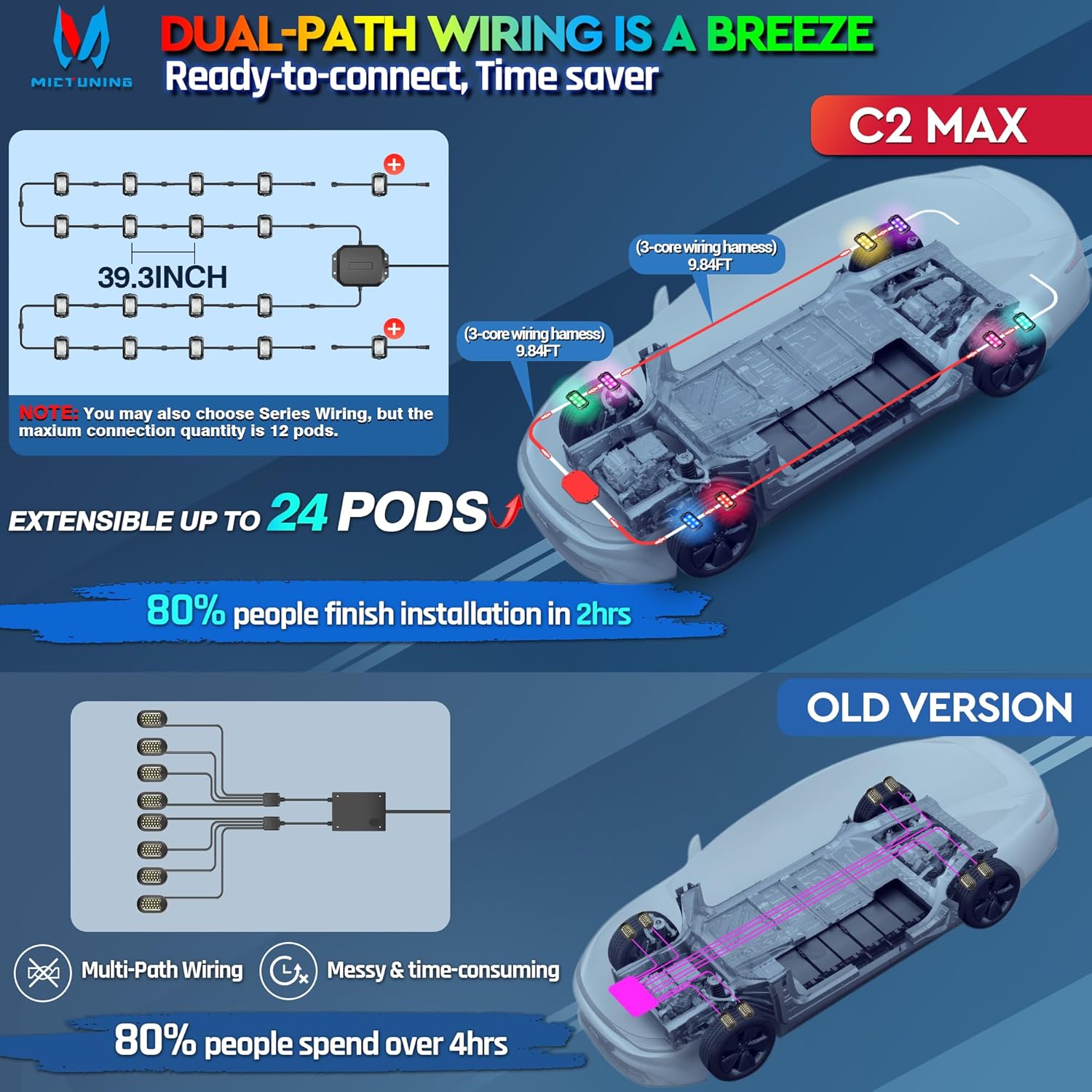
Image: A diagram illustrating the dual-path wiring options for the rock lights, showing how they can be connected to the vehicle's chassis for optimal light distribution.
5. Operation
The MICTUNING C2 Max rock lights are controlled via the user-friendly MICTUNING APP, available for both Android and iOS devices.
- Download App: Download the 'MICTUNING' app from your device's app store.
- Enable Bluetooth: Ensure Bluetooth is enabled on your mobile device.
- Connect to Device: Open the MICTUNING app. The app will search for and connect to your 'Rock Light-C1' or 'Rock Light-C1S' device.
- Select Lighting Modes: Explore the 76 pre-set dynamic color modes for various dazzling light shows.
- Customize DIY Effects: Utilize the 8 DIY patterns to create and save your own unique lighting designs.
- Color Selection: Pick your preferred color tone from countless available colors.
- Set Light Quantity: Easily program the quantity of lights connected within the app.
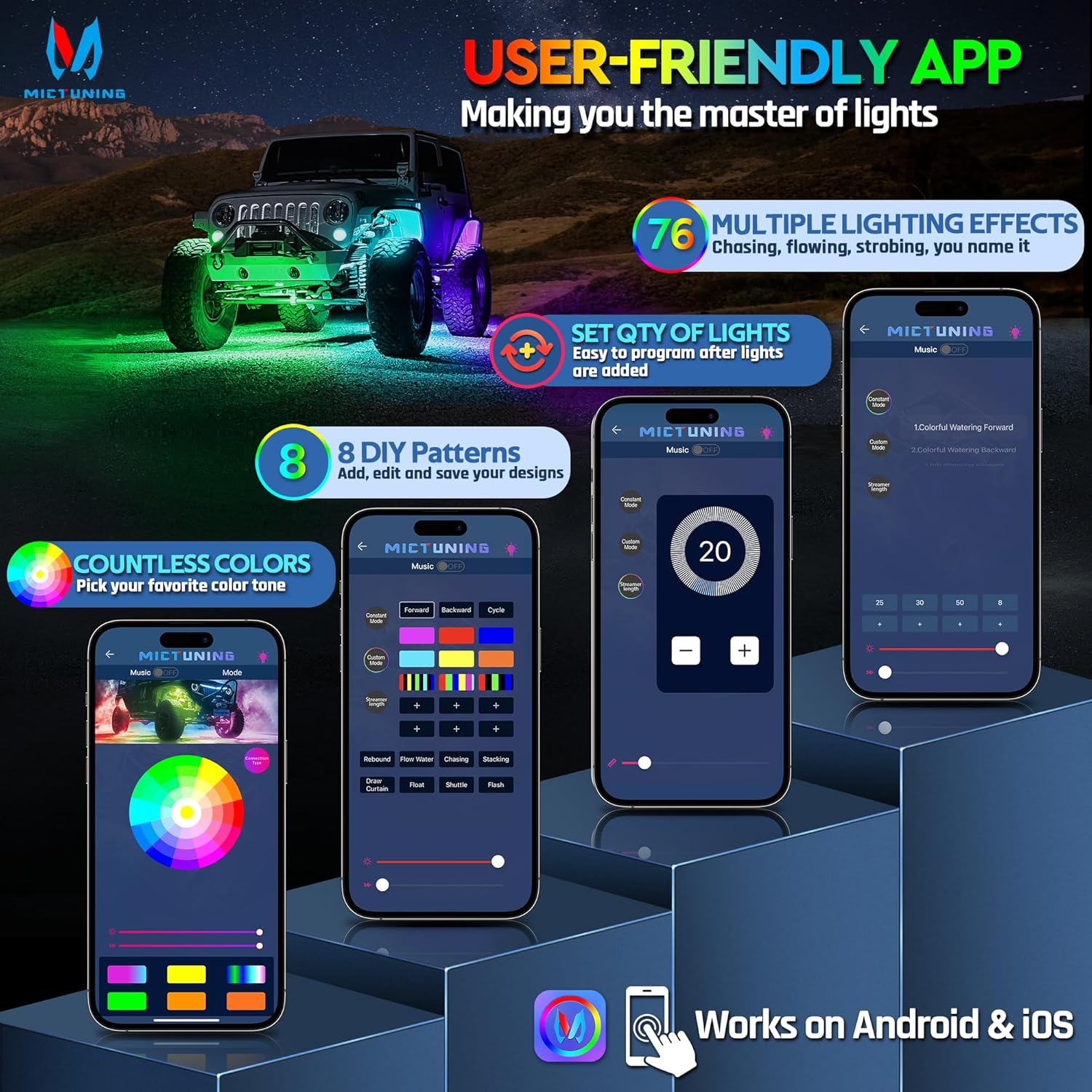
Image: Screenshots of the MICTUNING app interface, demonstrating its user-friendly design for controlling lighting effects, setting light quantity, and customizing colors.
6. Maintenance
To ensure the longevity and optimal performance of your MICTUNING C2 Max rock lights, follow these maintenance tips:
- Regular Cleaning: Periodically clean the light pods to remove dirt, mud, or debris that may accumulate, especially after off-road use. Use a soft cloth and mild soap if necessary.
- Inspect Connections: Regularly check all wiring connections for tightness and integrity. Ensure waterproof connectors are properly sealed.
- Check for Damage: Inspect the light pods and wiring for any signs of physical damage, such as cracks, frayed wires, or corrosion. Address any issues promptly.
- Waterproof Integrity: The IP68 rating ensures high resistance to water and dust. However, avoid high-pressure washing directly on the pods or connectors to prevent potential damage over time.

Image: A rock light pod submerged in water, illustrating its IP68 waterproof capability, along with a diagram of the 3-core waterproof connector.
7. Troubleshooting
If you encounter issues with your MICTUNING C2 Max rock lights, refer to the following common troubleshooting steps:
- Q1: The APP cannot search for the device?
A1: Step 1: Check the wiring to ensure correct connection. Step 2: Open the Bluetooth settings of the mobile phone, power on normally, and the device should be searchable on the mobile phone. Step 3: For iPhone, please restart the mobile phone, open the APP authorization and Bluetooth authorization (phone settings - privacy - Bluetooth - allowed apps). For Android devices, you also need to open the location service and APP location authorization to search and connect in the APP. - Q2: How to judge whether the product is powered on correctly?
A2: First, after connecting the cable, turn on the switch; the switch indicator should light up. Then, turn on the Bluetooth settings of the mobile phone and search for the device signal 'Rock Light-C1' or 'Rock Light-C1S'. If found, it means the connection is correct and the product is powered on normally. If not, check whether the connection of the wire harness is correct. - Q3: Four lights on one side are not on?
A3: This may indicate that one of the power cords in the control box has been pulled off. Please contact MICTUNING customer support for assistance. - Q4: After the Bluetooth connection, the light is black and you can't turn on the light at all?
A4: This is likely due to a power cord in the control box being disconnected. Please contact MICTUNING customer support for a quick replacement. - Q5: Can't switch colors after Bluetooth connection?
A5: Please check the device you need to control in the APP options to ensure the correct light group or individual light is selected.
8. Specifications
| Brand | MICTUNING |
| Model | C2 RGB+IC 12 POD |
| Item Dimensions (L x W x H) | 12.59 x 8.07 x 5.9 inches |
| Item Weight | 6.36 pounds |
| Color | RGB+IC Dreamcolor |
| Form Factor | Pod |
| Auto Part Position | Lower |
| Connectivity Technology | Bluetooth |
| Material | Polycarbonate (PC) |
| Water Resistance Level | IP68 Waterproof |
| Remote Control Included? | No (App Controlled) |
| Number of Pieces | 12 |
| Automotive Fit Type | Universal Fit |
| Manufacturer Part Number | MIC-RRL-663 |
9. Warranty and Support
MICTUNING is committed to customer satisfaction and provides comprehensive support for its products:
- Return/Replacement Policy: 30 days return or replacement.
- Service Period: 24-month relieved services.
- Response Time: Within 4 hours friendly response for inquiries.
- Customer Support: Lifetime customer support.
How to Contact MICTUNING Support:
Login to your Amazon account, navigate to 'Your Orders', find the order ID for your product, click 'Problem with the order', choose 'Other issue', and then click 'Contact seller'.
Ask a question about this manual
Ask about setup, troubleshooting, compatibility, parts, safety, or missing instructions. Manuals+ will review the question and use this page’s manual context to help answer it.