
Introduction
This manual provides detailed instructions for the assembly, operation, and maintenance of your Vicco Kron Desk. Please read all instructions carefully before beginning assembly or use to ensure proper setup and longevity of your product. The Vicco Kron Desk is designed as a functional and elegant corner computer desk, offering open shelves and ample space for accessories and multiple monitors.

Image: The Vicco Kron Desk, fully assembled, showcasing its corner design and integrated shelving, set up with a computer and gaming accessories.
Setup and Assembly
The Vicco Kron Desk requires assembly. Please ensure all components are present and undamaged before starting. It is recommended to assemble the desk in the room where it will be used, on a clean, soft surface to prevent scratches.
Required Tools (Not Included)
- Screwdriver (Phillips head recommended)
- Hammer (for dowels, if applicable)
- Measuring tape (for placement)
Assembly Steps
- Unpack Components: Carefully remove all parts from the packaging and lay them out. Verify against the included parts list in your assembly instructions.
- Follow Included Instructions: Refer to the detailed assembly instructions and diagrams provided in the packaging. These will guide you through each step of construction.
- Secure Connections: Ensure all screws, dowels, and fasteners are tightened securely. Do not overtighten to avoid damaging the particle board.
- Final Placement: Once assembled, carefully move the desk to its desired location. Ensure it is placed on a level and stable surface.
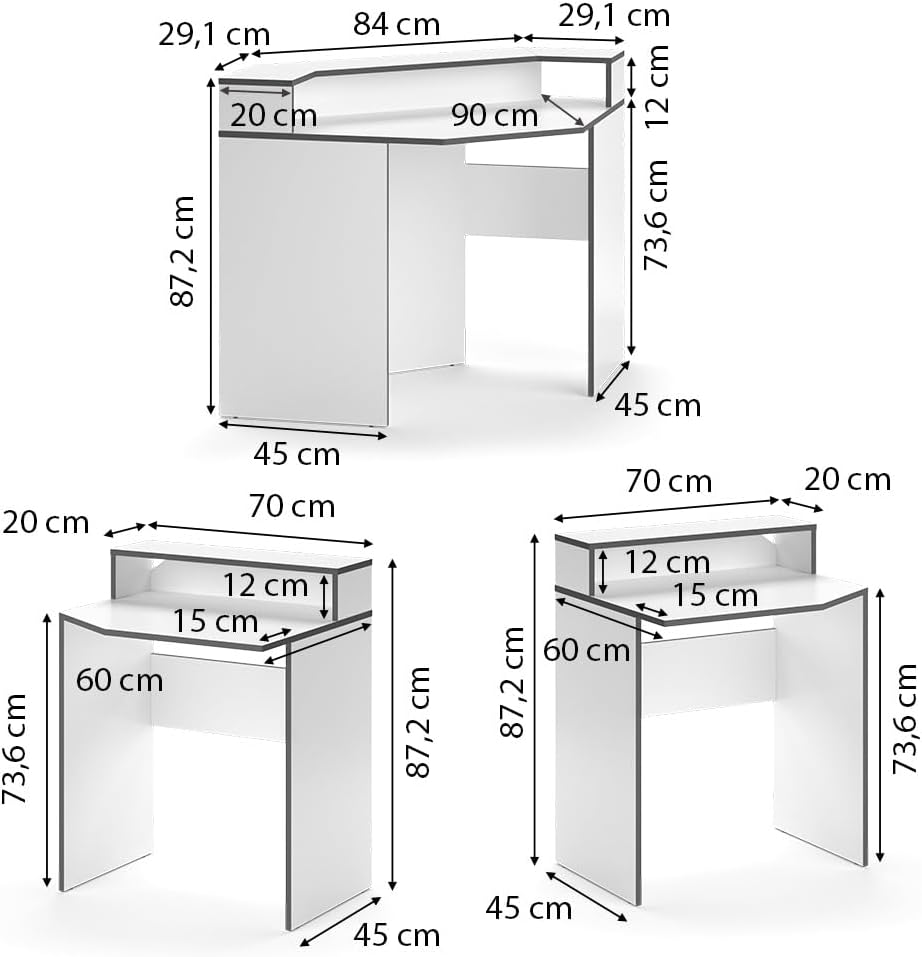
Image: A technical diagram illustrating the various dimensions of the Vicco Kron Desk, including width, height, and depth of its different sections.
Operating Instructions
The Vicco Kron Desk is designed for use as a computer workstation or study surface. Its corner design and integrated shelves provide efficient use of space.
- Weight Distribution: Distribute weight evenly across the desk surface and shelves. The maximum recommended load is 61.1 kg.
- Monitor Placement: The desk is designed to accommodate multiple monitors. Place monitors centrally or on the elevated shelves for optimal viewing.
- Cable Management: Utilize the desk's design to route cables neatly, preventing clutter and potential hazards.
- Surface Protection: Avoid placing hot items directly on the desk surface. Use coasters or protective pads as needed.

Image: The Vicco Kron Desk in a typical usage scenario, featuring a dual monitor setup, keyboard, mouse, and a gaming chair, highlighting its functionality as a gaming or office desk.
Maintenance
Proper care will help maintain the appearance and extend the lifespan of your Vicco Kron Desk.
- Cleaning: Wipe the desk surfaces with a dry cloth. For stubborn marks, a slightly damp cloth with mild soap can be used, followed immediately by a dry cloth.
- Avoid Harsh Chemicals: Do not use abrasive cleaners, solvents, or harsh chemicals, as these can damage the melamine resin coating.
- Check Fasteners: Periodically check all screws and fasteners to ensure they remain tight. Retighten if necessary to maintain stability.
- Sunlight Exposure: Avoid prolonged exposure to direct sunlight to prevent fading or discoloration of the surface.

Image: A close-up shot of the Vicco Kron Desk's surface, showing the white finish and the dark edge banding, emphasizing the material and construction quality.
Troubleshooting
If you encounter any issues with your Vicco Kron Desk, refer to the following common solutions:
- Wobbling Desk: If the desk feels unstable, recheck all assembly connections. Ensure all screws are tightened evenly and the desk is on a level surface. Adjust leg levelers if present.
- Missing Parts: If any parts were missing upon delivery, contact Vicco customer service with your purchase details.
- Damaged Parts: If any components arrived damaged, do not proceed with assembly. Contact Vicco customer service for replacement parts.

Image: A detailed view of the corner section of the Vicco Kron Desk, highlighting the elevated shelf and the space beneath, suitable for organizing desk accessories.
Specifications
| Feature | Detail |
|---|---|
| Model Name | Kron |
| Model Number | 40331 |
| Dimensions (L x W x H) | 90 x 224 x 87.2 cm |
| Weight | 55.2 Kilograms |
| Material | 16 mm Particle Board with Melamine Resin Coating |
| Color | White / Grey |
| Max. Recommended Load | 61.1 Kilograms |
| Assembly Required | Yes |
| Care Instructions | Wipe with a dry cloth |
Warranty and Support
For specific warranty information, please refer to the documentation included with your purchase or visit the official Vicco website. If you require further assistance, have questions about assembly, or need to report a defect, please contact Vicco customer service through their official channels.
You can often find contact information on the manufacturer's website or on your purchase receipt.