
Introduction
This manual provides comprehensive instructions for the assembly, operation, and maintenance of your Zinus Camden TV Stand. Please read this manual carefully before assembly and use to ensure proper setup and longevity of your product. This contemporary media unit is designed to accommodate televisions up to 65 inches and features open shelving with cable management for electronic devices and storage.
Safety Information
- Keep all small parts and packaging materials away from children.
- Ensure all connections are secure before use. Periodically check and tighten hardware.
- Do not exceed the maximum weight capacity of 45 kg (99 lbs) for the top surface.
- Use on a level and stable surface to prevent tipping.
- Do not stand or climb on the unit.

Image: The Zinus Camden TV Stand in a living room setting, showcasing its design and functionality with a television placed on top.
Package Contents
Verify that all components are present and undamaged before beginning assembly. Refer to the included parts list for detailed identification.
- Engineered wood panels (top, bottom, sides, shelves, dividers)
- Adjustable shelf pins
- Hardware kit (screws, dowels, cam locks, etc.)
- Assembly instructions

Image: A diagram illustrating the overall dimensions of the TV stand: 147 cm (Length) x 40 cm (Depth) x 60 cm (Height).
Setup and Assembly
Assembly is required. All necessary parts, tools, and instructions are provided in the package. Please follow these general steps, referring to the detailed diagrams in your included assembly guide for specific instructions.
- Unpack all components and lay them out on a clean, soft surface (e.g., a blanket or carpet) to prevent scratches.
- Identify each part using the provided hardware list and diagrams.
- Follow the step-by-step diagrams in the included assembly guide to connect the panels and secure them with the provided hardware.
- Secure all connections firmly, but do not overtighten screws to avoid damaging the engineered wood.
- Once assembled, ensure the unit is stable and level before placing any items on it.
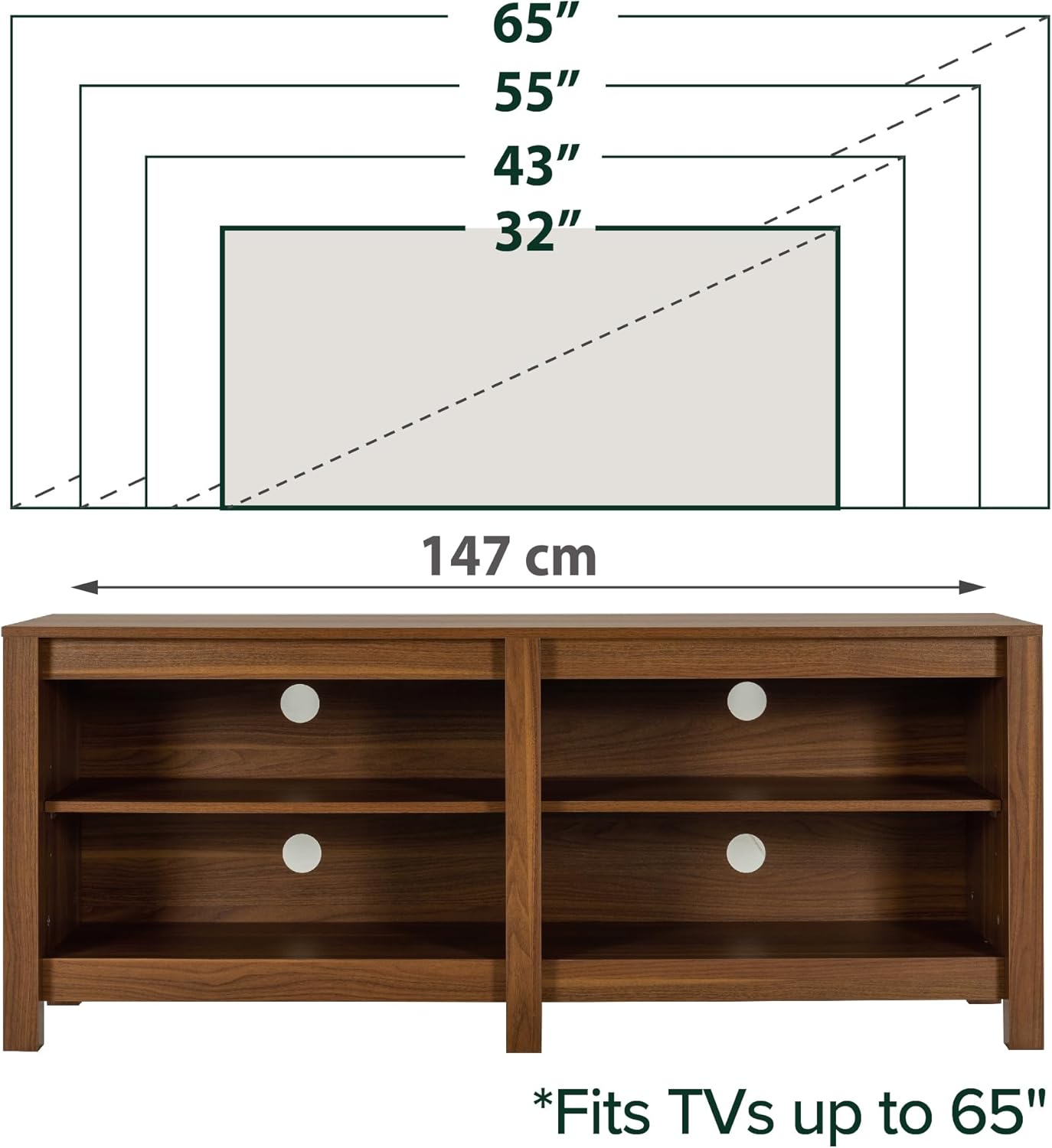
Image: An illustration demonstrating that the TV stand can accommodate televisions up to 65 inches in size, with a total width of 147 cm.
Operating Instructions
Adjustable Shelves
The Zinus Camden TV Stand features two adjustable shelves, allowing you to customize storage space for various items. To adjust the shelf height:
- Remove any items from the shelf you wish to adjust.
- Carefully lift the shelf and remove the shelf pins from their current holes.
- Reinsert the shelf pins into the desired height holes on both sides, ensuring they are at the same level.
- Place the shelf back onto the pins, ensuring it is level and securely seated.

Image: A detailed view of the adjustable shelves, highlighting the pin holes for height customization and showing approximate adjustment increments.
Cable Management
The stand includes strategically placed cable management ports to help organize and conceal wires from electronic devices, maintaining a tidy appearance.
- Route power cords and signal cables through the designated openings on the back panel and shelves.
- This feature helps prevent cable tangles and keeps your media area organized.
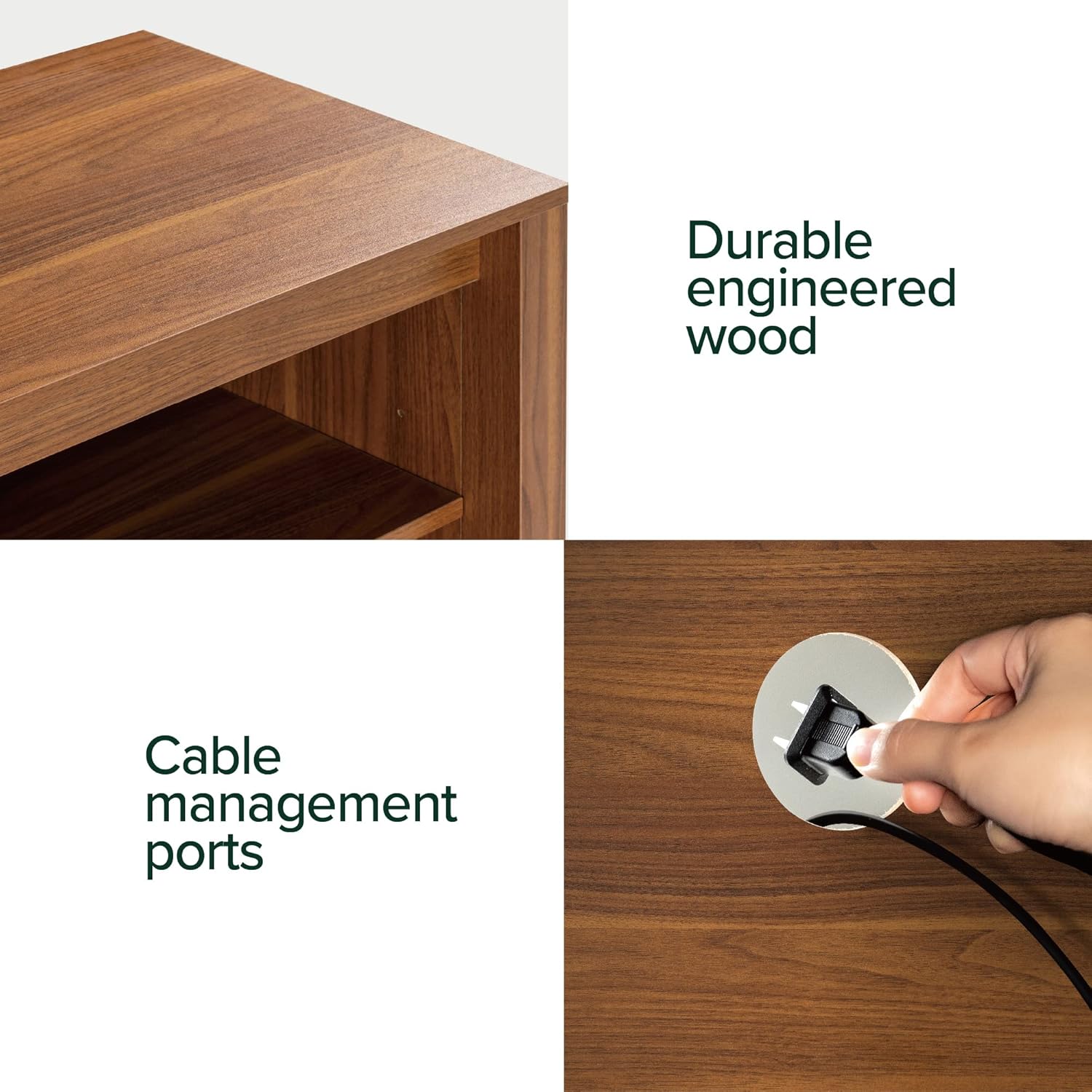
Image: A demonstration of the cable management ports, showing a hand guiding a cable through an opening on the back panel.
Maintenance
To maintain the appearance and longevity of your Zinus Camden TV Stand, follow these simple care instructions:
- Wipe with a damp cloth for routine cleaning.
- Avoid using harsh chemicals, abrasive cleaners, or furniture polish that may damage the finish.
- Protect the surface from excessive moisture, heat, and direct sunlight to prevent warping or discoloration.
- Periodically check all hardware connections and tighten if necessary to ensure structural integrity.

Image: A collage showcasing various details of the TV stand, including its durable engineered wood construction and cable routing options from different angles.
Troubleshooting
| Issue | Possible Cause | Solution |
|---|---|---|
| Stand is wobbly | Loose hardware; uneven floor | Tighten all screws and bolts. Ensure the stand is placed on a level surface. Use furniture glides if necessary. |
| Shelf not fitting correctly | Shelf pins not aligned; incorrect shelf orientation | Recheck pin placement in corresponding holes. Ensure the shelf is oriented correctly according to the assembly guide. |
| Missing parts or damaged components | Packaging error; shipping damage | Do not proceed with assembly. Contact Zinus customer support immediately for replacement parts. |
Specifications
- Brand: Zinus
- Model: EU-UTOTV3-16B
- Dimensions (L x W x H): 147 cm x 40 cm x 60 cm (57.9 in x 15.7 in x 23.6 in)
- Material: Engineered Wood (MDF)
- Color: Light Brown
- Weight Capacity (Top Surface): 45 kg (99 lbs)
- Number of Shelves: 2 (adjustable)
- Assembly Required: Yes
- UPC: 841550350173

Image: A clear front view of the Zinus Camden TV Stand, highlighting its open shelf design and cable pass-through holes.
Warranty and Support
This Zinus product is covered by a 2-year warranty against manufacturing defects. This warranty covers defects in materials and workmanship under normal use.
For warranty claims, missing parts, technical assistance, or any other inquiries, please contact Zinus customer support through their official website or the retailer where the product was purchased.
For more information and support resources, visit the official Zinus website: www.zinus.com

Image: The Zinus Camden TV Stand positioned beneath a wall-mounted television, illustrating a common and organized setup.


