
1. Introduction
Thank you for choosing the TOPBULL 3000 Watt Power Inverter. This device is designed to convert 12V DC power from your vehicle or battery into 110V AC household power, providing a reliable power source for various electronic devices and appliances. With a continuous output of 3000W and a peak surge capacity of 6000W, it is suitable for use in cars, RVs, homes during power outages, emergencies, and remote workplaces.
This manual provides essential information for the safe and efficient operation of your power inverter. Please read it thoroughly before use and retain it for future reference.
2. Safety Information
Always observe the following safety precautions to prevent personal injury or damage to the inverter and connected devices.
General Safety Guidelines:
- Do not open the inverter casing. There are no user-serviceable parts inside.
- Keep the inverter away from water, moisture, and flammable materials.
- Ensure adequate ventilation around the inverter to prevent overheating. Do not block the cooling fans.
- Connect the inverter only to a 12V DC power source. Connecting to other voltages may cause damage.
- Do not exceed the inverter's rated continuous power output (3000W) or peak surge power (6000W).
- Disconnect the inverter from the power source when not in use or before cleaning.
- This product is not suitable for powering inductive electrical appliances such as induction cooktops or microwave ovens.
Integrated Safety Protections:
The TOPBULL Power Inverter is equipped with a 6-fold comprehensive safety protection system:
- Undervoltage Protection: Prevents damage to the battery by shutting down if input voltage drops too low.
- Overvoltage Protection: Protects the inverter and devices from excessively high input voltage.
- Overload Protection: Shuts down if the connected load exceeds the inverter's capacity.
- Over Temperature Protection: Activates cooling fans and may shut down if internal temperature becomes too high.
- Short Circuit Protection: Prevents damage in case of a short circuit in the output.
- Reverse Connection Protection: Protects against damage from incorrect battery terminal connection.

Figure 2.1: Inverter Safety Features and Power Ratings
3. Product Overview
Familiarize yourself with the components of your TOPBULL Power Inverter:
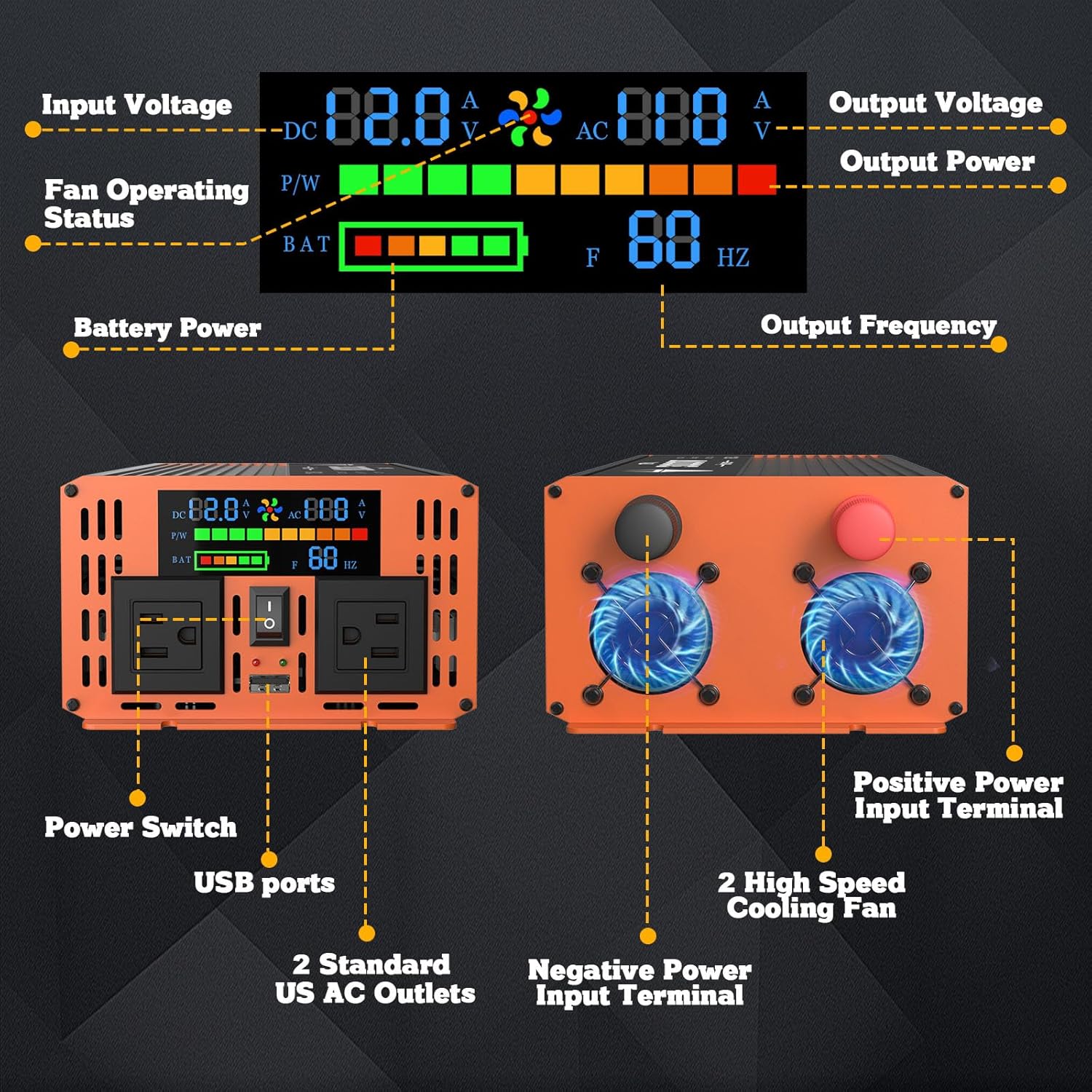
Figure 3.1: Front and Rear Panel Components
Key Components:
- LED Color Screen: Displays real-time information including input voltage (DC), output voltage (AC), output power, battery power level, fan operating status, and output frequency.
- AC Outlets: Two standard 110V US AC power sockets for connecting appliances.
- USB Port: One 2.1A USB fast charging interface for mobile devices.
- Power Switch: Controls the ON/OFF state of the inverter.
- DC Input Terminals: Positive (red) and Negative (black) terminals for connecting to a 12V DC battery.
- Cooling Fans: Dual intelligent fans for efficient heat dissipation, activating based on temperature and load.
Internal Structure and Features:

Figure 3.2: Internal Components and Smart Features
- Advanced High-Frequency Transformers: For efficient power conversion.
- 100% Pure Copper Ultra Flexible Cables: Included for safe and reliable connection.
- Aviation Aluminum Alloy Shell: Sturdy and durable, designed to withstand harsh environments.
- Built-in Power Management System (IPM): Optimizes power delivery.
- Voltage Regulation System (AVR): Ensures stable output voltage.
- Intelligent Fan Control System (IFC): Manages fan speed for optimal cooling and reduced noise.
- Low Interference Technology (LIT): Minimizes electrical noise.
4. Setup and Installation
Follow these steps to properly set up your power inverter:
- Prepare the Power Source: Ensure your 12V DC battery is fully charged and capable of providing the necessary current for your intended load.
- Position the Inverter: Place the inverter in a dry, well-ventilated area, away from direct sunlight, heat sources, and flammable materials. Ensure there is sufficient space around the cooling fans for airflow.
- Connect Battery Cables:
- Connect the red battery cable (included 4 AWG) to the positive (+) terminal of the inverter.
- Connect the other end of the red cable to the positive (+) terminal of your 12V battery.
- Connect the black battery cable (included 4 AWG) to the negative (-) terminal of the inverter.
- Connect the other end of the black cable to the negative (-) terminal of your 12V battery.
- Ensure all connections are tight and secure to prevent arcing or overheating.
- Verify Connections: Double-check that the positive and negative connections are correct before proceeding.
- Initial Power On: Once connections are secure, turn on the inverter using the power switch on the front panel. The LED display should illuminate.

Figure 4.1: Inverter Dimensions and Included Accessories
5. Operating Instructions
Using your TOPBULL Power Inverter is straightforward. Follow these guidelines for optimal performance:
- Power On: After setup, press the power switch on the inverter's front panel to turn it on. The LED display will show current operating parameters.
- Connect Appliances: Plug your 110V AC appliances into the standard US AC outlets or your USB devices into the USB port.
- Monitor Display: Regularly check the LED display for input voltage, output power, and battery level to ensure stable operation and prevent battery over-discharge.
- Power Off: When finished, first disconnect all appliances from the inverter, then press the power switch to turn off the inverter. Finally, disconnect the inverter from the 12V battery.
Suitable Usage Scenarios and Devices:
The inverter is ideal for powering a wide range of devices in various situations:
- Home Use: During power outages for essential appliances like televisions, laptops, and small fans.
- RV & Camping: Powering lights, small refrigerators, electronic devices, and charging phones/tablets.
- Outdoor & Fieldwork: Operating tools, cameras, and other electronic equipment where grid power is unavailable.

Figure 5.1: Compatible Devices and Incompatible Appliances
Important Note: This inverter produces a modified sine wave output. While suitable for most electronic devices, it is not recommended for sensitive electronics that require a pure sine wave, or for inductive loads such as refrigerators with compressors, motors, or certain medical equipment. Specifically, it cannot power inductive electrical appliances like induction cooktops or microwave ovens.
6. Maintenance
Proper maintenance ensures the longevity and reliable operation of your inverter:
- Cleaning: Keep the inverter clean and free of dust. Use a dry, soft cloth to wipe the exterior. Do not use liquid cleaners or solvents.
- Ventilation: Periodically check that the cooling fan vents are clear of obstructions.
- Connections: Regularly inspect battery cable connections for tightness and corrosion. Clean terminals if necessary.
- Storage: When storing the inverter for extended periods, ensure it is disconnected from the battery and stored in a cool, dry place.
7. Troubleshooting
Refer to the table below for common issues and their solutions:
| Problem | Possible Cause | Solution |
|---|---|---|
| Inverter does not turn on. | Loose battery connections; Low battery voltage; Blown fuse. | Check and tighten battery cables; Recharge or replace battery; Check and replace internal fuses (consult professional if unsure). |
| No AC output. | Overload protection activated; Over-temperature protection activated; Low battery voltage. | Reduce connected load; Allow inverter to cool down; Recharge battery. |
| Cooling fan runs constantly or is noisy. | High internal temperature; Heavy load. | Ensure adequate ventilation; Reduce load if possible. This is normal operation for intelligent fans. |
| Connected appliance not working. | Appliance power exceeds inverter capacity; Appliance requires pure sine wave; Appliance is inductive load. | Check appliance wattage; Verify appliance compatibility with modified sine wave; Do not use with inductive loads like microwaves. |
If the problem persists after attempting these solutions, please contact TOPBULL customer service for assistance.
8. Specifications
| Feature | Detail |
|---|---|
| Model Number | 3000W Inverter MSW_003 |
| Continuous Power Output | 3000 Watts |
| Peak Surge Power | 6000 Watts |
| Input Voltage | 12V DC |
| Output Voltage | 110V AC |
| Output Waveform | Modified Sine Wave |
| USB Output | 2.1A |
| Product Dimensions (L x W x H) | 13.7 x 5.9 x 3.45 inches |
| Item Weight | 7.96 pounds |
| Included Components | 4 AWG Battery Cable |
| Manufacturer | TOPBULL |
| Country of Origin | China |
9. Warranty and Support
TOPBULL is committed to providing high-quality products and excellent customer service.
Customer Service:
TOPBULL provides 24-hour online customer service. If you have any questions about the product, require technical assistance, or need to report an issue, please do not hesitate to contact us. Refer to the product packaging or the official TOPBULL website for the most current contact information.
For more information about TOPBULL products and support, you can visit the official TOPBULL store on Amazon: TOPBULL Store.