
Introduction
Thank you for choosing the Syncwire Bluetooth 5.3 FM Transmitter Car Adapter. This device allows you to stream music and calls wirelessly from your Bluetooth-enabled device to your car's FM radio, while also providing fast charging capabilities for your mobile devices. Please read this manual carefully to ensure proper use and optimal performance.
Safety Information
- Use according to manufacturer's instructions.
- Avoid interference with other wireless devices.
- Handle the device with care to prevent damage.
- Follow temperature and humidity guidelines for storage and operation.
- Do not disassemble or attempt to repair the device yourself.
Product Features
- Bluetooth 5.3 Technology: Provides a fast, stable, and smart connection with minimal sound quality loss for music and calls.
- Dual USB Fast Charging: Equipped with a PD 36W USB-C port and a 12W USB-A port, allowing simultaneous charging of two devices. Features over-current, over-voltage, intelligent temperature, and short-circuit protection.
- Hi-Fi Deep Bass: Enhance your audio experience with deep bass by pressing the dedicated 'B' button.
- Ambient LED Light: Features a colorful rainbow light design that can be easily turned on or off by double-pressing the 'B' button.
- Hands-Free Calling: Noise Suppression (CVC) technology and echo-cancellation ensure clear hands-free communication.
- USB Drive Support: Play music directly from a USB stick (up to 64GB).
Setup Instructions
- Insert the Transmitter: Plug the Syncwire FM Transmitter into your car's 12V/24V cigarette lighter socket. The LED display will light up, showing the current FM frequency.
- Select an Unused FM Frequency: Tune your car's FM radio to an empty frequency with no active broadcast. This will minimize interference and provide the clearest audio.
- Match Transmitter Frequency: On the Syncwire transmitter, long-press the multi-function knob (phone button) until the frequency display flashes. Use the left/right arrows (or rotate the knob) to adjust the transmitter's frequency to match the empty frequency on your car radio. Once matched, the display will stop flashing.
- Pair with Bluetooth: Activate Bluetooth on your mobile device. Search for available devices and select "SW-XC727" to pair. Once connected, the display will show "bt" (Bluetooth) and you can start streaming audio.
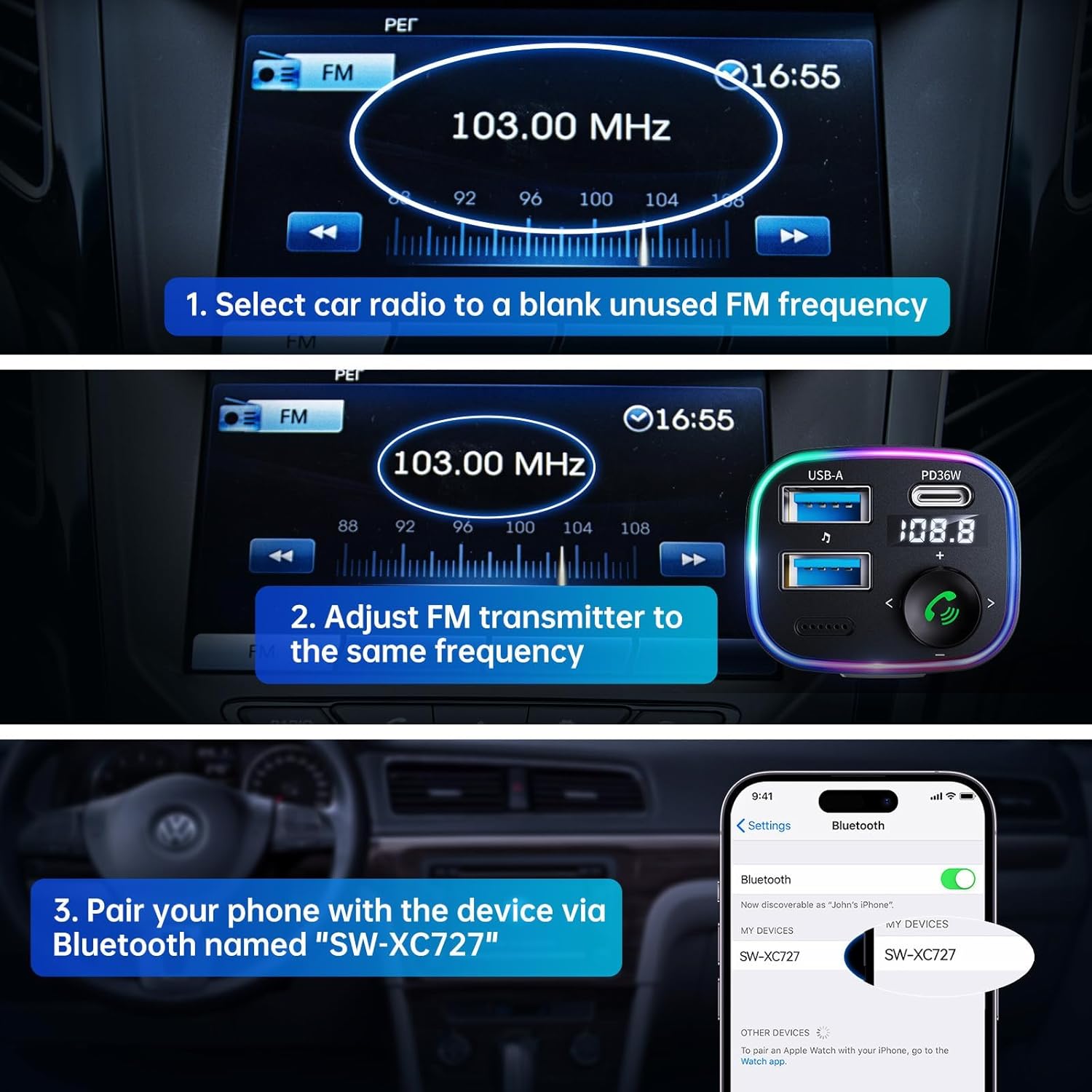
Image: Visual guide for connecting the Syncwire FM Transmitter to your car radio and phone.
Operating Instructions
Music Playback
- Bluetooth Streaming: After successful Bluetooth pairing, play music from your phone. The audio will transmit to your car's speakers.
- USB Drive Playback: Insert a USB flash drive (up to 64GB) containing MP3/WMA/WAV/FLAC files into the designated USB-A port (with music note icon). The device will automatically detect and play music from the drive.
- Adjust Volume: Rotate the multi-function knob clockwise to increase volume, counter-clockwise to decrease.
- Next/Previous Track: Use the left (<) and right (>) arrow buttons to skip tracks.
- Bass Boost: Press the 'B' button once to activate Hi-Fi Deep Bass mode (display shows 'b1'). Press again to deactivate (display shows 'b0').
Hands-Free Calling
- Answer/End Call: Press the multi-function knob (phone button) once to answer an incoming call or end an ongoing call.
- Reject Call: Long-press the multi-function knob to reject an incoming call.
- Redial: Double-press the multi-function knob to redial the last number.
Charging Devices
The adapter features two charging ports:
- PD 36W USB-C Port: For fast charging compatible devices.
- 12W USB-A Port: For standard charging of devices.

Image: Detail of the charging and USB drive ports on the Syncwire FM Transmitter.
Ambient LED Light Control
The device features a colorful LED light ring. To turn the lights on or off, double-press the 'B' button located on the side of the adapter.
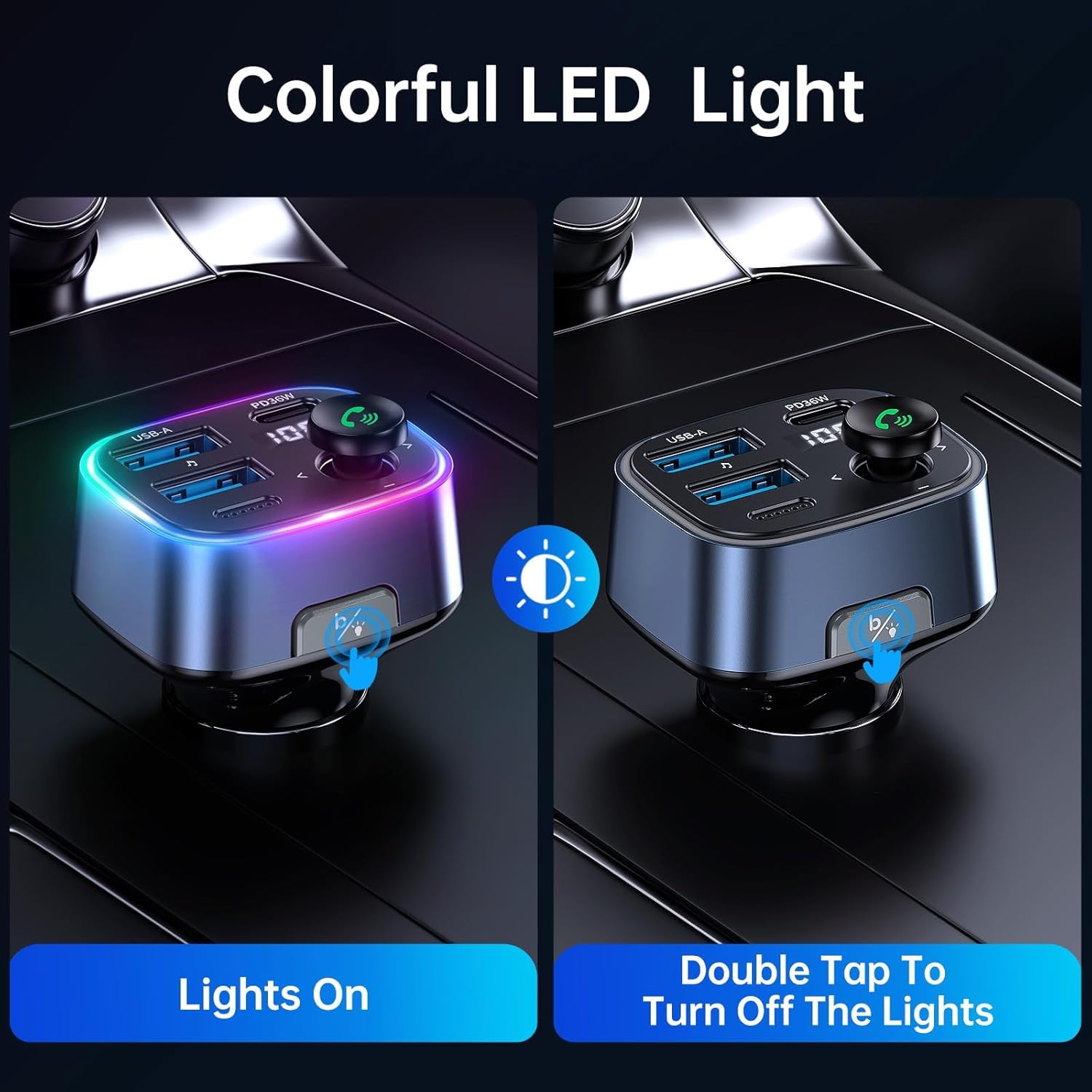
Image: Demonstrating how to control the ambient LED lights on the Syncwire FM Transmitter.
Maintenance
- Keep the device clean by wiping it with a soft, dry cloth.
- Avoid exposing the device to extreme temperatures, direct sunlight, or moisture.
- Do not use abrasive cleaners or solvents.
- Store in a cool, dry place when not in use.
Troubleshooting
- Poor Audio Quality/Static:
- Ensure your car radio and the FM transmitter are tuned to the exact same unused frequency.
- Try a different FM frequency if the current one has interference.
- Adjust the volume on both your phone and car radio to an appropriate level.
- Bluetooth Connection Issues:
- Make sure Bluetooth is enabled on your phone and the transmitter is powered on.
- Forget the device from your phone's Bluetooth settings and try pairing again.
- Restart both your phone and the FM transmitter.
- Charging Not Working:
- Check if the transmitter is securely plugged into the car's power outlet.
- Ensure your charging cable is not damaged and is properly connected.
- Verify that your device is compatible with the charging ports (e.g., PD fast charging).
Specifications
| Feature | Detail |
|---|---|
| Model Number | SW-XC727 |
| Bluetooth Version | 5.3 |
| Input Voltage | 12V-24V (Vehicle Powered) |
| USB-C Output | PD 36W |
| USB-A Output | 12W |
| Total Output | 48W |
| Supported Audio Formats | MP3, WMA, WAV, FLAC |
| USB Drive Capacity | Up to 64GB |
| Material | Plastic |
| Dimensions | 4.45 x 3.35 x 1.42 inches |
| Weight | 2.57 ounces |
Warranty and Support
Syncwire provides a 36-month warranty and lifetime support for this product. If you encounter any issues or have questions, please contact Syncwire customer service for assistance. They are committed to finding a satisfying solution.
For support, please contact the seller, Syncwire Shop, through the platform where you purchased the product.


