
HainoTeko Germany Air-5
HainoTeko Air-5 Wireless Bluetooth Earbuds User Manual
Model: Air-5 | Brand: HainoTeko Germany
1. Product Overview
The HainoTeko Air-5 Wireless Bluetooth Earbuds are designed to provide a high-quality audio experience with deep bass and ultra-clear call capabilities. Featuring a lightweight design and comfortable fit, these earbuds are universally compatible with both iOS and Android devices, making them ideal for daily use, sports, and travel.

Image: HainoTeko Air-5 Earbuds securely placed in their white charging case.
Key Features:
- Unlimited Entertainment: Enjoy up to 4 hours of continuous music playback or calls on a single charge.
- Extended Playtime: The included charging case extends total playtime to a wonderful 12 hours.
- Secure Fit: Ergonomic design ensures a comfortable and secure fit for extended wear.
- Automatic Touch Sensor Controls: Effortlessly manage music playback and calls with intuitive touch controls.
- Universal Compatibility: Seamlessly connects with both iOS and Android smartphones.
- Added Protection: Comes with a free silicone cover and hook for secure carrying during activities.
2. Package Contents
Please ensure all items are present in the package:
- HainoTeko Air-5 Wireless Bluetooth Earbuds (Left and Right)
- Charging Case
- USB Charging Cable
- Free Silicone Protective Cover
- Hook/Carabiner for Protective Cover
- User Manual (this document)
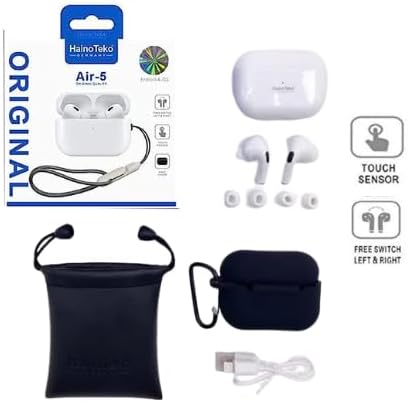
Image: The HainoTeko Air-5 earbuds, charging case, silicone cover, hook, and charging cable as included in the package.
3. Setup
3.1 Charging the Earbuds and Case
Before first use, it is recommended to fully charge the earbuds and the charging case.
- Place both earbuds into the charging case.
- Connect the USB charging cable to the charging port on the case and the other end to a USB power source (e.g., computer, wall adapter).
- The indicator light on the charging case will show charging status. Refer to the indicator light section for details.
- Once fully charged, disconnect the charging cable.

Image: The HainoTeko Air-5 earbuds inside their charging case, which is equipped with a grey strap for portability.
3.2 Pairing with a Device
The HainoTeko Air-5 earbuds are universally compatible with iOS and Android devices.
- Ensure the earbuds are charged.
- Open the charging case. The earbuds will automatically enter pairing mode (indicator lights will flash).
- On your smartphone or Bluetooth-enabled device, go to the Bluetooth settings.
- Search for "Air-5" or "HainoTeko Air-5" in the list of available devices.
- Select "Air-5" to connect. Once connected, the indicator lights on the earbuds will stop flashing.
- If pairing fails, place the earbuds back in the case, close it, and repeat the steps.
4. Operating Instructions
4.1 Wearing the Earbuds
Gently insert the earbuds into your ears, ensuring a comfortable and secure fit. The ergonomic design is crafted for lasting comfort, even during prolonged use.

Image: A close-up view of the HainoTeko Air-5 earbuds, highlighting their design and in-ear fit.
4.2 Touch Controls
The HainoTeko Air-5 earbuds feature automatic touch sensor controls for easy operation:
| Action | Function |
|---|---|
| Single Tap (Left/Right Earbud) | Play/Pause music, Answer/End call |
| Double Tap (Right Earbud) | Next Track |
| Double Tap (Left Earbud) | Previous Track |
| Triple Tap (Left/Right Earbud) | Activate Voice Assistant |
| Long Press (Left/Right Earbud) | Reject Call |
5. Maintenance
5.1 Cleaning
To maintain optimal performance and hygiene, regularly clean your earbuds and charging case:
- Use a soft, dry, lint-free cloth to wipe the earbuds and case.
- For stubborn dirt, slightly dampen the cloth with water or a mild, non-abrasive cleaner.
- Do not use harsh chemicals or abrasive materials.
- Ensure earbuds and case are completely dry before placing them back in the charging case or using them.
5.2 Storage
When not in use, store the earbuds in their charging case. The included silicone protective cover and hook provide additional safety and portability, protecting your earbuds from scratches and minor impacts.

Image: The HainoTeko Air-5 charging case with its black silicone protective cover, a charging cable, and a black storage pouch.
6. Troubleshooting
If you encounter any issues with your HainoTeko Air-5 earbuds, please refer to the following common solutions:
| Problem | Solution |
|---|---|
| Earbuds not pairing | Ensure earbuds are charged. Place them back in the case, close, then reopen to re-enter pairing mode. On your device, forget "Air-5" from Bluetooth settings and try pairing again. |
| No sound from one earbud | Check battery level of both earbuds. Ensure both are properly seated in the charging case. Try resetting the earbuds (refer to manual if specific reset steps are available, otherwise, re-pair). |
| Charging issues | Ensure the charging cable is securely connected to both the case and the power source. Try a different USB port or power adapter. Clean the charging contacts on the earbuds and inside the case. |
| Touch controls not responding | Ensure your fingers are clean and dry. Try restarting the earbuds by placing them in the case and taking them out. Re-pair with your device. |
7. Specifications
| Feature | Detail |
|---|---|
| Model Name | Air-5 |
| Brand | HainoTeko Germany |
| Connectivity Technology | Wireless (Bluetooth) |
| Compatible Devices | Mobile Phones (iOS & Android) |
| Control Type | Touch Sensor |
| Battery Type | 1 Lithium Polymer (included) |
| Playtime (Earbuds) | Up to 4 hours |
| Total Playtime (with Case) | Up to 12 hours |
| Material | Plastic |
| Color | White |
| Item Weight | 120 grams |
| Package Dimensions | 10.2 x 10.2 x 4.8 cm |
| Water Resistance Level | Not Water Resistant |
| Noise Control | Sound Isolation |
| Included Components | Wireless Charging Case, Free Silicone Cover, Hook |
8. Warranty and Support
HainoTeko products are manufactured to the highest quality standards. In the unlikely event of any issues, please contact your retailer or the official HainoTeko support channel for assistance.
Please retain your proof of purchase for warranty claims. Warranty terms and conditions may vary by region.
Ask a question about this manual
Ask about setup, troubleshooting, compatibility, parts, safety, or missing instructions. Manuals+ will review the question and use this page’s manual context to help answer it.