
ANXRE ANXTP03
ANXRE Auto Face Tracking Tripod 360 Rotation User Manual
Model: ANXTP03
Introduction
Thank you for choosing the ANXRE Auto Face Tracking Tripod 360 Rotation. This device is designed to enhance your video recording experience by automatically tracking your face and movements, providing smooth and dynamic footage without the need for a dedicated application. Please read this manual carefully to ensure proper setup and operation.
Product Overview and Key Features
The ANXRE Auto Face Tracking Tripod offers advanced features for content creators:
- 360° Accurate Face Tracking & Intelligent Gesture Control: Utilizes intelligent AI system technology and optical lenses for quick and accurate facial movement recognition within a 3-10 inch range. Adjust the pitch angle for sitting or standing. Use an "OK" gesture to start tracking and a "palm" gesture to pause.
- Detachable 360° Rotatable Phone Holder: Securely holds smartphones from 4 to 7 inches, including those with bulky cases. Features 360° rotation and 360° neck swivel for multi-angle shooting. The detachable design offers convenient shooting.
- Upgraded Buttons & Easy to Use without App: Features a gesture button to control recognition and a 360° panoramic rotation button for easy video capture without manual phone adjustment. No application required for operation.
- Built-in Rechargeable Battery & Detachable Remote: Powered by a built-in rechargeable battery, providing 5-7 hours of continuous use on a full charge. The easy-to-pair remote works up to 10m (30 feet) and supports over 20,000 selfies.
- Standard 1/4" Screw Thread for Multi-Scenario Usage: Equipped with a standard 1/4” screw thread at the bottom, allowing mounting on other tripods for varied heights and angles. Can also be used as a desktop stand with the provided base.
Package Contents
Please verify that all items are present in your package:
- 1 x ANXRE Auto Face Tracking Tripod 360 Rotation (with remote attached)
- 1 x USB Charging Cable
- 1 x User Manual
- 1 x Package Box

Image: Contents of the ANXRE Auto Face Tracking Tripod package.
Setup Instructions
- Unpack the Device: Carefully remove the ANXRE Auto Face Tracking Tripod and all accessories from the packaging.
- Attach the Base: If not already attached, secure the circular base to the bottom of the tripod unit. Ensure it is firmly in place for stability.
- Mount Your Phone: Extend the phone holder clip and securely place your smartphone (4-7 inches) into the holder. Adjust the phone's position to ensure it is centered and stable. The holder supports both vertical and horizontal orientations.
- Power On: Press and hold the Power Button on the device for 2 seconds until the green light illuminates.
- Remote Control Pairing (Optional): The remote control is typically pre-paired. If re-pairing is needed, ensure the remote is charged and the tripod is on. The remote connects via Bluetooth.
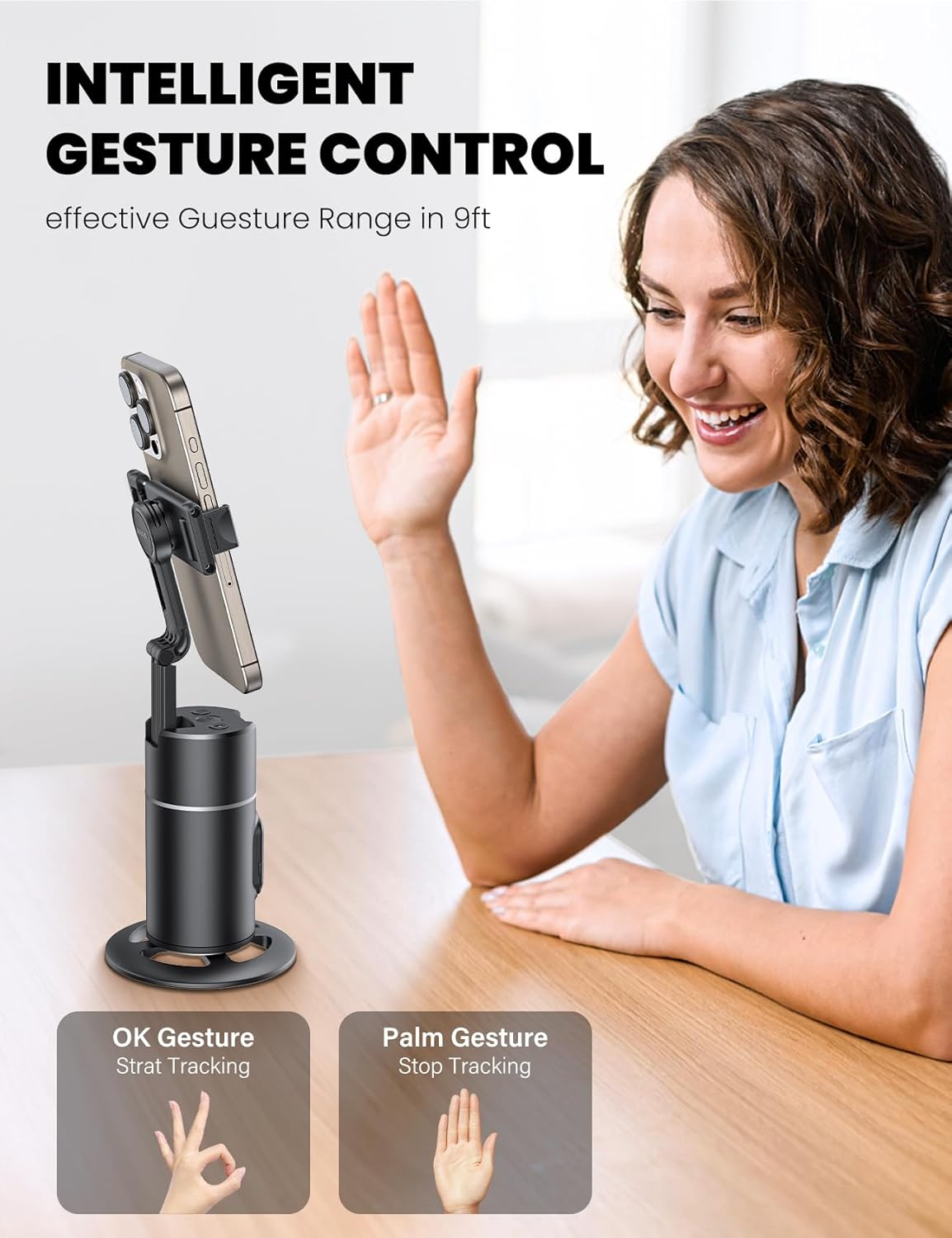
Image: A smartphone being securely placed into the adjustable phone holder of the tripod.
Operating Instructions
- Initiate Face Tracking: Once powered on, the device is ready for face tracking. Make an "OK" gesture (thumb and forefinger forming a circle) towards the device's camera to start tracking. The status light will turn green.
- Pause Face Tracking: To pause tracking, make a "palm" gesture (open hand) towards the device. The status light will turn red.
- Adjust Pitch Angle: The device allows for manual adjustment of the phone holder's pitch angle to suit sitting or standing positions.
- 360° Panoramic Rotation: Press the dedicated 360° rotation button on the device to initiate a panoramic rotation. This allows for capturing wide-angle videos without manually moving your phone.
- Using the Remote Control: The detachable remote control can be used to trigger photos or start/stop video recording on your paired smartphone.
- Power Off: Press and hold the Power Button until the light turns off to power down the device.

Image: A user demonstrating the "OK" gesture to initiate face tracking.

Image: Detailed view of the tripod's control panel, highlighting the rotation button.

Image: The detachable remote control being used to operate the tripod.
Product Demonstration Video
Video: Official demonstration of the ANXRE Auto Face Tracking Tripod 360 Rotation, showcasing its features and operation.
Maintenance
- Cleaning: Use a soft, dry cloth to clean the surface of the device. Avoid using harsh chemicals or abrasive materials.
- Storage: Store the tripod in a cool, dry place away from direct sunlight and extreme temperatures.
- Charging: Charge the device using the provided USB cable. Do not use damaged cables or chargers.
Troubleshooting
| Problem | Possible Cause | Solution |
|---|---|---|
| Device does not power on. | Low battery. | Charge the device using the USB cable. |
| Face tracking is not working. | Incorrect gesture or distance. | Ensure you are making the "OK" gesture clearly within 3-10 inches of the device's camera. Check for obstructions. |
| Remote control not connecting. | Remote battery low or not paired. | Ensure the remote has sufficient battery. Re-pair the remote via Bluetooth settings on your phone if necessary. |
| Phone is not stable in the holder. | Phone not properly secured or too large/small. | Ensure the phone is centered and the clips are firmly holding it. Verify phone size is within 4-7 inches. |
Specifications
- Model Number: ANXTP03
- Brand: ANXRE
- Color: Black
- Compatible Devices: iPhone 15 Pro Max/Pro/Plus/15; iPhone 14 Pro Max/Pro/Plus/14; iPhone 13 Pro Max/Pro/13/mini; iPhone 12 Pro Max/Pro/12/Mini; iPhone 11 Pro Max/Pro/11; iPhone XR/XS Max/XS/X, Samsung Galaxy/Google Pixel/Huawei/Xiaomi (4-7 inch smartphones)
- Battery: 1 Lithium Ion battery (included)
- Continuous Use Time: 5-7 hours (after full charge)
- Remote Control Range: Up to 10m (30 feet)
- Screw Thread: Standard 1/4"
- Item Weight: 12.3 ounces
- Package Dimensions: 4.76 x 4.02 x 3.03 inches
- Folded Size: 12 inches (L) x 3 inches (W) x 3 inches (H)
Warranty and Support
The ANXRE Auto Face Tracking Tripod 360 Rotation comes with a 2-year warranty.
If you encounter any issues or have questions regarding your product, please contact the ANXRE service team. They are available to assist you within 24 hours.
For support, please visit the ANXRE Store on Amazon or contact the seller directly: AnxreDirect.
Ask a question about this manual
Ask about setup, troubleshooting, compatibility, parts, safety, or missing instructions. Manuals+ will review the question and use this page’s manual context to help answer it.