
M1010
M10 PRO True Wireless Bluetooth Headset User Manual
Model: M1010 | Brand: GENERIC
Introduction
Thank you for choosing the M10 PRO True Wireless Bluetooth Headset. This manual provides detailed instructions for setting up, operating, and maintaining your new earbuds. Please read this manual thoroughly before use to ensure optimal performance and longevity of your device.
Safety Information
- Do not expose the device to extreme temperatures or humidity.
- Keep the device away from water and other liquids, unless specified (IPX7 rating applies to sweat/rain, not submersion).
- Do not attempt to disassemble or repair the device yourself. Contact authorized service personnel.
- Use only approved chargers and cables.
- Avoid listening at high volume levels for extended periods to prevent hearing damage.
Package Contents
Please check the package for the following items:
- M10 PRO True Wireless Earbuds (Left and Right)
- Charging Case with Power Bank Function
- USB Charging Cable
- Multiple Sizes of Ear Tips (S, M, L)
- User Manual
Product Overview
Familiarize yourself with the components of your M10 PRO headset.

Image: The M10 PRO earbuds are shown inside their charging case. The case features a prominent LED display indicating the battery levels of both the left and right earbuds, as well as the charging case itself. The earbuds have a sleek black design with blue accents.
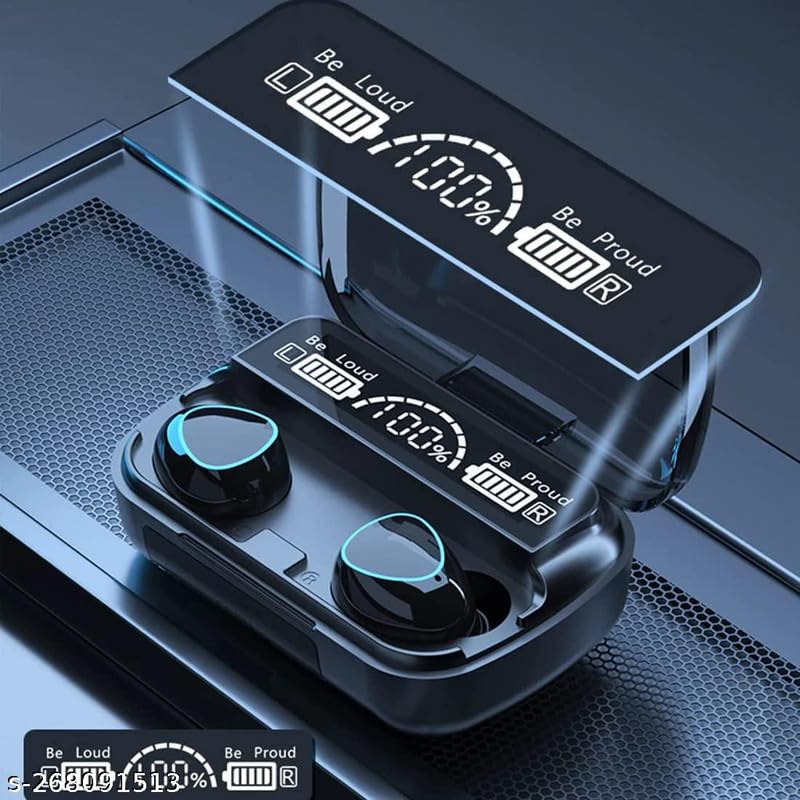
Image: A close-up view of the M10 PRO earbuds nestled in their open charging case. The digital display on the case clearly shows "Be Loud" and "Be Proud" along with battery percentage and individual earbud charge indicators. The earbuds themselves are black with blue LED rings.
Charging Case:
- LED Digital Display: Shows individual battery levels for left and right earbuds, and the charging case's remaining power.
- Charging Port: For recharging the case.
- USB Output Port: Functions as a power bank for other devices.
Earbuds:
- Touch Control Area: For managing music, calls, and voice assistant.
- Microphone: For calls.
- Charging Contacts: For charging inside the case.
- Ear Tips: Replaceable for comfortable fit.
Setup
1. Initial Charging
Before first use, fully charge the charging case and earbuds.
- Connect the charging case to a USB power source using the provided USB cable.
- The LED display on the case will show the charging progress.
- Place the earbuds into the charging case. They will begin charging automatically.
- A full charge for the case provides up to 220 hours of playback for the earbuds.
2. Pairing with Your Device (Bluetooth 5.1)
The M10 PRO earbuds feature one-step pairing for convenience.
- Ensure Bluetooth is enabled on your smartphone or other device.
- Take both the left and right earbuds out of the charging box. They will automatically power on and attempt to pair with each other.
- On your device, search for Bluetooth devices and select "TWS5.0" from the list.
- Once connected, you will hear a confirmation prompt, and the earbuds will be ready for use.
- If pairing fails, place the earbuds back into the case, close the lid, wait a few seconds, and then repeat the steps.
3. Wearing the Earbuds
For optimal sound quality and comfort, ensure a snug fit.

Image: A man is shown wearing one M10 PRO earbud in his right ear, demonstrating a comfortable and secure fit. The earbud is discreetly placed within the ear canal.

Image: A woman is shown wearing an M10 PRO earbud in her right ear. Text overlays indicate "HD Stereo Sound" and "CVC8.0 noise cancelling tech," highlighting the audio features of the product.
- Choose the ear tips that best fit your ear canal. The package includes multiple sizes (S, M, L).
- Gently insert the earbud into your ear and rotate it slightly until it feels secure and comfortable.
- A proper fit helps optimize sound quality and noise isolation.
Operating Instructions
Power On/Off
- Power On: Take the earbuds out of the charging case. They will power on automatically. Alternatively, press and hold the touch control area on both earbuds for 3 seconds.
- Power Off: Place the earbuds back into the charging case. They will power off automatically. Alternatively, press and hold the touch control area on both earbuds for 5 seconds.
Music Playback
- Play/Pause: Tap the touch control area on either earbud once.
- Next Track: Double-tap the touch control area on the right earbud.
- Previous Track: Double-tap the touch control area on the left earbud.
- Volume Up: Triple-tap the touch control area on the right earbud.
- Volume Down: Triple-tap the touch control area on the left earbud.
Call Management
- Answer/End Call: Tap the touch control area on either earbud once.
- Reject Call: Press and hold the touch control area on either earbud for 2 seconds.
Voice Assistant
- Activate Voice Assistant: Press and hold the touch control area on either earbud for 3 seconds (e.g., Siri, Google Assistant).
Charging Earbuds
- Place the earbuds into the charging case. They will automatically charge.
- The LED display on the case will show the charging status of each earbud.
- A single charge provides approximately 5.5 hours of playback.
Charging Case (Power Bank Function)
- The charging case has a built-in 2000mAh rechargeable battery.
- It can be used to recharge the earbuds multiple times, providing up to 220 hours of total playback.
- The case also features a USB output port, allowing it to function as a power bank to charge other small electronic devices.
Battery Display
- The charging case features an L/R Bluetooth earbuds battery separated LED display design.
- This display shows the remaining battery percentage of the charging case and the individual charge levels of the left and right earbuds, allowing you to know the best time to recharge.
Maintenance
Cleaning
- Regularly clean the earbuds and charging case with a soft, dry, lint-free cloth.
- Do not use abrasive cleaners, alcohol, or chemical solvents.
- Clean the charging contacts on both the earbuds and the case to ensure proper charging.
Storage
- When not in use, store the earbuds in their charging case to protect them and keep them charged.
- Store the device in a cool, dry place, away from direct sunlight and extreme temperatures.
Water Resistance (IPX7)
- The M10 PRO earbuds are IPX7 waterproof, meaning they are protected against damage from sweat or rain.
- This rating makes them suitable for workouts and outdoor activities.
- Note: The IPX7 rating does not mean the earbuds can be submerged in water for extended periods or used for swimming. The charging case is not waterproof.
Troubleshooting
| Problem | Possible Cause | Solution |
|---|---|---|
| Earbuds not pairing with device. | Bluetooth is off; earbuds are not in pairing mode; interference. | Ensure Bluetooth is on. Place earbuds back in case, then take them out to re-enter pairing mode. Move closer to your device. |
| Only one earbud working. | Earbuds not paired with each other; low battery. | Place both earbuds back in the charging case, close the lid, then open and take them out again. Ensure both are charged. |
| Earbuds not charging. | Charging contacts are dirty; case battery is low; faulty cable. | Clean charging contacts. Charge the charging case. Try a different USB cable. |
| Poor sound quality/audio dropouts. | Distance from device; interference; low battery. | Move closer to your device. Avoid obstacles. Ensure earbuds are fully charged. |
Specifications
- Model Name: M10
- Item Model Number: M1010
- Brand: GENERIC
- Connectivity Technology: Wireless (Bluetooth)
- Bluetooth Version: 5.1
- Noise Control: Active Noise Cancellation
- Battery Life (Earbuds): Approximately 5.5 Hours on a single charge
- Charging Case Battery Capacity: 2000 mAh
- Total Playback Time (with case): Up to 220 Hours
- Charging Time: Approximately 5.5 Hours (for case, likely)
- Water Resistance Level: IPX7 (Earbuds only)
- Control Method: Touch
- Material: Plastic
- Included Components: Cable
- Form Factor: In Ear
- Special Feature: Fast Charging, Power Bank Function
Warranty and Support
This product comes with a 30-day warranty from the date of purchase, covering manufacturing defects. For support, troubleshooting assistance, or warranty claims, please contact your retailer or the manufacturer directly. Please refer to your purchase receipt for contact details.
Manufacturer: seven shreshth products
ASIN: B0C8CYBV6N
Related documentsM1010


Ask a question about this manual
Ask about setup, troubleshooting, compatibility, parts, safety, or missing instructions. Manuals+ will review the question and use this page’s manual context to help answer it.