Introduction
This manual provides comprehensive instructions for the installation, use, and maintenance of your new farbrothersonline Universal Handlebar Grip Covers. These non-slip grip covers are designed for compatibility with a wide range of motorcycles, bicycles, and scooters, enhancing grip and protecting your existing handlebar grips. Please read this manual thoroughly before installation and use to ensure proper application and longevity of the product.
Product Overview
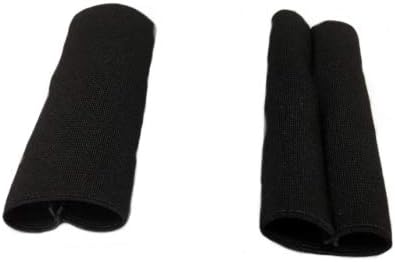
The farbrothersonline Handlebar Grip Covers are crafted from an elastic fabric, ensuring a snug fit over various handlebar grip sizes. Each package includes a pair of grip covers and a pair of work gloves for convenient installation.
- Handlebar Grip Covers: Designed to provide improved grip and protection.
- Work Gloves: Included for assistance during installation.



Installation Guide
The handlebar grip covers are designed for easy installation due to their elastic material. Follow these steps for optimal fit:
- Prepare the Handlebars: Ensure your existing handlebar grips are clean and dry. Remove any debris or loose material.
- Wear Gloves: Put on the included work gloves to improve grip and protect your hands during installation.
- Stretch the Cover: Gently stretch one of the grip covers to widen its opening. The elastic fabric allows for significant stretching.
- Slide On: Carefully slide the stretched grip cover over your existing handlebar grip. Start from one end and work your way to the other, ensuring it covers the entire grip surface.
- Adjust for Fit: Once fully on, adjust the cover to ensure it is evenly distributed and sits snugly without wrinkles. The elastic material will conform to the shape of your grip.
- Repeat for Second Grip: Follow the same steps for the second handlebar grip.
Note: The elastic nature of the fabric ensures a secure, non-slip fit once installed. No adhesives or additional tools are typically required.
Care and Maintenance
To ensure the longevity and performance of your handlebar grip covers, follow these simple care instructions:
- Cleaning: Wipe the covers with a damp cloth to remove dirt and grime. For stubborn stains, a mild soap solution can be used. Rinse thoroughly and allow to air dry completely before use.
- Avoid Harsh Chemicals: Do not use abrasive cleaners, solvents, or harsh chemicals, as these can damage the fabric and affect its elasticity.
- Storage: If removing the covers for extended periods, store them in a clean, dry place away from direct sunlight and extreme temperatures.
- Inspection: Periodically inspect the covers for any signs of wear, tear, or damage. Replace if significant wear is observed to maintain optimal grip and protection.
Troubleshooting
While the farbrothersonline Handlebar Grip Covers are designed for straightforward use, here are some common issues and their solutions:
- Cover is difficult to slide on:
Ensure the grip cover is stretched sufficiently before attempting to slide it over the handlebar. A slight twisting motion while pushing can also help. Ensure the handlebar grip is not excessively sticky or rough; clean it if necessary.
- Cover does not fit snugly:
The covers are designed with elastic fabric to fit most standard handlebar grips. If it feels loose, ensure it is fully extended along the length of your grip. If your handlebar grips are significantly smaller than average, the fit might not be as tight. Verify the dimensions of your grips against the product specifications.
- Cover slips during use:
Ensure the handlebar grip and the inside of the cover are completely dry and free of any lubricants or residues before installation. The non-slip property relies on direct contact with a clean surface. Re-install if necessary, ensuring a tight fit.
Technical Specifications
| Feature | Detail |
|---|---|
| Product Type | Handlebar Grip Cover |
| Brand | farbrothersonline |
| Model Number | CP01|3541 |
| Color | Black |
| Dimensions (Length) | 9.8 cm (approx. 3.86 inches) |
| Dimensions (Width/Diameter) | 3 cm (approx. 1.18 inches) |
| Material | Elastic Fabric |
| Compatibility | Universal fit for most motorcycle, bicycle, and scooter handlebars |
| Included Accessories | Pair of Work Gloves |
Warranty and Support
For any questions, concerns, or support regarding your farbrothersonline Handlebar Grip Covers, please contact the seller directly through the platform where the purchase was made. While specific warranty details are not provided in this manual, standard return and refund policies of the retailer apply. Please refer to your purchase documentation for details on returns and customer service.
We recommend keeping your purchase receipt as proof of purchase for any support inquiries.


