
DLYFULL U8-W
Dlyfull 8 Bay AA AAA Battery Charger
Model: U8-W User Manual
1. Product Overview
The Dlyfull 8 Bay AA AAA Battery Charger (Model U8-W) is a high-speed, intelligent charging solution designed for 1.2V Ni-MH and Ni-CD rechargeable batteries. It features 8 independent charging slots, allowing you to charge any number of batteries simultaneously without interference. Equipped with smart LED indicators and multiple safety protections, this charger ensures efficient and safe charging for your batteries.

Image: Dlyfull 8 Bay AA AAA Battery Charger with included USB-C cable.
2. Important Safety Instructions
- DO NOT charge non-rechargeable batteries. This can lead to battery leakage, rupture, or explosion.
- Use only with 1.2V Ni-MH or Ni-CD AA/AAA rechargeable batteries.
- Keep the charger away from water, moisture, and high temperatures.
- Do not disassemble or modify the charger.
- Ensure proper battery polarity (+/-) when inserting batteries into the slots.
- Unplug the charger from the power source when not in use or before cleaning.
- Keep out of reach of children.
3. Package Contents
- 1 x Dlyfull 8 Bay AA AAA Battery Charger (U8-W)
- 1 x USB-C Charging Cable
- 1 x User Manual

Image: Contents of the Dlyfull U8-W package, including the charger, USB-C cable, and user manual.
4. Product Features
- Independent Charging Slots: 8 individual slots allow for simultaneous charging of AA and AAA batteries without interference, eliminating the need for pairing.
- Smart LED Indicators: Each slot has an LED that indicates charging status (Red: Charging, Green: Fully Charged). Flashing red and green indicates low voltage, short circuit, or battery damage.
- Safe Charging System: Utilizes a constant voltage charging method to reduce loss and prolong battery life. Automatic shut-off when batteries are fully charged prevents overcharging.
- Intelligent Detection System: Performs a self-test upon power-on. Detects defective, short-circuited, or low-voltage batteries and automatically stops charging to protect the device and user.
- USB-C Fast Charging: Features a Type-C input for high-speed charging up to 375mA. Can be powered by various USB interfaces such as laptops, car chargers, and mobile phone chargers.
Visual Features:
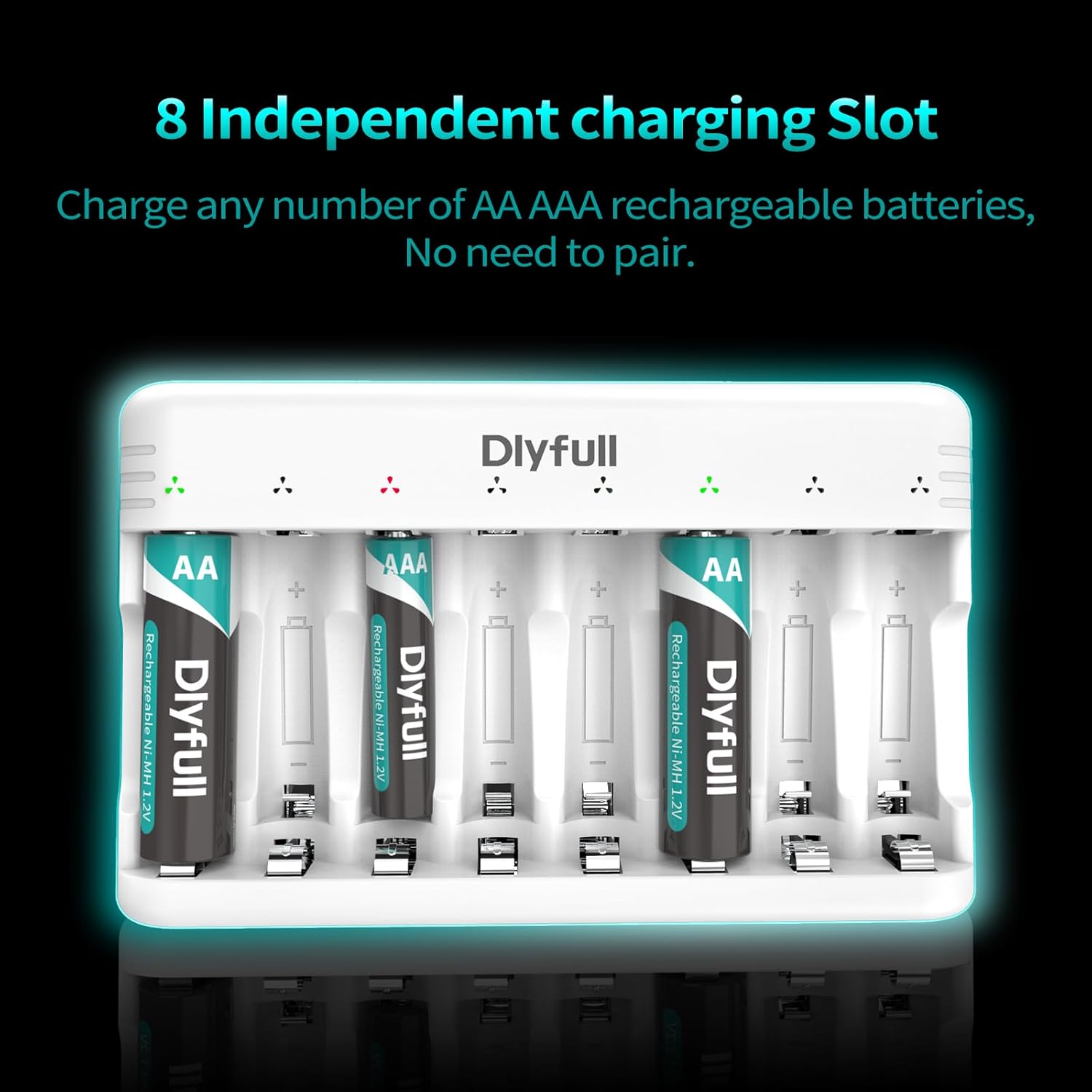
Independent 8-bay design for flexible charging.

Clear LED indicators for charging status.

USB-C input for high-speed charging.

Comprehensive safe charging system.
5. Setup and First Use
- Connect Power: Connect the provided USB-C charging cable to the charger's Type-C input port. Plug the other end of the USB-C cable into a compatible USB power adapter (not included), laptop, power bank, or car charger.
- Initial Self-Test: Once connected to power, the charger's indicator lights will flash alternately (red and green) once, indicating a successful self-test. The lights will then turn off, signifying standby mode.

Image: The Dlyfull charger connected to a laptop, demonstrating its compatibility with various USB power sources.
6. Operating Instructions
6.1. Charging Batteries
- Insert 1.2V Ni-MH or Ni-CD AA or AAA rechargeable batteries into any of the 8 independent charging slots. Ensure correct polarity (+/-) is observed.
- For AAA batteries, insert them into the inner contact points of the slot. For AA batteries, they will fit the full length of the slot.
- The corresponding LED indicator for each slot will turn RED to signify that charging has begun.
- Once a battery is fully charged, its corresponding LED indicator will turn GREEN. The charger will automatically stop charging that battery to prevent overcharging.
6.2. LED Indicator Status
| Indicator Color | Status | Description |
|---|---|---|
| RED | Charging | Battery is currently being charged. |
| GREEN | Fully Charged | Battery charging is complete. |
| RED & GREEN Flashing Alternately | Error / Abnormal Battery | Indicates low voltage, short circuit, or a damaged/non-rechargeable battery. Remove the battery and check. |
7. Maintenance
- Clean the charger and battery contacts regularly with a dry, soft cloth to ensure optimal performance.
- Store the charger in a cool, dry place away from direct sunlight and extreme temperatures.
- Avoid dropping or subjecting the charger to strong impacts.
8. Troubleshooting
- Charger not powering on: Ensure the USB-C cable is securely connected to both the charger and the power source. Verify the power source is active.
- LEDs flashing red and green: This indicates a problem with the battery or its insertion. Remove the battery, check its condition (ensure it's rechargeable and not damaged), and reinsert it correctly, observing polarity. If the issue persists, the battery may be defective.
- Batteries not charging: Confirm batteries are 1.2V Ni-MH or Ni-CD rechargeable types. Check for proper insertion and contact. Ensure the power source provides sufficient power.
- Slow charging: Ensure your USB power adapter provides adequate current (e.g., 5V/2A for optimal speed).
9. Product Specifications
| Specification | Detail |
|---|---|
| Model | U8-W |
| Input | USB-C, 5V/2A (Max) |
| Output Voltage | 1.2 Volts (DC) |
| Charging Current | Up to 375mA per slot |
| Compatible Batteries | AA / AAA Ni-MH / Ni-CD Rechargeable Batteries |
| Number of Slots | 8 Independent Slots |
| Product Dimensions | 3.3 x 5.3 x 1 inches (8.38 x 13.46 x 2.54 cm) |
| Item Weight | 4.9 ounces (0.14 kg) |
| Color | White |
10. Warranty and Support
For warranty information, technical support, or any inquiries regarding your Dlyfull 8 Bay AA AAA Battery Charger, please refer to the official Dlyfull website or contact their customer service directly. You may also find additional information in the official User Manual PDF available online.
Official User Manual (PDF): Download Here
Related documentsU8-W

Ask a question about this manual
Ask about setup, troubleshooting, compatibility, parts, safety, or missing instructions. Manuals+ will review the question and use this page’s manual context to help answer it.