
Brookstone BK1600
Brookstone Air Pressure Foot Massager with Heat and Remote Control User Manual
Model: BK1600
Introduction
The Brookstone Air Pressure Foot Massager with Heat and Remote Control is designed to provide a soothing and comforting massage experience for your feet. This device combines deep kneading, air compression, and gentle heat to help alleviate foot discomfort and promote relaxation. It features adjustable intensity levels and a convenient wireless remote for personalized use.

Image: Top-down view of the Brookstone Air Pressure Foot Massager, showing its black dome shape, foot inserts, control panel, and accompanying remote control.
Safety Information
Please read all safety instructions carefully before using the foot massager to ensure safe operation and prevent injury or damage.
- Avoid using the massager while sleeping.
- Do not use with wet feet or in a wet environment to prevent electrical shock.
- If you have certain medical conditions, such as diabetes, circulatory issues, or nerve damage, consult a doctor before use.
- Be cautious of the heat function; do not use for extended periods to prevent potential burns.
- Keep out of reach of children and pets.
- Do not attempt to disassemble or repair the unit yourself. Contact qualified service personnel for assistance.
Product Features
- 3 Pressure Levels: Customize the intensity of the air compression massage.
- Deep Kneading & Heating: Provides soothing warmth and targeted massage to the soles of your feet.
- Air Compression: Offers 360-degree coverage for comprehensive foot massage.
- Wireless Remote Control: Easily adjust settings without bending down.
- Adjustable Timer: Set massage duration to prevent overuse and save power.
- LCD Display: Clear display for current settings.
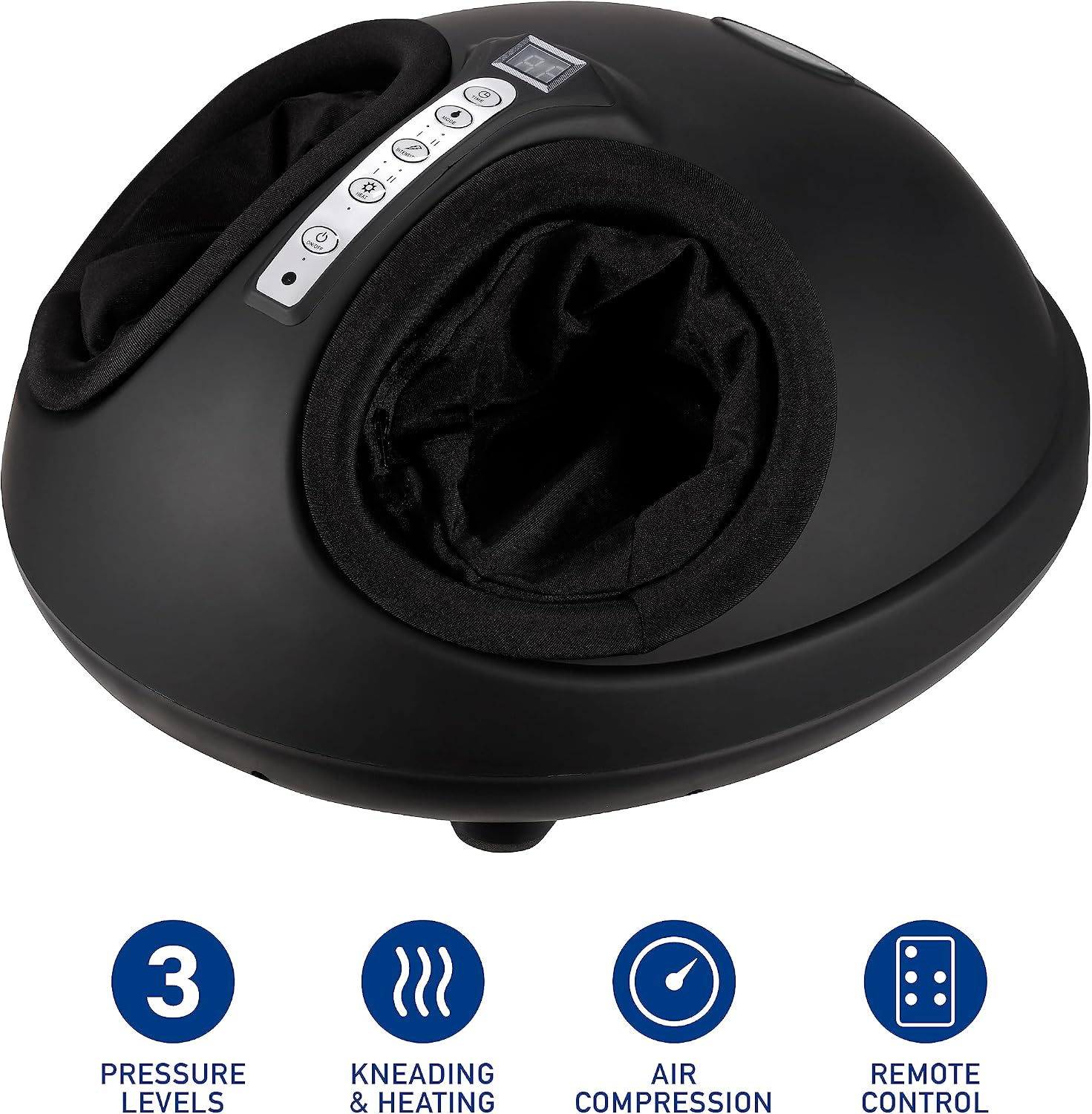
Image: Side view of the foot massager highlighting its key features: 3 Pressure Levels, Kneading & Heating, Air Compression, and Remote Control.
Setup
- Unpack: Carefully remove the foot massager and all accessories from the packaging.
- Placement: Place the massager on a flat, stable surface near a power outlet. Ensure there is enough space around the unit for comfortable use.
- Power Connection: Plug the power cord into a standard electrical outlet.
- Remote Control: Ensure the wireless remote control has working batteries.
Operating Instructions
The foot massager can be operated using the control panel on the unit or the wireless remote control.

Image: Close-up view of the foot massager's control panel and remote, with labels indicating Power On/Off, Heat control, Intensity control, Multiple Modes, Time control, and LCD Display.
Using the Control Panel / Remote:
- Power On/Off: Press the Power button (symbol: circle with vertical line) to turn the massager on or off. The LCD display will illuminate.
- Select Mode: Press the Mode button (symbol: M) to cycle through different massage modes (e.g., kneading, air compression, or a combination).
- Adjust Intensity: Press the Intensity button (symbol: up/down arrows) to select one of the 3 available pressure levels (low, medium, high).
- Activate Heat: Press the Heat button (symbol: sun/star) to turn the gentle heating function on or off.
- Set Timer: Press the Time button (symbol: clock) to set the desired massage duration. The massager will automatically shut off once the timer expires.
- Begin Massage: Insert your feet into the foot sleeves. Adjust your position for maximum comfort.
For optimal results, use the massager while seated comfortably. The portable design allows for use in various settings, such as watching TV, reading, or working.

Image: A person's feet are shown inside the foot massager, demonstrating its use in a relaxed home setting.
Maintenance
- Cleaning: Unplug the massager before cleaning. Use a soft, damp cloth to wipe the exterior. The foot sleeves are designed to be soft and gentle, and can be cleaned as needed. Refer to the product label for specific cleaning instructions for the fabric.
- Storage: Store the massager in a cool, dry place away from direct sunlight when not in use.
- Care: Do not use abrasive cleaners or solvents. Avoid placing heavy objects on the massager.
Troubleshooting
If you encounter issues with your Brookstone Air Pressure Foot Massager, please refer to the following common solutions:
- Unit does not power on:
- Ensure the power cord is securely plugged into a working electrical outlet.
- Check if the power button on the unit or remote has been pressed.
- Remote control is not working:
- Check and replace the batteries in the remote control if necessary.
- Ensure there are no obstructions between the remote and the massager's sensor.
- Massage intensity feels weak or too strong:
- Adjust the intensity level using the Intensity button on the control panel or remote.
- Ensure your feet are properly positioned within the foot sleeves.
- Heat function is not working:
- Ensure the Heat button has been pressed to activate the function.
- Allow a few minutes for the heating elements to warm up.
If the problem persists after trying these steps, please contact customer support for further assistance.
Specifications
| Feature | Detail |
|---|---|
| Product Dimensions | 14 x 8 x 10 inches |
| Item Weight | 8.65 Pounds |
| Model Number | BK1600 |
| Brand | Brookstone |
| Power Source | Corded Electric |
| Special Feature | Heat |
| Massager Form | Foot Massager Machine |
| Manufacturer | Sakar International |
| Date First Available | June 15, 2023 |
Warranty and Support
Specific warranty information for the Brookstone Air Pressure Foot Massager is not available in the provided product data. Please refer to the product packaging or the official Brookstone website for detailed warranty terms and conditions.
For customer support, technical assistance, or inquiries regarding your product, please contact Brookstone customer service through their official channels. Contact information is typically found on the product packaging or their official website.
Related documentsBK1600

Ask a question about this manual
Ask about setup, troubleshooting, compatibility, parts, safety, or missing instructions. Manuals+ will review the question and use this page’s manual context to help answer it.